0lidaxiang/dsh-plugin-greet ↗★ 2
dsh-plugin-greet
A minimal greet tool plugin for DeepSeek Harness.
安装
$
npx -p @deepseek-ai/dsh dsh plugin --profile web add github:0lidaxiang/dsh-plugin-greet说明文档
阅读完整 README ↗dsh-plugin-greet
一个可直接安装的 DeepSeek Harness 社区插件,用来演示最小工具插件的完整链路:Bundle 分发、Profile 装配、工具注册与真实调用。
An installable community plugin for DeepSeek Harness that registers a minimal greet tool.
本项目是社区示例,不是 DeepSeek AI 官方插件。DeepSeek Harness 目前仍处于 Developer Preview,后续版本可能需要调整兼容性。
功能
插件向模型注册一个 greet 工具:
- 输入:必填字符串
name - 输出:
Hello, ! - 额外依赖:无
- 构建步骤:无,仓库中的 JavaScript 可以直接安装
从 npm 安装
先停止正在运行的 DeepSeek Harness,然后把固定版本安装到 web Profile:
npx @deepseek-ai/dsh plugin --profile web add dsh-plugin-greet@0.1.0
在启动前确认 Bundle 已进入最终配置:
npx @deepseek-ai/dsh --profile web --dump-config
然后启动 Web UI:
npx @deepseek-ai/dsh web
从 GitHub 安装
先停止正在运行的 DeepSeek Harness,然后把固定版本安装到 web Profile:
npx @deepseek-ai/dsh plugin --profile web add \
  github:0lidaxiang/dsh-plugin-greet#v0.1.0
在启动前确认 Bundle 已进入最终配置:
npx @deepseek-ai/dsh --profile web --dump-config
启动 Web UI:
npx @deepseek-ai/dsh web
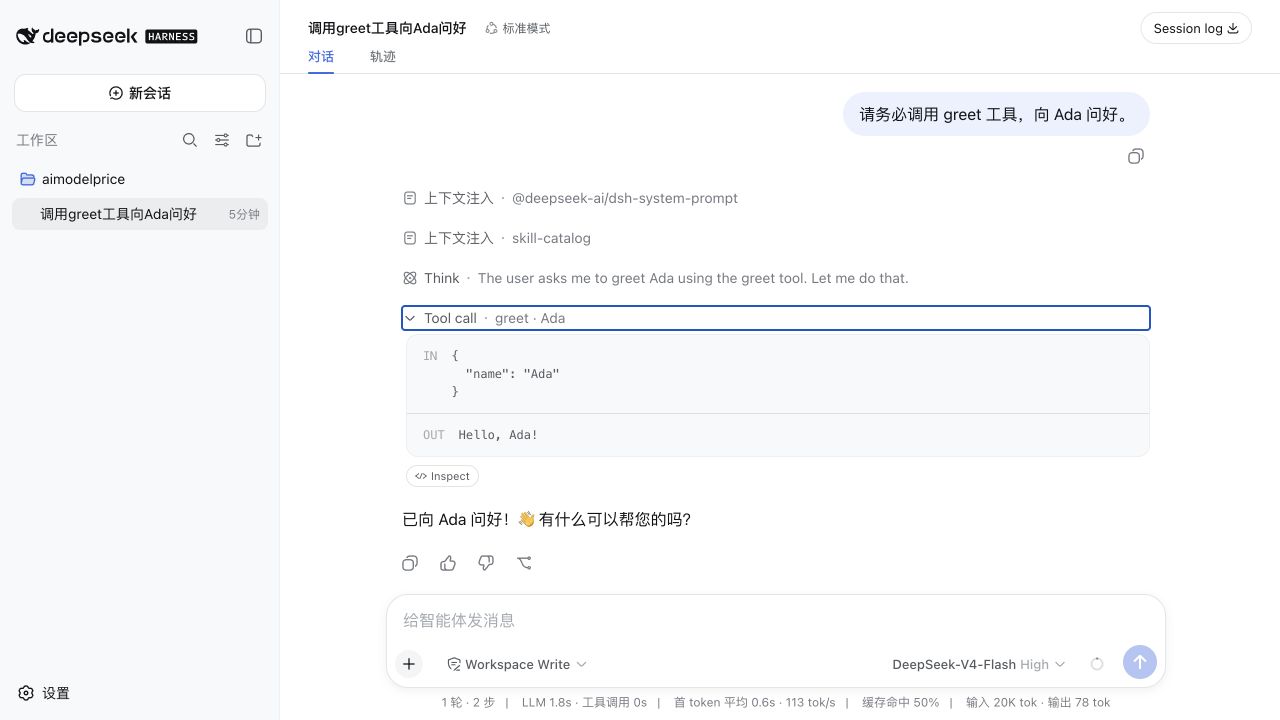
打开 ,向模型发送:
请务必调用 greet 工具,向 Ada 问好。
展开工具调用后,预期看到:
IN  { "name": "Ada" }
OUT Hello, Ada!
安装开发中的 main 分支
只想体验最新代码时,可以安装 main:
npx @deepseek-ai/dsh plugin --profile web add \
  github:0lidaxiang/dsh-plugin-greet#main
稳定使用建议固定 release tag 或具体 commit SHA,避免远程分支更新后改变实际安装内容。
本地开发安装
在仓库上一级目录执行:
npx @deepseek-ai/dsh plugin --profile web add ./dsh-plugin-greet
修改代码后重启 Harness,再通过聊天窗口验证工具调用。
卸载
npx @deepseek-ai/dsh plugin --profile web remove dsh-plugin-greet
文件结构
dsh-plugin-greet/
├── package.json       # 声明 dsh.bundle
├── cordis.patch.yml   # 向 Profile 插入插件条目
├── index.js           # 注册 greet 工具
├── docs/              # README 图片
└── LICENSE