1MLightyears/dsh-theme-synthwave ↗★ 0
dsh-theme-synthwave
DSH Synthwave theme plugin: neon glow hover/focus, translucent panels over image/video background, configurable blur, fontScale root font-size.
安装
$
npx -p @deepseek-ai/dsh dsh plugin --profile web add github:1MLightyears/dsh-theme-synthwave说明文档
阅读完整 README ↗⚙️ 配置
也可以在 DSH 设置 → 插件配置 → 「DeepSeek Harness: 合成波风格主题」卡片中,直接打开或复制当前 profile 的配置文件路径。
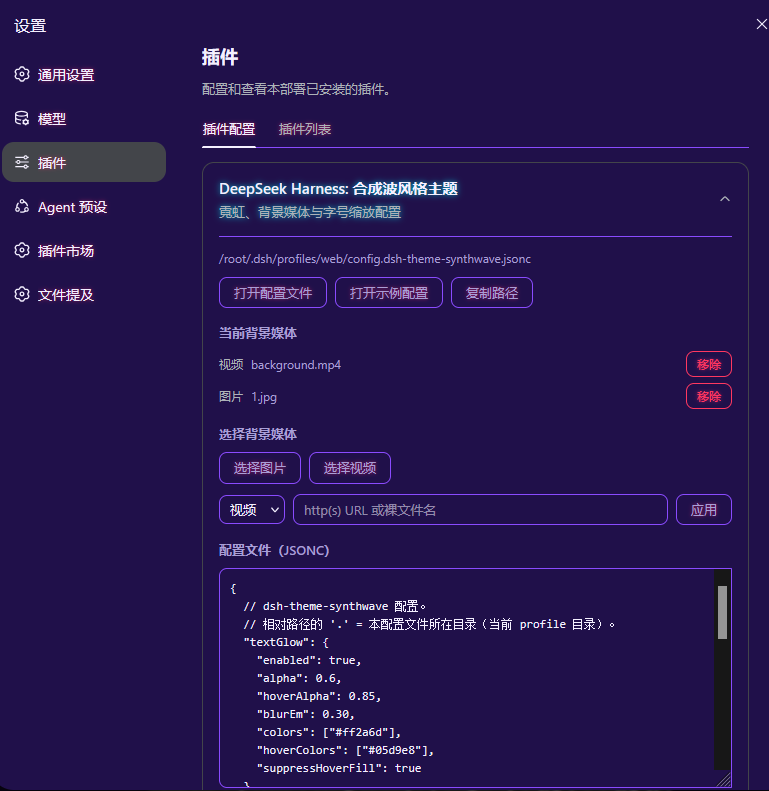
插件会在当前 profile 目录(通常为 $DSH_HOME/profiles/ /)查找 config.dsh-theme-synthwave.jsonc;不存在时自动用内置默认值创建一份。config.dsh-theme-synthwave.example.jsonc 是带逐项注释的参考模板,可直接照注释修改。
在「DeepSeek Harness: 合成波风格主题」卡片中可直接完成常用操作:选择/上传图片或视频、从「当前背景媒体」列表移除视频或单张图片、通过 URL / 裸文件名快速应用媒体源、以及编辑配置文件原文(「保存」写入,「取消」撤销未保存修改)。若配置文件解析失败,插件会临时套用默认配置且不改动原文件,并在界面提示你删除该文件让其自动重建默认配置,或参考示例文件修复。
一个不带注释的精简示例:
{
  "textGlow": {
    "enabled": true,
    "alpha": 0.6,
    "hoverAlpha": 0.85,
    "blurEm": 0.30,
    "colors": ["#ff2a6d"],
    "hoverColors": ["#05d9e8"],
    "suppressHoverFill": true
  },
  "fontScale": 1.15,
  "background": {
    "baseAlpha": 0.5,
    "blur": 2,
    "defaultEffect": 1,
    "video": {
      "path": "background.mp4",
      "loop": true,
      "muted": true,
      "objectFit": "cover"
    },
    "images": {
      "paths": ["background.jpg"],
      "alpha": 0.85,
      "intervalMs": 60000,
      "order": "sequential"
    }
  }
}
修改 config.dsh-theme-synthwave.jsonc 后,浏览器硬刷新页面即可重新拉取配置;安装/卸载插件本身才需要重启 DSH。