Mobile remote control for the dsh web GUI: scan-to-pair QR entry beside the settings button, one-time pairing tokens, live device status, and revocable mobile sessions
移动端远程控制 + 一键远程更新:扫码配对后用手机远程使用当前 dsh web 工作区;
点击侧边栏更新按钮自动检查并更新 dsh-web-ui 全家桶。
This repository is an external plugin package for DeepSeek Harness (DSH):
scan-to-pair mobile remote control for the dsh web GUI, plus a one-click
self-update for the dsh-web-ui family. It is a single dual-face package — the
host half owns pairing tokens, device sessions, the /api/pair route family,
and the /api/update surface; the browser half renders the sidebar-foot
entries (the download trigger and the phone icon beside the settings button),
the pairing panel with a QR code, live device status, and stop/refresh/copy
actions, and the update panel that probes and runs the update.
What it does
Entry: a phone icon in the sidebar foot, next to the settings button.
Panel: "移动端远程控制" title, "扫码或在手机上打开链接,即可远程控制当前工作区"
subtitle, a "手机扫码连接" card with the status area ("等待手机连接" + status
badge), a large QR code, the "无法扫码?可以在手机上打开链接" hint, and three
buttons: 停止 / 刷新二维码 / 复制链接.
Phone side: scanning the QR binds the phone with a one-time,
time-limited token and lands it on the standalone mobile surface at
/m — a thin client purpose-built for a small screen (see
Screenshots), not the desktop UI squeezed into a phone.
The link carries a workspace parameter so the phone lands in the same
workspace the desktop was looking at.
Security: one active one-time token (a refresh invalidates the old
link; an accepted token cannot be reused; tokens expire). 停止 revokes
every paired device and the current token — paired devices are cut off on
their next request. When the plugin's requirePairingForLan gate is on
(default), every non-loopback /api request must carry a live paired
device cookie, so the QR is the only way into a LAN-exposed dsh web.
Live status: the desktop panel mirrors the pairing state in real time
(waiting → connected → disconnected) over an SSE stream.
Remote update: the download trigger in the sidebar foot (left of the
phone icon) opens the update panel, which probes the npm registry for the
installed @captain1275/dsh-* family releases. When a newer release exists
the panel runs the update automatically (pnpm update inside the owning
dsh profile; the loopback-only +
endpoints drive it) and asks for a dsh web restart to pick it up. Local
link installs (development mode) are detected and report the npm state
without updating.
@captain1275/dsh-remote-web-ui · DSH Hub
/api/update/status
/api/update/run
Screenshots
The phone surface on a 390pt viewport. Light is the default theme; a
sun/moon toggle in every header flips to the dark palette at any time.
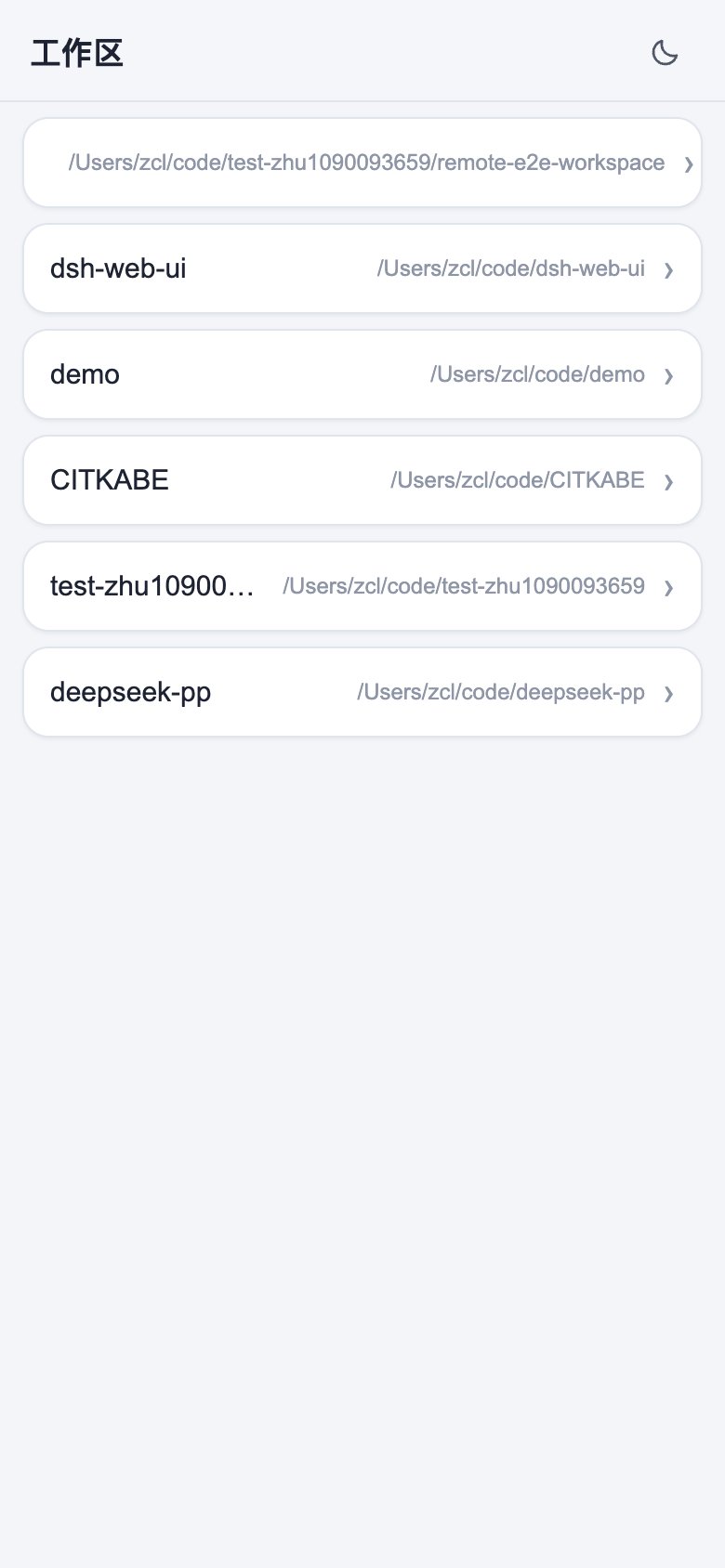
Workspaces — the roster, each row a workspace with its own sessions:
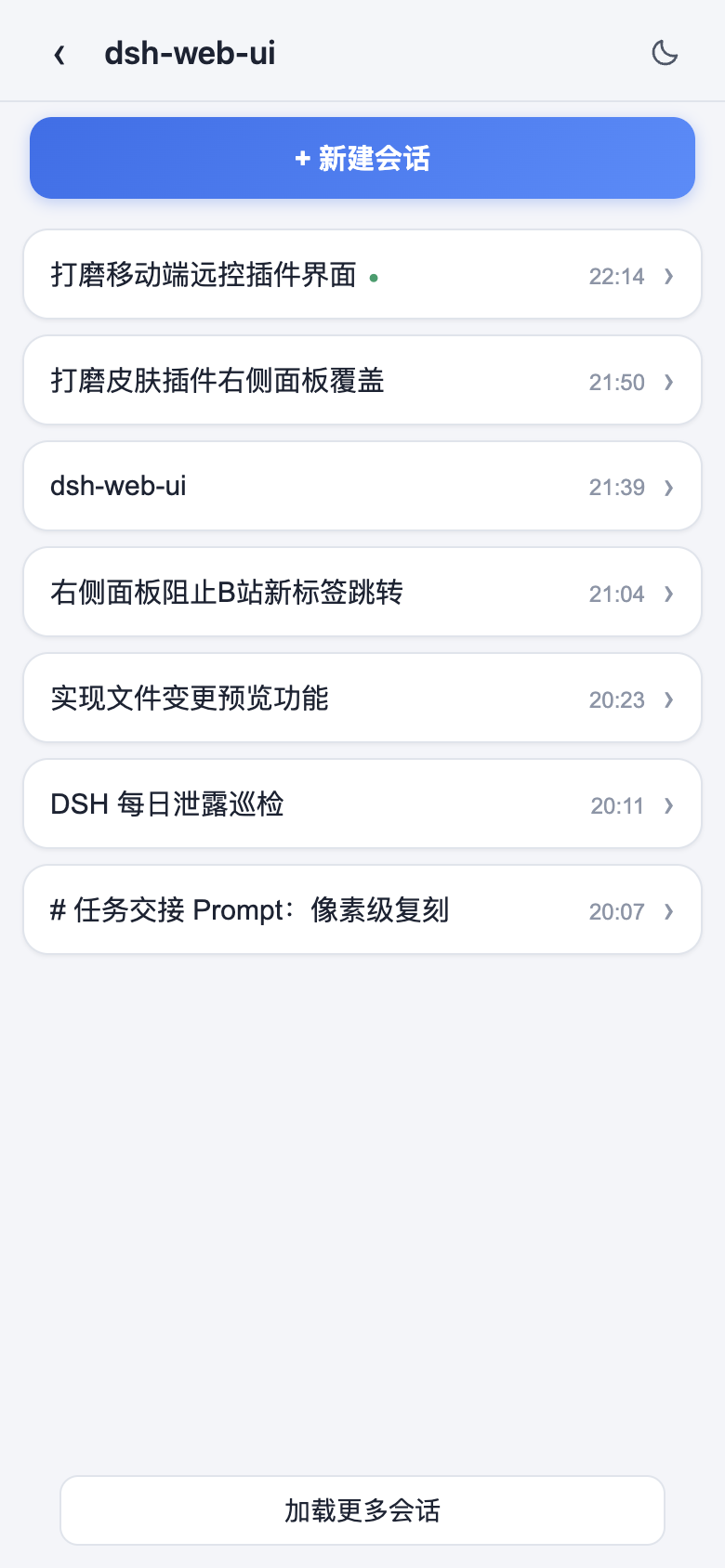
Sessions — one workspace's sessions, headed by the 新建会话 button
(creates a blank session attached to the workspace and opens it
immediately):
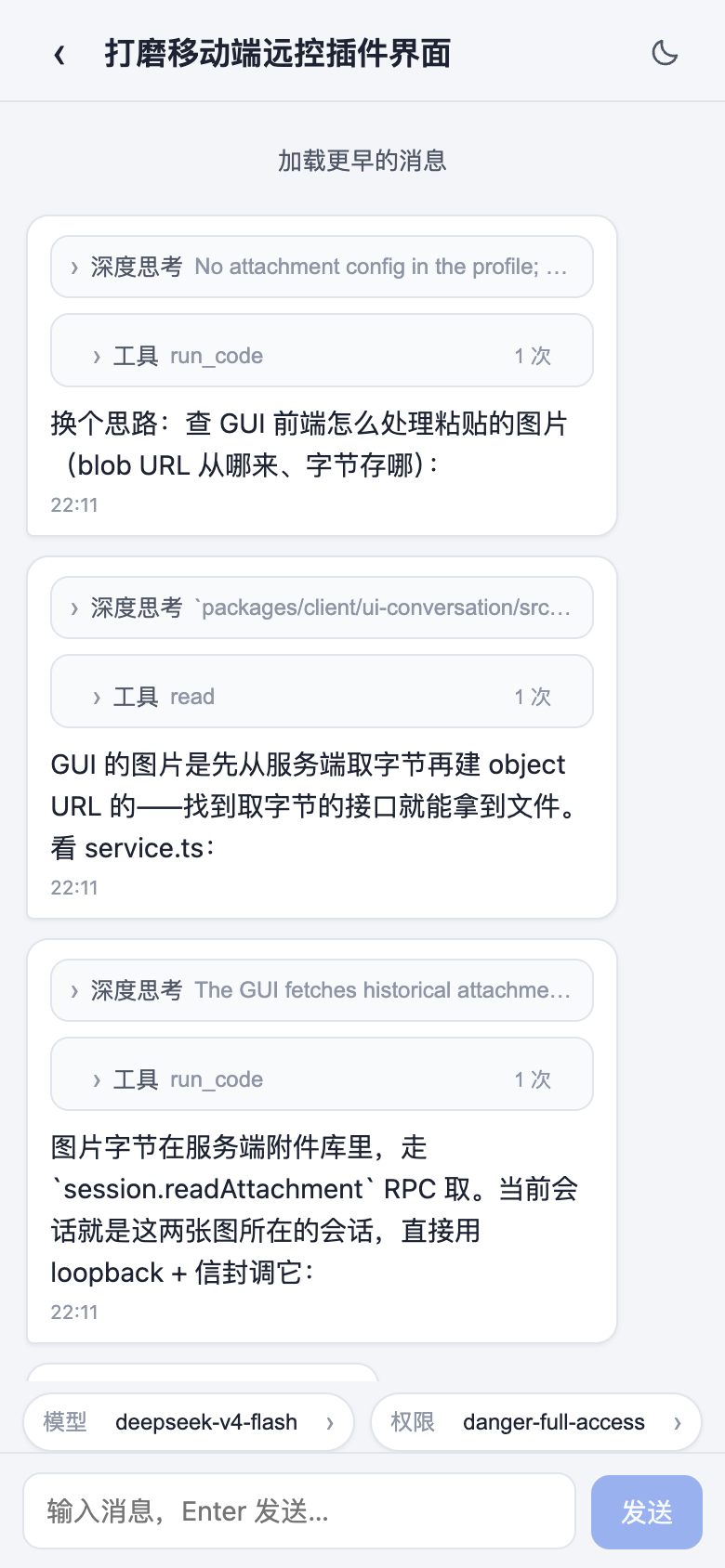
Chat — messages with the desktop fold discipline (collapsed
深度思考 reasoning and 工具 tool-call rows), a pinned composer with
模型 / 权限 chips, and a live stream while the agent works:
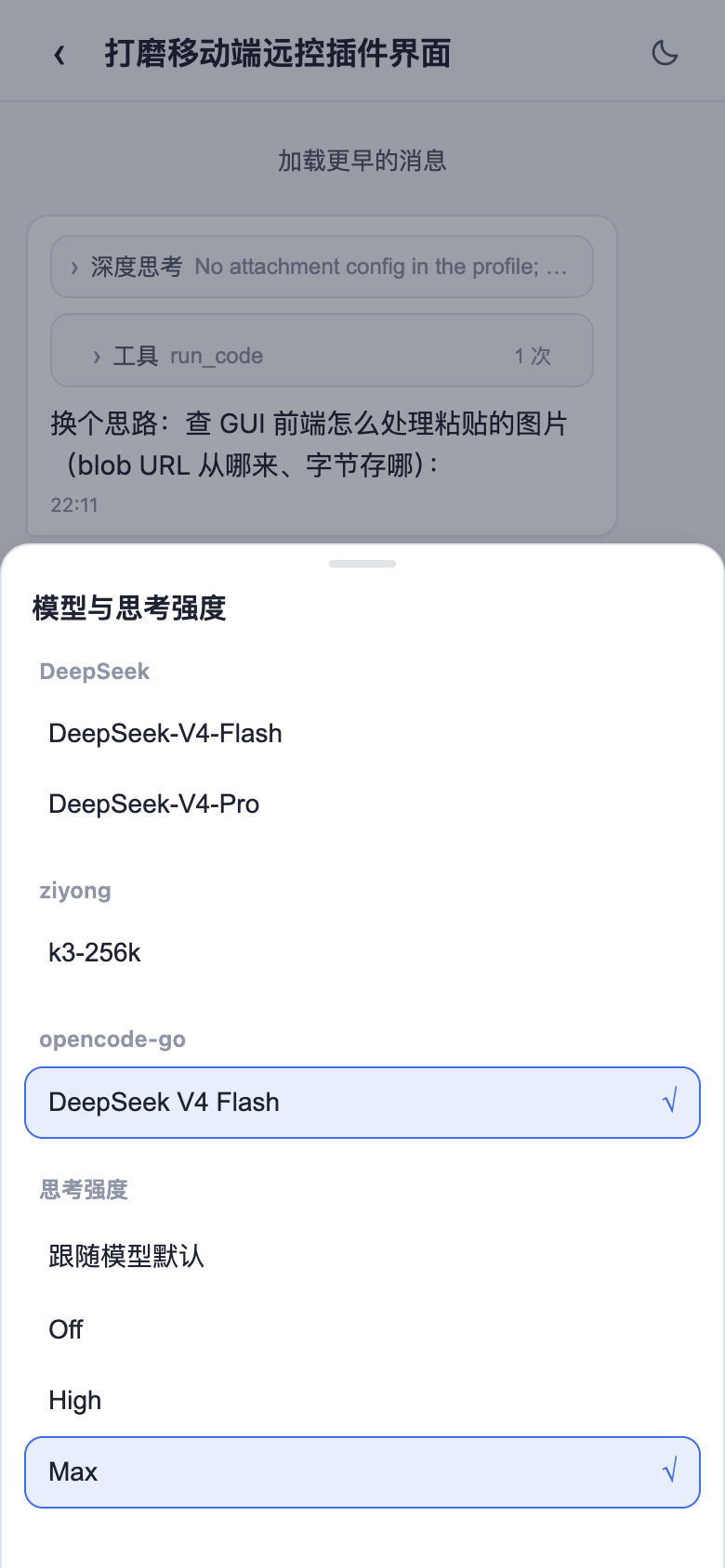
Model picker — the bottom sheet with a provider-grouped catalog and a
思考强度 section per model (the same session.models directory the
desktop uses):
Requirements
A DSH installation whose dsh CLI supports profiles (dsh --profile,
dsh plugin) — the profile/bundle mechanism this package rides on.
For LAN use the server must be reachable from the phone: start with
dsh web --host 0.0.0.0. With the default 127.0.0.1 bind the panel
shows an explicit explanation instead of a dead QR code — unless a public
base URL is configured (see "Remote access over the internet" below),
which makes the QR reachable from anywhere without rebinding. The panel's
mint/stop endpoints are loopback-only by design: a desktop browser
opened at the LAN URL sees a "配对面板仅限本机使用" banner instead —
open the panel at http://127.0.0.1 and let the phone use the paired
link.
For the one-click public tunnel (autoTunnel), the cloudflared
platform binary ships with the package (its postinstall downloads it; a
runtime download covers installers that skip postinstall scripts). No
user-side tooling, account, or domain is needed — a Cloudflare quick
tunnel is free and anonymous.
Install
Install the family aggregate package @captain1275/dsh-web-ui-all (all plugins and skins in one) or this plugin alone:
# Recommended: install directly from npm
dsh plugin --profile web add @captain1275/dsh-remote-web-ui

# Or from the repository (development loop)
git clone https://github.com/zhu1090093659/dsh-web-ui.git
cd dsh-web-ui
pnpm install && pnpm -r build
dsh plugin --profile web add link:$(pwd)/packages/dsh-remote-web-ui
Restart the profile (dsh web), then open the phone icon in the sidebar
foot. The plugin's cordis.patch.yml inserts the single plugin row that
mounts both halves.
github:/ installs work for a standalone repo whose package
sits at the root (the prepare script builds lib/ during install;
pnpm ≥10 blocks that until you copy the printed key into the profile's
pnpm-workspace.yamlallowBuilds and re-run). Monorepo subpackages
use the link: form above.
Use
dsh web --host 0.0.0.0 (the printed LAN URL confirms reachability).
Click the phone icon → the panel mints a fresh one-time QR.
Scan with the phone (or open the copied link): the phone binds and
lands on the standalone mobile surface at /m — no desktop UI on a
small screen. The surface is deliberately thin:
workspaces straight away (a 新建会话 button lives on each workspace's
session list: it creates a blank session attached to that workspace via
the host's session.create and opens the new chat immediately),
one workspace's sessions load incrementally (20 rows per page,
"加载更多会话" continues; never the whole list at once),
opening a session fetches its chat content on demand (history
pages, "加载更早的消息" goes further back),
a live stream shows new messages as they arrive, with a prompt box
for sending your own,
a light-first theme: the surface ships a light palette by default;
a sun/moon toggle in every header flips to the dark palette and the
choice persists across visits (localStorage),
messages render with the desktop fold discipline: reasoning hides
behind a collapsed 深度思考 disclosure, tool calls behind a collapsed
工具 row (tap to see each call's arguments), very long answers behind
an explicit 展开全文 toggle, and each row carries its time — and
a composer toolbar carries the model picker (provider-grouped
catalog with a 思考强度 effort section per model) and the 权限
picker (permission presets; 完全权限 requires an explicit confirm
step). Both ride the host's own session.models /
session.selectModel RPCs and the /permission command — the phone
changes the same session settings the desktop would.
The desktop badge flips to 已连接 in real time; it falls back to
offline/断开 when the phone leaves.
刷新二维码 invalidates the old link and issues a new one. 停止 revokes
mobile access: paired devices 403 on their next request, including their
live stream.
The mobile surface is fully self-contained in this plugin: the /m page
and its data channel (/m/api) are served by the plugin's own routes and
need no harness source changes — the phone's RPC calls ride the
plugin's /m/api proxy (which delegates to the host ApiProxy service and
pages session.list itself), so the tunneled Host never has to enter the
connection plugin's trust fence. The phone is gated by its paired-device
cookie and an explicit method allowlist (settings/credentials/host-action
domains are never reachable from the phone; model reads/writes are limited
to the advisory session.models / session.selectModel pair, creation to
session.create (workspace id only — the phone never names a working
directory of its own), and the permission picker only ever sends the
mode-agnostic /permission command
through the already-allowlisted session.prompt); the live stream arrives
over Server-Sent Events on /m/api/events.mux.
Behavior notes
Installing this plugin gates non-loopback /api access behind pairing
(see requirePairingForLan in src/index.ts). A desktop browser opened
via the LAN URL must pair like any remote device; loopback (127.0.0.1)
is unaffected. Set requirePairingForLan: false in the profile patch to
restore the open-LAN behavior while keeping tokens/status/revocation.
The QR link is built from the machine's non-internal IPv4 literals; a
multi-homed host (Wi-Fi + wired, or a proxy/VPN virtual adapter) shows a
radio picker so you can advertise the network the phone can actually
reach. The first literal is the default. When publicBaseUrl is set, the
picker adds a 公网地址 option on top — the default QR then uses the
public base, and picking a LAN literal re-mints an in-network link.
A configured publicBaseUrl satisfies the reachable-bind requirement on
its own: dsh web bound to 127.0.0.1 (no --host 0.0.0.0) still mints
working public QR links through the tunnel.
Remote access over the internet (tunnels)
One-click public tunnel (recommended)
Turn on autoTunnel in the plugin settings card (or set
autoTunnel: true in the profile patch). The plugin then runs its own
Cloudflare quick tunnel — the cloudflared binary ships with the package,
no install, account, or domain needed — and wires everything itself:
the minted https://xxx.trycloudflare.com URL becomes the QR base, so a
phone anywhere can pair. The panel shows the tunnel status (starting /
running / failed with the reason), and a crash is restarted
automatically with backoff.
The QR stays LAN-only until the tunnel reports its URL, and a tunnel
restart mints a NEW hostname — the plugin clears the old link and mints a
fresh one, so users never touch configuration. Note that a quick tunnel is
public: anyone with the URL can load the static page; the pairing gate is
the real fence, and the phone's data channel (/m/api) is protected by
its own paired-device gate plus a method allowlist — the tunneled Host
never needs to enter the connection plugin's trust fence, so no profile
or harness customization is required for the auto tunnel to work.
Manual tunnels (bring your own)
The QR link is normally a LAN URL, so a phone outside the house cannot use
it. Point a tunnel at the dsh web port and tell the plugin its public
address — the QR is then built from the tunnel URL and the phone-facing
pairing fence trusts the tunneled host. Two knobs are involved:
publicBaseUrl (plugin config, in the profile patch or the settings
card): the public origin, e.g. https://foo.trycloudflare.com. The QR
link is built from it, and accept/heartbeat/status accept its host.
Malformed values are ignored with a warning (LAN-only behavior kept).
--trusted-host (dsh web flag): the transport-level
/api fence of the connection plugin must accept the public host too —
without it every /api request through the tunnel 403s before the
pairing layer (the plugin's own fence only covers the /api/pair
routes). Pass the public host (or host:port) exactly as the tunnel
forwards it.
Cloudflare Tunnel (quick tunnel — no account, no domain)
Install the client once (macOS: brew install cloudflared; other systems:
grab the cloudflared-darwin-{arm64,amd64} binary from the official GitHub
releases). Then:
# 1. Expose the local port (whatever dsh web is listening on):
cloudflared tunnel --url http://127.0.0.1:3080
#    prints something like: https://xxxx-xxxx-xxxx.trycloudflare.com

# 2. Start dsh web with that host trusted (use --host 0.0.0.0 too when LAN
#    access should stay available):
dsh web --trusted-host xxxx-xxxx-xxxx.trycloudflare.com
Then set publicBaseUrl: https://xxxx-xxxx-xxxx.trycloudflare.com in the
profile patch (or the plugin settings card — it hot-reloads). Open the
phone icon at http://127.0.0.1, scan the QR from anywhere: the phone
binds, reloads into the mobile surface, and heartbeats keep it online.
Notes:
Quick tunnels are free and need no login, but the hostname is random per
run: every cloudflared restart changes it, so update --trusted-host
and publicBaseUrl together. Cloudflare documents no uptime guarantees;
in-flight-request concurrency is capped (HTTP 429 past it), and Quick
Tunnels do not forward Server-Sent Events. Tailscale Serve (and
tailscale serve on a single port) behaves the same way. SSE is how the
phone receives live messages in real time, so over a quick tunnel or
Tailscale Serve the mobile chat falls back to polling: the phone still
sends and receives messages (everything else rides plain HTTP, which does
forward), only a new message may arrive a few seconds late instead of
instantly. The plugin polls session.history on a short interval once the
SSE channel goes silent, and resumes streaming as soon as SSE works again.
For true real-time push, point the QR at a tunnel that forwards SSE — a
Cloudflare named tunnel (domain hosted on Cloudflare, see below), or a
plain TCP port forward (LAN address, the tailscale up virtual-interface
address, or a manual ssh -L / cloudflared TCP tunnel to the port).
A quick tunnel is public: anyone with the URL can load the static page.
The pairing gate is the real fence — unpaired devices get 403 on every
/api call — so keep requirePairingForLan on.
For a stable hostname, create a named tunnel from the Cloudflare
dashboard (Networking → Tunnels; the domain must be hosted on
Cloudflare) and use its hostname in the same two places. Reachability
from mainland China is not guaranteed by Cloudflare; verify locally.
Tailscale is an alternative for personal use that needs no plugin
changes at all: its virtual-interface address (100.x.y.z) shows up in
the QR's address picker automatically, and a phone on the same tailnet
reaches it like a LAN host.
Development
Work from this repository (no sibling checkout needed):
cd ~/code/dsh-web-ui
export NPM_TOKEN=''   # only if private @deepseek-ai auth is still required
pnpm install
pnpm --filter @captain1275/dsh-remote-web-ui run build
pnpm --filter @captain1275/dsh-remote-web-ui test
pnpm --filter @captain1275/dsh-remote-web-ui run typecheck
The peer APIs come from the official NPM SDK: every @deepseek-ai/* package
used here is declared in devDependencies (rc.6), and TypeScript/Vitest resolve
types straight from node_modules — no DSH source checkout is required. The
consumer-side prepare build (tsdown.prepare.config.ts) transpiles without
type checking, so git installs work without any harness checkout either.
Checks
pnpm run typecheck
pnpm test
pnpm run build
Harness contract dependencies
This plugin rides three harness seams that may not exist in older checkouts:
api/gate waterfall (packages/client/connection): the /api route and
event WebSocket upgrades emit this event after the trust fence so plugins
can enforce application-level access control. Without it, revocation has
no server-side teeth.
sidebar.remote foot seat (packages/client/ui-sidebar): the sidebar
declares and renders the seat the phone entry occupies.
LAN runtime connection fixes (host-apiproxy mintRpcId fallback for
insecure-context origins; the 20260808-branch connection loop opening the
host stream after the mux stream): without them the browser runtime cannot
run on a plain-HTTP LAN page at all (the mobile side of this feature).
The fence helpers (isTrustedApiRequest / isLoopbackHostname) are
reimplemented locally in src/gate.ts / src/routes.ts: the 20260810
upstream moved the trust fence inside the connection plugin and stopped
exporting them, so the pairing routes carry their own copy scoped to the
literals the QR links advertise.
See the Agent Notes api-gate-and-sidebar-remote-seat and
lan-runtime-connection-fixes in the harness checkout.
Manual E2E: LAN pairing round trip
The unit/component specs cover the route family, the gate, and the panel,
but the pairing loop involves a real browser on a non-loopback origin.
Repeat this after any change to the wire contract or the connection loop:
Start the server on all interfaces with a test workspace root:
dsh web --host 0.0.0.0 --port 3190 --workspace-root /tmp/remote-e2e.
Open the loopback URL (http://127.0.0.1:3190) in a browser: the
phone icon sits in the sidebar foot; the panel mints a QR instantly.
In a second tab (or a phone) open the LAN URL with the pair token
(e.g. http://192.168.1.7:3190/?pair=): the page accepts, sets
the HttpOnly dsh_pair cookie, reloads, and boots the full UI — no
console errors, and a generation round trip completes.
The desktop badge flips to 已连接 in real time; a LAN-origin desktop
page instead shows the 配对面板仅限本机使用 banner and opens no status
stream.
停止 on the desktop cuts the phone off: its next /api request 403s
(reconnect loops retry until a fresh QR re-pairs).
The public path is the same round trip through a tunnel (see "Remote access
over the internet"): loopback mint → phone opens the public QR URL →
accept → full UI. Both publicBaseUrl (plugin config) and
--trusted-host (dsh web flag) must name the tunneled host; the desktop
panel still opens at http://127.0.0.1.
Known Limitations and Deferred Work
Revocation is per-request: a paired phone whose request is already in
flight when 停止 lands completes that request; the next one 403s.
Device sessions are in-memory: pairing state (token + devices) resets
with the dsh web process.
No per-device management UI: the panel shows aggregate status
(waiting / connected N / offline); individual device revocation is
deferred.
Quick-tunnel hostnames change per run: a trycloudflare.com URL is
random on every cloudflared start, so --trusted-host and
publicBaseUrl must be updated together whenever the tunnel restarts.
A named tunnel (fixed hostname) avoids the churn.
Dev HMR: dsh web --dev polls every roster bundle by path, so
rebuilding this package (its own tsdown --watch) hot-reloads the client
bundle; no harness-side watcher is involved.
Dependency rationale
qrcode.react (MIT, actively maintained, React 16–19 support) renders the
QR as a dependency-free SVG component — no canvas, no server-side image
generation. It is inlined into the client bundle at build time (like the
official skin/turtle-ui plugins inline their non-shared deps), so profile
installations need no extra runtime dependency beyond the dsh peer closure.
schemastery is the DSH-standard config schema validator.