Cerbur/clutch-dsh--packages-clutch-dsh-title ↗★ 13
@cerbur/clutch-dsh-title
Configurable deterministic session titles for DeepSeek Harness.
安装
npx -p @deepseek-ai/dsh dsh plugin --profile web add github:Cerbur/clutch-dsh#b3de7d905dce42f5633ba3d39d72a0726b438cc4&path:packages/clutch-dsh-title说明文档
阅读完整 README ↗Usage
Open title settings
- Start the DSH Web UI.
- Open Settings → Session Title.
- Keep Use title templates enabled, choose a template, and select Activate.
- Create a new session to see the selected format in its title.
The page shows the current format, a live example, template rows, and title-generation token usage:
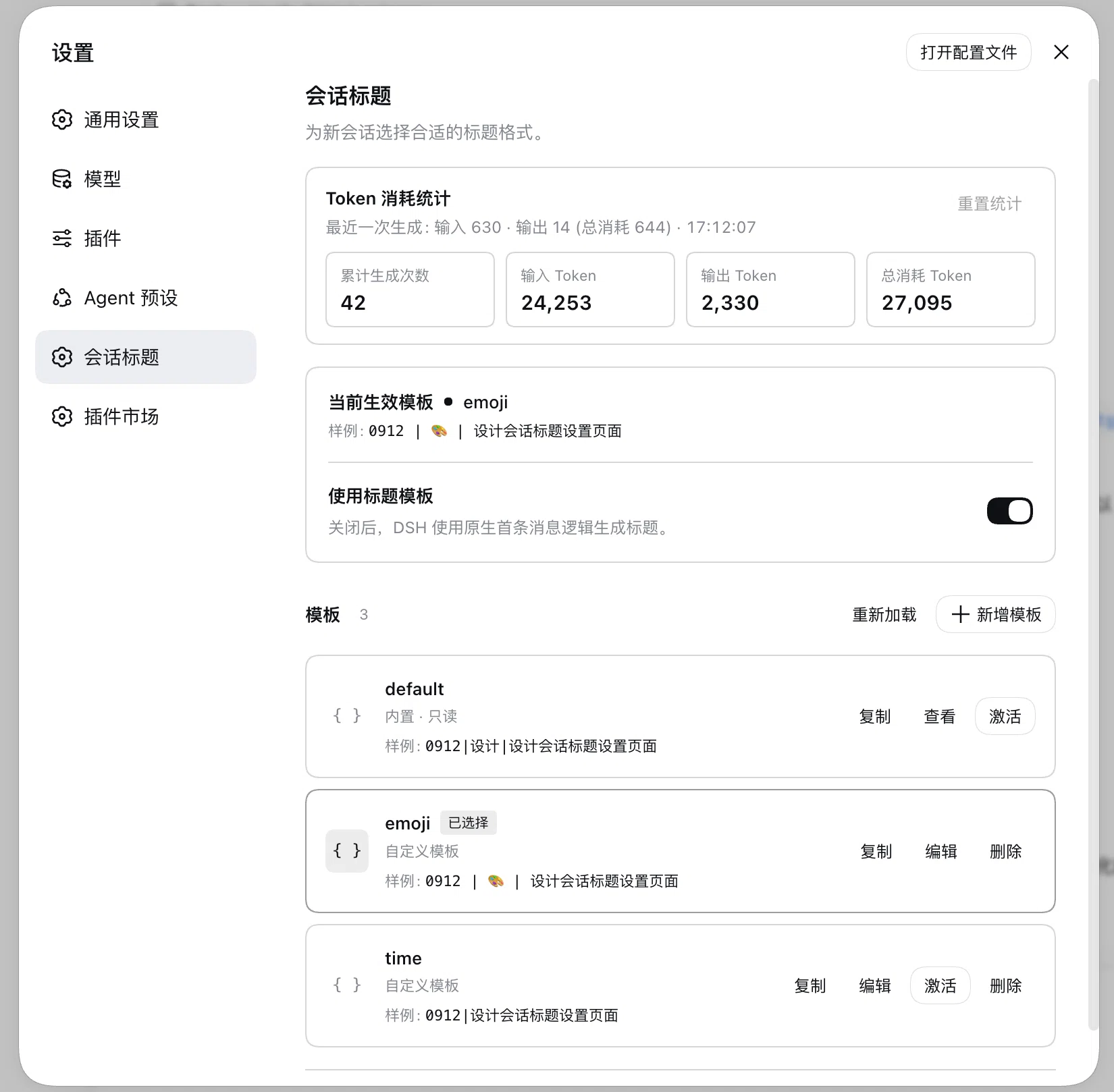
Choose and manage templates
Fresh settings include an editable emoji template using a date, an emoji category, and a description. The built-in default template remains selected initially. You can edit or delete emoji; deleting it does not recreate it.
- Select Duplicate on any row, including
default, to start a new template with the same format. - Give the copy a unique name, edit it, and choose Save. Saving does not activate it.
- Select Activate when you want to use a saved template.
- The built-in
defaulttemplate can be viewed and selected, but cannot be edited or deleted. - Deleting the active template selects
default. - Each row shows an Example title that updates while you edit. Examples do not use a model, so the real title may differ.
Create a custom format
The editor accepts a template and optional fields. Placeholders use the simple ${identifier} form. For example:
template: '${daytime} | ${desc}'
fields:
  daytime:
    kind: datetime
    source: session.createdAt
    format: MMDD
    timezone: Asia/Shanghai
  desc:
    kind: llm-text
    instruction: Summarize the first prompt in a few words
    maxCharacters: 32
Use datetime for a session date, literal for fixed text, llm-enum for a controlled list of choices, and llm-text for a short description. The editor validates placeholders, dates, timezones, enum choices, and text limits before saving. Functions, expressions, conditions, and code are not supported.
Saved templates are stored in the clutch-dsh-title section of $DSH_HOME/settings.yaml (normally ~/.dsh/settings.yaml). This file is the source of truth; browser storage and clutch.yaml are not used. External edits are picked up by DSH, and invalid entries remain visible so they can be repaired.
Understand updates and fallback
- Titles use the first eligible user prompt. Later messages do not automatically replace a title.
- A newly saved format affects new generation or an explicit refresh; existing sessions are not batch-migrated.
- Invalid or missing active templates fall back to
default. If field extraction or title generation fails, DSH uses its normal title generator. - Turning Use title templates off keeps your templates and selection, but uses DSH's built-in first-prompt generator.
- Long first prompts are clipped within the configured input budget while retaining their beginning and end. Later conversation messages are not used for the title.
- DSH continues to own title length limits, persistence, rename pinning, refresh, and fork behavior.
Token usage
The Settings page includes a token overview for title generation:
- Total generations counts title model calls with valid usage data, including DSH fallback calls.
- Input, output, and total tokens show cumulative usage, with the latest call's cache and thinking details when available.
- Reset statistics clears the stored overview after confirmation.
Deterministic formats that use only dates or fixed text do not make a model call and are not counted.
Existing Cordis configuration
If your DSH profile already provides title settings through Cordis, the existing template and fields values remain supported. With the Settings page enabled, they appear as an editable legacy template. Model routing and optional reasoning settings remain profile-level configuration rather than template fields.
Keep DSH's default title provider disabled when this package is enabled, and do not install another title provider in the same profile.
For package-specific release parameters, see docs/RELEASING.md. For the public release history, see RELEASE-LOG.md.
Token usage
The Settings page includes a token overview for title generation:
- Total generations counts title model calls with valid usage data, including DSH fallback calls.
- Input, output, and total tokens show cumulative usage, with the latest call's cache and thinking details when available.
- Reset statistics clears the stored overview after confirmation.
Deterministic formats that use only dates or fixed text do not make a model call and are not counted.
Existing Cordis configuration
If your DSH profile already provides title settings through Cordis, the existing template and fields values remain supported. With the Settings page enabled, they appear as an editable legacy template. Model routing and optional reasoning settings remain profile-level configuration rather than template fields.
Keep DSH's default title provider disabled when this package is enabled, and do not install another title provider in the same profile.
For package-specific release parameters, see docs/RELEASING.md. For the public release history, see RELEASE-LOG.md.