@chi-hong22/dsh-latexcp
DeepSeek Harness Web LaTeX formula copy helper: hover a formula to copy its TeX source as $...$ or \(...\), with inline/display delimiters auto-matched
安装
npx -p @deepseek-ai/dsh dsh plugin --profile web add github:Chi-hong22/dsh-latexcp说明文档
阅读完整 README ↗dsh-latexcp
DeepSeek Harness (DSH) Web 界面 LaTeX 公式复制插件:悬停公式浮现复制按钮,一键复制公式的 TeX 源码。
Overview
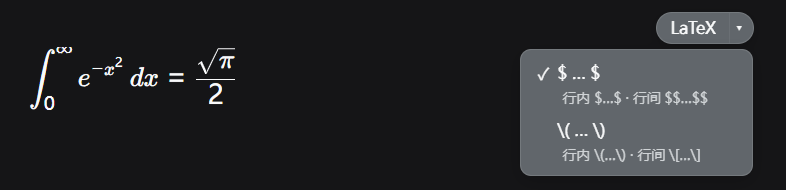
DSH 用 KaTeX 渲染公式,渲染结果只适合看,不适合直接复制:框选粘贴得到的是排版碎片。但 KaTeX 在页面 DOM 里保留了每个公式的原始 TeX 源码(隐藏的 .katex-mathml 子树中的 `` 节点)。这个插件悬停任意公式时在右上角浮现一个小按钮:
- 点主按钮
LaTeX:把该公式的源码复制到剪贴板; - 点箭头
▾:展开格式菜单,两种输出格式二选一设为默认:
| 格式 | 行内公式 | 行间(块级)公式 |
|---|---|---|
| 美元符号 | $E=mc^2$ | $$E=mc^2$$ |
| 斜杠括号 | \(E=mc^2\) | \[E=mc^2\] |
插件自动识别公式是行内还是行间(KaTeX 行间公式外层带 .katex-display 标记),按你选的格式输出正确的单/双定界符,不用自己改。
如果你经常要把对话里的公式搬进论文、笔记或别的 Markdown 文档,会用到它。
Compatibility
在 @deepseek-ai/dsh-* 0.1.0-rc.6(npx 部署快照)上验证过,最后验证日期 2026-08-15。
插件依赖 KaTeX 渲染 DOM 的两个结构:.katex-mathml 里的 annotation[encoding="application/x-tex"] 节点(源码保留处)和 .katex-display class(行间公式标记)。DSH 大版本如果调整 Markdown/KaTeX 渲染 DOM,可能需要跟着改。
纯浏览器端插件,没有宿主半部,没有服务注入。复制走浏览器 navigator.clipboard(用户点击触发)。
Install
装进官方 web profile(自带 dsh-base + dsh-web-app 两层):
dsh plugin --profile web add github:chi-hong22/dsh-latexcp
# 或本地 checkout:
dsh plugin --profile web add D:/path/to/dsh-latexcp
仓库包含构建产物(lib/ 已提交,纯 JS 没有构建步骤),安装后无需另外构建。dsh plugin add 会写入依赖并把本包加进 profile 的 bundles 列表,挂载行来自本包自带的 cordis.patch.yml,不需要手动改任何 profile 文件。
验证安装:
dsh --profile web --dump-config | Select-String ui-latexcp
输出里有下面几行就是装上了:
# == @chi-hong22/dsh-latexcp
- id: ui-latexcp
  name: '@chi-hong22/dsh-latexcp'
重启 DSH,插件出现在 设置 → 插件 里。
手动安装只留给旧版本或调试:把本包作为 workspace/link 依赖装上,再在 profile 的 cordis.patch.yml 里手写一行 insert: [{ id: ui-latexcp, name: '@chi-hong22/dsh-latexcp' }]。别和 bundle 通道并用,同一行挂两次会双重加载。
Uninstall
dsh plugin --profile web remove @chi-hong22/dsh-latexcp
执行后重启 DSH 生效。