dsh-mcp-diff
在 DSH Web 聊天中为 MCP 文件系统工具调用(如编辑、写入)渲染统一的 Diff 卡片插件。
AI 分析
核心用途是统一内置文件工具与外部 MCP 文件工具的修改展示效果。适合使用 MCP 协议进行文件操作、需要清晰查看代码差异的用户。
安装
npx -p @deepseek-ai/dsh dsh plugin --profile web add github:Fakek0f3sT/dsh-mcp-diff说明文档
阅读完整 README ↗dsh-mcp-diff
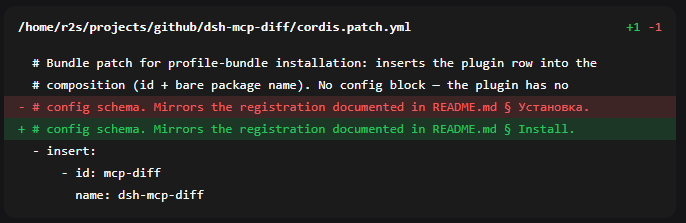
A client plugin for the DeepSeek Harness (Web GUI) that renders every file mutation in the chat as uniform diff cards — collapsed by default, with per-line highlighting (green for additions, red for deletions).
Covers both the filesystem MCP server (edit_file / write_file) and the
built-in DSH tools (edit / write), bringing them to one look.
Why
By default DSH draws a diff only for its own file tools (edit, write), with
its own renderer. When the agent edits files through the
@modelcontextprotocol/server-filesystem MCP server, the call is named
mcp__filesystem__edit_file / mcp__filesystem__write_file — there is no
registered toolview for it, so the chat shows only a generic block with no diff.
The plugin:
- registers a toolview under the MCP keys and builds the diff from the server
response (a ready unified diff with context and
@@headers) or from the call arguments when there is no response yet (write_file, a still-runningedit_file); - also overrides the built-in
edit/write, unifying their contextual hunks (a per-line LCS: shared lines read as neutral context instead of being doubled); - renders everything as one card built on a native `` — collapsed by
default, the header shows the path +
+N -M, and it expands on click.
Install
# from npm (prebuilt, recommended)
dsh plugin --profile web add dsh-mcp-diff

# or from GitHub (built on install)
dsh plugin --profile web add github:Fakek0f3sT/dsh-mcp-diff
dsh plugin add is a pnpm forwarder: it adds the package to your profile
(~/.dsh/profiles/web) and, since the plugin declares dsh.bundle,
automatically includes it in dsh.profile.bundles — nothing to wire by hand.
Installed from GitHub, lib/ is built in place (the prepare script); from npm
it ships prebuilt.
Important: DSH picks up its plugin set only at startup — after installing,
restart dsh web and refresh the GUI page.
Check that the bundle is served:
curl -s http://127.0.0.1:3080/plugins/dsh-mcp-diff/client.js | head -c 80
Manually from a clone
git clone https://github.com/Fakek0f3sT/dsh-mcp-diff.git
cd dsh-mcp-diff && npm install && npm run build
cd ~/.dsh/profiles/web
npm install /path/to/dsh-mcp-diff
{
  "dependencies": { "dsh-mcp-diff": "link:./node_modules/dsh-mcp-diff" },
  "dsh": { "profile": { "bundles": [ "…", "dsh-mcp-diff" ] } }
}
Configuring for another MCP server
The toolview keys are set for the server name filesystem. If your filesystem
MCP server is named differently (the serverName field in the config), edit the
TOOL_KEYS constant in src/client/index.tsx (keys of the form
mcp____edit_file). The edit / write keys live there too —
remove them if you do not want to override the built-in renderer.
Development
npm install
npm run build
node --import tsx/esm src/client/parse-diff.test.ts   # diff-parser self-check
Compatibility
Tested on DSH 0.1.1-rc.2. The plugin imports only platform modules (react,
ui-primitives, ui-slots, runtime/client) — ui-tool internals are not imported.
License
MIT