HanaAyane/dsh-reasoning-effort ↗★ 52
dsh-reasoning-effort
Codex-style DeepSeek Harness model and reasoning selector with model-advertised effort levels, DSH-native themes, left-clipped radiation effects, and copy-ready reasoning-effort declaration guidance for custom-provider models.
安装
$
npx -p @deepseek-ai/dsh dsh plugin --profile web add github:HanaAyane/dsh-reasoning-effort说明文档
阅读完整 README ↗第一次使用:三步完成
1. 安装插件
让 Agent 安装(推荐)
如果当前 Agent 可以执行终端命令,把下面这段话完整发送给它:
请为 DeepSeek Harness 的 web Profile 安装 dsh-reasoning-effort 插件。

只执行下面两条命令,不要修改其他 Profile:
dsh plugin --profile web add github:HanaAyane/dsh-reasoning-effort#main
dsh --profile web --dump-config

确认输出中出现 dsh-reasoning-effort 后告诉我安装结果。
不要替我关闭或重启正在运行的 DSH;安装完成后提醒我手动重启 DSH Web Host。
Agent 应当返回安装结果,并明确告诉你配置中是否已经出现 dsh-reasoning-effort。
手动安装
也可以自己打开 PowerShell 执行:
dsh plugin --profile web add github:HanaAyane/dsh-reasoning-effort#main
dsh --profile web --dump-config
main 当前版本为 0.6.0,与最新发行 Tag v0.6.0 一致。#main 始终安装最新代码(之后可能包含未发布改动);如需固定在当前版本,可把命令中的 #main 改为 #v0.6.0。
2. 重启 DSH Web Host
插件在 Web Host 启动时载入。安装命令完成后,请结束当前 Host 并重新启动,再刷新 DSH 页面。
3. 打开模型入口
- 新建或打开一个会话。
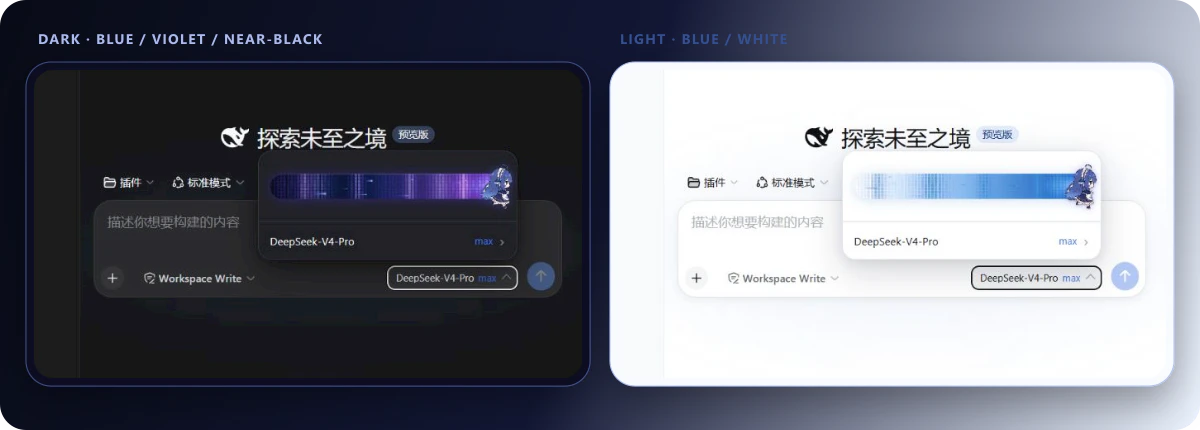
- 点击输入框下方显示“模型 + 当前强度”的按钮。
- 拖动滑块或点击轨道,释放后会吸附到最近的档位。
- 点击滑块下方的模型行,可以继续进入 DSH 原生模型列表。
完成后,你看到的效果应当与下面一致: