Hilbert-beinghappy/seektty ↗★ 3
seektty
SeekTTY, a pluggable DeepSeek-colored terminal surface for DeepSeek Harness
安装
npx -p @deepseek-ai/dsh dsh plugin --profile web add github:Hilbert-beinghappy/seektty说明文档
阅读完整 README ↗SeekTTY
English | 中文
SeekTTY 是独立的 DeepSeek Harness Profile Bundle。Harness 继续负责 Agent、Session、模型、设置、权限、Profile、插件和持久化;本仓库只提供 DeepSeek 配色的终端 Surface 和必要的兼容适配层,不再维护 Harness fork。
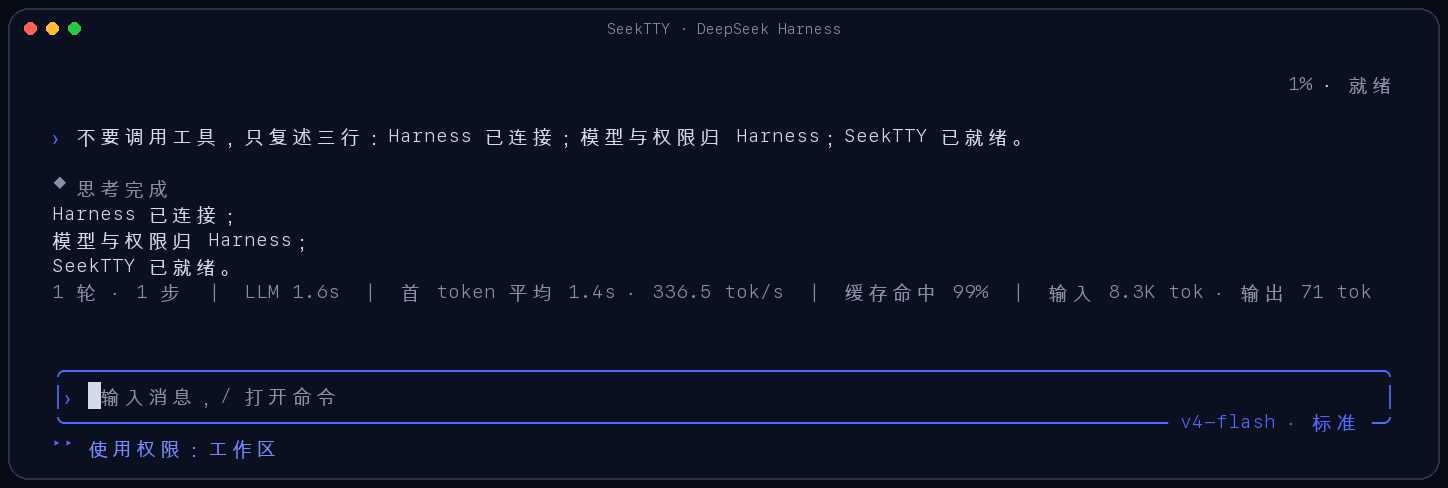
安装并使用裸命令
仓库公开,可直接从 GitHub 安装,无需配置私有仓库访问权限。
pnpm add --global github:Hilbert-beinghappy/seektty
deepseek
deepseek 首次运行会通过原生 dsh plugin 命令创建默认 tui Profile 并安装本 Bundle,以后直接启动同一 Profile。它支持初始任务、工作区、会话恢复和自定义 Profile:
deepseek "检查这个项目"
deepseek --cwd ../project
deepseek --resume
deepseek --resume
deepseek --profile team-tui
也可以只使用 dsh 的原生入口:
dsh plugin --profile tui add github:Hilbert-beinghappy/seektty
dsh --profile tui
从 deepseek-tui 迁移
旧版全局包只需替换一次;新的 deepseek 启动器会通过原生 dsh plugin 命令把目标 Profile 中的旧 Bundle 标识替换为 seektty:
pnpm remove --global deepseek-tui
pnpm add --global github:Hilbert-beinghappy/seektty
deepseek
自定义 Profile 在首次启动时分别迁移,例如 deepseek --profile team-tui。只使用 dsh 原生入口时,可显式执行:
dsh plugin --profile tui remove deepseek-tui
dsh plugin --profile tui add github:Hilbert-beinghappy/seektty
直接插拔
移除不会修改 dsh 本体,只会让 Bundle 离开目标 Profile:
dsh plugin --profile tui remove seektty
重新安装使用相同命令:
dsh plugin --profile tui add github:Hilbert-beinghappy/seektty
本包声明标准 dsh.bundle.patch,不建立第二套插件数据库、Profile 格式、Session Store、模型适配器、设置 Store 或权限系统。
模型和设置
模型目录、Provider、推理强度、凭据和全部非外观设置都来自 Harness。请通过 TUI 的 /model、/settings 或 Harness 原生设置配置;密钥不属于本插件,也不能提交到仓库。
已验证范围
- 官方 stock
@deepseek-ai/dsh@0.1.0-rc.6隔离安装、配置装配和 PTY 启动。 /doctor:95 个 Harness 插件运行,0 error,0 warning。- 模型列表、Provider/模型/推理强度切换、请求提交和 Harness 错误透传。
- 原生 remove 后依赖、Bundle 和配置条目全部消失;re-add 后再次启动成功。