KamChiHei/dsh-deepseek-usage-monitor ↗★ 0
dsh-deepseek-usage-monitor
DeepSeek Harness plugin for token usage and account balance monitoring.
安装
npx -p @deepseek-ai/dsh dsh plugin --profile web add github:KamChiHei/dsh-deepseek-usage-monitor说明文档
阅读完整 README ↗dsh-deepseek-usage-monitor
English | 简体中文




A DeepSeek Harness (dsh) plugin: records token usage for every model call on the Host side, polls your DeepSeek account balance on a timer, and shows a draggable, resizable live status card in the bottom-right corner of DSH Web.
The plugin has two halves reading the same data:
- Host side (
index.js): listens to harness events for accounting, queries the balance on a timer, and serves the state endpoint; - Web side (
client.js, loaded via thedsh.clientdeclaration inpackage.json): polls the state endpoint and renders the bottom-right "Usage" card. The API key never leaves the Host process and is never sent to the browser.
Showcase
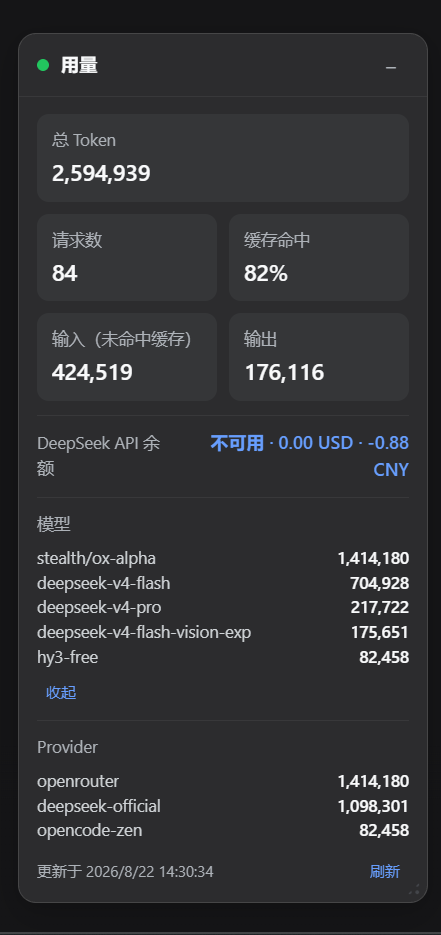
The "Usage" card in the bottom-right corner of DSH Web after installation (shown expanded, with total tokens, cache hit rate, balance, and model / provider groups):
Features
Token accounting
- Listens to
session/event:assistant/messageTokenUsageis the source of truth; usage recorded byassistant/chunk(chunk.type === "usage") is the fallback for failed requests, deduplicated by thesession:turn:stepkey so a step is never counted twice;step/endandsession/disposedflush chunk usage that never received a message confirmation. - Accepts both usage shapes: harness
inputTokens / outputTokens / cacheReadTokens / cacheWriteTokens, and raw DeepSeek response fieldsprompt_tokens / prompt_cache_hit_tokens / prompt_cache_miss_tokens / completion_tokens ...(converted automatically; miss = prompt − hit when omitted). totalTokens = input + output + cache read + cache write; reasoning tokens are already included in output — tracked separately but never double-counted.- Besides the grand totals, usage is grouped by model and provider; per-session details keep the most recent
sessionLimitentries (sessionCountis the number of retained sessions). Routing info comes fromrequest/header/request/contextevents; missing names fall into theunknowngroup. - Stats are persisted to a local JSON file (default
~/.deepseek-harness/deepseek-usage.json) and keep accumulating across restarts. Only numbers, group names, and timestamps are stored — never API keys, prompts, or model replies. Delete the file and restart DSH to reset the stats.
Balance queries
- Polls the official DeepSeek
GET /user/balanceendpoint on a timer (default 60s), recordingis_availableandbalance_infosamounts; timeouts (default 10s) and failures are recorded with the reason. - The API key is resolved per refresh and automatically reuses the DeepSeek key already configured in dsh (resolution order under "API key"); a key added after startup takes effect on the next balance refresh — no restart needed.
- Background refreshes silently skip when no key resolves (the card shows "Not queried"); only a manual refresh marks "Query failed" — hover the balance row to see the reason (including diagnostics for a missing key). Token accounting never depends on the key and always works.
State endpoint
GET /plugins/deepseek-usage-monitor/state: the endpoint used by the web card; add ?refresh=1 to force a balance refresh; HEAD is supported. See "State endpoint response" below for the shape.
DSH Web status card
After installation a "Usage" card appears in the bottom-right corner of DSH Web and polls state every 5 seconds (polling pauses while the tab is hidden and refreshes once immediately when it becomes visible again):
- Expanded view: total tokens, request count, cache hit rate, input (cache-miss), output tokens, DeepSeek API balance, model / provider group lists, and last-updated time; click "Refresh" to force a balance refresh immediately (equivalent to
?refresh=1). - Cache hit rate = cache read / (cache read + cache-miss input).
- Model / provider groups are sorted by total tokens descending; only the top 4 entries are shown by default — click "Show all N" to expand and "Collapse" to fold; "No data" when empty.
- Balance row states: Reading… / amounts (multiple currencies joined with
·) / No balance / Unavailable / Not queried / Query failed (hover for the reason). - Collapses to a title bar by default; click "+" to expand and "−" to collapse — the state is remembered.
- Drag the title bar to move, drag the bottom-right handle to resize (minimum 232×96), double-click the title bar to reset to the default bottom-right anchor; position, size, and collapsed state persist in browser localStorage (key
dsh-deepseek-usage-monitor:placement) across page reloads. - Collapsing hides the resize handle and returns the bar to its docking spot; the card pulls itself back into the viewport when expanded near an edge or when the window shrinks.
- The status dot turns red when the state endpoint fails; the error message shows at the bottom of the card.
- Styling is built on the official DSH design tokens (
--dsw-*for backgrounds, borders, text levels, and state colors;--ds-*for motion) with fallbacks, adapting to dark/light themes automatically; responsive width on small screens (≤560px). - The card UI language follows the browser locale: Chinese for
zh-*locales, English otherwise.
Requirements
-
Node.js ≥ 22.19
-
pnpm (
dsh pluginessentially forwards pnpm inside the profile directory) -
No global
dshinstall needed: everydshcommand can run viapnpm dlx. This document uses:pnpm dlx @deepseek-ai/dsh@0.1.1-rc.2Replace
0.1.1-rc.2with the dsh version you actually use (thepackage.jsonscripts are written the same way).
Install into a profile
Harness configuration and profiles live under ~/.dsh (C:\Users\\.dsh on Windows); the web profile is ~/.dsh/profiles/web. dsh plugin forwards pnpm in that directory and automatically adds dependencies that declare dsh.bundle to the profile's bundle layer — no YAML editing needed.
Option 1: npm install (recommended, stable releases)
No cloning and no manual dependency installs — run from any directory:
pnpm dlx @deepseek-ai/dsh@0.1.1-rc.2 plugin --profile web add dsh-deepseek-usage-monitor
- Plugin dependencies (
@deepseek-ai/schemasteryetc.) are installed into the profile's ownnode_modules, and the plugin joinsdsh.profile.bundlesautomatically; - Update to the latest release: run the same command again;
- Pin a version:
plugin --profile web add dsh-deepseek-usage-monitor@0.1.0.
Option 2: GitHub direct install (tracks the latest commit)
The install source points straight at the GitHub repository, so you always get the latest main-branch code:
pnpm dlx @deepseek-ai/dsh@0.1.1-rc.2 plugin --profile web add github:KamChiHei/dsh-usage-monitor
~/.dsh/profiles/web/package.jsongains"dsh-deepseek-usage-monitor": "git+https://github.com/KamChiHei/dsh-usage-monitor.git"and the plugin joinsdsh.profile.bundles;- Update to the latest commit: run the same command again;
- Pin a version: use a tag reference such as
github:KamChiHei/dsh-usage-monitor#v0.1.0.
Option 3: Local link install (for hacking on the source)
Run two steps inside the plugin directory:
cd C:\path\to\dsh-usage-monitor

## Configuration

Overrides go in the profile's `cordis.patch.yml` (`~/.dsh/profiles/web/cordis.patch.yml`). DSH patches replace whole lines, so keep `name` when overriding:

```yaml
- replace:
    - id: deepseek-usage-monitor
      name: dsh-deepseek-usage-monitor
      config:
        balanceRefreshMs: 60000
        requestTimeoutMs: 10000
        recentLimit: 200
Options:
| Option | Default | Description |
|---|---|---|
apiKey | "" (empty) | Explicit DeepSeek API key; takes precedence over the environment variable and the dsh credential store; leave empty to reuse the key configured in dsh |
baseUrl | https://api.deepseek.com | DeepSeek API base URL (trailing slashes stripped) |
storePath | ~/.deepseek-harness/deepseek-usage.json | Stats file path (~ expansion supported) |
balanceRefreshMs | 60000 | Balance refresh interval in ms (clamped to ≥ 5000) |
requestTimeoutMs | 10000 | Balance request timeout in ms (clamped to ≥ 1000) |
recentLimit | 100 | Recent calls retained and returned by the state endpoint (≥ 1) |
sessionLimit | 50 | Recent sessions retained by last-request time (≥ 1) |
Usage
After installing and restarting DSH Web, the "Usage" card in the bottom-right corner works automatically — no conversation needed; see "DSH Web status card" above for the interactions. Click "Refresh" to force a balance refresh immediately (equivalent to ?refresh=1).
The plugin listens to session/event in the background: assistant/chunk usage is the fallback source for failed requests; successful requests are merged with assistant/message.usage into a single record, avoiding double counting. Reasoning tokens are already included in output tokens and never added twice.
State endpoint response
GET /plugins/deepseek-usage-monitor/state returns:
{
  "generatedAt": "2026-08-22T00:00:00.000Z",
  "totals": {
    "requests": 15,
    "inputTokens": 21000,
    "outputTokens": 8000,
    "cacheReadTokens": 15000,
    "cacheWriteTokens": 1200,
    "reasoningTokens": 4000,
    "totalTokens": 45200,
    "lastRequestAt": "2026-08-22T00:00:00.000Z"
  },
  "sessionCount": 2,
  "models": [
    { "key": "deepseek-chat", "totals": { "requests": 12, "totalTokens": 45678 } },
    { "key": "deepseek-reasoner", "totals": { "requests": 3, "totalTokens": 12345 } }
  ],
  "providers": [
    { "key": "deepseek", "totals": { "requests": 15, "totalTokens": 58023 } }
  ],
  "balance": {
    "checkedAt": "2026-08-22T00:00:00.000Z",
    "isAvailable": true,
    "balanceInfos": [{ "currency": "CNY", "total_balance": "110.00" }]
  },
  "recent": [{ "timestamp": "…", "sessionId": "…", "turn": 1, "step": 1, "provider": "deepseek", "model": "deepseek-chat", "usage": { "…": "…" } }]
}
Notes:
models/providersare sorted by total tokens descending (name order breaks ties);recentis newest-first with at mostrecentLimitentries;sessionCountis the number of retained recent sessions (capped atsessionLimit);- a failed balance query adds an
errorfield insidebalance(with the reason) and setsisAvailabletofalse; - missing group names fall into
unknown; store files from older versions without group data start from empty groups — no migration needed.