dsh-retro-mac
为 DeepSeek Harness Web GUI 打造的复古麦金塔(Classic Mac OS 8/9)铂金皮肤插件。
AI 分析
核心用途是将 DSH Web 界面替换为 1997 年经典的 Mac 铂金灰视觉风格。适合喜爱复古像素风、拟物化控件和经典字体的个性化用户。
安装
$
npx -p @deepseek-ai/dsh dsh plugin --profile web add github:Leyan0365/dsh-retro-mac说明文档
阅读完整 README ↗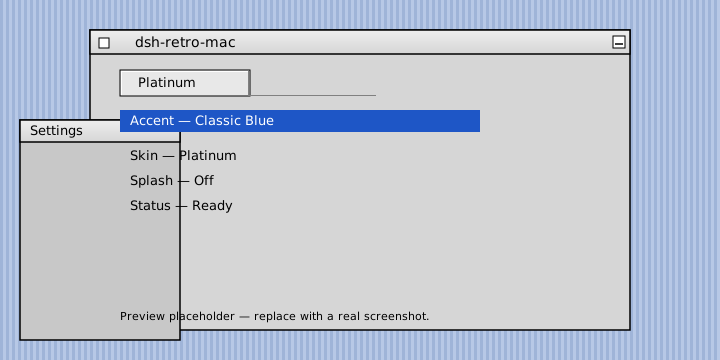
Retro Macintosh for [DeepSeek Harness](https://github.com/deepseek-ai/deepseek-harness)
Work like it's 1997. · 像 1997 年那样工作。
[](https://github.com/Leyan0365/dsh-retro-mac/stargazers)
[](https://github.com/Leyan0365/dsh-retro-mac/forks)
[](https://github.com/Leyan0365/dsh-retro-mac/issues)
[](https://github.com/Leyan0365/dsh-retro-mac/blob/main/LICENSE)
English | [中文](https://github.com/Leyan0365/dsh-retro-mac/blob/5c54a4d90e3202d38dfd0035d3b644c5677dbebc/README.zh.md)
A classic Mac OS 8/9 Platinum skin for the DeepSeek Harness Web GUI — a trip back to 1997: platinum greys, Chicago/Geneva/Monaco type, pinstripe wallpaper, beveled controls and hard shadows.
⭐ If you enjoy it, give the repo a star — it helps more people discover the plugin.
Why you'll love it
- Nostalgia, done right — a faithful System 7 → Mac OS 9 design language, not just a grey theme: platinum chrome, classic fonts, pinstripe desktop, beveled buttons, hard shadows.
- Completely self-contained — the Chicago web font is inlined as base64 and the pinstripe is pure CSS. The whole plugin is one 47KB file, zero external assets, zero downloads.
- Four themes in one —
Platinum(light) andGraphite(dark), each with Classic Blue or System Teal highlights, an homage to the Appearance Manager's customizable accent palette. - Immersive — all 103 design tokens the web shell consumes are remapped; no modern DeepSeek blue-grey leaks through.
- Respects your defaults — switching back to the built-in appearance restores it pixel-identical, no injected styles remain.
Features
- Two skins, four themes —
Platinum(light) /Graphite(dark) ×Classic Blue/System Teal. - Full token coverage — every one of the 103 design tokens is remapped; verified at build time.
- Chicago web font, zero external assets — the free ChicagoFLF clone is inlined as a base64
@font-face; Geneva and Monaco come from the OS with graceful fallbacks. - Pinstripe desktop — the iconic System 7 / Mac OS 8 wallpaper in pure CSS, no image downloads, no licensing issues.
- Beveled Platinum controls — buttons with the classic 2px inset highlight/shadow bevel, double-rule default buttons, sunken inputs, square scrollbars with black arrow glyphs, hard
2px 2px 0drop shadows, near-zero border radius. - Barber-pole progress — indeterminate progress indicators render as the classic striped marquee.
- Happy Mac easter egg — an optional startup splash (inlined SVG, off by default) with a toggle in the settings row.
- Your choice is remembered — skin, accent and splash persist per browser in
localStorage. - Zero intrusion on Default — switch back anytime; pixel-identical restore.
- Accessible — respects
prefers-reduced-motion; micro-interactions disabled on request.
Requirements
- DeepSeek Harness web profile (
dsh web/dsh --profile web) - Any modern browser (ES modules + CSS custom properties)
Installation
# from your harness checkout (the npm exec wrapper that boots `dsh`)
dsh plugin --profile web add dsh-retro-mac
Or add it by hand in the profile's package.json:
{
  "dependencies": {
    "dsh-retro-mac": "^0.1.0"
  }
}
Then restart the web profile and refresh the page. A Retro Mac settings row appears with:
- Skin:
System(built-in),Platinum,Graphite - Accent:
Classic Blue,System Teal - Splash: Happy Mac startup screen toggle
Development
# rebuild lib/client.js from src + themes (zero-dependency, plain Node)
npm run build

# syntax-check the generated bundles
npm run check
The build validates that every generated theme covers the full 103-key baseline and inlines the Chicago font, so a stale or partial theme fails loudly.
License
MIT © dsh-retro-mac contributors