MistyBridge/dsh-agent-bus ↗★ 2
dsh-agent-bus
Multi-agent orchestration for DeepSeek Harness: assign work, review results, and run DAG workflows between live sessions — without you as the messenger.
安装
npx -p @deepseek-ai/dsh dsh plugin --profile web add github:MistyBridge/dsh-agent-bus说明文档
阅读完整 README ↗dsh-agent-bus
English | 中文



Multi-agent orchestration for DeepSeek Harness
Turn a workspace of isolated agents into a working team. Assign work, review output, and run multi-step plans on the inbox you already have — without copy-pasting between them or babysitting the loop.
dsh-agent-bus is a DeepSeek Harness plugin. It gives live sessions in one workspace a durable task ledger, a review loop, and a DAG scheduler — so the agents do the coordination, not you.
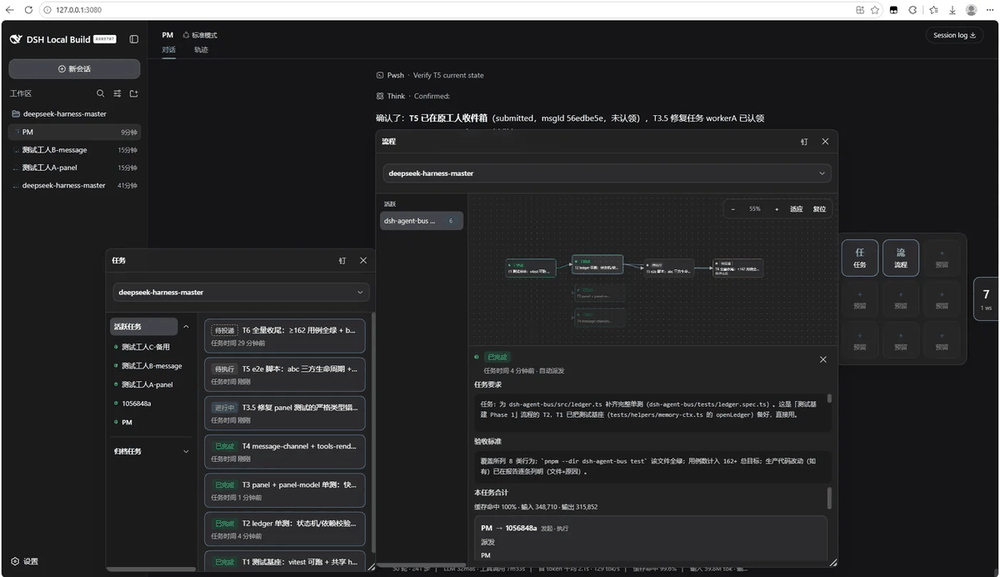
Task workbench: every job's state, its parties, and its token cost at a glance.
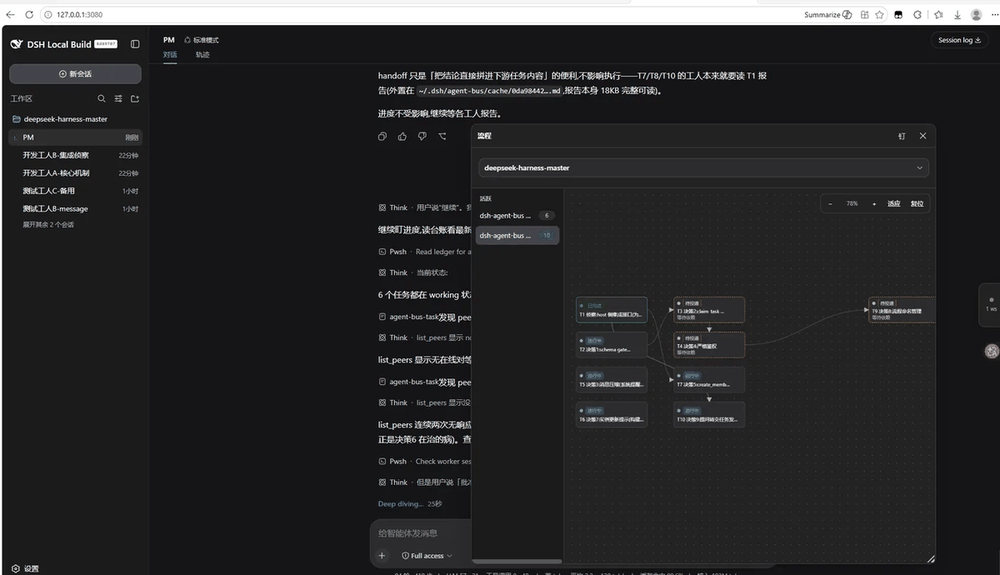
Flow (DAG) board: a flow's nodes, delivered only after their predecessors settle.
Why it matters
Harness already runs several agents in one workspace — but it does not let them collaborate. In practice that means you are the glue:
- A planner has no way to hand a coder the brief. You paste it.
- A coder has no way to wait for a review. You paste the patch and ping the reviewer.
- When step 3 fails, you reconstruct steps 1–2 from chat logs and re-orchestrate by hand.
agent-bus removes you from that loop. It makes the coordination durable, reviewable, and automatic — which is what makes it production-usable rather than a chat-based demo.
What it gives you
| Capability | What you stop doing |
|---|---|
| Real work items, not messages | create_task is a job with a body, an acceptance bar, and a reviewer. send_note stays a lightweight ping. Chat-as-task is what gets work stuck; task-as-chat is what loses review. |
| Plans that run by themselves | create_flow builds a named DAG: each task dispatches only after its predecessors settle. A terminal failure propagates down the chain — no orphaned workers. |
| A durable task log | Every job is a ledger row, not buried chat. get_task reads a task's whole life; long reports spill to disk, never to a path the model could leak. |
| Reviewers that actually review | The worker reports; the reviewer accepts or sends the same task back with feedback. The id never changes across rework. |
| Context that carries itself | After settle, the executor attaches a handoff (numbers, decisions, caveats) that rides into the downstream task. The next agent reads the chain, not the archaeology. |
| Memory that survives a crash | Ledger + inbox checkpoints survive a restart; the plugin re-wakes stranded workers with their full tool set automatically. No one pulls the team back online. |
| Real specialists, not children | Every bus peer is a normal dsh session with its own skills, MCP servers, permission preset, and model. create_member onboards a full team member in one call, rollback-safe. |
Where it pays off in production
agent-bus is built for teams that have outgrown "one agent and a lot of copy-paste":
- A long-running multi-step build — plan a release, split it into tasks the agents actually execute, and let the DAG dispatch each step only when its dependency is accepted. You watch the panel, not the transcript.
- A specialist pool with different capabilities — a coder with a repo MCP, a researcher with a web MCP, a reviewer with a tighter permission set. Each keeps its own config; the bus routes work between them.
- A reproducible review gate — every task has an acceptance bar and a reviewer. Nothing is "done" until a named reviewer settles it. This is the difference between a chat and a workflow.
- An audit trail you can query — every decision, verdict, and handoff is a ledger row or a stored report. "What was accepted yesterday?" is a
get_task, not a grep through chat logs. - A team that survives a restart — session compaction and process restarts do not lose the plan or strand a worker. The bus re-wakes everything.
How it works
Delivery is the harness inbox: one followup() per turn, idle sessions take the next item. This plugin does not add a second queue.
The plugin's job is the ledger — who asked, who does it, what "done" means, what depends on what — plus a panel that reads that ledger.
There is no receive-side tool. The worker sees an ordinary turn. They do the work and call report_task.
note     send_note              →  peer replies in prose (or not)
task     create_task            →  queued → submitted → working → completed → settle
flow     create_flow + tasks    →  DAG auto-dispatches each node after its predecessors settle
Pick the lightest channel that still matches the ask.
Agent Bus vs sub-agents
Sub-agents are the default answer in Harness today for a reason — and we are not arguing with that. The question is not "which is better" but "which fits the shape of the work."
What sub-agents are good at
spawn_subagent boots a disposable child that inherits the parent's permission envelope and session config, does one job, and returns a summary. That is exactly right when:
- You want to protect the caller's context — send an isolated explorer off to research, and keep the parent's window clean.
- The child is one-shot and throwaway — its memory does not need to survive the job.
- The task is a single, self-contained request with a fixed prompt, not a role that will take many jobs.
What agent-bus is good at
A bus peer is not a child. It is a normal DeepSeek Harness session — the same object you already customize — with its own skills, MCP servers, plugin group, permission preset, and model. That matters when:
- The worker is a named specialist you want to keep — a coder with a repo MCP, a researcher with a web MCP, a reviewer with a tighter tenant allowlist. Sub-agent inheritance gives all three the same envelope; per-session config gives each its own.
- The work is a multi-step plan with dependencies — B should not start until A is accepted. That ordering is a DAG, not a "spawn the next one when the summary lands."
- You need a review loop and an audit trail, not just a tree of summaries. A task's body, acceptance bar, reviewer, verdict, and handoff are all durable ledger rows you can query with
get_task. - The team has to survive a restart or a compaction — the ledger and inbox checkpoints outlive the parent's context.
The comparison
| Sub-agent | Agent Bus | |
|---|---|---|
| Unit of work | Child session spawned for one job, then gone | followup() into an existing peer session |
| What the worker is | A disposable child: type + capability mode + optional persona | A first-class session instance you configured in dsh |
| Skills / MCP / plugins | Inherited from the parent, usually narrowed for the spawn | Per session: its own skills, MCP servers, and plugin group |
| Permissions | The parent's envelope, narrowed | Per session (and, in a multi-tenant host, per permission group) |
| Topology | Star: the parent is the hub | Peers in one workspace + a durable ledger |
| Who reviews | The parent reads a summary | A first-class reviewer accepts or reworks the same task id |
| Ordering | The parent must orchestrate every next spawn | DAG: B is not delivered until A is settled |
| Failure | The parent has to notice | Terminal fail/cancel propagates down the chain |
| After restart | The play lives in the parent's context | Ledger + inbox checkpoints survive |
| Parallelism | Many children at once from one parent | Many peers at once; each peer still one inbox item per turn |
| Warm context | Each spawn pays a cold prefix | A specialist is long-lived; the next task is a warm turn |
The rule of thumb
Use a sub-agent to protect the caller's context for a one-shot — isolated explore, a single request, a throwaway child.
Use agent-bus when the callee is a named teammate — with their own skills, MCP, plugins, and permissions — who will take the next job after this one, and when the work has ordering, review, and an audit trail worth keeping.
They are complementary, not competing: spawn a sub-agent to keep the caller clean, and use the bus to run the team that spawns, reviews, and carries the work forward.
Quick start
dsh plugin --profile web add dsh-agent-bus
dsh web
From a local checkout:
dsh plugin --profile web add .
dsh --profile web --dump-config
dsh web
Requires Node.js ^22.19.0 or >=24.0.0 (same as the harness itself; CI runs on Node 24).
Tools
| You want to… | Use |
|---|---|
| Ask a peer something that is not a job | send_note |
| Give one peer one deliverable to review | create_task |
| Run a multi-step plan in order | create_flow, then create_task with flow_id / dependencies |
| Finish / accept / rework / stop / ask back / move the job | report_task · settle_task · cancel_task · request_input · reassign_task |
| Claim a re-delivered task yourself | claim_task |
| Answer a worker's structured question | answer_question |
| Pass context down the chain | submit_handoff |
| Fix an undispatched node, or look things up | edit_task · list_flows · list_tasks · get_task |
| Rename a flow so task groups stay manageable | rename_flow |
| See who is live, declare what you can do | list_peers · update_card |
| Onboard a new team member into a workspace | create_member |
Docs
docs/usage.md | Handbook (Chinese): tools, state machine, templates |
docs/v1.5-resilience-spec.md | Offline notes, reassign, offline grace |
docs/v1.4-event-driven-scheduling-spec.md | Event-driven dispatch, flows, handoffs |
docs/a2a-alignment.md | A2A task-state alignment |
License
MIT