MistyRain-field/dsh-hu-tao-skin ↗★ 0
dsh-hu-tao-skin
Genshin Impact Hu Tao (往生堂) skin for the DeepSeek Harness web GUI (dsh web): crimson/ink/gold palette, plum-blossom and spirit-butterfly ambience.
安装
npx -p @deepseek-ai/dsh dsh plugin --profile web add github:MistyRain-field/dsh-hu-tao-skin说明文档
阅读完整 README ↗原神 · 胡桃 界面美化 · dsh-hu-tao-skin


给 DeepSeek Harness 的 Web GUI(dsh web)换上一套「往生堂」气质的皮肤:墨黑 / 绯红 / 琥珀金配色,梅花与蝶影的氛围层,一枚五瓣梅花徽记,以及一个会跟着侧栏走的浮动开关。
A Hu Tao (往生堂) themed skin for the DeepSeek Harness web GUI — ink-black / crimson / amber palette, falling plum petals, spirit butterflies, a plum-blossom brand mark, and a floating toggle pinned to the conversation column.
原神 / Genshin Impact 的同人美化,非官方,与米哈游及 DeepSeek 均无关联。
效果
皮肤开启 —— 墨黑 / 绯红配色,飘落的梅花瓣,流光蝴蝶,右侧「往生堂」金印,右下角梅花水印,首屏梅花徽记,左下角是浮动开关。
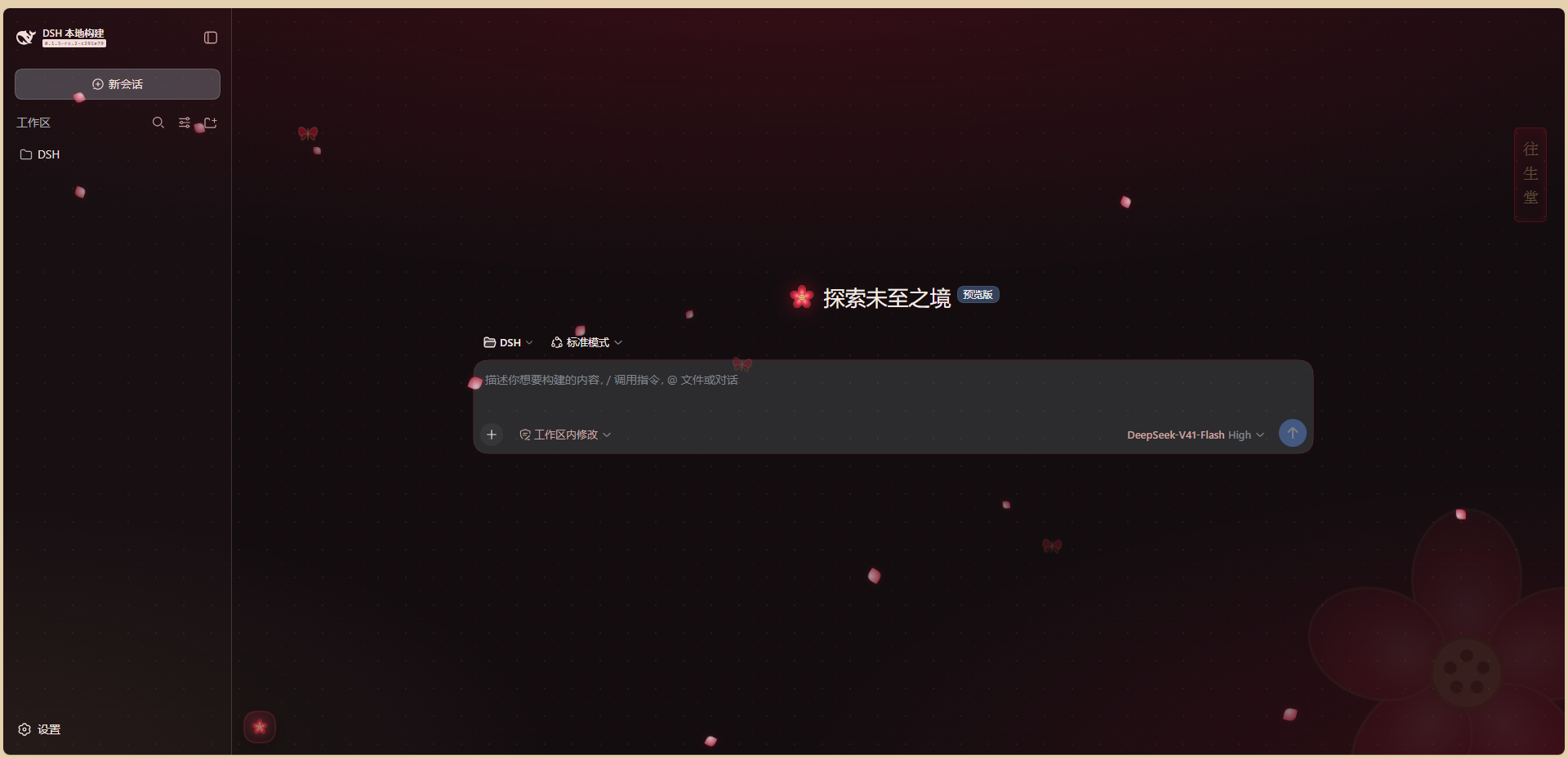
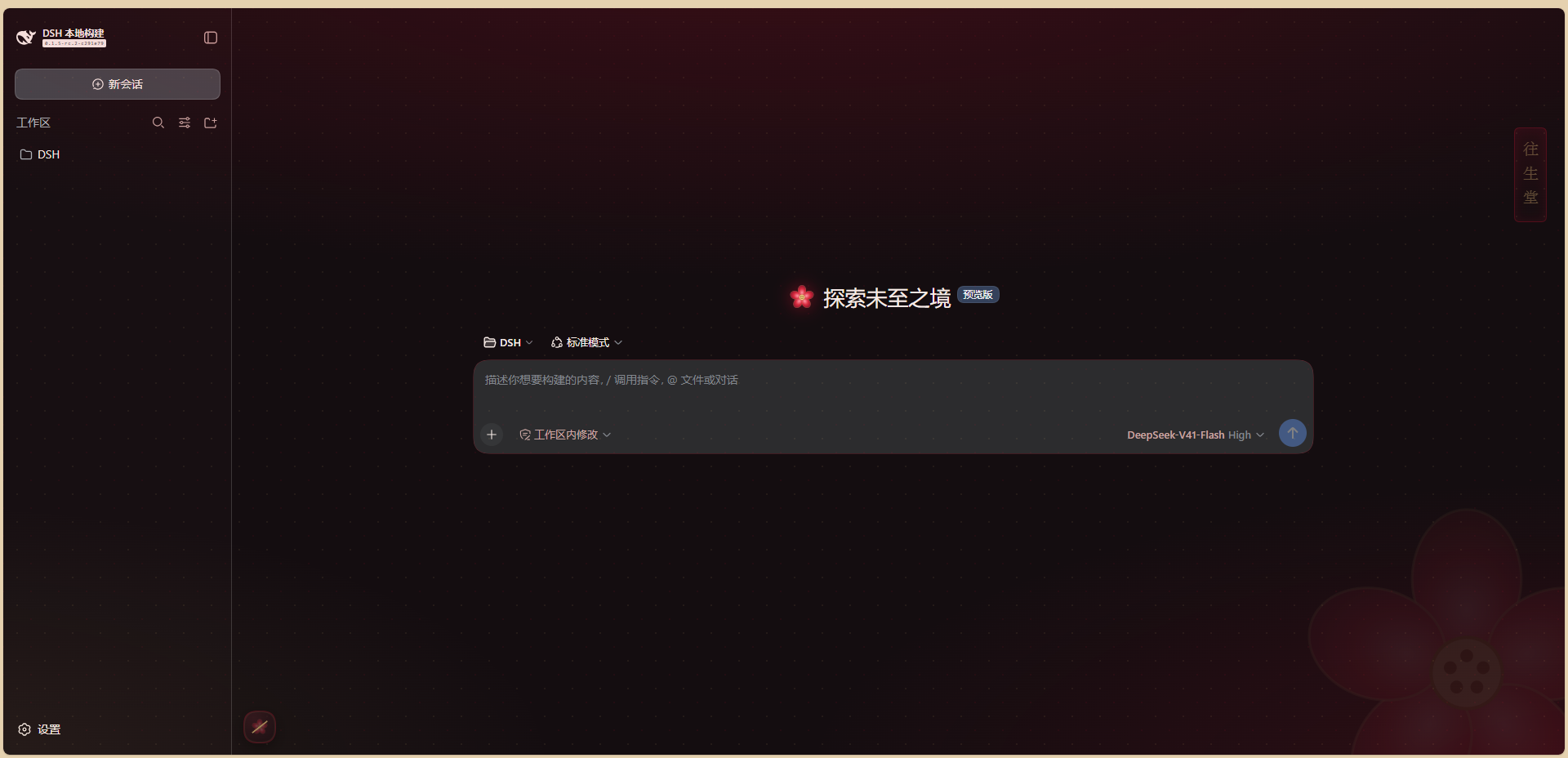
按下浮动开关 —— 花瓣与蝶影同时关闭,其余不变。
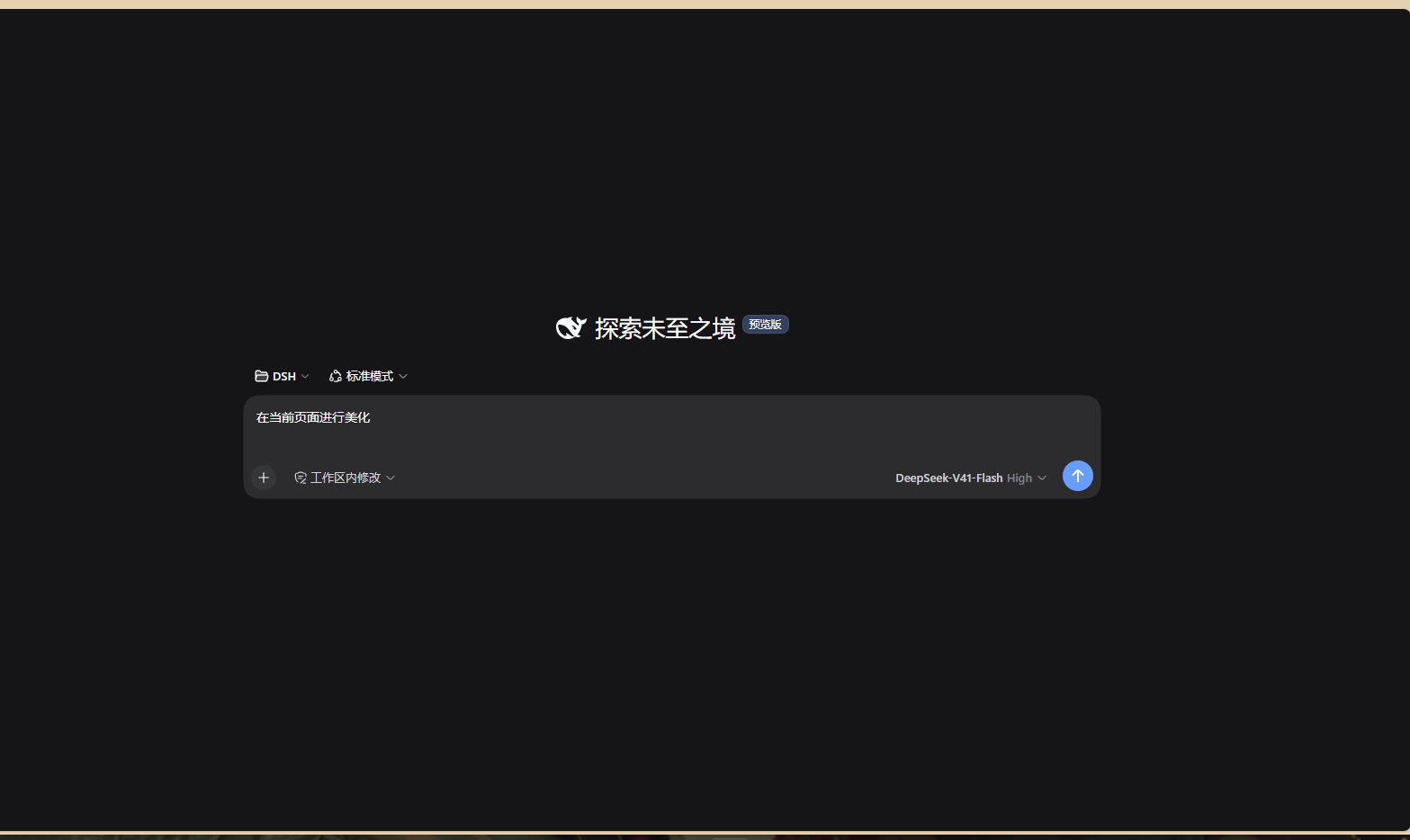
安装前的默认界面(对照)
特性
主题令牌(13 个,明暗两套,跟随系统主题)
底色墨黑、主色绯红 #d92b3f、警示琥珀金 #e8c47a,侧栏、边框、文字层次同步。通过 theme.overrideTokens() 叠加,不修改主题注册表、不动你的主题偏好。
氛围层(shell.overlay,点击穿透)
金点梅纹底 + 绯红晕染、右下角巨大梅花水印、右侧竖排「往生堂」金印、14 片飘落梅花瓣、3 只流光蝴蝶。系统开启「减少动态效果」时动画自动停用。
浮动开关(对话区左下角) 一键开关花瓣 + 蝶影。位置由框架网格第一列(侧栏)的实际宽度算出,所以侧栏拖宽、收起成 56px 窄栏、再展开时,它会跟着一起移动,并沿用外壳的过渡时长与缓动。关闭时梅花上出现一道金斜杠。
设置页(设置 → 「往生堂」) 三个独立开关:梅花飘落 / 蝶影流光 / 胡桃配色。
首屏徽记 空白会话的品牌图标换成带红光的五瓣梅花徽记。
状态持久化
所有开关存在 localStorage,重启后保留。
安装
插件是一个标准的 DSH profile bundle:package.json 里同时声明 dsh.bundle.patch(组合树行插入)与 dsh.client(浏览器半边),所以 dsh 的模块扫描器会自动把 lib/client.js 收进 window.__DSH_BOOT__。没有构建步骤 —— 浏览器半边是手写的 window.__ModuleLoader__.load(...) 格式。
从 dsh-market 一键安装
装了插件市场之后,打开 设置 → 插件市场 → 主题 标签页,找到它一键安装:
dsh plugin --profile web add dshmarket
收录材料已备好(
tools/market/,含tools/submit-to-market.ps1)。精选列表awesome-dsh-plugin的 CI 要求仓库创建满 1 天,所以 PR 会在满 24 小时后提交。
方式 A:装进 profile(推荐)
git clone https://github.com/MistyRain-field/dsh-hu-tao-skin.git
cd dsh-hu-tao-skin
pwsh -File tools/deploy.ps1
脚本会把运行时文件装到 %DSH_HOME%\profiles\web\local-plugins\dsh-hu-tao-skin,备份并改写该 profile 的 package.json(加依赖 + 追加 dsh.profile.bundles),最后建立 node_modules 链接并自检。整个脚本幂等,可反复运行。
目标 profile 可用参数覆盖:
pwsh -File tools/deploy.ps1 -ProfileName web
pwsh -File tools/deploy.ps1 -ProfileDir 'D:\some\profile'
也可以交给 dsh 自己管:
dsh plugin --profile web add
装完需要重启一次 dsh web —— 浏览器插件名册在启动时扫描,重启后自动加载,不需要额外授权。
方式 B:手动放置
- 把
package.json、cordis.patch.yml、lib/复制到\local-plugins\dsh-hu-tao-skin\ - 在该 profile 的
package.json里加依赖"dsh-hu-tao-skin": "link:./local-plugins/dsh-hu-tao-skin" - 把
"dsh-hu-tao-skin"追加进dsh.profile.bundles - 让
\node_modules\dsh-hu-tao-skin指向第 1 步的目录(junction / symlink 均可) - 重启
dsh web
验证安装
node tools/verify.mjs          # 行包能否解析、三个声明是否齐备、bundles 是否登记
node tools/structure-check.mjs # 按 DSH 模块扫描器的真实读取方式校验
node tools/logic-check.mjs     # 桩件跑 apply()、渲染全部组件、点一遍开关
三个脚本都只读,且默认从 %DSH_HOME%\profiles\web 找 profile(可用 DSH_PROFILE_DIR 覆盖)。
卸载
# 1. 删掉插件目录与链接
Remove-Item "$env:DSH_HOME\profiles\web\local-plugins\dsh-hu-tao-skin" -Recurse -Force
Remove-Item "$env:DSH_HOME\profiles\web\node_modules\dsh-hu-tao-skin" -Recurse -Force
# 2. 用备份还原 profile 清单(deploy.ps1 会留下 package.json.bak-*)
# 3. 重启 dsh web
皮肤的全部改动都在插件生命周期内:主题层会被卸载,槽位注册会被撤销,首屏原本的 DSH 徽记自动回来。
挂载点
| 槽位 | 内容 |
|---|---|
shell.overlay (hutao-skin-style, 900) | 本包样式表:滚动条、选中色、氛围层动画 |
shell.overlay (hutao-petals, 1100) | 对话区左下角浮动开关 |
shell.overlay (hutao-skin-ambient, 1200) | 梅纹底、晕染、花瓣、蝴蝶、金印、水印 |
settings.section (hu-tao-skin) | 设置页「往生堂」 |
conversation.hero.brand.mark | 首屏梅花徽记 |
定位原理:shell.overlay 的图层本身就在外壳的 grid 内部(data-shell-overlay),所以浮动开关从自己 DOM 祖先的 parentElement 读出侧栏那一列的宽度 —— 不使用任何产品 class 或 DOM 选择器。读的是内联目标值而非 computed 值(后者在过渡途中是中间值),因此收起 / 展开时能与侧栏同步滑动。
结构
package.json        双半边声明:dsh.bundle.patch + dsh.client.platform
cordis.patch.yml    组合树行插入(id 与包名一致)
lib/index.js        宿主半边:无操作的合法 Cordis 插件,只为让该行可挂载
lib/client.js       浏览器半边:皮肤本体,手写模块格式,零构建
tools/              安装、校验与排障脚本
docs/               截图
自动化校验
.github/workflows/validate.yml 在每次 push 与 PR 上运行(Node 20 与 22):
| 步骤 | 做什么 |
|---|---|
| 语法 | git ls-files '*.js' '*.mjs' 逐个 node --check |
| 契约与卫生 | tools/ci-check.mjs —— dsh.bundle / dsh.client / 行 id 与包名一致、无 BOM、无凭据字面量、无个人绝对路径、screenshots.json 与市场条目形状 |
| 行为 | tools/logic-check.mjs —— 桩件跑 apply()、渲染全部挂载点、点开关、断言侧栏跟随的测量与退出码 |
| 安装 | tools/deploy.ps1 → tools/verify.mjs → tools/structure-check.mjs —— 装进临时 profile、行包可从 profile 解析、两种 YAML 方言都能解析补丁、宿主半边可 ESM 导入 |
| 幂等 | 再跑一次 tools/deploy.ps1(它是文档里的安装路径,必须可重复执行) |
本地同样可以跑:
node tools/ci-check.mjs
node tools/logic-check.mjs
两个 Windows 陷阱(踩过,已规避)
1. UTF-8 BOM 会让 DSH 启动失败。
本机 Windows PowerShell 的 Set-Content -Encoding utf8 会写入 BOM,而 DSH 的模块扫描器用 JSON.parse(readFileSync(pkgPath, "utf8")) 读行包 manifest —— BOM 会让它直接抛错,GUI 起不来。本仓库写入 manifest 一律走 [System.IO.File]::WriteAllText($p, $t, (New-Object System.Text.UTF8Encoding($false)))。tools/fix-bom.ps1 用于事后清理。
2. 无 BOM 的 .ps1 会被按 ANSI 解码。
Windows PowerShell 5.1 的 Get-Content 对无 BOM 文件默认使用 ANSI 代码页,中文路径会被读坏(一个 UTF-8 的中文目录名会被解成一串乱码)。因此 tools/*.ps1 保留 BOM,读取时一律加 -Encoding UTF8。
English
A Hu Tao (往生堂) themed skin for the DeepSeek Harness web GUI.
Screenshots: docs/skin-on.png · docs/skin-off.png.
Features — a 13-token ink-black/crimson/amber palette (light + dark, stacked over the active theme without touching the registry); an ambient layer of plum petals, spirit butterflies, a plum-blossom watermark and a vertical 往生堂 seal; a floating petal-and-butterfly toggle pinned to the bottom-left of the conversation column that tracks the sidebar as it is dragged or collapsed; a 「往生堂」 page in Settings with three independent toggles; and a plum-blossom brand mark on the blank-session hero. All preferences persist in localStorage.
Install
git clone https://github.com/MistyRain-field/dsh-hu-tao-skin.git
cd dsh-hu-tao-skin
pwsh -File tools/deploy.ps1     # -ProfileName  / -ProfileDir  to override
The script installs the runtime files into \local-plugins\dsh-hu-tao-skin, patches the profile manifest (dependency + dsh.profile.bundles), links it into node_modules and self-checks. Then restart dsh web: the browser roster is scanned at startup, after which the skin loads with no further approval.
There is no build step — the browser half is a hand-written window.__ModuleLoader__.load(...) bundle served straight from lib/client.js.
Uninstall — delete the plugin directory and the node_modules link, restore the profile manifest from the package.json.bak-* backup, restart dsh web. Every effect is lifecycle-scoped, so the stock UI returns on its own.
Fan work. Not affiliated with HoYoverse or DeepSeek.
许可 / License
MIT —— 见 LICENSE。