Nth-5620/dsh-crystal-viewer ↗★ 0
dsh-crystal-viewer
A crystal-structure visualization window for DeepSeek Harness (DSH): a 3D structure + Q-peak viewer and parameter panel, opened as a dsh-better-sidebar tab.
安装
npx -p @deepseek-ai/dsh dsh plugin --profile web add github:Nth-5620/dsh-crystal-viewer说明文档
阅读完整 README ↗dsh-crystal-viewer
A crystal-structure visualization window for DeepSeek Harness (DSH).
dsh-crystal-viewer is a standalone DSH plugin that gives a human user a window for inspecting crystal and molecular structures directly inside DeepSeek Harness. It combines an interactive 3D structure (rendered with a modified build of 3Dmol.js), a Q-peak (electron-density peak) layer, and a live parameter panel showing unit cell, symmetry, elements, atom statistics, Q-peak statistics and refinement R factors.
It opens as a sidebar / bottom-dock tab — exactly like DSH's built-in Terminal / Browser tabs — via the dsh-better-sidebar tab-registration API. It also registers a file previewer so that clicking a .res / .ins / .cif / .xyz / .mol / .pdb file in the Files tree renders it in 3D instead of a plain code viewer.
What this plugin is: a human-facing viewer. It self-parses structure files (unit cell, symmetry operators, atoms, Q peaks, bonds) to draw the structure and fill the panel. It is not a crystallographic computation engine — solving / refinement decisions and deep geometry analysis are out of scope for this plugin.
Table of contents
- Why a viewer at all
- Feature tour
- Screenshots
- Supported file formats
- Getting started
- Open-source attribution & gratitude
- Compatibility
- Repository layout
- License
Why a viewer at all
A human still needs to see the structure. This plugin is the window that a person looks at to make the calls that actually drive a structure-solution / refinement workflow:
- Is the unit cell correct, and did I pick the right space group (or is it still P1)?
- Have R1 / wR2 / GooF converged, or do I need another refinement cycle?
- Are there large Q peaks left that I should assign as atoms, or is the electron-density map "clean"?
- Is the coordination geometry an octahedron, a square plane, or a tetrahedron?
All of these are "look at it" judgements — exactly what this viewer is for. It renders the structure and fills the panel so those calls can be made at a glance.
Feature tour
A condensed, feature-oriented summary — every item below is described further in the Screenshots section with a matching image.
3D rendering
- Interactive 3D structure viewer (WebGL, no WASM dependency).
- Atom display styles:
None·Line·Stick·Ball and stick·CPK(space-filling) ·Polyhedron(coordination polyhedra). - Coloring:
Custom(one uniform color) ·Color by Element(Jmol scheme) ·Color by Group(periodic-table main group / transition-metal gold). - Bond order toggle (show double / triple bonds when the file carries them, e.g. SDF / MOL2) · Label atoms toggle.
- Fine numeric controls with both type-to-edit and ▲/▼ steppers: line width, stick radius, ball radius, CPK scale.
- Lattice / unit-cell box rendering:
None·Dashed line·Line·Stick, with per-axis range (0..2 = 2×2×2 supercell), line width / stick radius, axis coloring (a·b·c axes) or a custom color, and axis labels (a / b / c). - View controls: Perspective (center) ⇄ Parallel (orthographic) projection, Background (
Follow theme/White/Dark gray/Custom:), and an Outline edge effect. - Correct mouse-wheel zoom direction (relative zoom, no jump-back) and an un-clamped fit distance so Perspective and Parallel render at the same apparent size.
Crystallography
- Complete periodic symmetry expansion — the plugin closes the
SYMMgenerator set (group multiplication) and applies theLATTlattice translation (body-centered I / face-centered F / base-centered A, B, C), so high-symmetry space groups (e.g. MOFFm-3m,Im-3) render a full 1×1×1 unit cell instead of a sparse one. The tool can derive the full general-position set from just the generators + LATT (e.g. 11SYMMrows +LATT -2→ 24 general positions). - Lattice "Style" (packing) modes — how symmetry operations are applied to the displayed atoms (display-only; the file is never modified):
- In Cell (default) — apply symmetry to fill a complete 1×1×1 unit cell (edge atoms retained).
- Original — apply symmetry but keep the raw coordinates, which may fall outside the cell.
- No Packing — show the file's atoms as-is, with no symmetry operations. This is the key view for inspecting the true asymmetric unit during structure solution.
- Q-peak (electron-density peak) layer — rendered as an independent, un-bonded model (yellow point layer), toggleable. Directly shows unassigned-density candidates during structure solution.
- Unit-cell box + supercell / grow — unit-cell box style, supercell (2×2×2) via the
Growtoggle or the Lattice range, and axis labels.
Parameter panel
A live 7-group panel populated from the parsed file:
- Source — file format + name, structure title, collection temperature.
- Refinement (highlighted) —
R1·wR2·GooF,d_maxresolution, observed / total reflections, completeness, highest difference peak / deepest hole (Δρ). - Cell — a / b / c, α / β / γ, volume V, wavelength λ, Z. (Periodic structures only.)
- Symmetry — space-group hint, LATT, symmetry-operator count. (Periodic structures only.)
- Elements (SFAC) — element list +
UNIT:formula counts. - Atoms — total atom count, per-element counts.
- Q peaks — collapsible group listing the number of unassigned peaks and the top 5 by height (label, height in e/ų, fractional coordinates) with a
maxsummary. Hidden entirely when there are no Q peaks.
The panel is built to answer "is it converging / should I continue?" at a glance.
Polished UX
- DSH-native theming — all colors come from DSH
--dsw-*design tokens, so the panel, the Display Style dialog and the canvas background automatically follow the harness light / dark theme (see the theme screenshot below). AMutationObserveronbody[data-ds-dark-theme]re-renders the "Follow theme" background live when you flip the theme. - Smart UI adaptation — the Display Style dialog shows a Lattice tab only for periodic structures; non-periodic (
.xyz/.mol/.pdb) structures get only Atom + View tabs, and the panel omits Cell / Symmetry. - Performance gate — the tab pauses its subscription / polling when the panel is collapsed or inactive.
Screenshots
All screenshots below were taken from the real plugin running inside a DeepSeek Harness session — the crystal-viewer tab/window in the DSH UI, exactly as a user would see it. Demonstrations use the public HKUST-1 (Cu-BTC) MOF and the caffeine molecule as examples.
Main view — periodic structure + full parameter panel
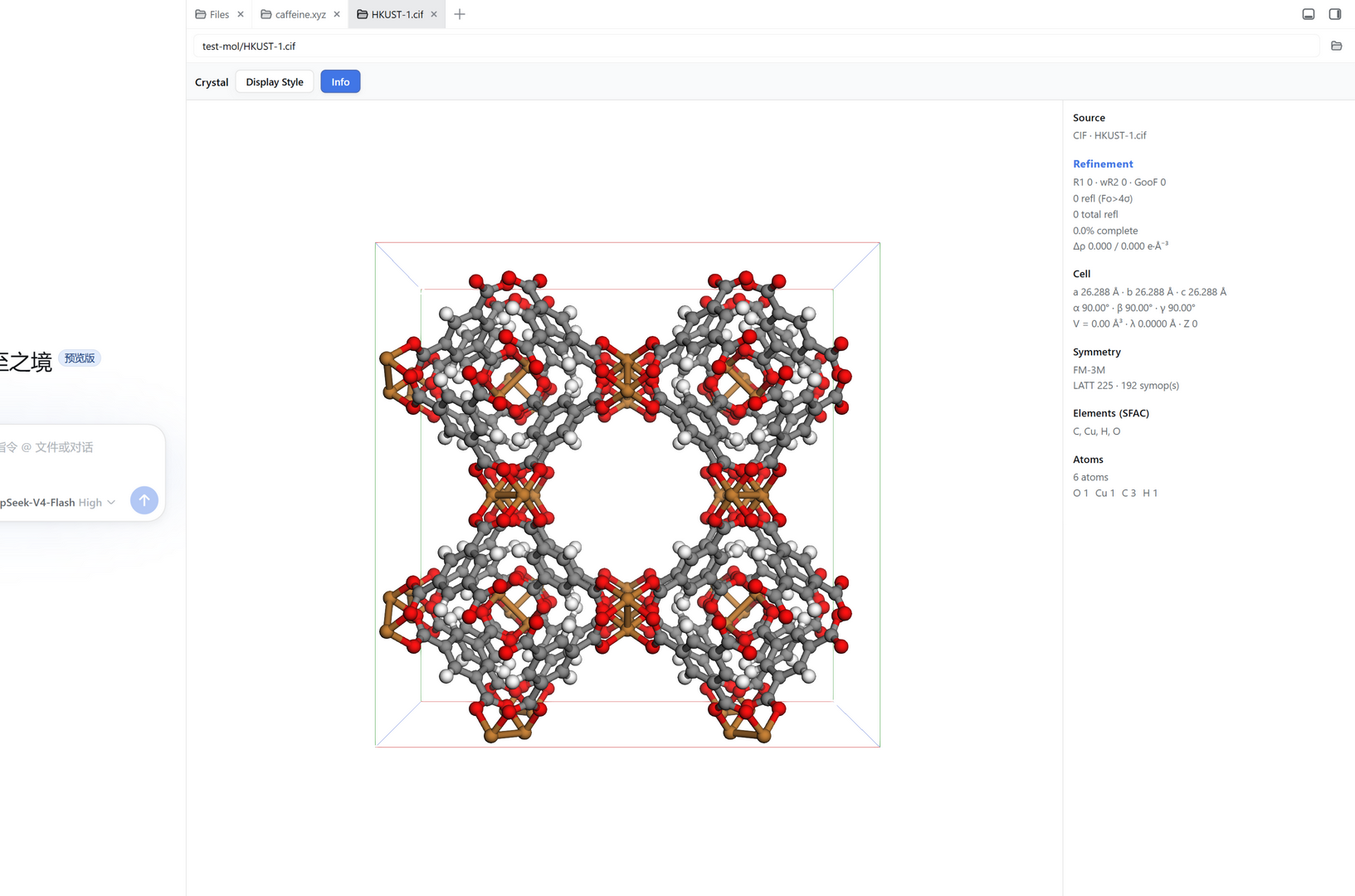
The crystal-viewer window shows an interactive 3D structure in the centre and the live parameter panel on the right. This is HKUST-1 / Cu-BTC (F m -3 m, a ≈ 26.29 Å). The plugin used the CIF's symmetry operations to render a complete unit cell — note how all the Cu paddle-wheel clusters and organic linkers fill the cell rather than a single asymmetric unit. The unit-cell box and axis labels are drawn.
Display Style dialog — Atom tab
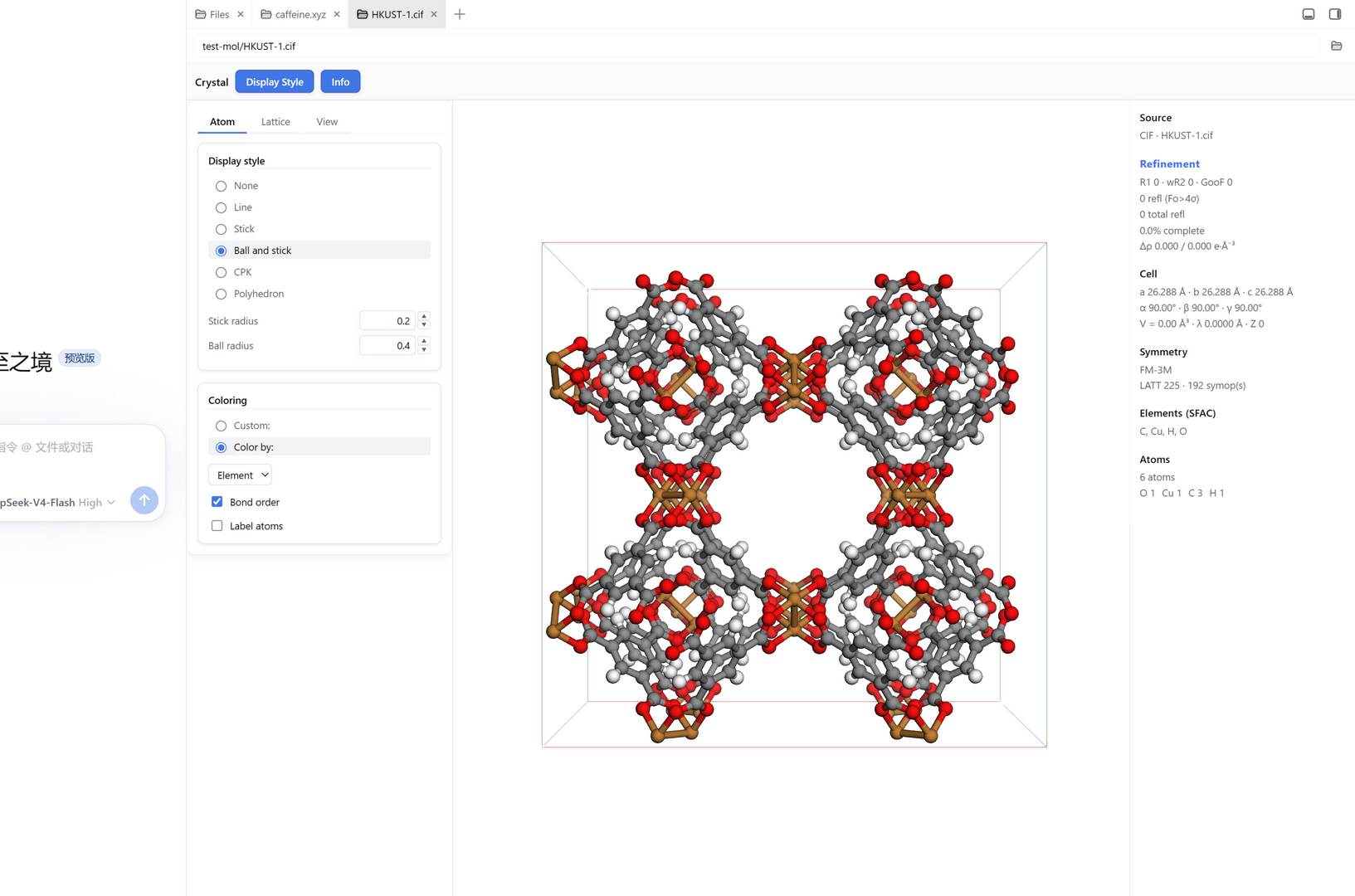
Clicking Display Style slides in a dialog on the left (so it never covers the parameter panel on the right). The Atom tab controls how atoms and bonds are drawn:
- Display style: None / Line / Stick / Ball and stick / CPK / Polyhedron.
- Coloring: Custom (one color) or Color by (Element = Jmol scheme, or Group = periodic-table group).
- Bond order (show double / triple bonds) and Label atoms toggles.
- Context-aware numeric fields (Line width, Stick radius, Ball radius, CPK scale) with type-to-edit and ▲/▼ steppers.
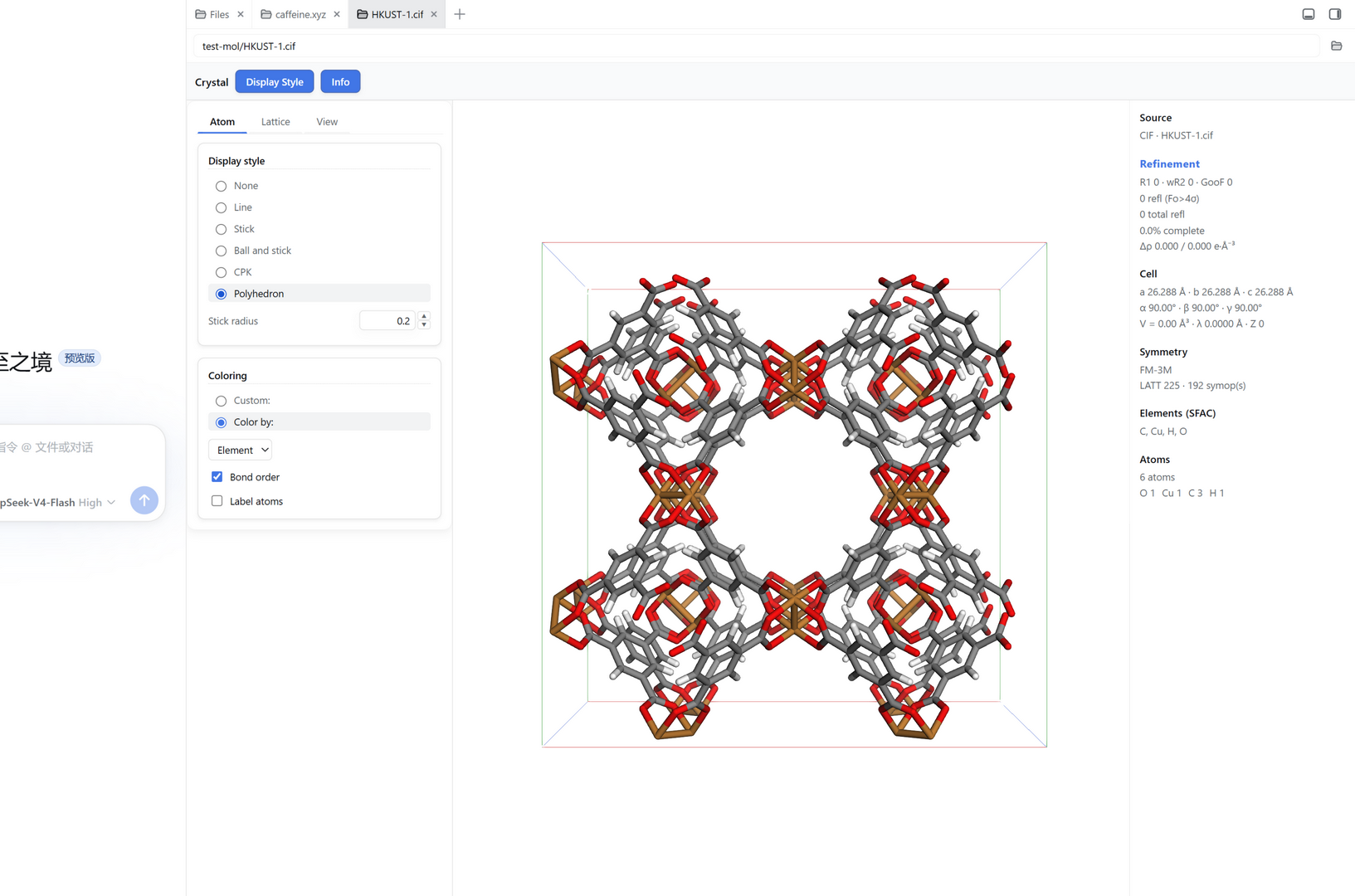
Switching to Polyhedron replaces the display with the coordination polyhedra — the Cu centres here are shown with their semi-transparent octahedral coordination shells. This is the "show me the coordination geometry" view that makes the "octahedron? square plane? tetrahedron?" call immediately.
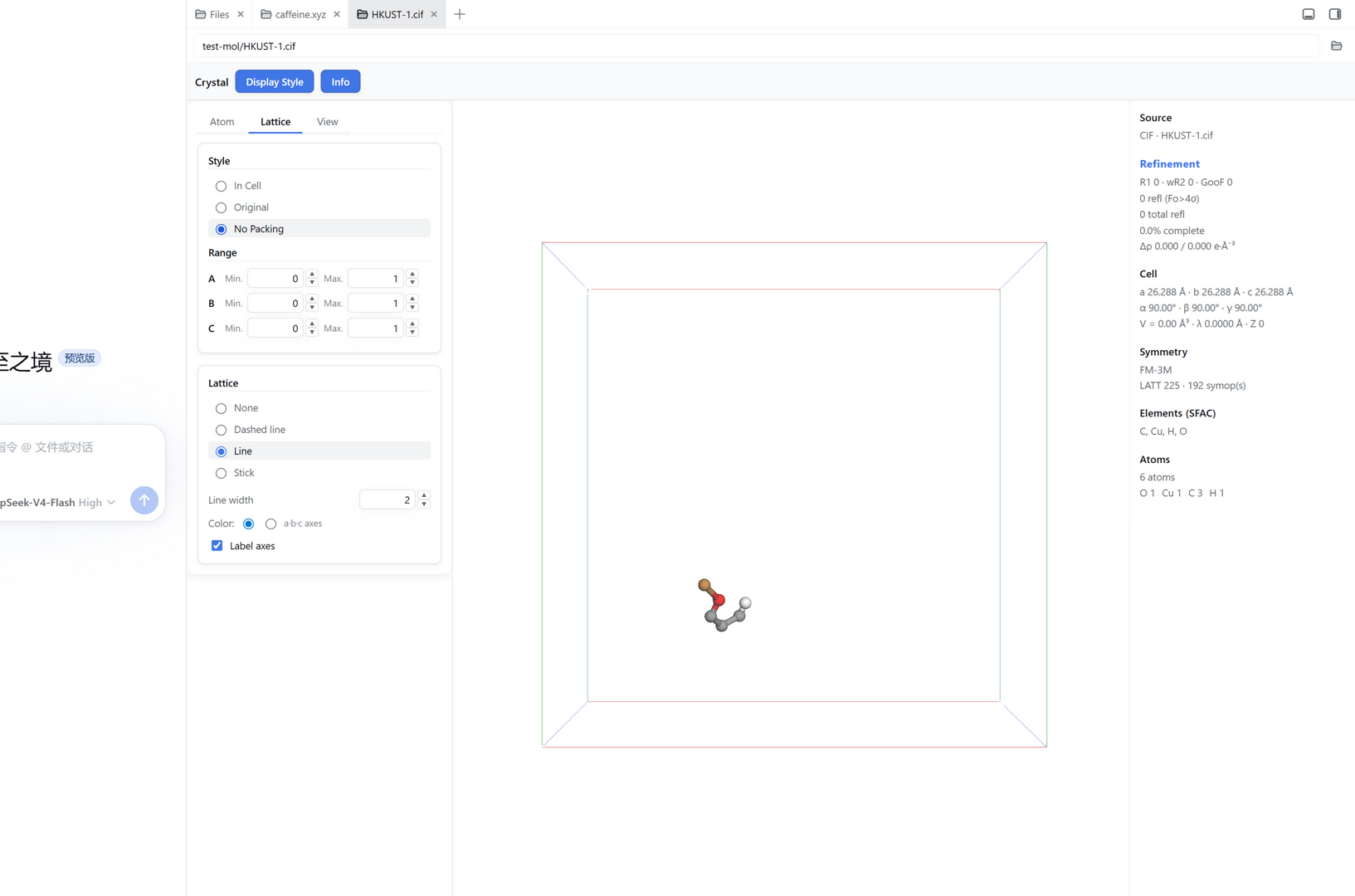
Display Style dialog — Lattice tab & the unit-cell "Style" (packing)
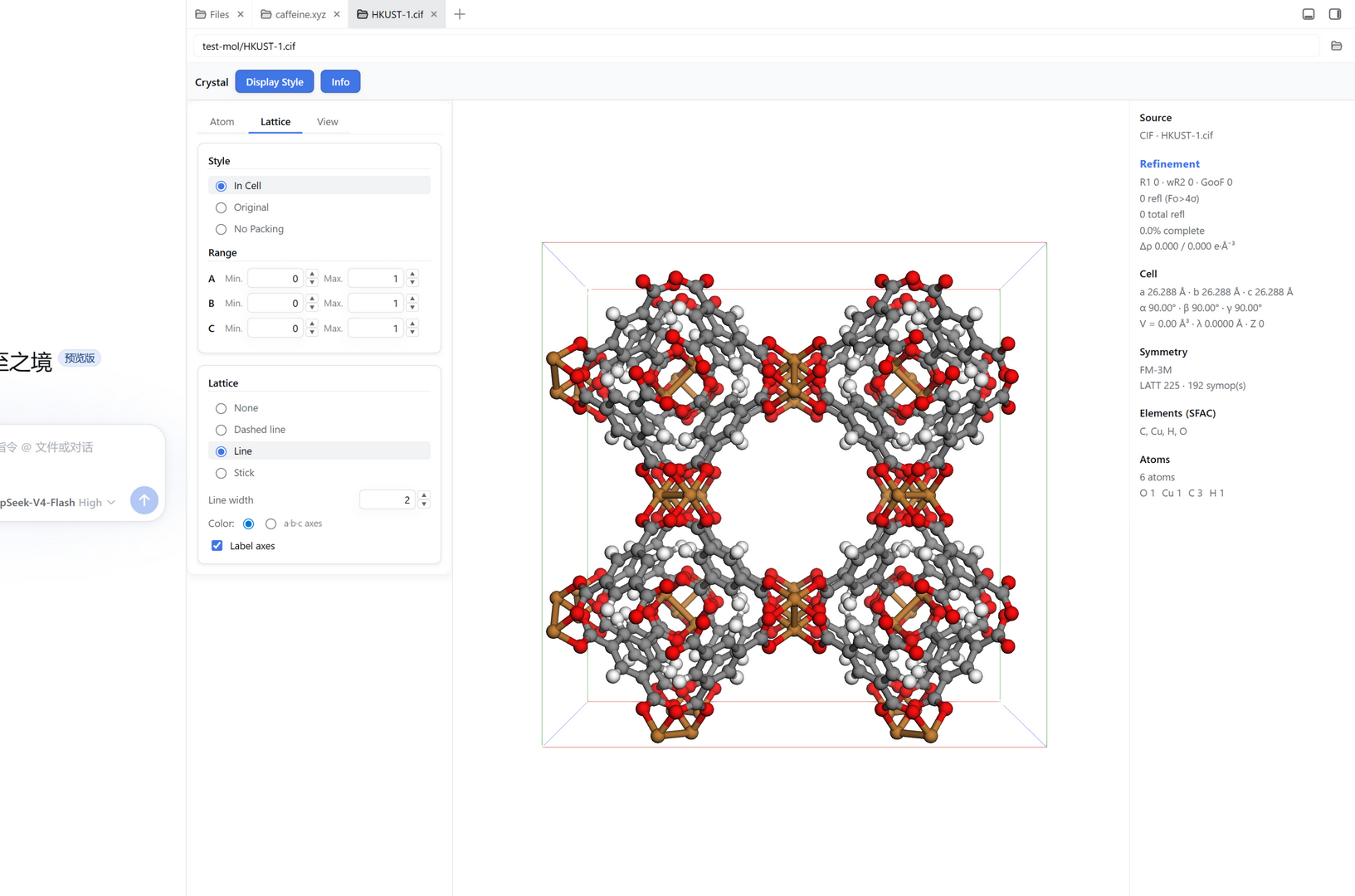
The Lattice tab exposes two material ideas at once:
- Style — the unit-cell packing mode, i.e. how symmetry operations are applied to the displayed atoms (display-only, never modifies the file):
- In Cell — fill a complete 1×1×1 unit cell (default; the full-symmetry view above).
- Original — apply symmetry but keep raw coordinates (may fall outside the cell).
- No Packing — show the file's atoms as-is with no symmetry operations (the true asymmetric unit).
- Range — cells to display per direction (0..2 → 2×2×2 supercell).
- Lattice — unit-cell box style (None / Dashed line / Line / Stick), line width / stick radius, axis coloring (a·b·c) or a custom color, and axis labels.
The No Packing mode is a key structure-solution helper. Here the same HKUST-1 CIF shows only the single asymmetric unit (a Cu paddle-wheel fragment) in a nearly-empty cell — versus the full symmetry-packed cell above. This is what you inspect when you need to see an atom's true fractional coordinates and connectivity without the clutter of symmetry mates.
Display Style dialog — View tab (projection & background)
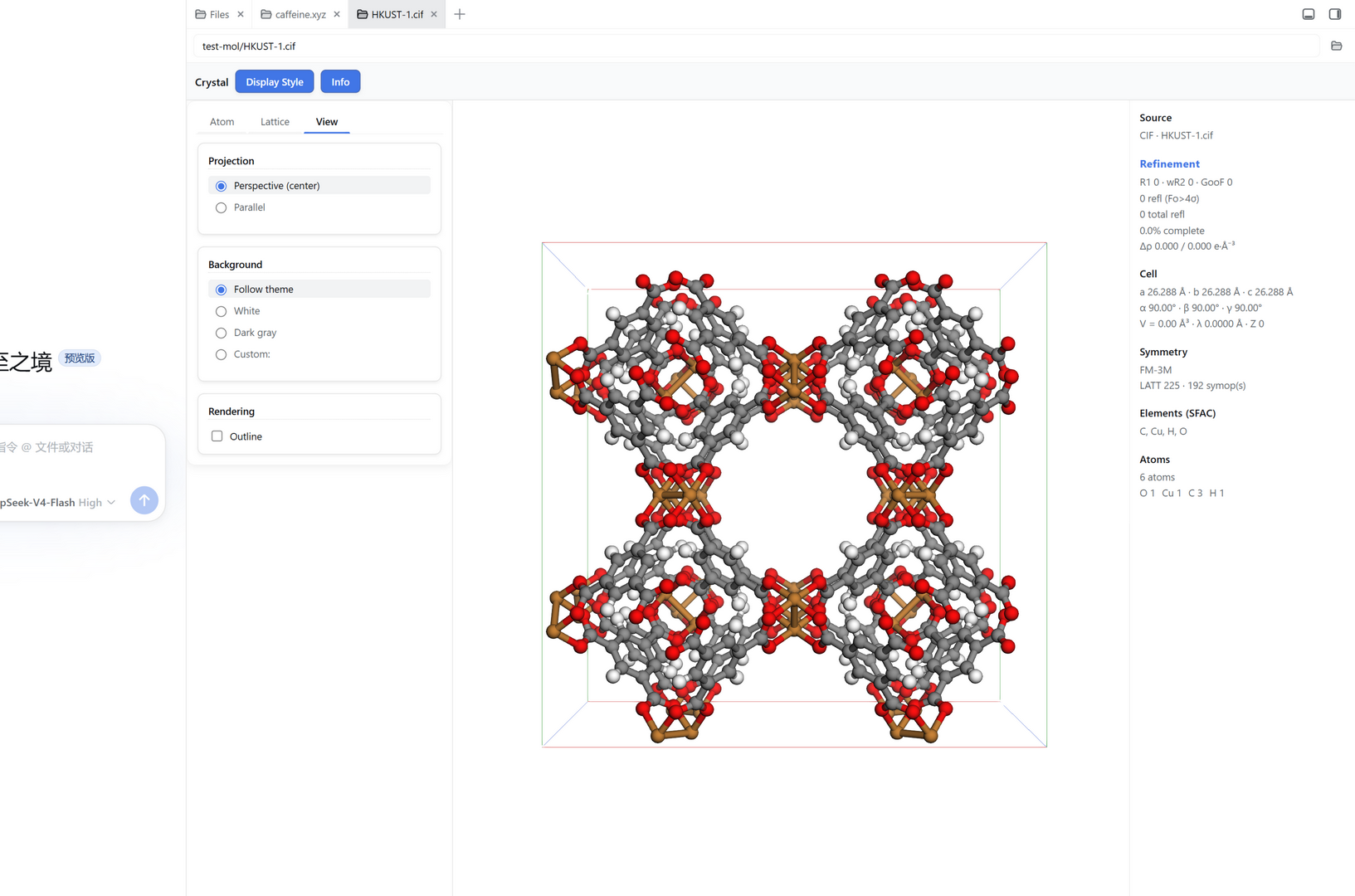
The View tab controls the projection and the canvas background:
- Projection: Perspective (center) ⇄ Parallel (orthographic view).
- Background: Follow theme (adapts to the harness light / dark mode), White, Dark gray, or Custom.
- Rendering: an Outline edge effect.
Light ⇄ dark theme linkage
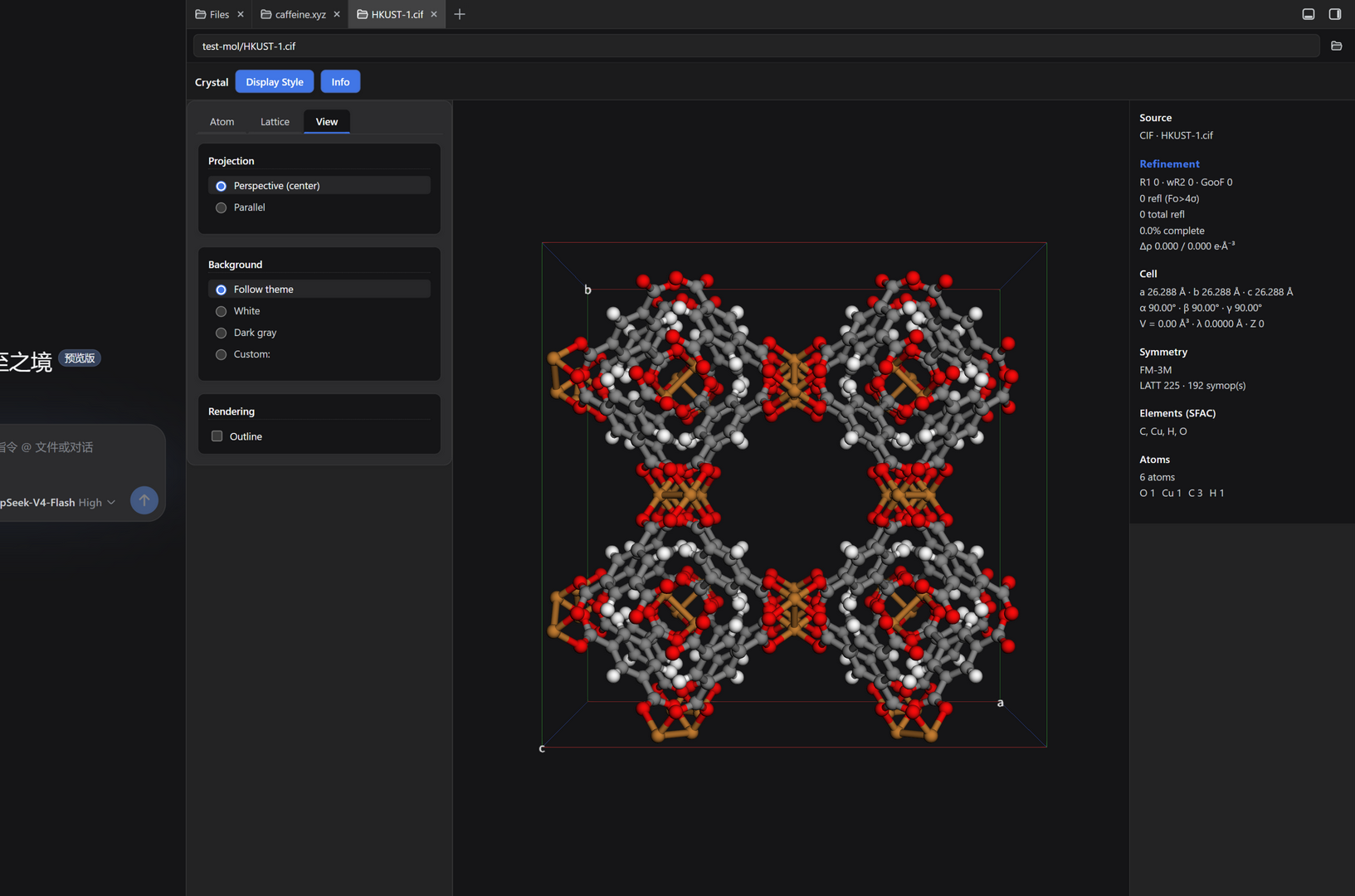
The whole plugin — the parameter panel, the Display Style dialog and the 3D canvas background — consumes DSH --dsw-* design tokens and follows the harness theme. Here the same HKUST-1 structure is shown with the harness switched to dark and the background set to Follow theme: the canvas backdrop becomes a dark gray instead of white, and every panel re-themes in lockstep. A MutationObserver on the theme attribute re-renders the background live, so toggling the theme updates the view instantly.
Periodic vs. non-periodic structures
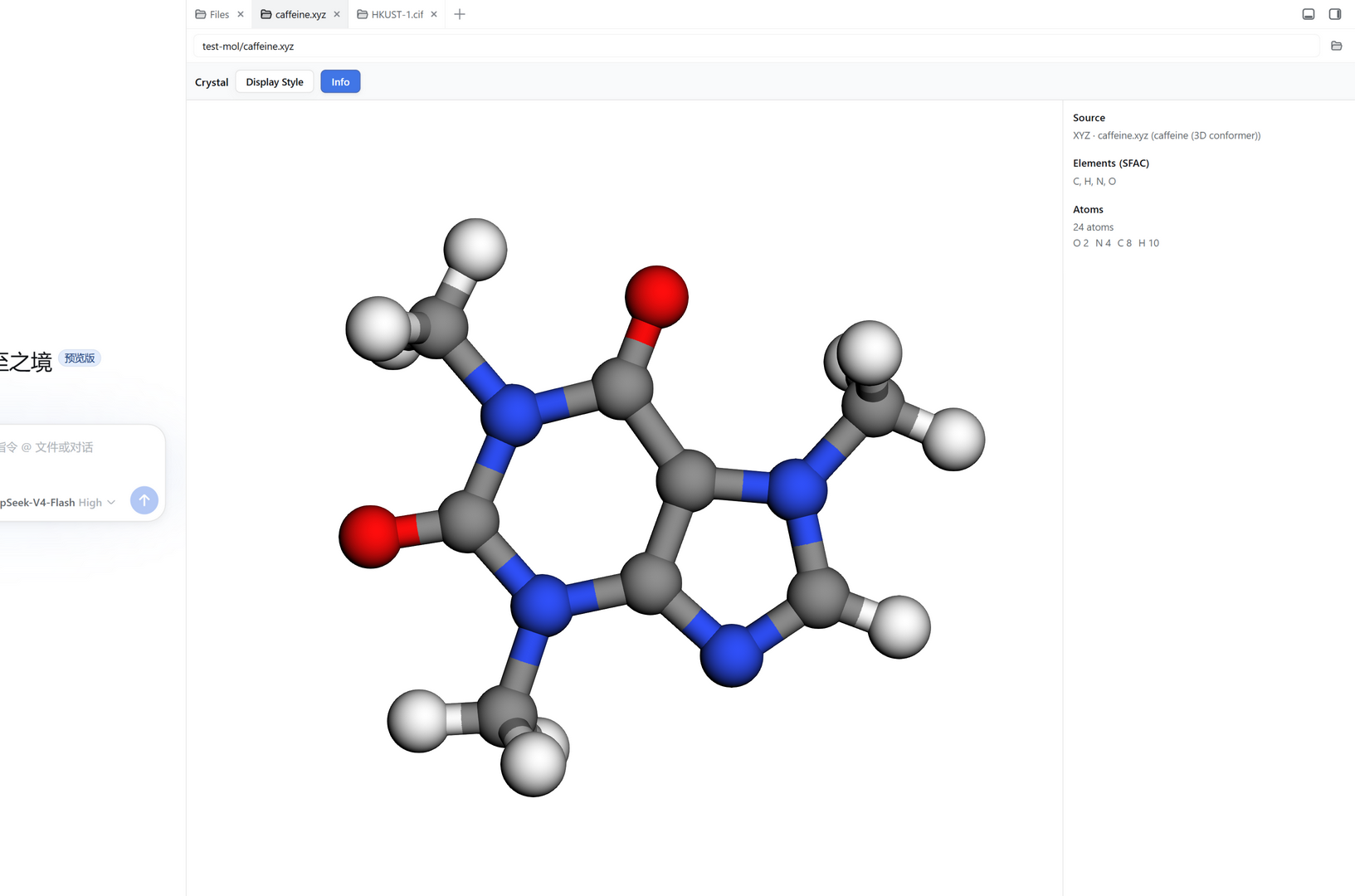
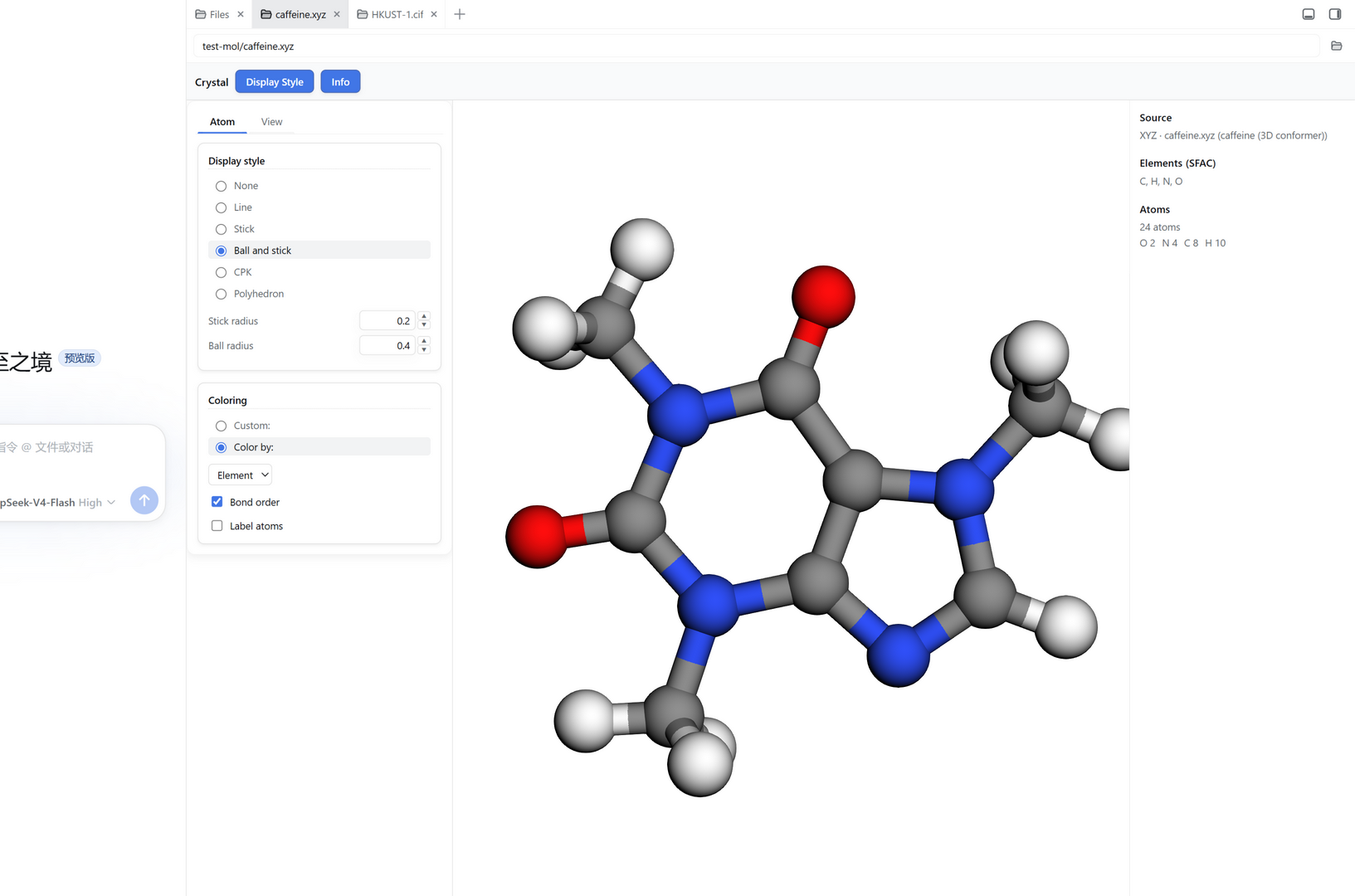
The plugin adapts to whether the file is a periodic crystal (has a unit cell + symmetry) or a non-periodic molecular structure. Open the caffeine molecule (a 3D conformer) and the difference is immediate:
- No unit-cell box, no lattice, no axis labels.
- The parameter panel omits the Cell and Symmetry groups — it shows only Source, Elements (SFAC) and Atoms.
- The Display Style dialog presents only the Atom and View tabs; the Lattice tab is hidden (no lattice concept for a molecule).
Supported file formats
| Format | Role | Notes |
|---|---|---|
.cif | Crystallographic Information File | Self-written parser + symmetry-expanded clean CIF re-emission for 3Dmol. |
.ins / .res | SHELX input / output | Self-written parser reads unit cell, symmetry, SFAC/UNIT, atoms, Q peaks, MOLE groups, aniso / riding H; the .res REM block supplies R1 / wR2 / GooF, reflection counts and Δρ. Displayed in 3D; no screenshots are shown for this format in the README. |
.xyz | Cartesian coordinates | Lightweight parser for the panel (non-periodic). |
.mol | V2000 molfile | Lightweight parser for the panel; raw text fed to 3Dmol (bond order supported). |
.pdb | Protein Data Bank | Lightweight parser for the panel; raw text fed to 3Dmol. |
.hkl | Reflection data | Not parsed (not needed for 3D display; R factors come from .res / .lst). |
The .ins / .res (SHELX read/write) path fully supports round-tripping: parse the structure, view it in 3D, and read back the unit cell, symmetry, atoms, Q peaks and refinement statistics into the panel.
Getting started
Requirements
- Node.js ≥ 22.18 — required by
tsdown0.22.14 (usesPromise.withResolvers). CI runs Node 22. - DeepSeek Harness (DSH) web runtime — the plugin is a DSH external plugin (bundle), loaded by the DSH profile.
- pnpm (
corepackor local install).
Build
pnpm install
pnpm build        # emits lib/index.js (host) + lib/client.js (client)
pnpm typecheck
.npmrcsetsauto-install-peers=falsebecause DSH host packages (@deepseek-ai/cordis,dsh-better-sidebar,react) are resolved at runtime from the DSH profile's hoistednode_modules, not from the npm registry.
Install into a DSH profile
dsh plugin --profile  add dsh-crystal-viewer
# or, for local development:
dsh web --patch /abs/path/cordis.patch.yml
Then open the DSH web UI, click the Crystal entry (sidebar + menu / bottom dock), and open a structure file — either via the path box or by clicking a .res/.cif/.xyz in the Files tree.
Hard-refresh the browser (Ctrl+F5) after installing or updating the client bundle.
Open-source attribution & gratitude
This project stands on the shoulders of several excellent open-source projects. We are deeply grateful to their maintainers and contributors — LICENSE holds this project's MIT license, and NOTICE records the full legal text of every third-party license we inherit.
This plugin's own license: MIT
The dsh-crystal-viewer plugin itself is released under the MIT License (see LICENSE). You are free to use, copy, modify, merge, publish, distribute, sublicense and sell it, under the MIT conditions.
3Dmol.js — rendered & modified
- Project: 3Dmol.js — institutional-grade molecular visualization for web.
- License: BSD-3-Clause.
- Role: the rendering base (WebGL, no WASM dependency). Its
GLVieweradds models, applies styles, draws the unit cell and handles CIF. - Modifications in this plugin (shipped as a modified/integrated build):
- Self-written SHELX/CIF symmetry expansion (group closure of
SYMMgenerators +
- Self-written SHELX/CIF symmetry expansion (group closure of