PeterZoneZz/dsh-token-cost ↗★ 1
@dsh-user/dsh-token-cost
DSH (DeepSeek Harness) web plugin: a draggable whale floating widget showing per-request token cost, session/total spend, and the official DeepSeek account balance
安装
npx -p @deepseek-ai/dsh dsh plugin --profile web add github:PeterZoneZz/dsh-token-cost说明文档
阅读完整 README ↗🐋 dsh-token-cost
DSH(DeepSeek Harness)网页端插件 —— 一只可拖动的 DeepSeek 鲸鱼悬浮球
随时查看 Token 用量、本次会话 / 累计花费 与 DeepSeek 账号余额
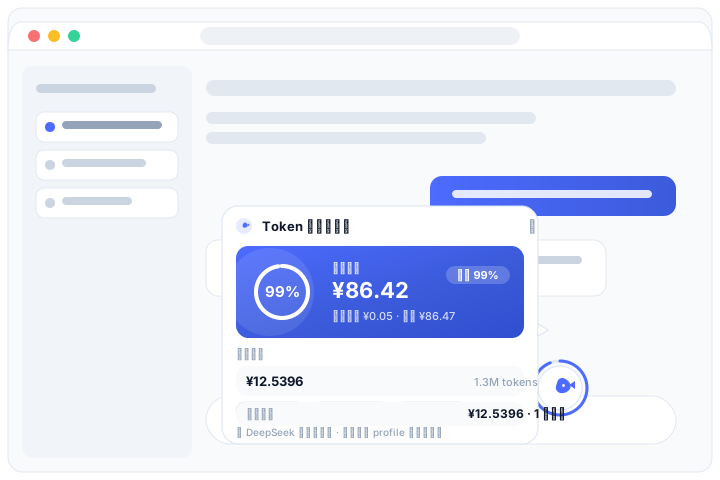
交互风格参考豆包 / 有道翻译的桌面浮窗:小鲸鱼常驻屏幕角落,点击弹出锚定卡片,可拖动并自动吸附屏幕边缘,安静、不挡事。
✨ 功能特性
- 🐋 鲸鱼悬浮球:毛玻璃质感小圆球,hover 时鲸鱼摇摆,外圈环形进度实时显示剩余余额百分比
- 🖱️ 豆包式交互
- 点击展开 / 收起卡片;点击外部、
Esc、✕ 或再次点击鲸鱼均可关闭 - 拖动鲸鱼移动位置,靠近屏幕左右边缘自动吸附,位置记忆在浏览器本地
- 卡片打开时拖动,鲸鱼与卡片一起移动,不会被意外关掉
- 卡片自动在鲸鱼旁空间最大的一侧展开(右 → 左 → 下 → 上),带指向箭头,任何位置都不会超出屏幕
- 点击展开 / 收起卡片;点击外部、
- 💳 官方账号余额:复用 DSH 已配置的
DEEPSEEK_API_KEY,调用 DeepSeek 官方GET /user/balance接口,卡片展示总余额、赠送 / 充值构成 - 📊 剩余余额可视化:以每次打开 DSH 页面时的余额为基准,剩余 % = 当前余额 ÷ 基准余额(官方真实计费差额,非估算);充值后基准自动提升、剩余重置 100%。蓝色(>60%)→ 琥珀(30~60%)→ 红色( dsh-token-cost
### 2. 安装进 DSH 的 web profile

```sh
dsh plugin --profile web add file:/path/to/dsh-token-cost
dsh plugin是 pnpm 的转发器:本地 file 依赖离线即可安装。安装完成后插件会自动进入dsh.profile.bundles(识别dsh.bundle声明)。
3. 重启 DSH Web
安装后需重启 dsh web 使新的 loader 行与投影单元生效,然后在浏览器刷新页面即可看到右下角的鲸鱼。
4. 配置 API Key(余额查询)
余额查询复用 DSH 的 credentials 机制:在 DSH Web 的 模型设置页写入 DEEPSEEK_API_KEY,或启动 DSH 前 export DEEPSEEK_API_KEY=sk-...。不配置也不影响 token 用量与费用显示,仅余额部分显示降级提示。
⚙️ 配置
价格表与余额查询均可通过 profile 的 cordis.patch.yml 覆盖(价格单位为元 / 百万 tokens,按模型 id 匹配,未匹配回落 default;cacheWrite 按输入价计费,cacheRead 按缓存命中价计费):
- id: token-cost
  config:
    prices:
      deepseek-chat:     { input: 2, cacheRead: 0.5, cacheWrite: 2, output: 8 }
      deepseek-reasoner: { input: 4, cacheRead: 1,   cacheWrite: 4, output: 16 }
      deepseek-v4-flash: { input: 1, cacheRead: 0.25, cacheWrite: 1, output: 4 }
      default:           { input: 2, cacheRead: 0.5, cacheWrite: 2, output: 8 }
    balance:
      enabled: true
      apiKeyEnv: DEEPSEEK_API_KEY
      baseUrl: https://api.deepseek.com
      pollMs: 60000