Sanqi-normal/dsh-webui-market-plugin ↗★ 0
@sanqi-normal/dsh-webui-market-plugin
In-harness community plugin market for the dsh web GUI: browse awesome-dsh-plugin.com, install and uninstall plugins into a profile
安装
npx -p @deepseek-ai/dsh dsh plugin --profile web add github:Sanqi-normal/dsh-webui-market-plugin说明文档
阅读完整 README ↗dsh-webui-market-plugin
在 dsh web GUI 内部的社区插件市场:浏览 awesome-dsh-plugin.com 的插件目录,直接在 设置 → 插件 → 插件市场 里安装 / 卸载插件到 profile。界面风格与 harness 前端一致(跟随系统深浅色主题),支持中英文(按系统语言自动切换)。
An in-harness community plugin market for the dsh web GUI: browse the awesome-dsh-plugin.com catalog and install/uninstall plugins into a profile from Settings → Plugins → Plugin Market.
效果展示 Screenshot
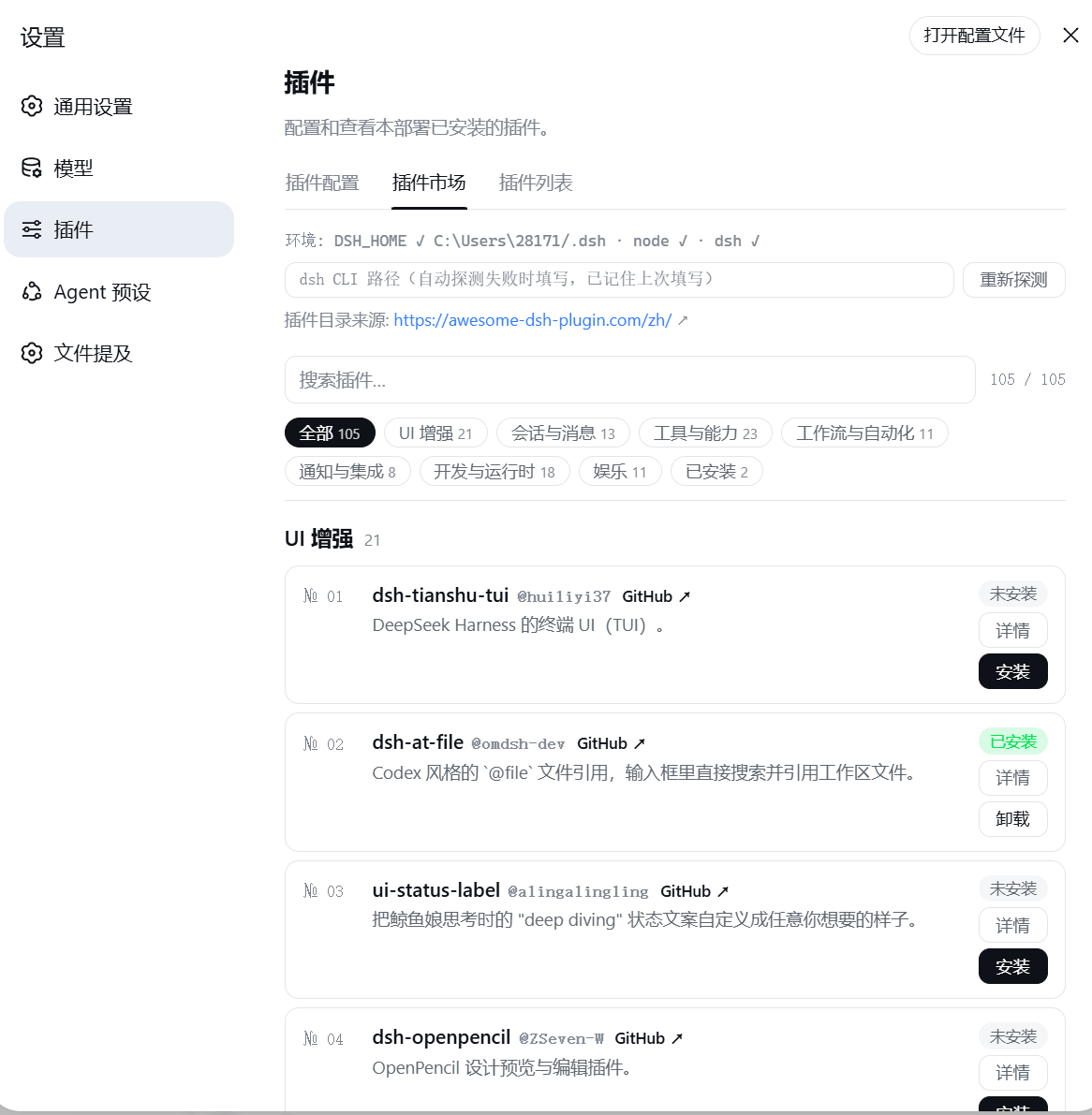
安装 Install
方式一:从 npm registry 安装(推荐,无 git 克隆 / prepare 脚本步骤):
dsh plugin --profile web add @sanqi-normal/dsh-webui-market-plugin
方式二:从 GitHub 源码安装:
dsh plugin --profile web add github:Sanqi-normal/dsh-webui-market-plugin
安装后重启 web 服务生效:
pnpm dsh web
GitHub 源安装会执行包内 prepare 脚本,如被 pnpm 拦截,把提示的包名加入 profile 的 pnpm-workspace.yaml 的 allowBuilds 后重试。
使用 Usage
打开 设置(Settings)→ 插件(Plugins)→ 插件市场(Plugin Market):
- 目录按分类分组,支持搜索与"已安装"过滤
- 点 详情 查看该插件的官方安装命令(含目标 profile)
- 安装 / 卸载 以弹窗形式确认,任务后台执行、实时显示 pnpm 输出,可最小化到后台、随时终止;超过 120 秒自动超时报错
- 每个插件卡片显示真实的已安装状态(与 profile 的
package.json同步) - 顶部显示插件目录来源官网链接,可直接打开
工作原理 How it works
持久化 bundle(package.json 的 dsh.bundle.patch → cordis.patch.yml),由 dsh plugin add 的 reconcile 自动加入 profile 的 dsh.profile.bundles 层:
- Host 半(
lib/host.js):注册/api/dsh-market路由,提供list(抓取并解析官网目录)、probe(环境探测)、installed(读取 profile package.json)、 / (后台 spawn CLI)、(轮询任务状态)、(终止任务)