TAOxxx7/dsh-plugin-manager ↗★ 2
dsh-plugin-manager-community
适用于桌面端和原生 Web 配置文件的 DSH 设置页插件管理器组件。
AI 分析
核心用途是在 DSH 的“设置”中提供一个分类清晰的插件管理界面。适合需要直观发现、安装、更新或卸载社区插件的桌面端及 Web 端用户。
安装
npx -p @deepseek-ai/dsh dsh plugin --profile web add github:TAOxxx7/dsh-plugin-manager说明文档
阅读完整 README ↗DSH Plugin Manager
An independently publishable DSH bundle that adds a categorized plugin manager to Settings → Plugins.
This repository is intentionally shaped like a normal DSH community plugin:
- the root
package.jsonis the installable npm package; dsh.bundle.patchmounts the Host gateway;dsh.clientloads the browser Settings tab in native Web clients;lib/contains the already-built Host and Client artifacts;- GitHub is the source, documentation, and
dsh-pluginmarket-discovery page; - npm is the normal installation and update channel.
Screenshots
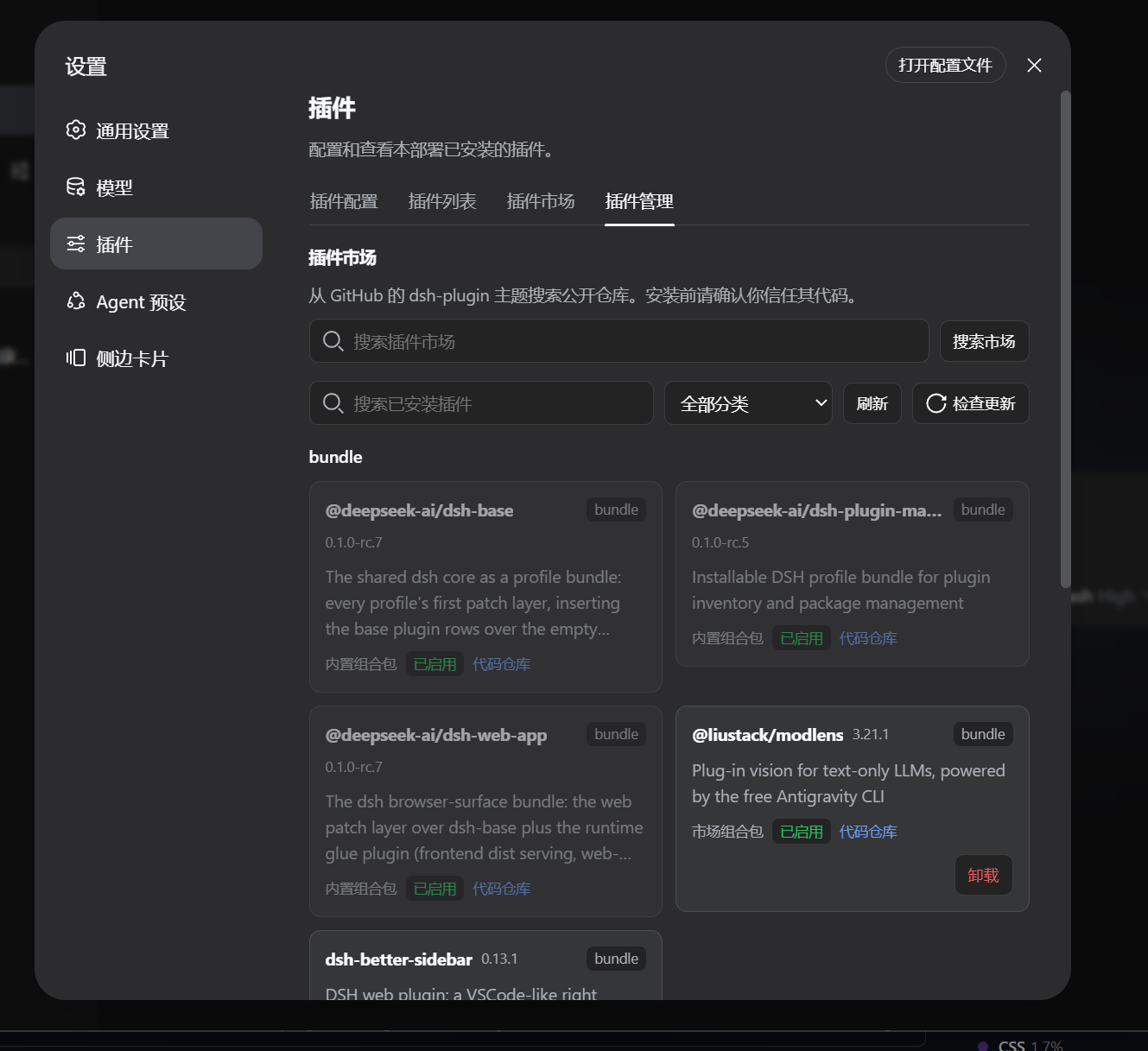
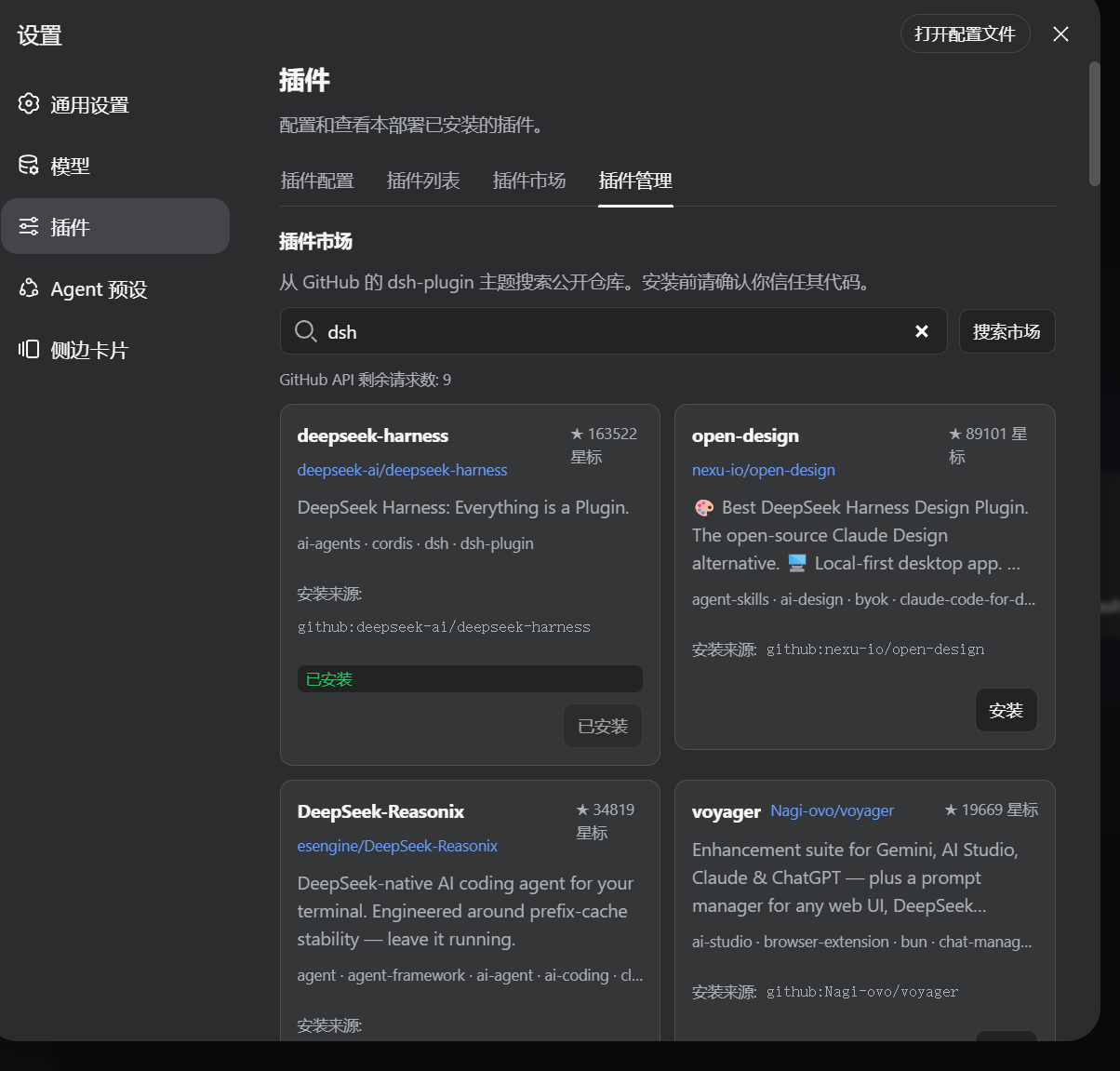
What it provides
- categories for every installed profile package;
- GitHub
dsh-pluginmarket search; - duplicate-install detection;
- npm-first installation when a market repository publishes a DSH bundle;
- GitHub fallback for unpublished repositories;
- uninstall, single-package update, update checking, and startup checks;
- explicit pnpm build approval/retry with captured diagnostics;
- an install-complete restart prompt for Desktop and native Web;
- the same active-profile behavior in DSH Desktop and
npx @deepseek-ai/dsh web.
Install after publishing
Replace the package name below if the publisher renames it:
dsh plugin --profile desktop add dsh-plugin-manager-community@latest

# Native Web profile
npx -y @deepseek-ai/dsh plugin --profile web add dsh-plugin-manager-community@latest
npx -y @deepseek-ai/dsh web
After installing a newer package version, restart the current DSH process so the new bundle layer is loaded. The Settings tab asks about restarting after a successful market install.
Compatibility
The plugin manager is verified against DeepSeek Harness (DSH) Desktop and the native Web profile of the same application. The dsh.client.platform: "web" declaration describes the browser face; it is not a GitHub-only installation mode. A remote browser still controls the Host/profile running the DSH process, so package operations occur on that machine.
On Windows native Web, the Host resolves pnpm in this order: DSH_PNPM_BIN, the active profile/shared DSH pnpm package, PNPM_HOME/npm global directories, PATH, and finally Node.js Corepack. Direct .exe/pnpm-script launches avoid shell splitting of paths such as C:\\Program Files; .cmd shims are quoted when needed. Command output uses UTF-8 with a GB18030 fallback so Chinese cmd.exe diagnostics remain readable. If none of those locations is available, install Node.js/Corepack or set DSH_PNPM_BIN to the full pnpm.cmd path, then restart the Web process.
Development note
lib/ is the release artifact copied from the verified Harness build. src/ is included for review and future maintenance. The current source mirror is kept aligned with the Harness implementation; the handoff instructions publish the verified artifact directly and do not require a Harness monorepo checkout.
See HANDOFF.md and PUBLISH.md for the exact publishing checklist.