dsh-skin
用于 DeepSeek Harness Web UI 的可定制皮肤工具——预设、图片壁纸、半透明和强调色,全部保存在用户设置中
安装
此插件尚未提供可验证的 bundle,或兼容性检查未通过。请先阅读仓库说明。 阅读完整 README ↗
说明文档
阅读完整 README ↗dsh-skin — 自定义换肤工具(支持图片换肤)
📖 中文使用教程:使用教程.md · 📦 源码:github.com/Yugitan/dsh-skin · 🏷 dsh-plugin
A customizable skinning plugin for the DeepSeek Harness Web UI. It adds a 「换肤 / Skin」panel to 设置 → 通用 (Settings → General) that lets you:
- Toggle the skin on/off with one switch.
- Pick a built-in gradient preset (深海 Ocean / 极光 Aurora / 落日 Sunset / 薄荷 Mint / 樱花 Cherry).
- Upload your own wallpaper image (PNG / JPG / WebP / GIF, ≤ 10 MB) — stored
under
~/.dsh/skins/and served from/skins/(no base64 bloat in settings). - Paste any image URL (local
/skins/...or external). - Tune fit (铺满/适应/拉伸/平铺), position, image opacity, background blur, a dim overlay for readability, and panel translucency (glass effect).
- Override the brand accent color (swatches + color picker).
- Reset everything back to the default appearance.
效果预览 / Preview
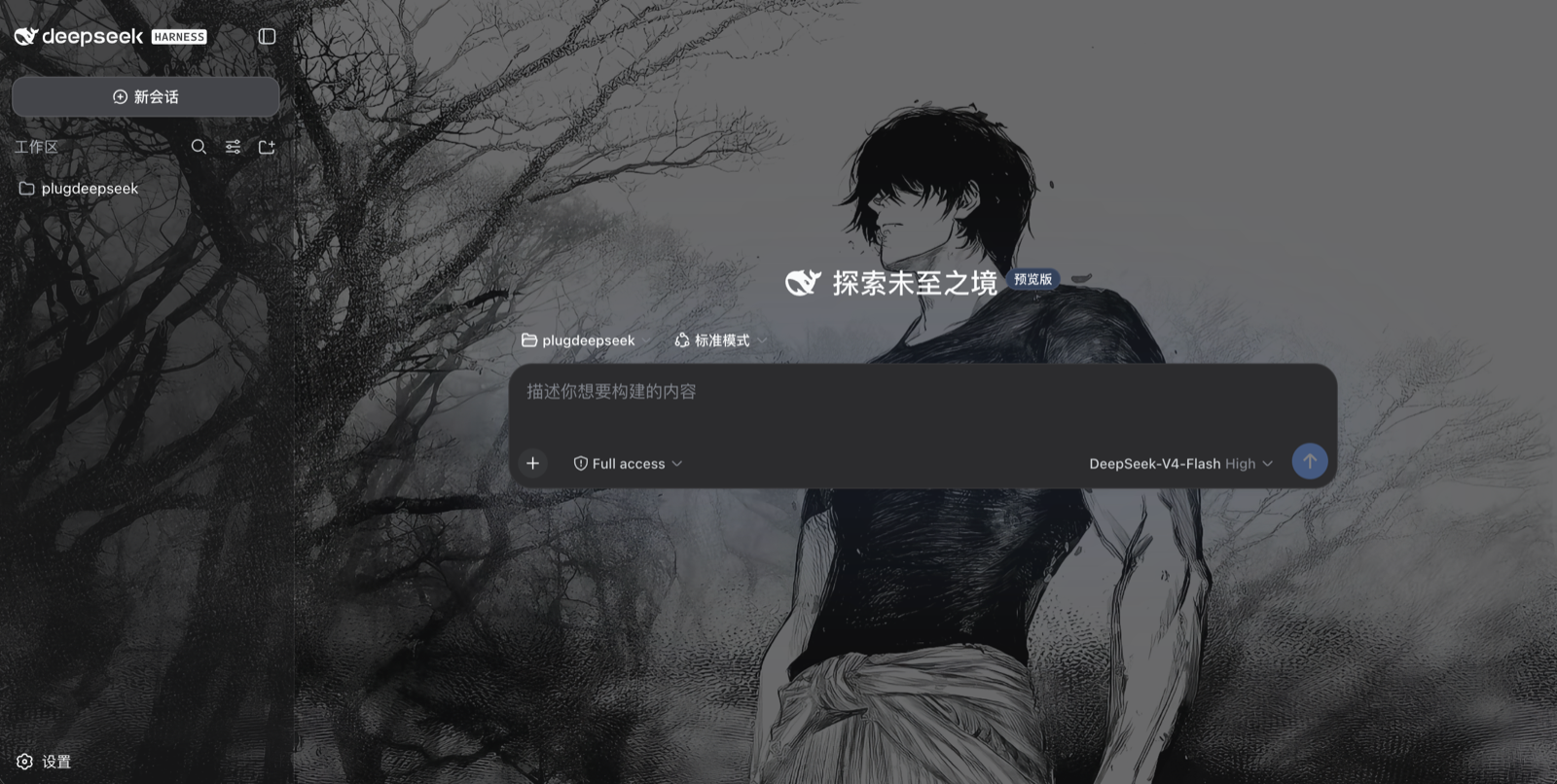
Everything is persisted in the DSH user-settings document
(~/.dsh/settings.yaml → skin: section), survives restarts, and re-applies
before the React app mounts (host-injected boot style, no flash).
How it works
- Host half (
lib/index.js, runs in thedsh webprocess)- registers the
skinsettings namespace + schema, - serves
POST /skin/upload(magic-byte image sniffing, 10 MiB cap) andGET/HEAD /skins/(immutable cache, path-traversal guarded), - taps the index HTML with a pre-plugin boot script/style that projects the
durable skin onto
--dsh-skin-*CSS custom properties and thebody[data-ds-skin]attribute.
- registers the
- Browser half (
lib/client.js, loaded by the client module system)SkinRuntimemirrors the settings section into CSS custom properties, togglesdata-ds-skin/data-ds-skin-accenton ``, and removes the host boot nodes once active,- registers the「换肤 / Skin」row into the
settings.general.itemslot (order 20, right below the built-in Appearance row).
The wallpaper is painted by a fixed full-viewport body::before layer
(z-index: -1), the dim overlay by body::after, and the app surfaces are
made translucent through --dsw-alias-bg-* token overrides (!important
beats the ui-layout ThemePresenter's inline tokens), so the image shows
through panels while text stays readable via the dim overlay.
Install into a running profile
Install from GitHub
git clone https://github.com/Yugitan/dsh-skin.git
cd dsh-skin
node manage.mjs install        # one-click install (links + registers + patches)
# restart the server, then refresh the browser:
#   cd ~ && npm exec @deepseek-ai/dsh web
On a new machine, recreate the
node_modulessymlink inside the clone (ln -s ~/.dsh/profiles/node_modules node_modules) or runnpm installthere so the harness resolvesreact/@deepseek-ai/*.
One-command install / uninstall (recommended)
From the dsh-skin/ directory, run the bundled manager script. It does all
three steps — module link, cordis.patch.yml entry, host allowlist patch —
and is idempotent (safe to re-run):
node manage.mjs install        # one-click install
node manage.mjs status         # verify (also checks the live server bundle)
node manage.mjs uninstall      # one-click uninstall
node manage.mjs uninstall --clean   # also delete ~/.dsh/skins/ + the skin: settings
node manage.mjs install --profile ~/.dsh/profiles/   # custom profile
node manage.mjs --help
Or via npm scripts in this package: npm run plugin:install /
npm run plugin:uninstall / npm run plugin:status.
Restart the server afterwards and refresh the browser:
dsh --profile web (or npm exec @deepseek-ai/dsh web).
Manual install (advanced)
# from this repository root
PROFILE=~/.dsh/profiles/web
ln -s "$PWD/dsh-skin" "$PROFILE/node_modules/dsh-skin"
Append to $PROFILE/cordis.patch.yml:
- insert:
    - id: skin
      name: 'dsh-skin'
Then apply the one-line platform patch (required — see below), and restart the
server: dsh --profile web (or npm exec @deepseek-ai/dsh web).
node patch-host.mjs        # adds the "skin" settings namespace to the API-gateway allowlist
node patch-host.mjs --check
Platform patch (required). DeepSeek Harness's API gateway (
dsh-host-apiproxy) only lets configuration clients read/write a hard-coded allowlist of settings namespaces (WEB_SETTINGS_NAMESPACES). A third-party namespace — even one registered throughsettings.register()— is refused withsettings-not-exposed, so the skin row would render but every toggle/preset write silently fails and nothing persists (nothing is written tosettings.yaml).patch-host.mjsidempotently adds"skin"to that allowlist (with--check/--revertmodes). Re-run it after any harness reinstall/update, then restart the server.
While developing, edit dsh-skin/lib/client.js — the client HMR watcher
polls the bundle and hot-reloads it in the browser without a server restart.
Development
node patch-host.mjs— reapply the one-line API-gateway allowlist patch (--checkto verify,--revertto undo); needed after a harness reinstall.node test-client.mjs/node test-runtime.mjs— execute the browser bundle in Node and render the Skin row withreact-dom/server(smoke + runtime projection + row actions).node test-host.mjs— mounts the upload/skins handlers on a throwawaynode:httpserver and exercises upload, serving, traversal guard, and the index tap.- The
node_modulessymlink inside the package points at the profile module fallback so the harnesses resolvereact/@deepseek-ai/*without an install.
Optional config
The plugin row accepts a config to relocate the image storage root:
- id: skin
  name: 'dsh-skin'
  config:
    root: /absolute/path/to/skins
Default: ~/.dsh/skins.