anonRTtty/dsh-plugin-balance ↗★ 0
dsh-plugin-balance
DeepSeek API balance display in the DSH web session header (balance capsule beside the Session log button)
安装
npx -p @deepseek-ai/dsh dsh plugin --profile web add github:anonRTtty/dsh-plugin-balance说明文档
阅读完整 README ↗dsh-plugin-balance
DeepSeek API 余额显示插件(DSH WebUI) · A DeepSeek API balance display plugin for the DSH web session header
English / 介绍(Overview)
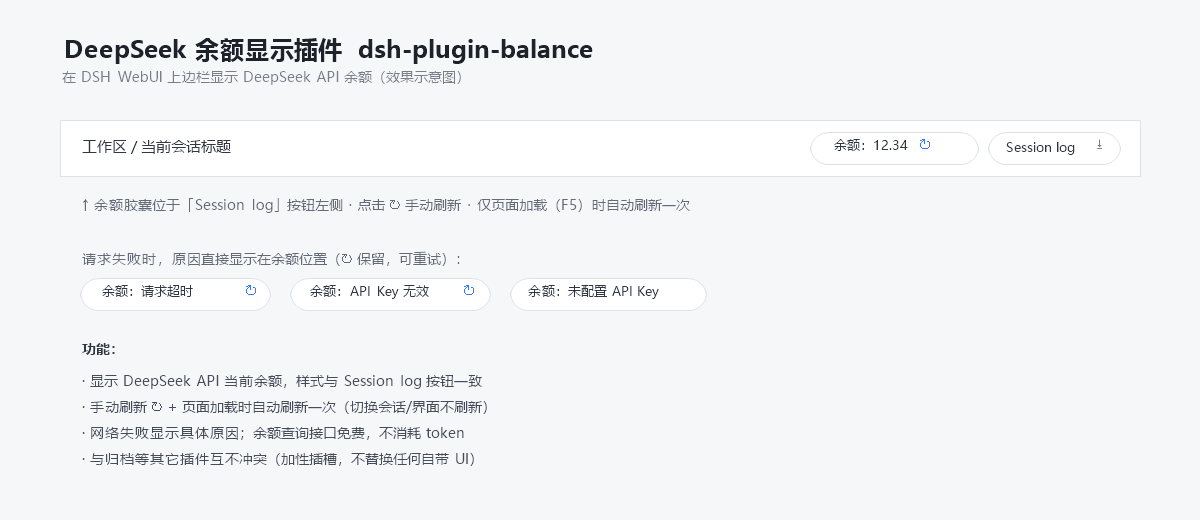
A lightweight, zero-build plugin for DeepSeek Harness (DSH) that shows your DeepSeek API account balance in the web session header, right next to the built-in "Session log" button:
[余额:12.34 ↻] [Session log]
What it does
- Displays the current DeepSeek API balance in the top-right of the session header, styled to match the built-in "Session log" button.
- Manual refresh: click the ↻ button.
- Auto refresh: once per page load (F5) only — switching sessions/views never triggers a refresh.
- Clear failure reasons: on network/credential errors the capsule shows the concrete reason (e.g.
余额:请求超时timeout,余额:API Key 无效bad key,余额:未配置 API Keymissing key). - Free to use: the balance query (
GET https://api.deepseek.com/user/balance) consumes no API tokens. - No conflicts: registered in the additive slot
conversation.session.header.utilities(replaceRisk: none) — it never replaces any built-in UI.
The API key is resolved through DSH's own credential seam (~/.dsh/.credentials.yaml → DEEPSEEK_API_KEY) and never leaves the host process.
下载 / Download
方式一(Git clone):
git clone https://github.com/anonRTtty/dsh-plugin-balance.git
方式二(ZIP):打开 仓库页面 → Code → Download ZIP,解压后得到 dsh-plugin-balance/ 目录。
安装 / Install
三选一,不要混用(混用可能重复注册插件)。装完都要重启 DSH(或等 patch HMR 生效),然后硬刷新浏览器
Ctrl+Shift+R。
方式一:一键安装(Windows PowerShell,推荐)
无需 clone,直接运行(脚本会自动下载 release ZIP、复制到 profile 并启用):
irm https://raw.githubusercontent.com/anonRTtty/dsh-plugin-balance/main/scripts/install.ps1 | iex
或先 clone/解压后本地运行:
cd dsh-plugin-balance
powershell -ExecutionPolicy Bypass -File .\scripts\install.ps1
非默认 profile:powershell -ExecutionPolicy Bypass -File .\scripts\install.ps1 -ProfileName headless
方式二:官方 CLI(dsh plugin)
dsh plugin --profile web add github:anonRTtty/dsh-plugin-balance
本插件声明了 dsh.bundle,官方命令会把它加入 dsh.profile.bundles 并自动应用包内 cordis.patch.yml,无需手动改任何配置文件。
方式三:手动安装
-
把整个
dsh-plugin-balance/目录复制到:C:\Users\Administrator\.dsh\profiles\node_modules\dsh-plugin-balance\ -
在
C:\Users\Administrator\.dsh\profiles\web\cordis.patch.yml的 insert 列表中追加:- insert: - id: dsh-archive-manager name: dsh-archive-manager - id: dsh-plugin-balance name: dsh-plugin-balance -
重启 DSH。
卸载 / Uninstall
一键卸载(Windows PowerShell):
irm https://raw.githubusercontent.com/anonRTtty/dsh-plugin-balance/main/scripts/uninstall.ps1 | iex
或本地运行:powershell -ExecutionPolicy Bypass -File .\scripts\uninstall.ps1
或手动:删除 cordis.patch.yml 中 dsh-plugin-balance 那两行,删除 C:\Users\Administrator\.dsh\profiles\node_modules\dsh-plugin-balance\,然后重启 DSH。
(若使用方式二安装,卸载时也请执行 dsh plugin --profile web remove dsh-plugin-balance。)
文件结构 / File structure
dsh-plugin-balance/
├── package.json        # 包声明 + dsh.bundle(官方 CLI 自动激活)+ dsh.client 注入
├── cordis.patch.yml    # bundle patch(官方 CLI 安装时自动应用)
├── src/
│   ├── index.js        # Host 半部:/api/plugin.balance 路由(webServer 精确路由)
│   └── client.js       # 浏览器半部:__ModuleLoader__ 加载的余额胶囊
├── scripts/
│   ├── install.ps1     # Windows 一键安装脚本
│   └── uninstall.ps1   # Windows 卸载脚本
├── screenshot.png      # 效果示意图
├── README.md
└── LICENSE
说明 / Notes
- 余额接口:
GET https://api.deepseek.com/user/balance(免费,不消耗 token);凭据读取~/.dsh/.credentials.yaml中的DEEPSEEK_API_KEY(与 DSH 内置模型路由同一凭据通道),Key 不离开宿主进程。 - 主机端通过
webServer注册精确路由/api/plugin.balance(与 dsh-plugin-session-delete 同款扩展点);浏览器端通过同源 fetch 获取余额。 - License: MIT