@badai147/dsh-ocgo-usage
OpenCode Go usage stats for the DeepSeek Harness Web GUI: compact bottom-left sidebar button with a hover detail card
安装
$
npx -p @deepseek-ai/dsh dsh plugin --profile web add github:badai147/dsh-ocgo-usage说明文档
阅读完整 README ↗dsh-ocgo-usage
在 DeepSeek Harness Web 侧边栏左下角显示 OpenCode Go 用量的插件。
Show your OpenCode Go usage in the DeepSeek Harness web sidebar's bottom-left corner.
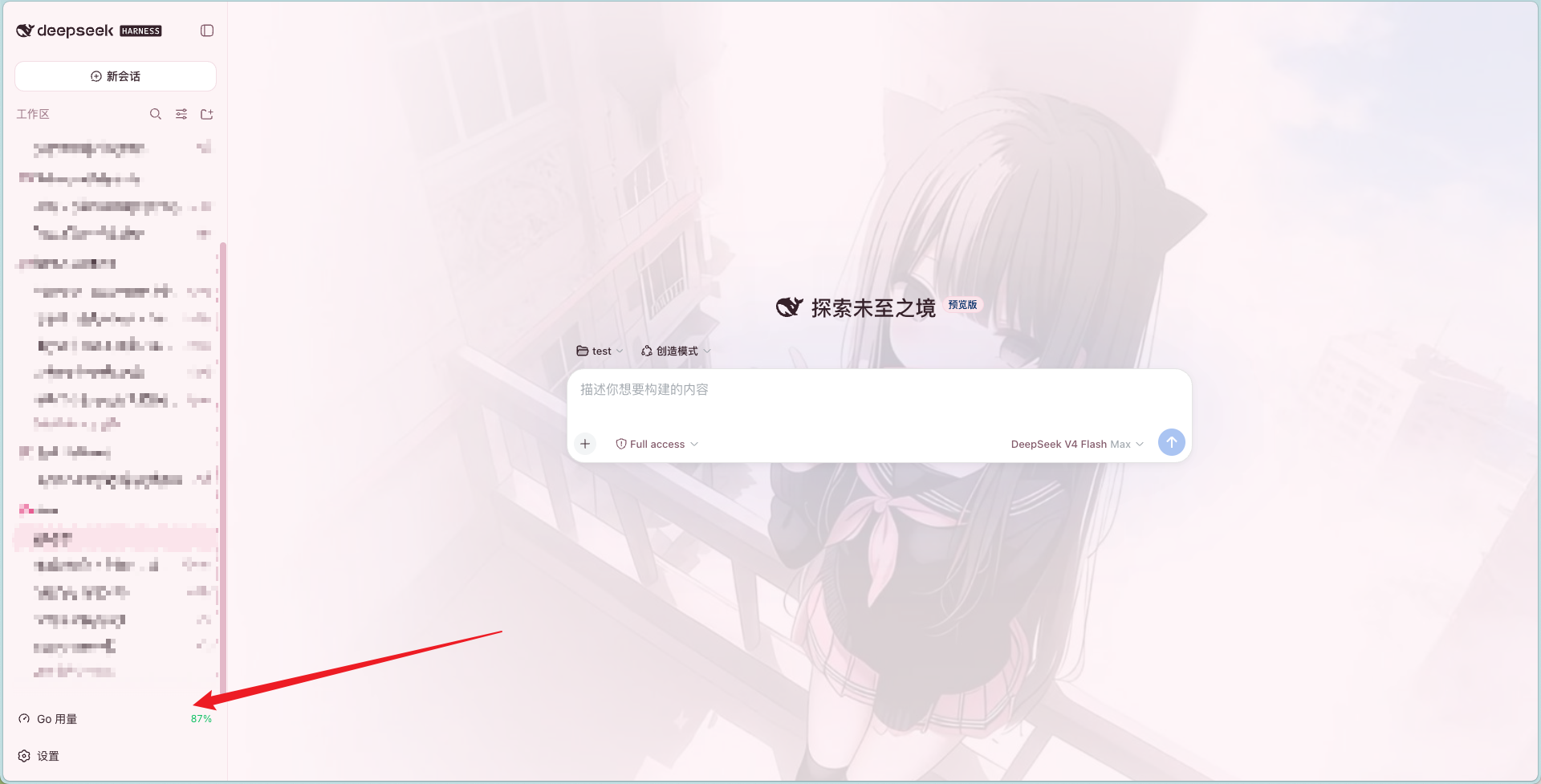
功能 / Features
- 左下角常驻按钮(与设置按钮同列同款):仪表盘图标 + 剩余用量百分比,剩余 ≤20% 变橙、≤0 变红
- 悬停展开明细卡片(向上弹出):滚动 / 本周 / 本月三条用量进度 + 已用百分比 + 重置时间
- 数据每 60 秒自动刷新
- 零配置:自动读取 DSH 供应商配置中的 opencode-go API key(
~/.dsh/.ocg-state.json→~/.dsh/.credentials.yaml→ 环境变量) - 零构建:Client 端为手写
__ModuleLoader__bundle,Host 端为纯 Node ESM
安装 / Install
dsh plugin --profile web add @badai147/dsh-ocgo-usage
从 GitHub 源安装(备选):
dsh plugin --profile web add github:badai147/dsh-ocgo-usage
重启 dsh web,左下角(设置按钮旁)即可看到「Go 用量」按钮。
使用 / Usage
- 在 DSH 设置中配置 opencode-go 供应商(含 API key)——插件自动读取,无需额外配置
- 悬停左下角「Go 用量」按钮查看明细
- 常驻角标显示滚动用量的剩余百分比(如已用 5% 则显示
95%)
工作原理 / How it works
- Host(
lib/index.js):注册 DSH web server 路由GET /api/ocgo-usage,按序读取 DSH 供应商配置中的 opencode-go API key,代理请求https://opencode.ai/zen/go/v1/usage;key 只在本机处理,不下发浏览器 - Client(
lib/client.js):手写window.__ModuleLoader__.loadbundle,注册sidebar.footer.action按钮 +shell.overlay悬浮卡片,通过本地路由取数 - 刷新:激活即拉取,之后每 60 秒自动刷新
目录结构 / Structure
dsh-ocgo-usage/
├── cordis.patch.yml   # bundle patch:插入 ocgo-usage 插件行
├── lib/
│   ├── index.js       # Host:/api/ocgo-usage 代理路由(Node ESM)
│   └── client.js      # Client:按钮 + 悬浮卡片 UI(__ModuleLoader__ bundle)
└── package.json
License
使用 / Usage
- 在 DSH 设置中配置 opencode-go 供应商(含 API key)——插件自动读取,无需额外配置
- 悬停左下角「Go 用量」按钮查看明细
- 常驻角标显示滚动用量的剩余百分比(如已用 5% 则显示
95%)