benz-ai-x/dsh-research-graph ↗★ 1
@benz-ai-x/dsh-research-graph
DeepSeek Harness plugin for organizing AI discussions into research topics, traceable knowledge cards, and reusable research materials on an interactive graph
安装
npx -p @deepseek-ai/dsh dsh plugin --profile web add github:benz-ai-x/dsh-research-graph说明文档
阅读完整 README ↗description: "Research Graph for DeepSeek Harness: organize AI discussions into research topics, traceable knowledge cards, and materials for further research." kind: "package-bundle"
DSH Research Graph · 研图





English | 中文
Turn AI discussions into traceable, reusable research knowledge in DeepSeek Harness.
Research Graph (@benz-ai-x/dsh-research-graph) adds an interactive Research Graph tab to the DeepSeek Harness Web conversation view. Organize discussions across Workspaces into Research Topics, save Knowledge Cards with exact sources, review AI extraction, and use selected materials to start another discussion.
The canvas also shows Session Lineage, movable Branch clusters, Merge provenance, and compact Subagent summaries. Read original discussion or generate on-demand Session Digests while preserving source Session logs.
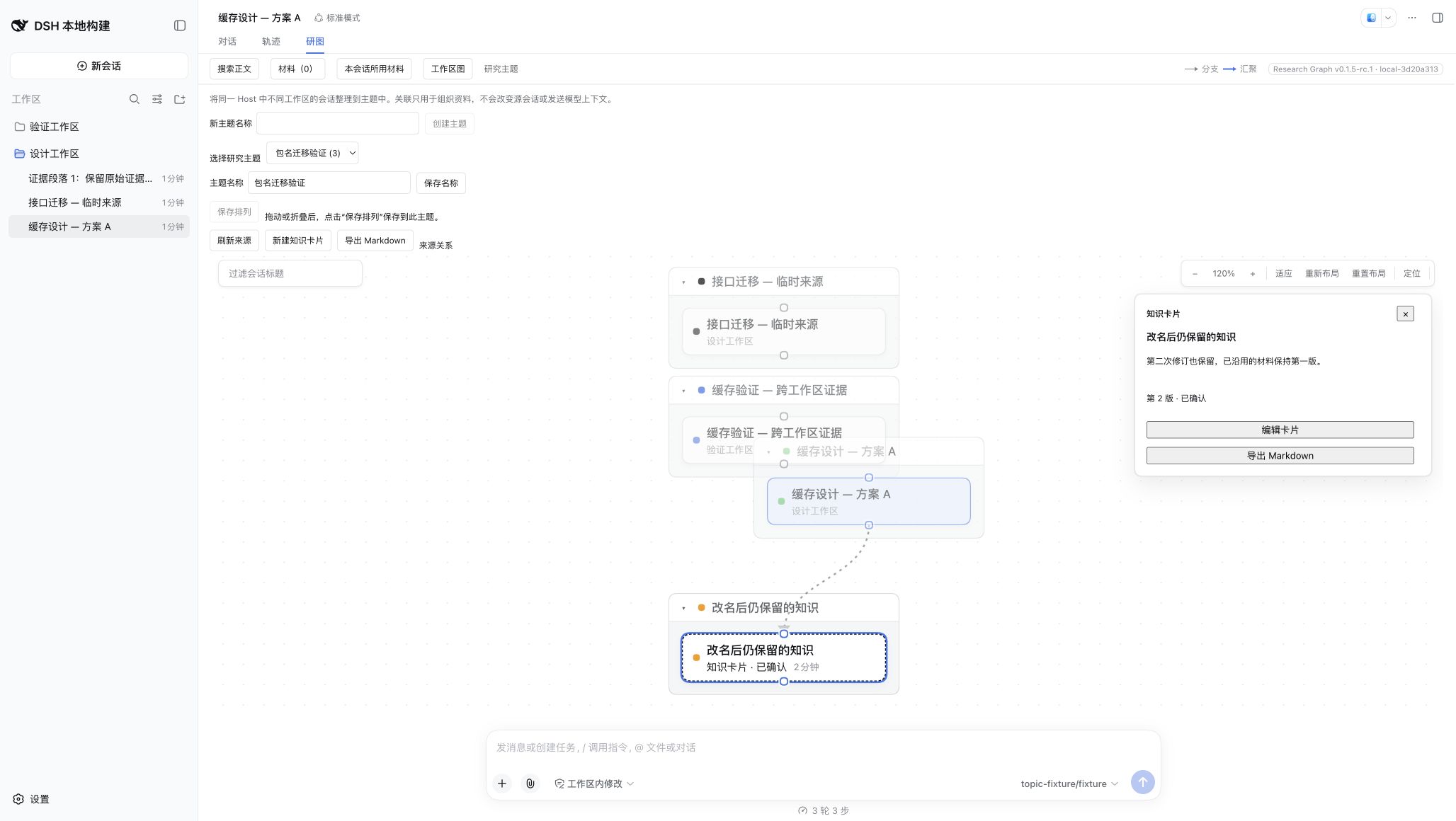
Research Graph rendered with synthetic research data after upgrading from the previous package name.
npm · Releases · Issues · DeepSeek Harness
Quick start
dsh plugin --profile web add @benz-ai-x/dsh-research-graph@0.1.5-rc.2.4
dsh web
If dsh web is already running, stop it before restarting. Open the one-time authenticated URL printed by the command, enter a non-blank Session, and choose Research Graph. Do not share or persist the URL token.
Compatibility
| Package release | DeepSeek Harness | Node.js | Verification |
|---|---|---|---|
@benz-ai-x/dsh-research-graph@0.1.5-rc.2.4 | 0.1.5-rc.2 | `^22.19.0 | |
@benz-ai-x/dsh-research-graph@0.1.5-rc.2 | 0.1.5-rc.2 | `^22.19.0 | |
@benz-ai-x/dsh-research-graph@0.1.5-rc.1 | 0.1.5-rc.1 | `^22.19.0 | |
Previous package: v0.1.5-rc.1 | 0.1.5-rc.1 | `^22.19.0 | |
v0.1.5-alpha.1 | 0.1.5-alpha.1 | `^22.19.0 | |
v0.1.6 | 0.1.2-alpha.1, 0.1.2-alpha.2, 0.1.2-alpha.3 | `^22.19.0 | |
v0.1.5 | 0.1.2-alpha.1, 0.1.2-alpha.2 | `^22.19.0 |
In the DSH-aligned release line, the first plugin adaptation uses the full target DSH version. Further plugin releases for the same DSH prerelease append one positive revision number: plugin 0.1.5-rc.2.1 targets DSH 0.1.5-rc.2, followed by plugin 0.1.5-rc.2.2. Direct DSH dependencies retain the target DSH version. The previous package is @benz-ai-x/dsh-client-ui-session-graph; its tags and artifacts keep that name. The research workflow shipped in 0.1.5-rc.1; 0.1.5-rc.2 adds the first UI/UX repair round, including draft protection, direct material selection and search-scope restoration. 0.1.5-rc.2.1 adds the research workbench, full knowledge reading, and cross-workspace merge. 0.1.5-rc.2.2 fixes truncated Session Digests and adds resizable Markdown reading, nearby knowledge capture, and graph controls in the research context bar. 0.1.5-rc.2.3 adds editable Session title suggestions and concise Markdown digests with highlighted key points. 0.1.5-rc.2.4 unifies saved knowledge reading across entry points, preserves extraction-batch reading position after editing, centralizes responsive reading geometry, and makes digest highlights more visible. See the release acceptance record for validation and remaining acceptance. The earlier 0.1.5-alpha.1 package retains its original feature set. Historical v0.1.0–v0.1.6 tags remain unchanged. For DSH 0.1.2-alpha.1–alpha.3, keep plugin 0.1.6; current source does not promise compatibility with those older hosts. Select by the compatibility table, not npm latest or plugin version ordering.
This prerelease uses npm tag next; the commands below pin the exact matching version. To install a local build, run pnpm install --frozen-lockfile and pnpm pack --pack-destination .artifacts in this repository, then use dsh plugin --profile web add /absolute/path/plugin.tgz.
Research Workbench
Open Research Graph and switch between Graph / Knowledge. The graph supports arranging relationships and exploring directions; Knowledge offers a catalog, full content, exact sources, and follow-up research. Choose Research scope → Cross-workspace topics to collect materials on the same Host. Knowledge can also browse all knowledge on that Host.
Switching Graph and Knowledge within a topic preserves the selected card, displayed revision, expanded source, reading scroll, and canvas position. Selecting a different card starts at the beginning. Saved state is separate from verification status. Continue discussion carries the displayed revision; Edit card edits that version directly and saves a new revision. When reading an older version, the export action explicitly says Export latest revision; the export preview lists the actual versions.
Search results, View knowledge, and saved manual or extracted cards use the same reader. It shows the selected revision's saved time and exact sources, plus follow-up discussions across all revisions with their version labels. Follow-up loading and failures are shown explicitly, with retry on failure. Discarding an inline edit returns to the same revision, expanded source, and reading position. Within an extraction batch, canceling also restores the batch's reading position and focus while preserving the other drafts.
Topic graphs arrange source discussions, knowledge, and follow-ups in dependency rows while preserving Branch clusters and manual arrangements. Selecting knowledge emphasizes its immediate sources and follow-ups. Topic graphs connect discussions to knowledge through source edges, and knowledge to follow-up discussions through Used in discussion edges. Only Host-acknowledged admissions produce these edges. A new discussion need not be a topic member to remain traceable. Later card edits do not rewrite the version used; select follow-up research to inspect frozen materials and open its target.
Discussion and knowledge bodies use DSH Markdown rendering for headings, lists, quotes, tables, and code. Expand reading gives the document more space. Identity, revision or Original tabs, and main actions stay visible while only the body scrolls. Expansion and Original position restore on return; text remains selectable for copying. Scope and workspace/topic selection share one context bar; Topic options offers creation, renaming, and scope help. In narrow containers, More contains Merge discussions and New Knowledge Card. Zoom, Fit, and Locate sit at the right of the research context bar, alongside the input session. Graph options contains Relayout, Reset layout, the relationship legend, and topic refresh/export. Save arrangement appears only for an unsaved arrangement. The toolbar remains available when reading is expanded or resized. Fit, Locate, toolbar zoom, and the 100% reset share the visible canvas center; wheel zoom stays anchored to the pointer. Graph options opens downward; in narrower containers, Fit/Locate and then zoom move into the menu. Menu zoom stays open for repeated steps. Input session · title identifies the composer's Viewed Session, which does not change when inspecting other content; the full title is available on hover.
See the workbench acceptance record, reading UX round, and unified reading and geometry acceptance for scope, validation, and screenshots.
Drag the reading panel's left edge left to widen it or right to narrow it. The width is remembered locally for the research scope; expanding and collapsing returns to your chosen width. Focus the edge to adjust with Left/Right (Shift for larger steps) or Home/End; Enter or double-click restores the default, and Escape cancels a drag. Small screens retain full-width reading and hide the resize handle.
Panel sizing follows the research container's width. At 760 px or less, the panel overlays the canvas and graph commands use the full canvas center; wider containers reserve the panel's measured width. Opening, expanding, or dragging the panel keeps the canvas position. The next Fit, Locate, or toolbar zoom uses the current available area.
Knowledge Cards
In Research Graph → Original, each completed turn has Save as knowledge at its beginning and end. You can also select consecutive turns and choose Save as Knowledge Card. The original prefills an editable title, question, and conclusion; a late response preserves fields you have typed or intentionally cleared. Title and conclusion are shown first, with optional details collapsed. Sources use discussion titles and turn numbers. Draft text over 24,000 characters is explicitly marked as an excerpt; the full selected source remains attached. Choose Save knowledge; topic assignment is in optional details. Saving a card from Original returns to the same reading position, with the saved title and a View knowledge action. Saving does not verify factual correctness. Manual creation does not call a model or modify the source Session. The header offers New Knowledge Card, and the save bar remains visible while scrolling.
Cards appear in topic graphs with a distinct Source Relation. Open a card to inspect any saved revision, read its retained excerpt, or check the exact original turns. Unavailable originals remain clearly labelled as retained excerpts. Edits append immutable revisions; a failed save preserves the draft, and retrying it does not create another card. Escape, Close card and Discard edits ask before losing unsaved content, including generated drafts; Keep editing preserves the current form. A pending save stays mounted until it completes. Discarding edits returns to saved content. Drafts are held in the open view, not automatically saved to Host storage.
Open Knowledge or More → Knowledge Cards from the header, or use Search discussions & knowledge and switch the visible content buttons to search card titles and bodies across this Host or the selected topic. Topic membership is independent of source directories. Removing a card from a topic preserves its content, revisions and sources; search can find and reattach it. Cards live in Host storage and survive browser-cache clearing and Host restart. Reset and Relayout only affect presentation. Each save supports up to 32 sources and 4 MB of source text JSON; reduce the selected range if it exceeds that limit.
A change of graph scope restores the new scope's saved search type and conditions, or its defaults. Returning to an earlier scope restores that scope's last choice, even after opening through Knowledge Cards.
Starting another card or extraction from a source reader opens a separate editor. Closing it returns to the earlier card or draft with its edits preserved.
See the first UX repair round and screenshots for interaction and responsive acceptance.
Reviewed AI extraction
Select completed turns in Original and choose Extract knowledge. Preview readable source titles, turns and user/assistant text before generating; View exact message text expands the unchanged model payload. The material budget includes only whole turns and lists omitted ranges. Confirm the provider/model and generate drafts. Review each card's question, conclusions, conditions and open questions, then correct its text and citations before saving. Invalid citations are excluded; uncited drafts are marked for verification. A valid citation establishes provenance, not correctness, and raw tool evidence is not inspected.
Generation is cancellable. Generating again appends another batch and preserves existing edits. Extraction source snapshots survive Host restart, so an open draft can still save the same cited text. Generated drafts themselves stay in the open view until saved. Each model call allows up to five drafts, with a 4,096-token output limit and the configured timeout.
See the batch acceptance and browser screenshots and real-model qualitative review for the complete research workflow and its evidence limits.
Start a discussion from selected materials
Choose Continue discussion on a card, or add a saved card revision or one completed original turn to More → Materials. You can also open Materials → Choose materials to select saved card revisions or completed discussion turns without leaving your question. Choose 1–3 items, reorder or remove them, enter a new question and explicitly choose the target Workspace. Preview message presents the question, readable material content, card revisions and the 32,000-character total budget. View exact message text reveals the unchanged text submitted after confirmation. Card selection includes only card content and source labels; original discussion needs a separate selection. Oversized material and embedded Harness Session references must be edited or removed before sending.
If a submission response is lost, materials stay locked while Research Graph checks the Host's recorded target state. Check target status or reopening Materials repeats that check; Retry always uses the same submission. Closing the dialog suppresses late navigation.
If target creation succeeds while the reuse log cannot be saved, Research Graph checks the reserved Session directly and keeps its Open and Retry actions. A failed state check keeps materials locked; retrying after storage recovers uses the same target and message.
Confirming creates an independent Session and sends the frozen preview through native Harness admission. Success keeps the workbench open; continue organizing or explicitly choos