bowenliang123/dsh-context ↗★ 24
dsh-context
Context insight panel for DeepSeek Harness: a Context tab (beside Chat/Trajectory) showing what the model's context window is made of and how it evolves — composition, per-request history, compactions, injections, and model switches.
安装
npx -p @deepseek-ai/dsh dsh plugin --profile web add github:bowenliang123/dsh-context说明文档
阅读完整 README ↗dsh-context
A Context insight panel for DeepSeek Harness (dsh): a plugin that adds a Context tab to the web UI — right beside Chat and Trajectory — so you can see what the model's context window is actually made of, and how it evolves across the conversation.
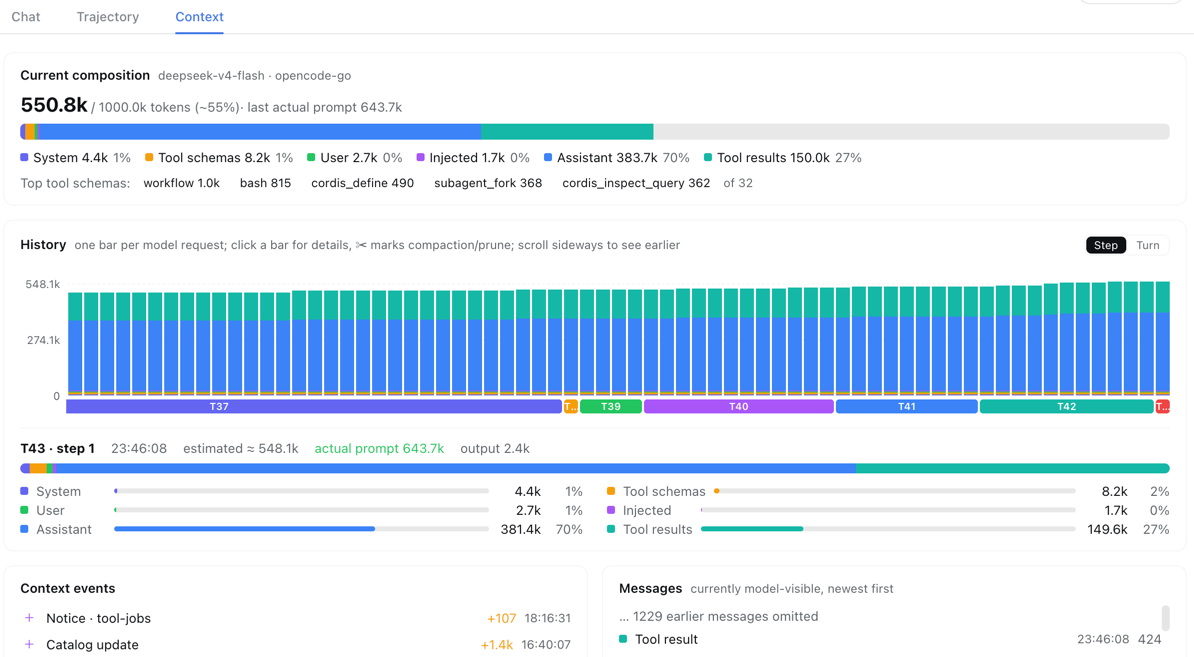
Quick install
One command, from any DeepSeek Harness installation (the web profile is the one dsh web boots; it is created automatically on first use):
dsh plugin --profile web add dsh-context
then start the web UI and open any session — the 上下文 / Context tab appears right beside Chat and Trajectory:
dsh web
Running dsh from a source checkout instead of the installed CLI? Prefix the commands with
pnpm(pnpm dsh plugin --profile web add dsh-context).
Why
Every model request packs the same window from six sources: the system prompt, tool schemas, your messages, injected context (skills, AGENTS.md, runtime snapshots), assistant replies, and tool results. When a conversation degrades or gets compacted, which part ate the budget is usually invisible. dsh-context makes it observable:
- Current composition — a stacked bar of the six categories, scaled against the model's context window (the gray track is your remaining headroom), plus the top-5 most expensive tool schemas.
- History — one stacked bar per model request (finer than per-turn), with Y-axis ticks and gridlines. Click any bar for its full breakdown, including the provider-reported prompt/output tokens next to the estimate. ✂ marks where compaction/pruning happened — watch the bars drop.
- Context events — compactions, tool-output prunes, skill injections (
Skill injected (code-review)), plugin context injections, model switches — each with its token delta and timestamp.