duntansen/dsh-update-checker ↗★ 0
dsh-update-checker
DSH web plugin: check DeepSeek Harness for updates from the sidebar — local dsh --version vs npm registry latest/next, one-click update, timeline, notifications, history.
安装
$
npx -p @deepseek-ai/dsh dsh plugin --profile web add github:duntansen/dsh-update-checker说明文档
阅读完整 README ↗dsh-update-checker
一个 DeepSeek Harness(DSH)Web 插件:在侧边栏一键自检你的 DeepSeek Harness 是否有新版本。
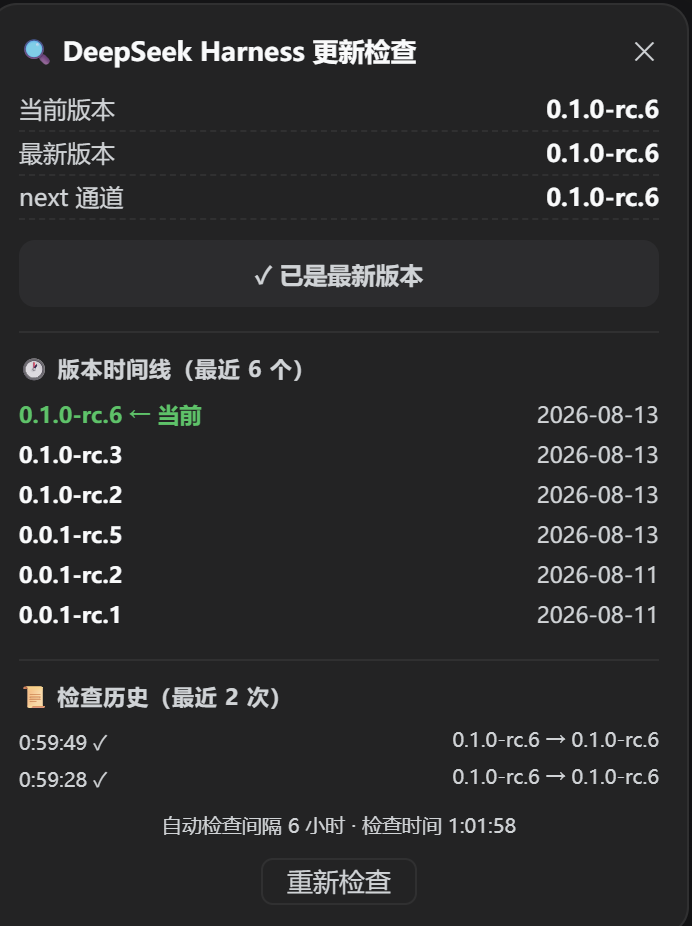
中文: 在侧栏一键自检 DeepSeek Harness 是否有新版本(本地
dsh --versionvs npm 最新版)。English: Check DeepSeek Harness updates from the sidebar (local
dsh --versionvs npmlatest/next).
功能特性
- 通过
dsh --version读取本地版本 - 查询 npm registry 中
@deepseek-ai/dsh的latest/next通道 - 语义化版本比较(正确处理
rc预发布段,如0.1.0-rc.6 > 0.1.0-rc.3) - 侧栏底部按钮状态:
⟳空闲 /…检查中 /⬆有新版本 /⚠检查失败 - 点击弹出面板:当前版本、最新版本、next 通道、状态徽章、检查时间、重新检查按钮
- 插件加载 1.5 秒后自动检查一次
安装
dsh plugin --profile web add dsh-update-checker
然后重启 dsh web 并打开界面,侧栏底部会出现 ⟳ 按钮。
源码安装 / 本地开发:
dsh plugin --profile web add link:/绝对路径/dsh-update-checker
使用方法
点击侧栏底部的 ⟳ 按钮:
| 按钮 | 含义 |
|---|---|
⟳ | 空闲(等待中) |
… | 检查中… |
⬆ | 发现新版本 |
⚠ | 检查失败(网络 / 解析) |
面板显示当前版本、最新版本、next 通道,以及状态徽章(✓ 已是最新版本 / ⬆ 发现新版本),还有检查时间和重新检查按钮。
工作原理
- Host 端:通过
webServer服务注册 HTTP 路由 。本地版本用 Node 的 读取;npm registry 数据用全局 抓取。