dsh-auth
Caddy-fronted administrator authentication bundle for DeepSeek Harness
安装
npx -p @deepseek-ai/dsh dsh plugin --profile web add github:hxy91819/dsh-auth说明文档
阅读完整 README ↗dsh-auth


Unofficial community plugin for DeepSeek Harness. Add a secure administrator login to the DeepSeek Harness Web app. dsh-auth keeps Harness on loopback and installs a project-owned Caddy forward_auth edge for pages, APIs, downloads, SSE, and WebSockets.
Version 0.2.0 is a breaking upgrade from legacy v1 deployments. Previous installer flags, Nginx-managed installations, and old sessions are not migrated. Uninstall the previous installation, then run setup again.
Quick start
Interactive setup
Install the published CLI, then start from an existing DSH Web systemd service whose upstream listens only on loopback:
sudo npm install -g dsh-auth
sudo dsh-auth setup
npm install -g dsh-auth installs the current stable CLI, and the installer pins that same version in the selected DSH profile. For controlled production rollout, install the exact version approved by your supply-chain policy:
sudo npm install -g dsh-auth@0.2.0
The interactive installer asks for the exact DSH service, administrator initialization method, HTTPS hostname, and TLS mode; shows a secret-free plan; and changes the system only after you type the exact confirmation. It installs the pinned bundle into the selected DSH profile, copies a checksum-verified Caddy binary bundled in the same package, writes permission-restricted authentication state, and enables an independent dsh-auth-caddy.service. It never stores a plaintext password and never downloads Caddy at setup time.
Normal deployment requires Linux x64 or ARM64, systemd, Node.js 24.7 or newer, and DSH Web 0.1.0-rc.7. Automatic TLS is the HTTPS default. Manual TLS requires an existing certificate and key.
$ sudo dsh-auth setup
Existing DSH Web systemd unit: dsh-web.service
Administrator initialization (password/login-token): password
Login tokens (enabled/disabled) [disabled]: enabled
Administrator username: operator
Edge mode (https/http) [https]:
TLS (automatic/manual) [automatic]:
Public HTTPS hostname: harness.example.com
...
Type install to apply this exact plan: install
Password:
Confirm password:
dsh-auth setup completed successfully.
Rerunning the same command is idempotent. An existing managed installation with identical non-secret settings is reported unchanged; different settings or files without an ownership record are rejected instead of overwritten.
Use plan before setup to inspect the same typed plan without reading a password or changing the filesystem:
sudo dsh-auth plan
CLI setup (non-interactive)
Non-interactive mode requires stable flags and an explicit administrator initialization method. For password initialization, mount the plaintext password as a temporary 0600 secret file supplied by the platform; dsh-auth reads it once to create an Argon2id hash and does not copy the plaintext.
These command names, flag names, --name value or --name=value syntax, JSON schema version 2, and exit codes are the public automation contract. Global flags may precede the command. New flags and diagnostic codes may be added. Renaming, removing, or changing the meaning of an existing flag, JSON field, or exit code is a breaking change.
Print the frozen usage text:
dsh-auth --help
dsh-auth --version
-h is an alias for --help. dsh-auth setup --help prints the same usage text. The example below is a complete HTTPS system install with password initialization and automatic TLS.
Prompts run only when stdin and stdout are both TTYs and --non-interactive is not set. --json is output format only and does not disable prompts.
sudo dsh-auth setup \
  --non-interactive \
  --json \
  --dsh-service dsh-web.service \
  --dsh-home /var/lib/dsh \
  --dsh-executable /usr/local/bin/dsh \
  --profile web \
  --admin-bootstrap password \
  --admin-username operator \
  --login-token enabled \
  --password-file /run/secrets/dsh-auth-password \
  --mode https \
  --tls automatic \
  --upstream 127.0.0.1:3080 \
  --listen-address 0.0.0.0 \
  --server-name harness.example.com
Token initialization omits the password and username. The first authorized user sets them in the browser, or chooses Later:
sudo dsh-auth setup \
  --non-interactive \
  --json \
  --dsh-service dsh-web.service \
  --admin-bootstrap login-token \
  --login-token enabled \
  --mode https \
  --tls automatic \
  --server-name harness.example.com
| Flag | Required | Default | Description |
|---|---|---|---|
--help, -h | no | Print usage and exit. | |
--version | no | Print the CLI version and exit. | |
--non-interactive | on a TTY | Disable prompts. | |
--json | no | Emit one JSON document. Does not disable prompts. | |
--mode | no | https | https or http. |
--admin-bootstrap | when not prompting | password or login-token. | |
--admin-username | password setup | Initial administrator login name. | |
--login-token | when not prompting | enabled or disabled. Token initialization requires enabled. | |
--login-token-error-message-zh | no | built-in Chinese copy | Optional 1–500 character Chinese token-failure page text. Requires --login-token enabled. |
--login-token-error-message-en | no | built-in English copy | Optional 1–500 character English token-failure page text. Requires --login-token enabled. |
--listen-address | HTTP | 0.0.0.0 for HTTPS | Literal IP bind address. HTTP still requires an explicit private or loopback address. |
--dsh-service | system setup | Exact existing DSH Web systemd unit. Omit only with --output-dir. | |
--password-file or --password-stdin | ready password setup | Password source. Not used by plan or token initialization. Unchanged reruns skip it. | |
--server-name | --mode https | Public HTTPS hostname. | |
--tls | HTTPS | automatic | automatic or manual. |
--certificate | --tls manual | Absolute TLS certificate path. | |
--certificate-key | --tls manual | Absolute TLS private-key path. | |
--dry-run | no | On setup, alias for plan. On uninstall, list owned removals without changing the host. | |
--dsh-home | no | discovered | Harness home when the unit does not infer it. |
--dsh-executable | no | discovered | DSH executable file when the unit does not infer it. Not a directory. |
--profile | no | web | DSH profile name. |
--upstream | no | 127.0.0.1:3080 | Loopback DSH listener (127.0.0.1 or [::1]). |
--package | no | dsh-auth@ | Pinned registry spec or absolute .tgz. |
--http-port | no | 80 (8080 for HTTP) | HTTP or HTTPS-redirect port. |
--https-port | no | 443 | HTTPS listen port. |
--output-dir | no | Offline or container render directory. Skips systemd. |
Removed without aliases: --nginx, --authorize-nginx-install, --user-id, --username, --roles, and --dsh-bin.
Other commands accept a smaller frozen flag set:
| Command | Required when not prompting | Optional |
|---|---|---|
plan | Same setup flags, without a password source | --json, --non-interactive |
doctor | --json | |
reset-password | --password-file or --password-stdin; --authorize-password-reset | --json, --non-interactive |
uninstall | --authorize-uninstall | --json, --non-interactive, --dry-run |
issue-login-token | --authorize-login-token-issue when not prompting | --ttl-seconds, --auth-state-file with --public-origin, --json |
hash | --password-stdin | |
secret |
Passwords are accepted only through hidden interactive input, --password-stdin, or --password-file. There is no inline password flag. Command output, JSON, plans, subprocess argv, and installer errors never contain password or session-secret values. issue-login-token is the only command whose successful stdout or JSON may contain a bearer login token.
Preview
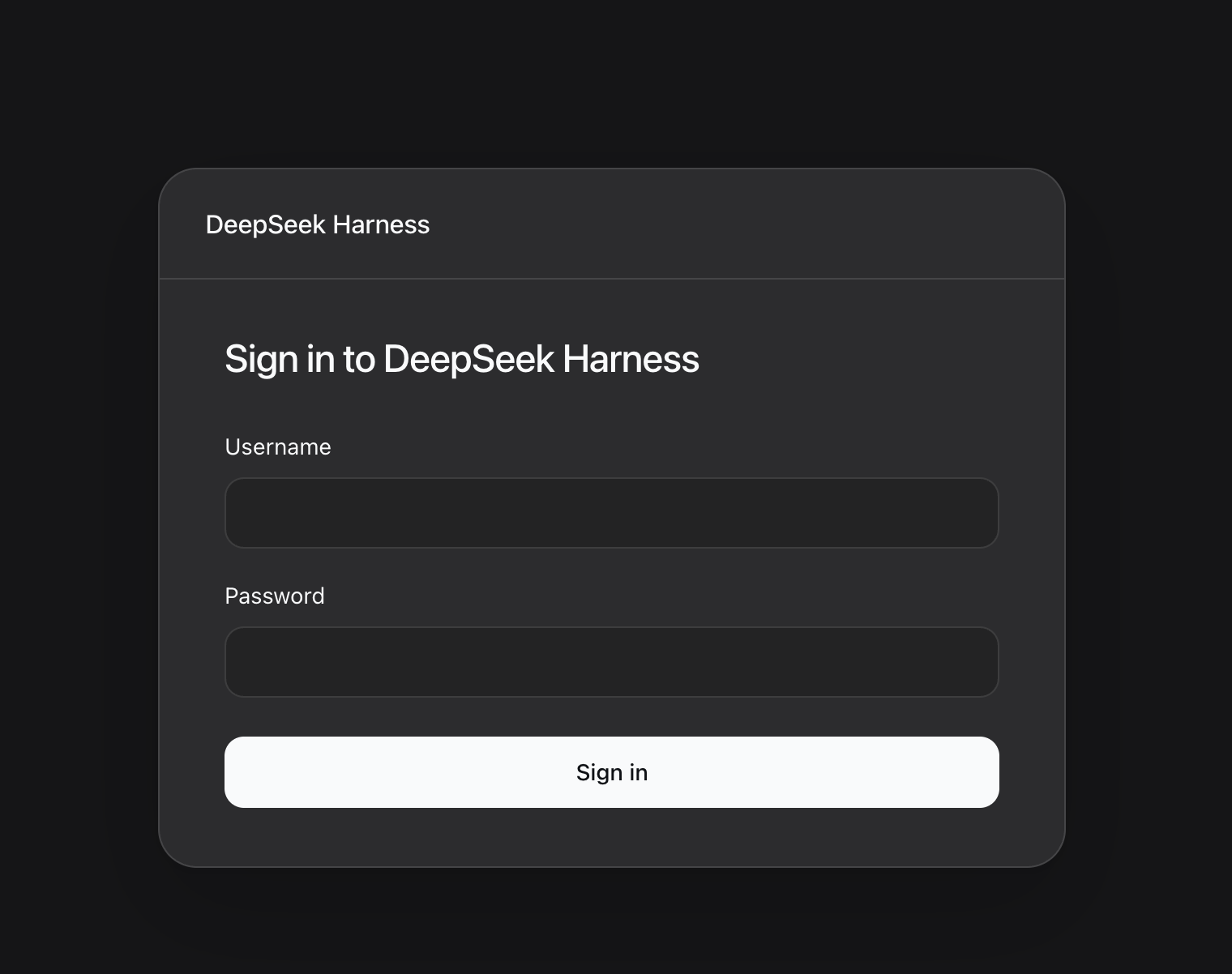
Unauthenticated visitors see a responsive login page styled to match DeepSeek Harness:
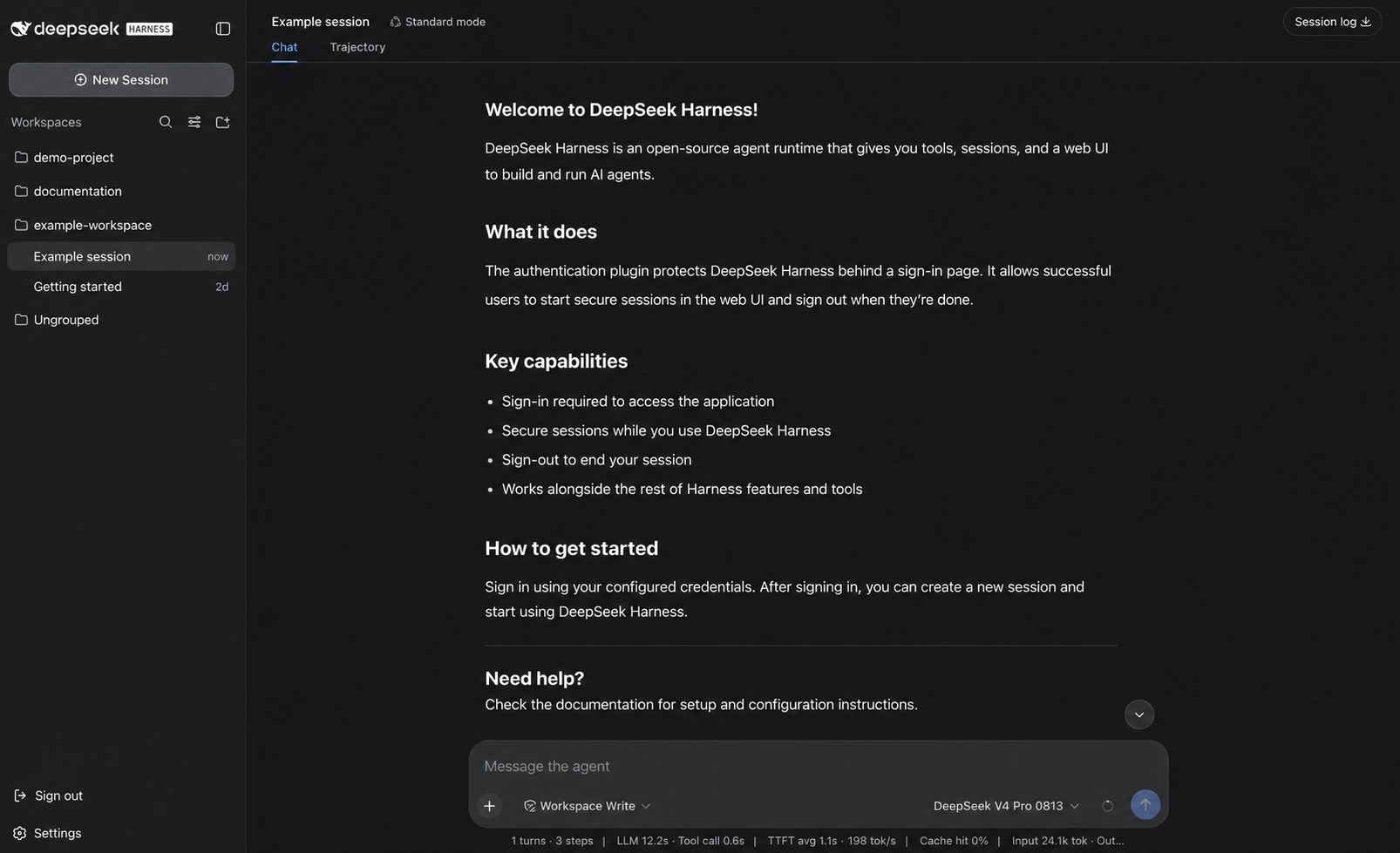
After sign-in, users enter the real Harness Web app with its normal sessions, tools, model selection, and workspace navigation. The authentication plugin adds a native sign-out action to the sidebar and a password-reset row in Settings → General:
Issue a one-time login link
When setup enabled login tokens, a cloud control plane or operator can mint a single-use URL. The raw token appears only in the successful human URL line or the JSON success document:
sudo dsh-auth issue-login-token --non-interactive --authorize-login-token-issue
The URL uses a fragment (/auth/token#token=…). Opening it establishes the same 72-hour rolling session as a password login. If the administrator password has not been set, the browser first offers a setup page; Later skips only that login.
Container and image layouts pass explicit paths instead of reading the systemd ownership record:
dsh-auth issue-login-token \
  --non-interactive \
  --authorize-login-token-issue \
  --json \
  --auth-state-file /export/dsh-auth/state/auth-state.json \
  --public-origin https://harness.example.com
Setup can replace the built-in failure page text. Configure Chinese and English independently; an omitted language keeps its built-in copy. Each value is 1–500 Unicode characters of plain text. Control characters are rejected, and HTML is shown as text rather than markup. The installer refuses these flags when --login-token is disabled.
Malformed, expired, already-used, and unknown tokens all return the same HTTP 401 page with that text. The page does not identify which of those cases occurred.
sudo dsh-auth setup \
  --login-token enabled \
  --login-token-error-message-zh '登录链接不可用,请向管理员重新申请。' \
  --login-token-error-message-en 'This sign-in link is unavailable. Request a new one from your administrator.'
Reset the password
Signed-in administrators can open Settings → General → Reset password, enter the current password, and set a new one. That updates the stored hash and signs out other browser sessions; it does not rotate the session secret.
If the current password is unavailable, operators with root on an installation created by setup can run the interactive reset:
sudo dsh-auth reset-password
After exact confirmation, the command reads and confirms the new password without echo. It atomically replaces the managed Argon2id hash, rotates the session secret, revokes all existing sessions, and restarts the recorded DSH service only when it is active. A failed restart restores both previous credential files.
Automation must provide the password through stdin or a temporary 0600 file and explicitly authorize the operation:
sudo dsh-auth reset-password \
  --non-interactive \
  --json \
  --authorize-password-reset \
  --password-file /run/secrets/dsh-auth-new-password
The command never accepts a password value in argv and does not print the password, hash, or session secret.
Plain HTTP for an isolated trusted network
Plain HTTP remains authenticated but exposes credentials and sessions to network interception. It is accepted only with an explicit --mode http and a literal loopback, RFC1918, or ULA listen address:
sudo dsh-auth setup \
  --admin-bootstrap password \
  --admin-username operator \
  --login-token disabled \
  --mode http \
  --listen-address 10.0.0.20 \
  --http-port 8080
Do not use this mode on an untrusted network. HTTPS is the production default.
Doctor, uninstall, and v1 reinstall
doctor checks the ownership record, file permissions, the exact DSH service, root-executable safety, Caddy version and checksum, caddy validate, and service state:
sudo dsh-auth doctor
sudo dsh-auth doctor --json
uninstall --dry-run lists only files and profile changes proven by the ownership record. Interactive uninstall requires typing uninstall; automation requires the exact --authorize-uninstall flag. The independent Caddy unit is removed; a user-installed Caddy or Nginx is never touched.
sudo dsh-auth uninstall --dry-run
sudo dsh-auth uninstall
schema v1 ownership records, old Nginx flags, and old plugin identity fields are refused with a reinstall diagnosis. There is no automatic migration. Old sessions become invalid after uninstall and a new setup.
Exit codes
| Code | Meaning |
|---|---|
0 | success, healthy, or unchanged |
2 | invalid or incomplete CLI input |
3 | missing or unsupported prerequisite |
4 | ownership or existing-configuration conflict |
5 | insufficient or unsafe permissions |
6 | execution or rollback failure |
7 | interactive cancellation before changes |
8 | doctor found an unhealthy installation |
JSON output uses schema version 2 and includes the command, status, exit code, redacted actions, and structured diagnostics.
Docker and offline images
Build and pin the exact npm tarball, then install it into the DSH profile without registry access:
Replace X.Y.Z with the version in the packed artifact's filename.
corepack pnpm pack --pack-destination packed
dsh plugin --profile web add --offline --config.auto-install-peers=false /artifacts/dsh-auth-X.Y.Z.tgz
Generate deterministic runtime files without invoking systemd, a package manager, or a host Caddy binary:
dsh-auth setup \
  --non-interactive \
  --output-dir /image/dsh-auth \
  --package /artifacts/dsh-auth-X.Y.Z.tgz \
  --admin-bootstrap password \
  --admin-username operator \
  --login-token enabled \
  --password-file /run/secrets/dsh-auth-password \
  --server-name harness.example.com \
  --tls manual \
  --certificate /run/tls/fullchain.pem \
  --certificate-key /run/tls/privkey.pem
The output directory contains dsh-auth.env, file-backed credentials, authentication state, a login-token directory, and a Caddyfile. Copy or mount them into fixed image paths and explicitly wire the environment file and Caddy config. The same tarball already contains linux-x64 and linux-arm64 Caddy binaries; setup copies the current architecture after checksum verification and never downloads a binary. deploy/docker/Dockerfile.install shows the offline profile layer.
Security behavior and limits
- Production cookies are
HttpOnly,Secure,SameSite=Lax,Path=/, and__Host-prefixed. Plain HTTP uses an explicit compatibility cookie mode. - Argon2id hashes and random session secrets live in separate permission-restricted files. Persistent opaque sessions use a
0600authentication-state document. - Login, logout, token redemption, and first-time administrator setup enforce CSRF plus exact Origin/Referer checks after trusted-proxy resolution. Authentication responses are
no-store. - Version 2 supports one administrator identity (
admin) per managed installation. Password and token initialization are an explicit choice. Registration, self-service account recovery, MFA, databases, multi-account policy, and multi-tenancy are outside this release. - Caddy is the only public listener. A standard reverse proxy cannot immediately revoke an already-open WebSocket. Deployments requiring immediate stream termination need a connection-aware edge.
Se