dsh-ui-outline
Turn navigation rail for dsh web following the official TurnNavigator design · 轮次导航轨道(大纲/刻度/毛玻璃预览)
安装
npx -p @deepseek-ai/dsh dsh plugin --profile web add github:iluluyu/dsh-ui-outline说明文档
阅读完整 README ↗
dsh-ui-outline
A turn rail for DeepSeek Harness (dsh) web — the official TurnNavigator design language, plus the choices the official rail doesn't give you.
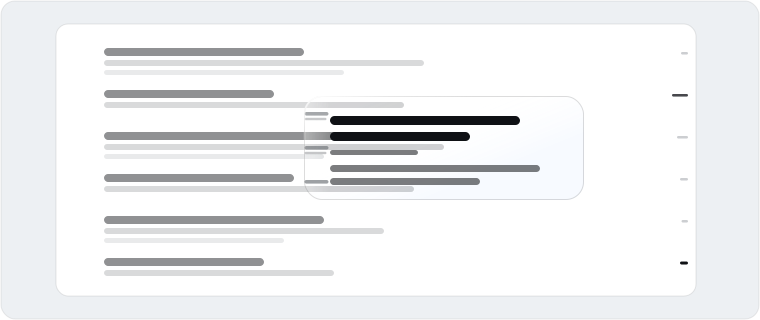
Why
- Official DNA. The rail hugs the conversation column edge (the details panel never collides), centers on the live reading band, and hides below a 900px column — exactly like the shipped navigator. Every color, radius, shadow, and motion curve resolves live from the host's design tokens.
- A living mark language. Idle ticks rest in perfect alignment; the current turn is highlighted by color alone; hovering sweeps a neighbor wave. One language, two densities —
compact(14px pitch, whole history in view) orloose(one real 30px row per turn). - Forgiving input. The strip is 44px wide and snaps every click to the nearest visible turn — the 2px line is never the target. Drag to scrub the whole conversation; a quiet landing flash marks click-arrivals, while fast scrubs stay animation-free.
- Glass, done carefully. The per-turn preview card in three finishes:
none(official opaque tokens),frost(default), orliquid, where a neutral glint enters from the conversation-facing corner and a Fresnel-thin rim catches the edge. On Chromium, liquid runs the backdrop through a real displacement lens (an SDF normal map consumed byfeDisplacementMap), so content near the card edge bends into the glass — the thick-lens fold; other engines keep a plain blur fallback. Each finish keeps exactly one rim line: a real 1px border flush against the glass (no ring-shadow gap). Each glass ships three presets — airy (transparency axis) · standard (the balance point) · misty (blur axis) — plus custom transparency and blur-radius sliders. Never overflows the page. - First-class settings. Lives in Settings → Plugins → Plugin configuration, persisted in the host's settings document — preferences follow you across browsers and machines. Not localStorage.
- Cheaper than a shadow. Scrolling costs one rect read plus a binary search per frame; every animation is compositor-only; pointer moves coalesce to one job per frame; a settled outline re-renders nothing while you read.
- Never two rails. While this rail is up, the official one stands down — and below two turns (the official minimum) this one stands down instead.
Install
Requires dsh ≥ 0.1.0-rc.7 (keyed plugin-settings slot + open settings namespaces).
From npm:
dsh plugin --profile web add dsh-ui-outline
Or straight from GitHub (pin a tag or branch if you like):
dsh plugin --profile web add github:iluluyu/dsh-ui-outline
# pinned to a tag/branch:
dsh plugin --profile web add github:iluluyu/dsh-ui-outline#v0.0.2
Both paths behave identically; update with dsh plugin --profile web update dsh-ui-outline, remove with dsh plugin --profile web remove dsh-ui-outline. Restart dsh web and reload the page to activate.
Settings
All settings apply live and persist in the host settings document:
| Setting | Options | Default |
|---|---|---|
| Side | Right · Left | Right |
| Preview material | None · Frosted · Liquid glass | Frosted |
| Glass parameters | Presets: Airy · Standard · Misty + Custom (transparency / blur-radius sliders, shown only while its material is selected) | Standard |
| Mark layout | Compact · Loose | Compact |
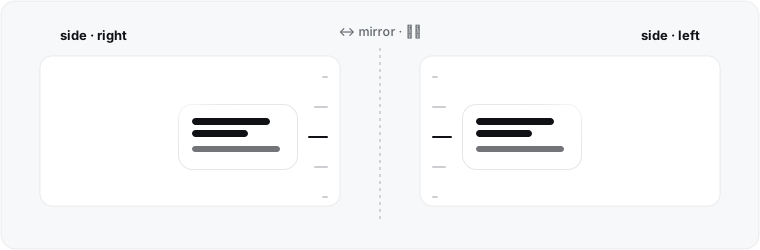
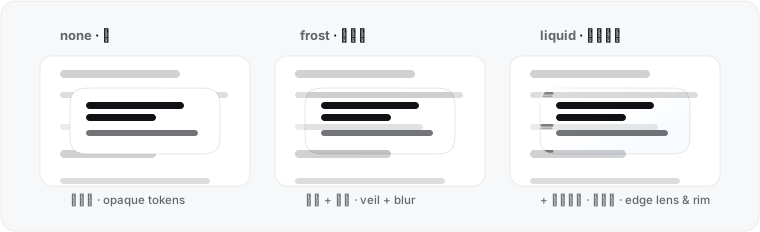
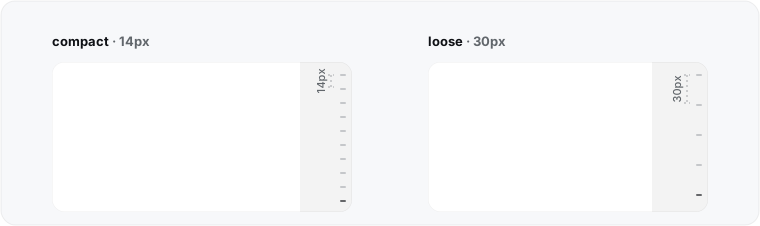

The card is bilingual zh/en, tracking the app locale. The settings namespace is outline; a manual override looks like outline: { side: left, material: frost, frostTransparency: 65, frostBlur: 10 } in ~/.dsh/settings.yaml. The plugin's cordis.yml row also carries a config: block — it layers under the user document, so profile owners can pin fleet-wide defaults that personal settings always override.
Performance
- Reading is free. Scroll tracking reads one rect per frame and binary-searches cached turn offsets, refilled only when the conversation DOM changes.
- Streaming doesn't ripple. Unchanged rows reuse their objects; a settled outline re-renders nothing while you read. Snippets read
textContent, never the layout-forcinginnerText, and only the newest step per turn. - Compositor-only motion. The wave, the preview card's glide, and every entrance animate
transform/opacity— animating coordinates would relayout the fixed rail every frame, so nothing does. - Coalesced pointers. Pointer moves become one read-then-write job per animation frame, so scrubbing costs O(1) layouts regardless of pointing-device frequency.
- Contained by construction. The rail is
position: fixedinside the click-through overlay layer: it can never stretch the page or add a scrollbar.
Design notes
- Design tokens (
--dsw-alias-*) resolve live from the host page with the official first-paint fallbacks, so theme changes and future token updates are picked up automatically. - The rail anchor, reading-band geometry, and preview interaction follow the official TurnNavigator. The mark language (aligned rest + color highlight + wave) and the 14/30px density split are this plugin's own ergonomics.
- 18.4px corner radius, plain circles — the shape this card has effectively always rendered as. (A G2
corner-shapeupgrade was explored and abandoned with measurements: thesquirclekeyword silently computes to a plain circle in Chrome 152; the explicitsuperellipse(4)collapses the perceived radius at any matching scale; and Chrome's defaultcorner-shapeis alreadysuperellipse(1.5), which is the look users know — see docs/theme-plan.md.) - Reduced motion is respected throughout.
Credits & license
- Design language follows the TurnNavigator in the official deepseek-harness (MIT, © DeepSeek): rail geometry, reading-band centering, and hiding thresholds all match the official behavior.
- The neighbor wave (nearby marks stretching with distance decay under the pointer) and drag-to-scrub were informed by the floating thread-navigation rail built into OpenAI's ChatGPT desktop app (Codex desktop).
- Liquid-glass layering — and the displacement-lens technique (SDF normal map +
feDisplacementMapon the backdrop) — was informed by DevBehindYou/LiquidLens and tomagranate/liquid-glass (both MIT); the implementation here is independent, with a deliberately neutral (non-chromatic) lens after per-channel CA was measured to fringe text edges. - Runs on dsh: plugin host cordis, React runtime provided by the host; settings schema via @deepseek-ai/schemastery (MIT).
- No third-party code is bundled; no transitive license obligations.
MIT © iluluyu
Development
Zero-build: lib/ is both source and artifact. Turn discovery is DOM-based ([data-conversation-scroll], [data-chat-flow-kind="user"]), decoupled from the snapshot API; geometry reads the official CSS variables off the live scrollport.
git clone https://github.com/iluluyu/dsh-ui-outline
npm run check        # syntax gate
| File | Role |
|---|---|
cordis.yml | bundle patch: one loader row into the Web profile |
lib/index.js | node half: registers the outline settings namespace |
lib/client.js | browser half: the rail + preview card (into shell.overlay) and the settings card (into settings.plugin.item) |
Local dev: point the profile at the working copy ("dsh-ui-outline": "link:/path/to/outline", pnpm install in both), restart dsh web, hard-reload.
Keywords: dsh plugin · dsh 插件 | deepseek-harness · DeepSeek Harness 插件 | turn navigation · 轮次导航 | thread navigator · 对话导航 | conversation outline · 会话大纲 | chat history · 对话记录 | sidebar rail · 侧边栏导航条 | glassmorphism · 玻璃拟态 | frosted glass · 毛玻璃 | liquid glass · 液态玻璃 | backdrop filter · 背景滤镜