keman-ai/dsh-skin-pack--packages-dsh-blue-whale-ocean ↗★ 5
dsh-blue-whale-ocean
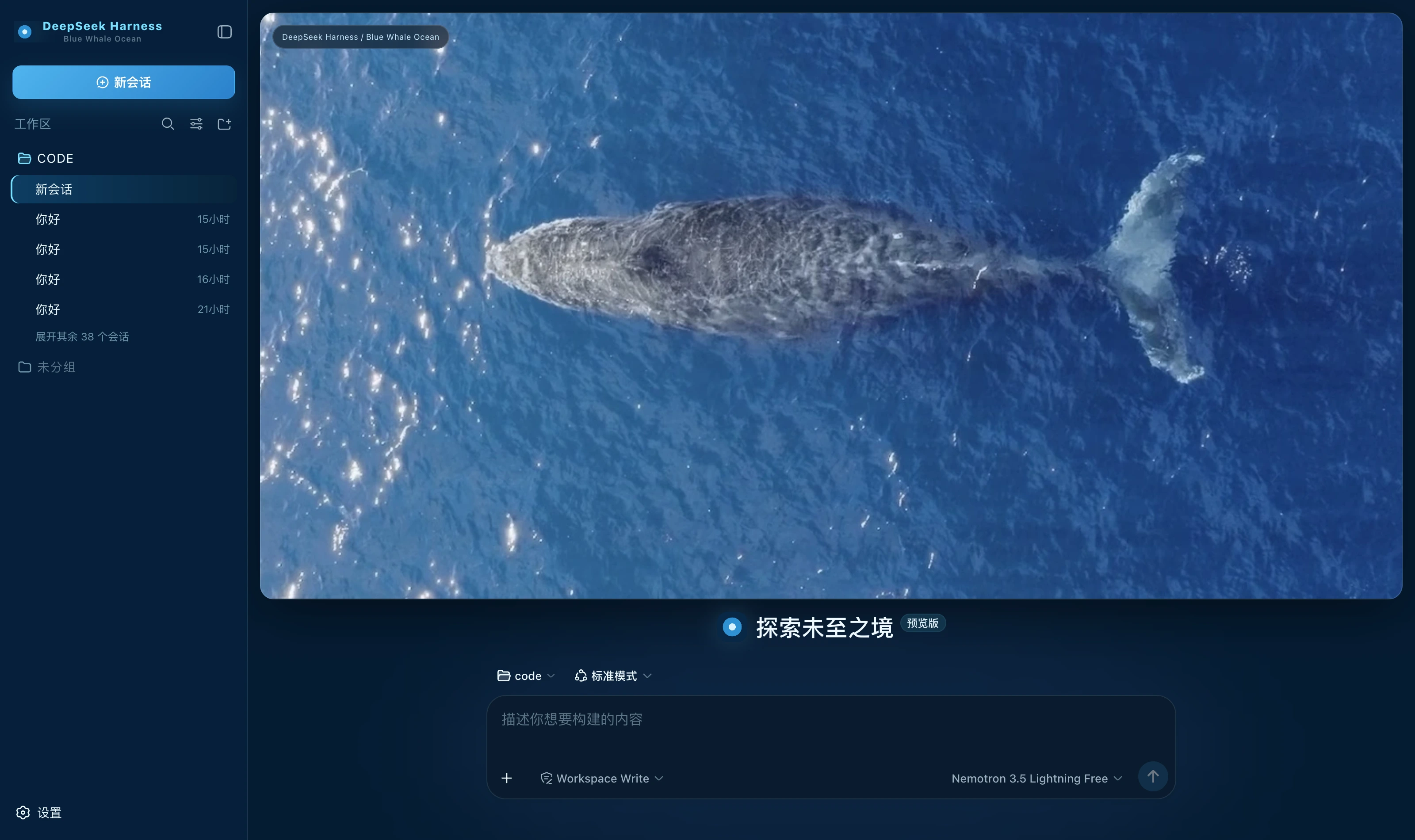
Blue Whale Ocean — a dark skin for DeepSeek Harness: a deep-ocean blue / translucent cyan-blue / ice-white highlight palette with a full whale-at-sea banner on the new-session page
安装
npx -p @deepseek-ai/dsh dsh plugin --profile web add github:keman-ai/dsh-skin-pack#83e92004f8c3b52b9bf66d75aa96ddbc709bde13&path:packages/dsh-blue-whale-ocean说明文档
阅读完整 README ↗dsh-blue-whale-ocean · Blue Whale Ocean
A skin for DeepSeek Harness (dsh): deep-ocean blue as the ground, translucent cyan-blue for borders and state and ice white for highlights alone, with a full whale-at-sea banner on the new-session page.
What it changes
- A full set of semantic tokens: a deep-ocean ground
#051c33, two rising panel levels and a single dark border tinted cyan-bluergba(173,226,255,.15), with#eef9fftext. Around 80--dsw-alias-*/--dsw-specific-*variables change at once. - A full banner on the new-session page: the whale seen from above with its wake, a 16px radius, a cyan-blue border and a deep shadow; the composer sits separately below and the two never overlap, with an identity badge in the cover's top-left corner. The banner retracts once you enter the chat page.
- Brand mark takeover: a round mark of ice-white core, cyan-blue ring and deep-ocean ground, subtitled "Blue Whale Ocean".
- A right-hand status dock: always present; see the table below.
Palette rules
The prototype states the rule plainly in its own notes:
The whole theme is drawn together into deep-ocean blue, translucent cyan-blue and ice-white highlights.
The handoff is blunter still: theme = deep ocean / cyan light / ice white, mode = deep ocean.
| Colour | Value | Used for |
|---|---|---|
| Deep-ocean blue | #051c33 / #082845 / #0d3559 | Ground and panels — most of the interface |
| Translucent cyan-blue | #79dfff | Borders, emphasis and running. The light coming down through the surface |
| Ice white | #d9f3ff | Highlights. Only the one or two places that most need to be seen; spread wider it stops being a highlight |
| Mid blue | #3da7e4 → #2472b9 | The primary action. The prototype's 135° gradient on .new |
🔴 Cyan is never a solid button: here it is the language of borders and state, and a solid fill would crush the clarity of the water, so the primary action goes to the mid-blue gradient instead.
🔴 Warning and error are derived: the prototype drew only the happy path and gave neither colour. Amber is derived towards the ice white as a cool-leaning warm tone, and red is pulled down to low saturation — this skin's character is clarity, and nothing glaring belongs in it.
What the status dock shows
| Card | Fields | Source |
|---|---|---|
| Waiting on you | Tools awaiting approval, questions awaiting an answer | ConversationSnapshot.pending. Appears only when something is genuinely waiting |
| Current Session | State, elapsed turn time, current tool duration, inbox, model | running / turnTimings / runningCalls / queue; the model comes from the latest assistant message's provenance.model |
| Context | Occupancy %, token load, and the System / tool-schema / conversation composition bar | The contextPressure and contextBreakdown projections |
| Permission | The active permission and sandbox mode | The permissions projection |
| Usage | Input / output / cache hits / time spent / turns | The tokenUsage and sessionStats projections |
| Plan | Todo progress | The todos projection (the card is absent when there is no list) |
| Tool calls | Tool name · real duration · outcome | Trajectory tool-result nodes (duration = time - callTime) plus the snapshot's runningCalls. Appears only once a call has happened |
| Context injections | The source and form of each injection | Trajectory context nodes (provenance.label / form) |
| Folded away | Compaction count, items and tokens folded | Trajectory compaction nodes. Absent when nothing was compacted |
⚠️ A tool duration may be absent: it can only be computed while the matching tool/call is still inside the session window.
Older calls that scrolled past report only name and outcome — better blank than an invented figure.
⚠️ Composition is not a total: the three contextBreakdown figures use fixed-density estimates (systematically low for Chinese and JSON schema)
and do not add up to the token load, which is anchored to the provider's reported value. The UI says so too.
Deliberately not done
The several ONLINE rows under Harness Systems in the prototype's right column, its mode cards and its fixed energy value, and the "◌ DEEP WATER ONLINE" in the cover's top-right corner all have no matching projection in the harness.
Decoration is fine; fake state is not. An energy value that never changes convinces nobody the second time they see it, and the real numbers beside it get doubted along with it.
This draft gives no agent-copy specification either, so not one line of host copy is replaced.
Install
Skin market (recommended): find it in the market and install, then restart dsh.
Manual install (during development):
npm install && npm run build
DST=~/.dsh/profiles/web/node_modules/dsh-blue-whale-ocean
mkdir -p "$DST" && cp -R lib cordis.patch.yml skin.json package.json README.md "$DST/"
# then add dsh-blue-whale-ocean to the profile package.json's dependencies and dsh.profile.bundles
After changing it you must restart dsh: the profile tree has to be recomposed, and without a restart the UI stays as it was.
🔴 The side effect of autoApply
Installing switches to this skin by default (autoApply, default true). The reason is that the harness does not persist third-party theme ids,
and the built-in Settings → Appearance has only three cells: light / dark / follow system, with no third-party themes —
switching manually requires the skin market's own panel (Settings → Skin Market).
The cost: it reapplies on every refresh, so switching away lasts only for that session. To change permanently, set autoApply to false
or uninstall the plugin. It is implemented as an 8-second window after startup (long enough to outlast the Host preference snapshot), after which it lets go entirely.
Version requirements
Requires dsh 0.1.1-rc.2 or newer. The brand-slot takeover relies on slot priority shadowing (only equal
priorities count as a conflict; different priorities shadow, and the lower number renders). On older versions these three registrations throw and are swallowed,
merely falling back to the official brand mark, while the palette and cover keep working.
Assets
The cover is the overhead photograph from the prototype (1418×1179), cut to 1418×700 to match the banner's ratio, at cwebp q95 in native resolution — the fine specular points on the water cannot survive downscaling.
Development
npm run check   # tsc --noEmit
npm run build   # produces lib/index.js (host half) and lib/client.js (browser half)
lib/ must be committed: skins install via github:owner/repo, which installs the build output from the repository;
if the source moves and the output does not, people install the old version (and the market uninstalls the package outright over the missing entry file).
License
MIT © Science Roam Limited