keman-ai/dsh-skin-pack--packages-dsh-cyber-tao ↗★ 5
dsh-cyber-tao
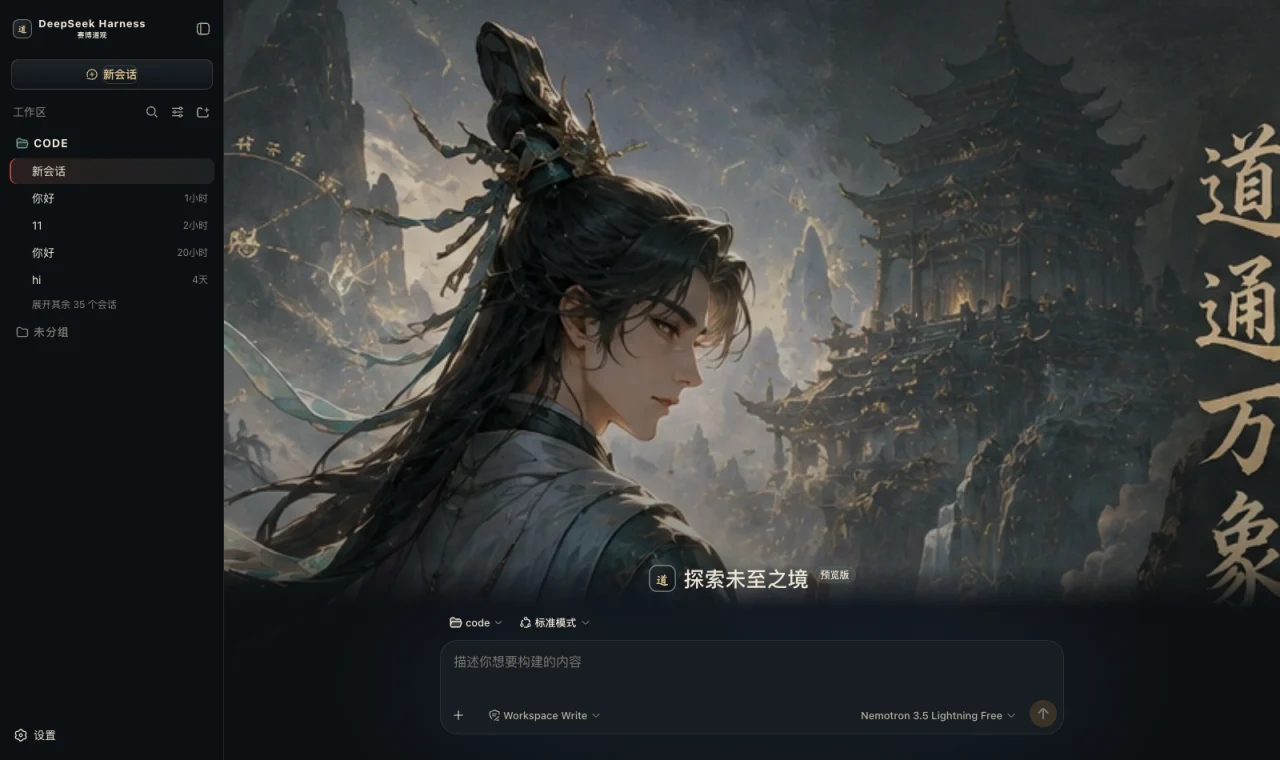
Cyber Tao Temple — a dark skin for DeepSeek Harness: obsidian, bronze, rice-paper white, cinnabar and jade, with a full-bleed mountain-gate visual on the new-session page
安装
npx -p @deepseek-ai/dsh dsh plugin --profile web add github:keman-ai/dsh-skin-pack#83e92004f8c3b52b9bf66d75aa96ddbc709bde13&path:packages/dsh-cyber-tao说明文档
阅读完整 README ↗dsh-cyber-tao · Cyber Tao
A skin for DeepSeek Harness (dsh): an obsidian ground, bronze borders, rice-paper white text, cinnabar for emphasis, jade for state, and a full-bleed mountain-gate visual on the new-session page
What it changes
- A full set of semantic tokens: an obsidian ground
#0a0d10, panels#13181d, and exactly one dark gold borderrgba(228,207,168,.12), with rice-paper white text#efe7d7. About 80--dsw-alias-*/--dsw-specific-*tokens change at once, and every layer follows. - A talisman grid:
body::beforelays a 140px dark-gold grid at 8% opacity withmix-blend-mode: screen— the prototype's texture layer. It is faint enough to disturb no text, andpointer-events: noneguarantees it intercepts no click. - A full cover on the new-session page: the acolyte, the mountain gate above the clouds, and the calligraphy. It collapses on entering a conversation or the trajectory.
- Brand takeover: the sidebar and hero marks both become a bronze seal bearing the character 道, with the subtitle "Cyber Tao Temple".
- Personified copy: thinking → "The acolyte is contemplating the workings of fate…"; failure → "The workings are disturbed — recalculate."; and a confirmation prompt is prefixed with "this carries consequences; a human decides" — the original text stays, since that is what you judge by.
- A right-hand status dock: always present; see the table below.
Palette rules
The prototype states the rule in one line: an obsidian ground, bronze borders, rice-paper white text, cinnabar for emphasis, jade for state. Five words, five uses; stray beyond them and this is no longer the skin:
| Colour | Value | Used for |
|---|---|---|
| Obsidian | #0a0d10 / #13181d | Ground and panels — most of the interface |
| Bronze | rgba(228,207,168,.12) | Borders. All layering on a dark ground rests on this one line |
| Rice-paper white | #efe7d7 | Body text |
| Cinnabar | #b94235 | Emphasis: the selected session, and hovering a destructive action. Only ever for "this is the one" |
| Jade | #6e9788 | State: running. A step apart from the success green, so running and success never read as one |
| Red gold | #e0c58f → #c8a768 | The primary action button (the prototype's .new-btn gradient) |
The prototype writes another line too: the temple's character must run deep, but the product's usability must not be swallowed. So the three-column layout, the information density and the button and card hierarchy are untouched; only atmosphere, wording and texture take on the temple.
What the status dock shows
| Card | Fields | Source |
|---|---|---|
| Waiting on you | Tools awaiting approval, questions awaiting an answer | ConversationSnapshot.pending. Appears only when something is genuinely waiting |
| Current Session | State, elapsed turn time, current tool duration, inbox, model | running / turnTimings / runningCalls / queue; the model comes from the latest assistant message's provenance.model |
| Context | Occupancy %, token load, and the System / tool-schema / conversation composition bar | The contextPressure and contextBreakdown projections |
| Permission | The active permission and sandbox mode | The permissions projection |
| Usage | Input / output / cache hits / time spent / turns | The tokenUsage and sessionStats projections |
| Plan | Todo progress | The todos projection (the card is absent when there is no list) |
| Tool calls | Tool name · real duration · outcome | Trajectory tool-result nodes (duration = time - callTime) plus the snapshot's runningCalls. Appears only once a call has happened |
| Scripture injection | The source and form of each context injection | Trajectory context nodes (provenance.label / form) |
| Folded away | Compaction count, items and tokens folded | Trajectory compaction nodes. Absent when nothing was compacted |
⚠️ A tool duration may be absent: it can only be computed while the matching tool/call is still inside the session window. Older calls that scrolled past report only name and outcome — better blank than an invented figure.
⚠️ Composition is not a total: the three contextBreakdown figures use fixed-density estimates (systematically low for Chinese and JSON schema)
and do not add up to the token load, which is anchored to the provider's reported value. The UI says so too.
Deliberately not done
The prototype's right column has a Goal · 72% · 5 / 7 checkpoints line, three hardcoded Context files
(entries such as ui-theme/src/client/index.ts at 8.1 KB), and a daily-practice figure on the cover —
the harness has a projection for none of them.
Decoration is fine; fake state is not. A spirit figure permanently reading 76 is disbelieved the second time it is seen, and the real numbers beside it get doubted along with it. So none of them are built, and the right column keeps only cards backed by real data.
The prototype's agent copy for Tool run and Context is also not implemented: The harness's tool rows have only ok / error and no running to hang on, and forcing one would produce a permanently lit fake state.
Install
Skin market (recommended): find it in the market and install, then restart dsh.
Manual install (during development):
npm install && npm run build
DST=~/.dsh/profiles/web/node_modules/dsh-cyber-tao
mkdir -p "$DST" && cp -R lib cordis.patch.yml skin.json package.json README.md "$DST/"
# then add dsh-cyber-tao to the profile package.json's dependencies and dsh.profile.bundles
After changing it you must restart dsh: the profile tree has to be recomposed, and without a restart the UI stays as it was.
🔴 The side effect of autoApply
Installing switches to this skin by default (autoApply, default true). The reason is that the harness does not persist third-party theme ids,
and the built-in Settings → Appearance has only three cells: light / dark / follow system, with no third-party themes —
switching manually requires the skin market's own panel (Settings → Skin Market).
The cost: it reapplies on every refresh, so switching away lasts only for that session. To change permanently, set autoApply to false
or uninstall the plugin. It is implemented as an 8-second window after startup (long enough to outlast the Host preference snapshot), after which it lets go entirely.
Version requirements
Requires dsh 0.1.1-rc.2 or newer. The brand-slot takeover relies on slot priority shadowing (only equal
priorities count as a conflict; different priorities shadow, and the lower number renders). On older versions these three registrations throw and are swallowed,
merely falling back to the official brand mark, while the palette and cover keep working.
Assets
The cover comes from the prototype's full-screen design, with its mock sidebar, mock panels and title buttons cropped away, leaving only the artwork (652×500 webp, inlined as a data URI).
Development
npm run check   # tsc --noEmit
npm run build   # produces lib/index.js (host half) and lib/client.js (browser half)
lib/ must be committed: skins install via github:owner/repo, which installs the build output from the repository;
if the source moves and the output does not, people install the old version (and the market uninstalls the package outright over the missing entry file).
License
MIT © Science Roam Limited