keman-ai/dsh-skin-pack--packages-dsh-niulai ↗★ 5
dsh-niulai
Niulai Field — a dark skin for DeepSeek Harness: a warm-black field palette with a low-poly orange cow background
安装
npx -p @deepseek-ai/dsh dsh plugin --profile web add github:keman-ai/dsh-skin-pack#83e92004f8c3b52b9bf66d75aa96ddbc709bde13&path:packages/dsh-niulai说明文档
阅读完整 README ↗dsh-niulai · Niulai Field
A dark skin for DeepSeek Harness: a field at dusk, with a low-poly orange cow standing beneath your conversation.
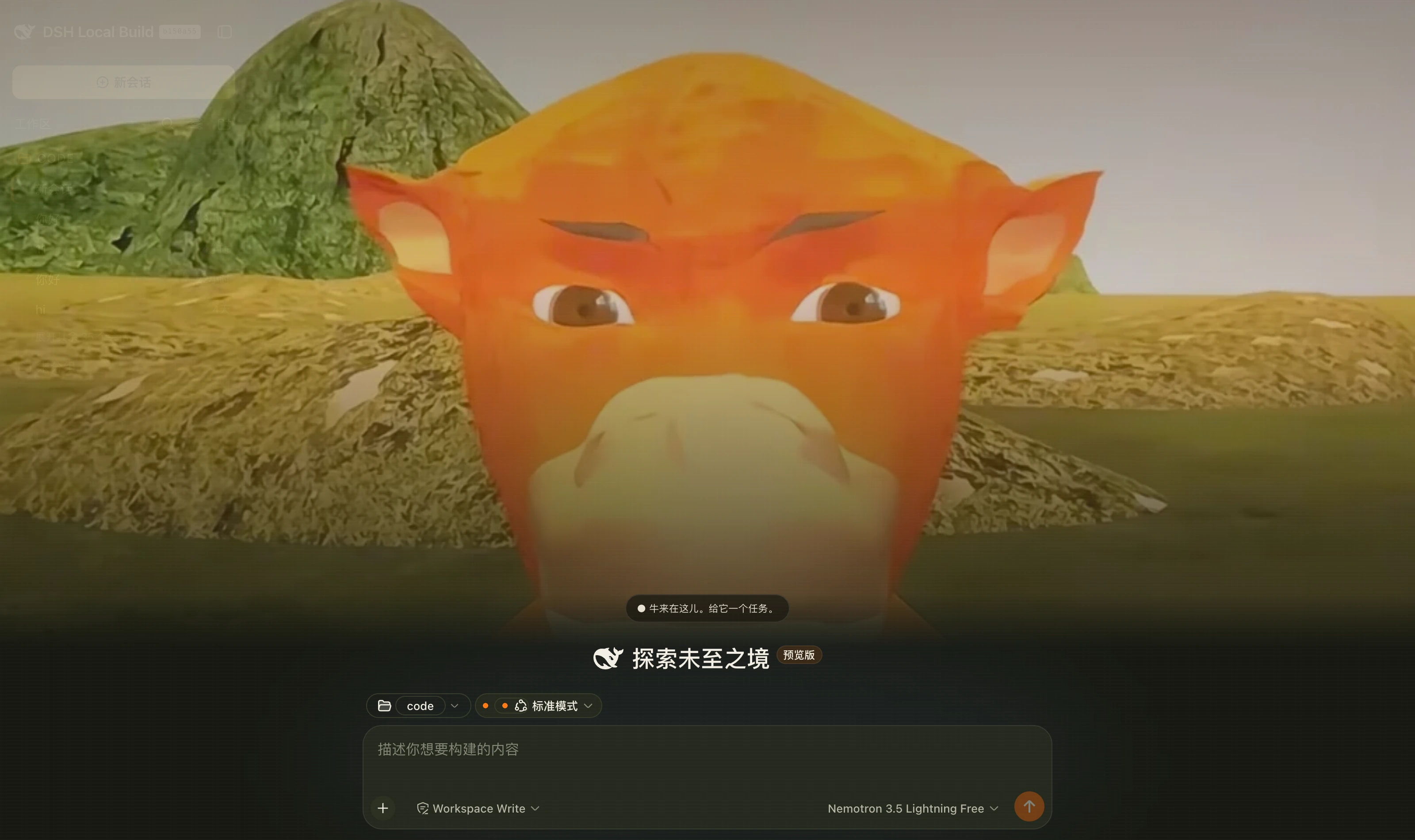
The ground is a warm black with a grass-green cast, #171911 — not neutral grey, which is the most visible difference from the built-in dark theme, whose family leans blue. The primary button becomes the cow's body orange #ff7a14, and dividers and scrollbars run from grass to straw. Dark only.
Install
Not published to npm; install from GitHub:
dsh plugin --profile web add -w github:keman-ai/dsh-niulai
-w is not optional. The profile directory ships a pnpm-workspace.yaml, so pnpm reads it as a workspace root and without the flag fails outright with ERR_PNPM_ADDING_TO_ROOT.
Restart dsh once and it takes effect on install.
To return to "install only registers it; select it yourself", turn auto-apply off in the profile's cordis.patch.yml:
- id: niulai
  config:
    autoApply: false
Why auto-apply is the default: the harness's third-party theme ids never enter the built-in settings schema (see the ui-theme README), so the choice lives only in the process and is never written to $DSH_HOME/settings.yaml. Without auto-apply you would return to Settings → Appearance and reselect on every start — installing a skin and not seeing it. You may switch away at any time; the plugin switches once at load and never takes the choice back.
The repository ships its build output (lib/) and has no prepare script, so pnpm runs no build script when installing from a git source and you never have to grant allowBuilds.
Uninstall
dsh plugin --profile web remove -w dsh-niulai
Unregistering the theme resets the preference to the default, so the UI never sticks on a palette that no longer exists.
What it changes
| Layer | Content | Does a redesign break it? |
|---|---|---|
| Palette | About 80 --dsw-alias-* / --dsw-specific-* semantic tokens | No. Tokens are a semantic contract, and a harness redesign does not change their meaning |
| Background | A translucent cow spread at the lowest layer, darkened by gradients above and below | No. It hangs only on our own body[data-dsh-niulai] |
Deliberately not done: hooking individual parts (putting a cow avatar beside assistant messages, rebranding the title bar). That needs fuzzy [class*='sidebarCol'] matches against the harness's internal hashed CSS module names — more striking, but it shatters the moment the host is redesigned. Niulai bets on the semantic layer instead, buying upgrades that do not break.
The background appears only while the Niulai theme is active: switching back to the built-in dark removes the element and the body attribute. A cow still spread while the palette is no longer the field's is pure visual pollution.
Palette at a glance
The draft's 25 variables are the whole colour source, held in NIULAI_PALETTE in src/client/tokens.ts. Recolour there.
| Primary orange / deep orange | #ff7a14 / #e95e0a |
| Muzzle cream | #f0d28a |
| Grass / moss / straw | #737746 / #4f5f32 / #b49a54 |
| Ground / sidebar / three container levels | #171911 / #1c1f16 / #20231a #25291e #2b3022 |
| Body / secondary / tertiary text | #f3efe4 / #b7b6a5 / #858777 |
| Success / warning / danger / info | #91b65b / #d9b45e / #db735b / #7f9fbf |
The mapping is semantic alignment, not colour-by-colour transcription: the draft's --surface/-2/-3 are three container levels and so are the harness's bg-layer-1/2/3. What the draft omits (scrims, skeletons, toolbar buttons) is derived from the existing ramp, with the rule stated in each section of tokens.ts.
Development
pnpm install
pnpm check     # type check
pnpm build     # → lib/index.js (host half) + lib/client.js (browser half)
| File | Responsibility |
|---|---|
src/index.ts | The host half, the Loader's mount point |
src/client/index.ts | Registers the theme and mounts the background layer, both through ctx.effect for full cleanup |
src/client/tokens.ts | The mapping from 25 design variables to 80 semantic tokens |
src/client/niulai.module.css | Background-layer styles |
src/client/cow-art.generated.ts | The inlined cow artwork (generated from the source with cwebp; nothing hand-written) |
lib/ is committed on purpose: this package is not published to npm and everyone installs from a git source, so shipping the output avoids betting on the other machine's toolchain. Commit the pnpm build output along with your code changes.
Both cow images are generated from the draft's 1011×702 original:
cwebp -crop 300 55 470 470 -resize 256 256 -q 84 source.png -o cow-avatar.webp   # 6KB
cwebp -q 76 source.png -o cow-cover.webp                                          # 32KB
types/dsh.d.ts vendors the parts of the harness API we use, transcribed from 0.1.0-rc.7 — the @deepseek-ai/dsh-client-* dependency chain on npm is incomplete and cannot be installed. When host behaviour disagrees with the declarations, check that file first.
Related
- dsh.a2hmarket.ai — the DSH skin market
- dsh-skin-market — browse the market and install skins in one click from dsh's settings
License
MIT © 2026 Science Roam Limited