keman-ai/dsh-skin-pack--packages-dsh-ultraman-cosmic-hero ↗★ 5
dsh-ultraman-cosmic-hero
Cosmic Hero — a dark skin for DeepSeek Harness: deep-space blue-black, the timer's three colours (cyan/amber/red), and a full-bleed hero visual on the new-session page
安装
npx -p @deepseek-ai/dsh dsh plugin --profile web add github:keman-ai/dsh-skin-pack#83e92004f8c3b52b9bf66d75aa96ddbc709bde13&path:packages/dsh-ultraman-cosmic-hero说明文档
阅读完整 README ↗dsh-ultraman-cosmic-hero · Cosmic Hero
A dark skin for DeepSeek Harness (dsh): deep-space blue-black with the colour timer's three colours, and a full-bleed cosmic hero visual on the new-session page.
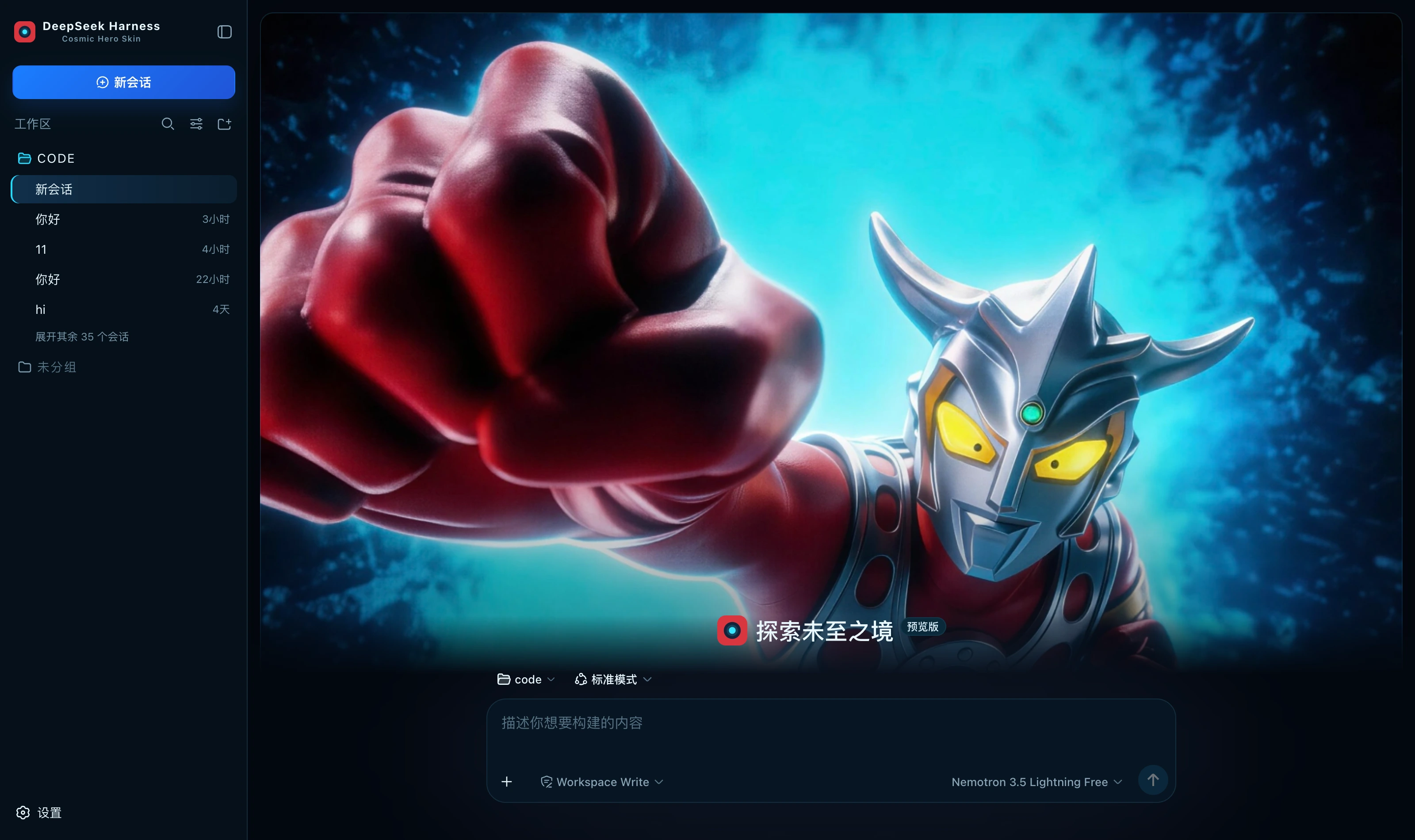
What it changes
| Surface | Content |
|---|---|
| Palette | A full set of --dsw-alias-* / --dsw-specific-* semantic tokens on the dark base, with every border a 1px line tinted cyan |
| New session | The visual fills a 15px-radius card with a cyan border and a large shadow, the composer sitting at its lower edge; it collapses on entering a conversation |
| Brand slots | The sidebar and new-session marks become a timer cross-section badge — cyan core, deep-blue ring, red shell — with the subtitle Cosmic Hero Skin |
| Status dock | Always present on the conversation page: a reduced visual, six kinds of real state and an energy core that changes colour, collapsible (the choice is remembered) |
The colour division (read from the prototype)
- Blue = the primary action, the interface's only large solid button (
+ New session); - Cyan = borders, icons and running;
- Green = ready and success; amber = actions needing your confirmation;
- Red is scarce — in the prototype it appears only on the badge's outer ring, so here it is reserved for errors and carries weight whenever it shows.
The energy core is real
The Energy Core in the prototype's right column is decoration: a fixed colour and a hardcoded STABLE. Here it
follows real context occupancy, using exactly the colour timer's three colours:
| Occupancy | Core | Core state |
|---|---|---|
| < 60% | Cyan | STABLE |
| < 85% | Amber | CAUTION |
| ≥ 85% | Red | CRITICAL |
| No data | Grey-blue | — (it does not pretend to be stable) |
The occupancy bar above takes one colour per band rather than copying the prototype's three-colour gradient — the prototype's bar is a hardcoded 72% wide, across which the gradient reads cyan → amber → red, while ours is as wide as the real occupancy: at 3% the whole gradient compresses into 3%, crushing three colours together and reading as critical when the opposite is true.
What the status dock shows
| Card | Fields | Source |
|---|---|---|
| Waiting on you | Tools awaiting approval, questions awaiting an answer | ConversationSnapshot.pending. Appears only when something is genuinely waiting |
| Current Session | State, elapsed turn time, current tool duration, inbox, model | running / turnTimings / runningCalls / queue; the model comes from the latest assistant message's provenance.model |
| Context | Occupancy %, token load, and the System / tool-schema / conversation composition bar | The contextPressure and contextBreakdown projections |
| Energy Core | The core's colour and state | Derived from the occupancy above; see the table |
| Permission | The active permission and sandbox mode | The permissions projection |
| Usage | Input / output / cache hits / time spent / turns | The tokenUsage and sessionStats projections |
| Plan | Todo progress | The todos projection (the card is absent when there is no list) |
| Beam calls | Tool name · real duration · outcome | Trajectory tool-result nodes (duration = time - callTime) plus the snapshot's runningCalls. Appears only once a call has happened |
| Context injections | The source and form of each injection | Trajectory context nodes (provenance.label / form) |
| Folded away | Compaction count, items and tokens folded | Trajectory compaction nodes. Absent when nothing was compacted |
⚠️ A tool duration may be absent: it can only be computed while the matching tool/call is still inside the session window. Older calls that scrolled past report only name and outcome — better blank than an invented figure.
⚠️ Composition is not a total: the three contextBreakdown figures use fixed-density estimates (systematically low for Chinese and JSON schema)
and do not add up to the token load, which is anchored to the provider's reported value. The UI says so too.
The five ONLINE rows under Harness Systems and the two Hero Modes cards in the prototype's right column are pure decoration; the harness has no matching projection, so they are not built and no fake data fills the space.
Install
Skin market (recommended): search for "Cosmic Hero" in the market and install, then restart dsh.
Manual install (during development):
npm install && npm run build
DST=~/.dsh/profiles/web/node_modules/dsh-ultraman-cosmic-hero
mkdir -p "$DST" && cp -R lib cordis.patch.yml skin.json package.json README.md "$DST/"
# then add dsh-ultraman-cosmic-hero to the profile package.json's dependencies and dsh.profile.bundles
After changing it you must restart dsh: the profile tree has to be recomposed, and without a restart the UI stays as it was.
🔴 The side effect of autoApply
Installing switches to this skin by default (autoApply, default true). The reason is that the harness does not persist third-party theme ids,
and the built-in Settings → Appearance has only three cells: light / dark / follow system, with no third-party themes —
switching manually requires the skin market's own panel (Settings → Skin Market).
The cost: it reapplies on every refresh, so switching away lasts only for that session. To change permanently, set autoApply to false
or uninstall the plugin. It is implemented as an 8-second window after startup (long enough to outlast the Host preference snapshot), after which it lets go entirely.
About the copy
This skin replaces no host copy. The prototype draws only the New Session screen and gives no agent-copy specification; inventing personified lines without a basis is embellishment. Earlier skins replaced copy because their drafts listed an explicit mapping.
Version requirements
Requires dsh 0.1.1-rc.2 or newer. The brand-slot takeover relies on slot priority shadowing; on older versions
these three registrations throw and are swallowed, merely falling back to the official brand mark, while the palette and hero keep working.
Assets
The hero is a 2048×1150 illustration compressed to webp (q92, 215 KB) and inlined into the bundle rather than linked
from an image host — it has to work offline and on an intranet. How it is generated and its resolution ceiling are documented at the top of src/client/cover.generated.ts.
Development
npm run check   # tsc --noEmit
npm run build   # produces lib/index.js (host half) and lib/client.js (browser half)
lib/ must be committed: skins install via github:owner/repo, which installs the build output from the repository;
if the source moves and the output does not, people install the old version (and the market uninstalls the package outright over the missing entry file).
License
MIT © Science Roam Limited