keman-ai/dsh-skin-pack--packages-dsh-whale-wave-banner ↗★ 5
dsh-whale-wave-banner
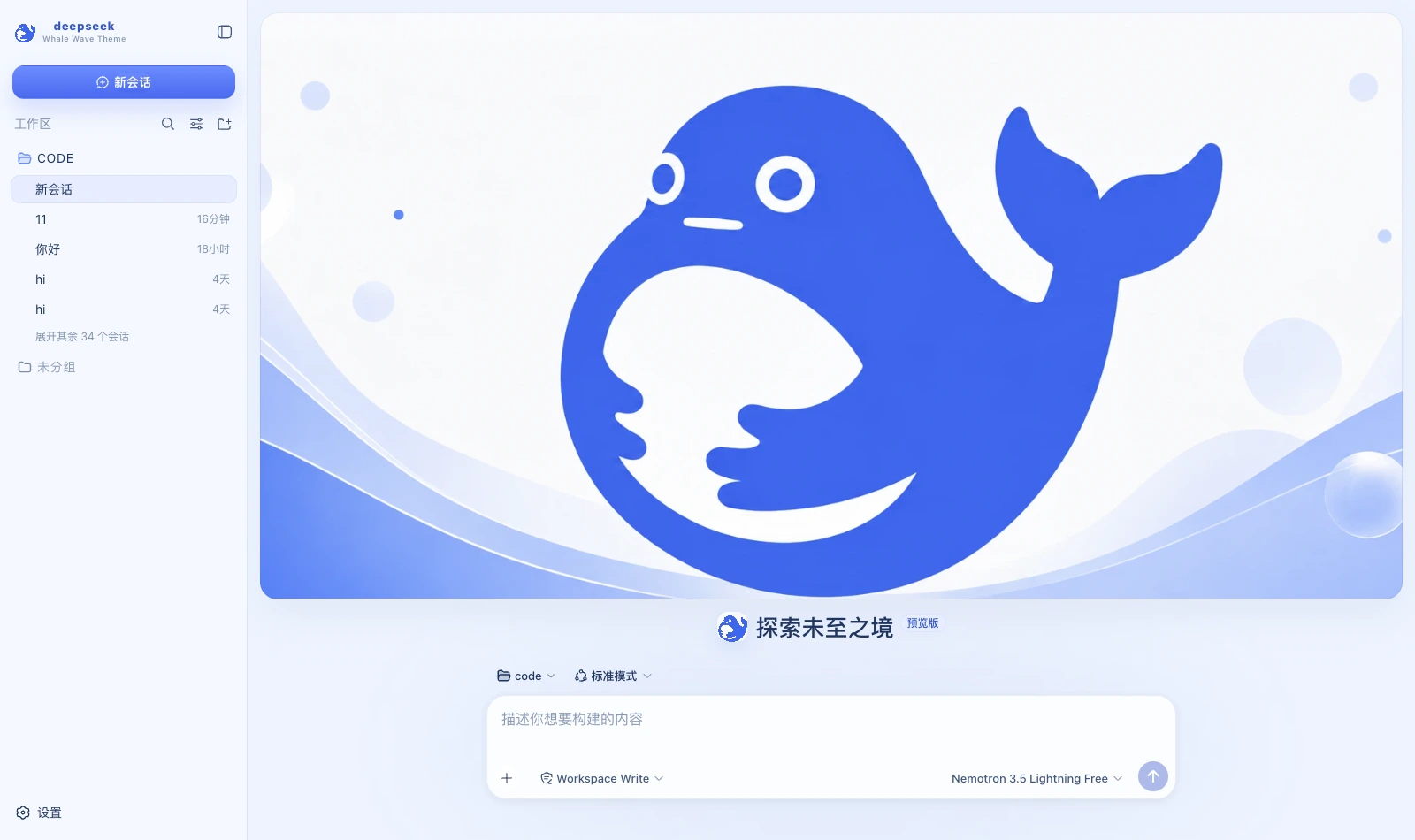
Whale Wave Banner — a light skin for DeepSeek Harness: DeepSeek blue, white and a very pale grey-blue, with a banner cover on the new-session page and the composer separately below it
安装
npx -p @deepseek-ai/dsh dsh plugin --profile web add github:keman-ai/dsh-skin-pack#83e92004f8c3b52b9bf66d75aa96ddbc709bde13&path:packages/dsh-whale-wave-banner说明文档
阅读完整 README ↗dsh-whale-wave-banner · Whale Wave Banner
A light skin for DeepSeek Harness (dsh): DeepSeek blue, white and a very pale grey-blue, with a banner cover on the new-session page and the composer sitting separately below it.
What it changes
| Surface | Content |
|---|---|
| Palette | A full set of --dsw-alias-* / --dsw-specific-* semantic tokens on the light base, with every border a pale 1px line tinted blue |
| New session | The banner takes only the upper half, as a card with a 20px radius; the composer sits separately below, the two never overlap, and no copy is laid over the cover |
| Brand slots | The sidebar and new-session marks are the banner cropped square (reusing the same inlined image), with the subtitle Whale Wave Theme |
| Status dock | Always present on the chat page: a reduced banner plus six kinds of real state, collapsible (the choice is remembered) |
🔴 This skin does the opposite of the others
Points 1 and 2 of the implementation notes in the prototype's Appearance panel are the whole point:
- Use this banner image directly at the top of New Session, laying no block of explanatory copy over the cover.
- Place the composer separately below the cover so the hero visual stays intact.
Its handoff likewise says hero.copy = none / composer = below cover. So where other skins pin the composer to the
bottom over the full image, this one must not — the banner takes all the height above the composer, which sits below it.
(Implementation detail: drawing it at the source ratio aspect-ratio: 2.5/1 first left the cover shorter than the space available, with a wide gap in the middle that
looked half-loaded. The prototype's .home is grid-template-rows: minmax(0,1fr) auto — the cover takes all the remaining
height and object-fit: cover trims the excess. Filling the space with background-size: cover is what finally matched.)
Point 4 is just as binding: keep the colours to DeepSeek blue, white and a very pale grey-blue. So this skin has almost no fifth colour: green appears only for online and success, and even running uses a brighter step of the brand blue rather than a new accent.
What the status dock shows
| Card | Fields | Source |
|---|---|---|
| Waiting on you | Tools awaiting approval, questions awaiting an answer | ConversationSnapshot.pending. Appears only when something is genuinely waiting |
| Current Session | State, elapsed turn time, current tool duration, inbox, model | running / turnTimings / runningCalls / queue; the model comes from the latest assistant message's provenance.model |
| Context | Occupancy %, token load, and the System / tool-schema / conversation composition bar | The contextPressure and contextBreakdown projections |
| Permission | The active permission and sandbox mode | The permissions projection |
| Usage | Input / output / cache hits / time spent / turns | The tokenUsage and sessionStats projections |
| Plan | Todo progress | The todos projection (the card is absent when there is no list) |
| Tool calls | Tool name · real duration · outcome | Trajectory tool-result nodes (duration = time - callTime) plus the snapshot's runningCalls. Appears only once a call has happened |
| Context injections | The source and form of each injection | Trajectory context nodes (provenance.label / form) |
| Folded away | Compaction count, items and tokens folded | Trajectory compaction nodes. Absent when nothing was compacted |
⚠️ A tool duration may be absent: it can only be computed while the matching tool/call is still inside the session window. Older calls that scrolled past report only name and outcome — better blank than an invented figure.
⚠️ Composition is not a total: the three contextBreakdown figures use fixed-density estimates (systematically low for Chinese and JSON schema)
and do not add up to the token load, which is anchored to the provider's reported value. The UI says so too.
The five "Harness Systems ONLINE" rows in the prototype's right column are pure decoration, and the three Theme Mode rows are a hardcoded theme description —
neither is built; nothing is padded out with fake data.
About the copy
This skin replaces no host copy. The prototype gives no agent-copy specification, and inventing personified lines without a basis is embellishment.
Install
Skin market (recommended): search for "Whale Wave", install, then restart dsh.
Manual install (during development):
npm install && npm run build
DST=~/.dsh/profiles/web/node_modules/dsh-whale-wave-banner
mkdir -p "$DST" && cp -R lib cordis.patch.yml skin.json package.json README.md "$DST/"
# then add dsh-whale-wave-banner to the profile package.json's dependencies and dsh.profile.bundles
After changing it you must restart dsh: the profile tree has to be recomposed, and without a restart the UI stays as it was.
🔴 The side effect of autoApply
Installing switches to this skin by default (autoApply, default true). The reason is that the harness does not persist third-party theme ids,
and the built-in Settings → Appearance has only three cells: light / dark / follow system, with no third-party themes —
switching manually requires the skin market's own panel (Settings → Skin Market).
The cost: it reapplies on every refresh, so switching away lasts only for that session. To change permanently, set autoApply to false
or uninstall this plugin.
Version requirements
Requires dsh 0.1.1-rc.2 or newer. The brand-slot takeover relies on slot priority shadowing; on older versions
those three registrations throw and the error is swallowed — it simply falls back to the official brand mark, while the palette and banner keep working.
Assets
The banner is a 1983×793 illustration compressed to webp (q92) at just 56 KB — flat colour compresses far better than photographic art. The prototype embeds the same image three times (cover / brand mark / avatar, identical md5, 1.08 MB each); only one copy is inlined here, with the brand mark cropped square from the centre.
Development
npm run check   # tsc --noEmit
npm run build   # produces lib/index.js (host half) and lib/client.js (browser half)
lib/ must be committed: skins install via github:owner/repo, which installs the build output from the repository.
License
MIT © Science Roam Limited