kirkchinese/CiteCiter--packages-citeciter ↗★ 7
@kirkchinese/dsh-citeciter
提供只读学习主题与演示看板
AI 分析
适合需要在独立窗口中深入探索AI回答、不干扰主任务的用户。
安装
npx -p @deepseek-ai/dsh dsh plugin --profile web add github:kirkchinese/CiteCiter#ee7c8d56e243d0445e831d29c8c5545239cea6e0&path:packages/citeciter说明文档
阅读完整 README ↗CiteCiter
A learning and investigation companion for DeepSeek Harness Web and Desktop.
Select a committed response and explore it in a private Topic while the main task continues. Ask follow-ups, change models, or let the presenter explain with formulas, diagrams, tables and animations.

Install and compatibility
CiteCiter 0.6.0 targets DSH 0.1.2-rc.1 and DSH Desktop 2.0.5. Node.js must satisfy ^22.19.0 || >=24.0.0; Windows validation uses Node 24.19.0. DSH alpha and Desktop master are separate targets.
| Environment | Installation target | Status |
|---|---|---|
| DSH Web 0.1.2-rc.1 | web profile | Windows runtime and UI verified |
| DSH Desktop 2.0.5 | Current Desktop profile, default desktop | Targeted; see release notes for mode-specific checks |
| DSH 0.1.1-rc.1 / rc.2 | Older environment | Keep CiteCiter 0.5.0 |
| DSH alpha, TUI | — | Unsupported |
| Linux / macOS | Same package | Not tested in this migration |
Install or upgrade the Web plugin:
npm install -g @deepseek-ai/dsh@0.1.2-rc.1
dsh plugin --profile web add @kirkchinese/dsh-citeciter@0.6.0
dsh plugin --profile web list --depth 0
dsh web
Confirm version 0.6.0, restart the owning host and refresh the page. Alternatively, download the .tgz from the GitHub Release and replace the package name with the tarball's absolute path. See Contributing for a local workspace installation.
For Desktop, confirm its selected profile and data directory, then install using the same DSH_HOME:
dsh plugin --profile desktop add @kirkchinese/dsh-citeciter@0.6.0
dsh plugin --profile desktop list --depth 0
Replace desktop if a custom profile is selected; set $env:DSH_HOME in PowerShell if it uses a custom home. Restart Desktop. Updating the global npm CLI does not replace Desktop's embedded runtime.
If npm 12 blocks the native dependency scripts listed by this DSH release, allow them for this installation:
npm install -g @deepseek-ai/dsh@0.1.2-rc.1 --allow-scripts=@deepseek-ai/dsh-subprocess-local,koffi,node-pty,@google/genai,protobufjs
This addresses native installation. An old plugin importing the removed effectiveSandboxMode export requires a plugin upgrade; reinstalling the host alone does not fix it.
Use
- Select committed assistant answer or reasoning text, right-click, enter a question, and choose “开始提问” or “开始讲解”.
- Continue in the learning panel, change model/reasoning effort, and manage Topic titles, archives and deletion.
- Use
+ 新 Topicfor a free question or presentation. A new source session needs its first message before the Topic can reuse its model route. - Presenter boards appear in the main workspace's “小黑板” tab. Board citations append to the current question draft.
- Tool results, terminal output, diffs and the text/Markdown Reader also provide Topic entry points.
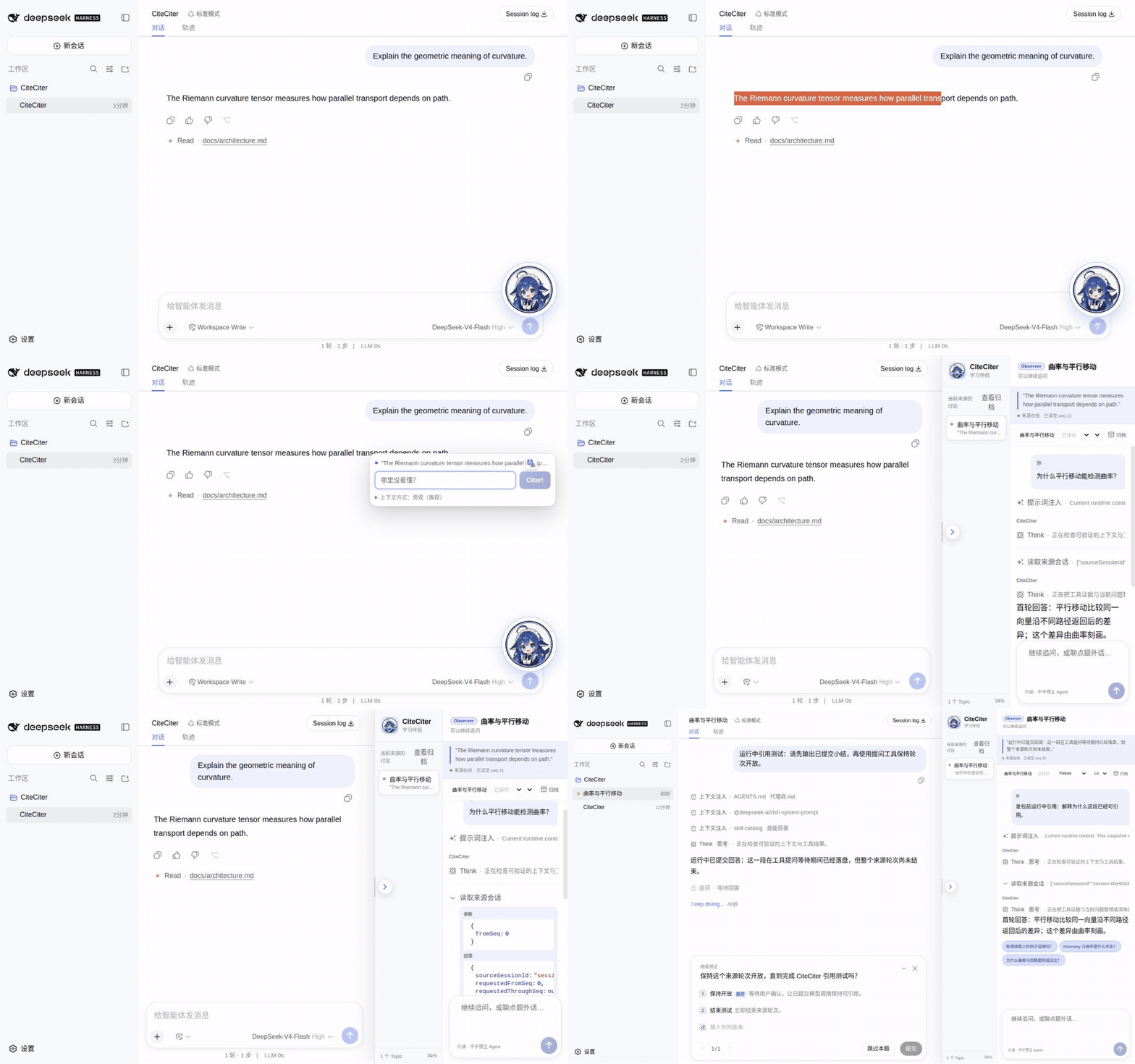
This older recording demonstrates the citation workflow; host layout and controls differ in 0.6.
Keep the source conversation visible
- Wide windows allocate a separate learning column and retain native details.
- Saved panel proportions range from 28% to 55%. Actual width is capped to leave at least 480 CSS pixels for conversation, then returns to the preference when space permits.
- Narrow or zoomed windows place the learning panel in a bottom row, with the conversation visible above it.
- Closing restores host layout. Unrecognized frames show a compact compatibility message.
Content uses public DSH slots, conversation projections and snapshot hooks. This release has no public right-dock sizing service, so a small maintained host adapter allocates space. Revalidate it after host upgrades.
Topics and data
Observer discussions use private logs and read source events or project files as needed. Exact Fork inherits context from a completed source turn. File tools remain read-only and Topics never append to the source Session. Uncommitted streaming text has no stable citation position; Exact Fork requires a completed source turn.
Atomic blackboard_apply commits support formulas, Markdown, tables, safe SVG, isolated HTML animations and embedded images. Topics support follow-ups, model changes, archive/restore and permanent deletion with a Session ID confirmation.
Indexes live under $DSH_HOME/citeciter/workspaces/; logs under $DSH_HOME/citeciter/sessions/. Without the variable the home is usually .dsh in the user directory. Back up the complete home before upgrading. Version 0.6 uses the new runtime API without bulk-rewriting old logs. DSH's version-0 physical JSONL still uses seedLength; preserve and diagnose unknown events rather than deleting fields.
Only one active CiteCiter host may own a home. Concurrent Web and Desktop instances need different homes. Update notices copy a command without installing anything; Desktop commands target the current profile.
Development
pnpm typecheck
pnpm test
pnpm build
pnpm test:snapshot
The real application snapshot uses a temporary profile and keyless model for Observer, Exact Fork, source reads, boards and source-log isolation. Host ctx.citeciterRuntime exposes create, ask, get, list, delete and Topic change events. Public frontend entry registration and preset extension APIs remain unfinished. See Contributing and the 0.6.0 release note.
Community and license
DSH-Citeciter QQ group: 1108040435.