lavapapa/dsh-composer-layout ↗★ 0
dsh-composer-layout
DSH Web 插件:允许将输入框(Composer)停靠在底部或右侧列中。
AI 分析
核心用途是改变输入框布局,支持将输入框右侧分栏停靠,以便在输入长 Prompt 时对照左侧对话或日志。适合需要编写复杂、长篇提示词的用户。修改后需重启 Web profile。
安装
npx -p @deepseek-ai/dsh dsh plugin --profile web add github:lavapapa/dsh-composer-layout说明文档
阅读完整 README ↗DSH Composer Layout
English · 简体中文


Read here. Compose there. Dock Composer to the right when a long prompt needs the conversation, source material, or logs to remain in view.
Optional DeepSeek Harness Web plugin that lets the Composer stay at the bottom or dock in a right-side column. The chat and Composer keep their own space, while the normal DSH model, permission, quota, session, and tool behavior remains intact.
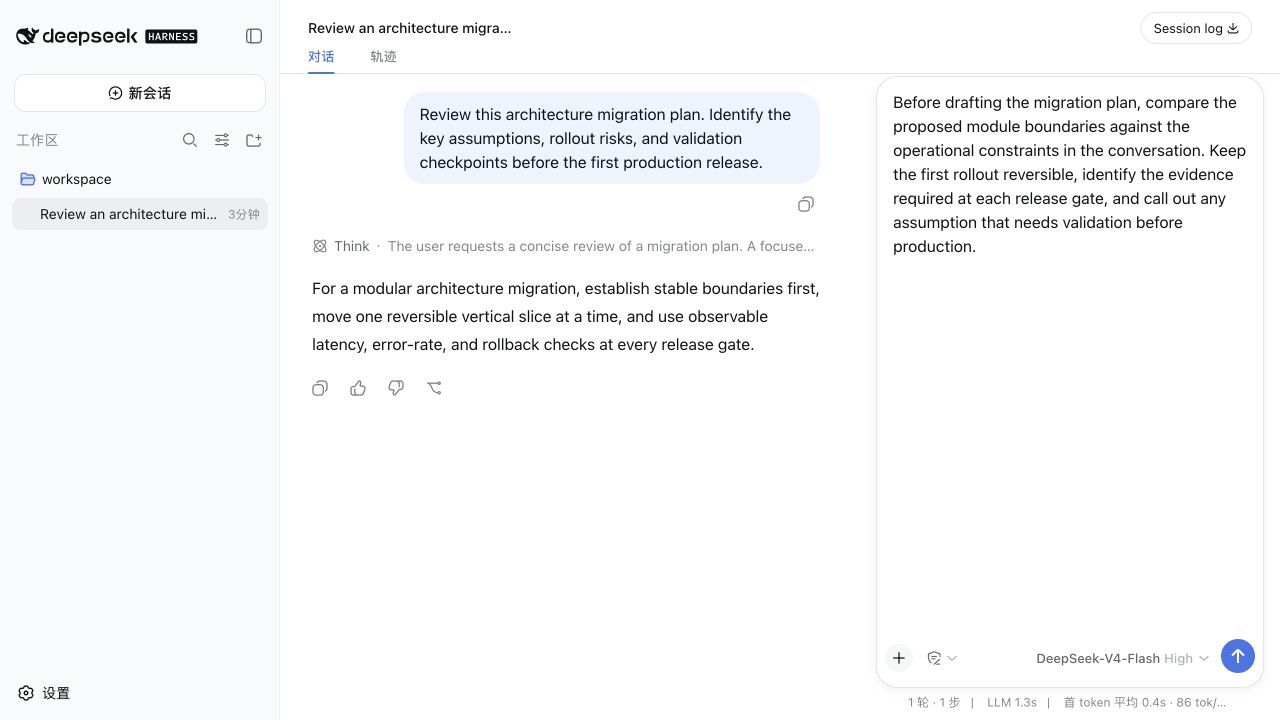
A clean demonstration profile reviewing an architecture migration plan. The conversation is sample content, not a user session.
Why a side-by-side Composer?
The default bottom layout works well for short exchanges. The right layout is for work where writing and reference-reading happen together: a long instruction, a revision against an earlier answer, a code or log excerpt, or a multi-step request. It gives the input a tall, independent column and leaves the conversation visible next to it, so expanding a draft does not push the material being referenced out of sight.
What it adds
- Bottom and right-side Composer placement from Settings → Plugins → Composer Layout.
- A visible docking handle; in the right layout it also resizes the Composer pane.
- Per-session placement and manually resized right-pane width when “Remember this session layout” is enabled.
- Narrow-window positioning for slash commands, model/access/context menus, and quota panels.
- Inline command menus close before another Composer popup opens, while the normal bottom layout keeps DSH's native behavior.
- A 512×512 icon at
assets/icon.svg.
The plugin is presentation-only: it does not add model-facing tools, change prompts, or alter token accounting.
Install
Fastest path — install from GitHub
You do not need npm for the first release. DSH can install a plugin bundle directly from a GitHub repository; pinning the command to v0.1.0 makes the installed source explicit and repeatable.
dsh plugin --profile web add "github:lavapapa/dsh-composer-layout#v0.1.0"
dsh web --profile web
Then open Settings → Plugins → Composer Layout and select Right side. Restarting the Web profile is required because DSH does not hot-reload profile patches.
The repository ships the prebuilt host and browser artifacts used by this command, so installation does not need an install-time build step. To confirm that DSH added the bundle to the intended profile:
dsh --profile web --dump-config
Release asset and updates
The GitHub Release also contains a .tgz package for an offline or inspected install:
dsh plugin --profile web add /path/to/dsh-composer-layout-0.1.0.tgz
dsh web --profile web
For a later version, remove the installed package, then add the new tag or release asset:
dsh plugin --profile web remove dsh-composer-layout
dsh plugin --profile web add "github:lavapapa/dsh-composer-layout#v0.1.0"
dsh web --profile web
The plugin requires a DSH Web build whose @deepseek-ai/dsh-* packages are in the 0.1.x prerelease line; the tested source checkout is recorded in the release notes.
Settings and behavior
Open Settings → Plugins → Composer Layout and choose the default position. With session memory enabled, a session records its own placement and only a manually changed right-pane width; a new or unrelated session starts from the configured default. Turning session memory off makes the configured default authoritative again.
The right layout keeps a minimum-width Composer seat and uses viewport-aware portals for menus and quota details. If the viewport becomes too narrow, DSH's own sidebar policy remains the source of truth; this plugin does not introduce a second sidebar threshold.
Compatibility and scope
This is a Web-only bundle. It expects the standard DSH Web profile and does not provide a server, desktop shell, TUI, or model provider. It is compatible with DSH's optional plugin model and can be removed with:
dsh plugin --profile web remove dsh-composer-layout
Third-party DSH plugins execute with the permissions of the local DSH process. Review the source and pin a release or commit before installing a plugin from GitHub.
Development
The repository intentionally commits the generated lib/ artifacts used by GitHub installs. The source is under src/; the source-of-record implementation lives in the DSH workspace and is kept here so a release can be reviewed without opening the monorepo. Changes that touch DSH internals should be tested against the matching DSH checkout before publishing a new release.
Related links
License
MIT. See LICENSE.