@linxin666/dsh-balance
DeepSeek API 账户余额实时显示:左下角悬浮余额徽章(可拖拽)+ 设置页;Host 经 curl 调用官方余额接口,API Key 持久化在 ~/.dsh/ds-balance.json。
安装
$
npx -p @deepseek-ai/dsh dsh plugin --profile web add github:linshule/dsh-balance说明文档
阅读完整 README ↗dsh-balance
DeepSeek API 账户余额实时显示插件(dsh web GUI 常驻插件)
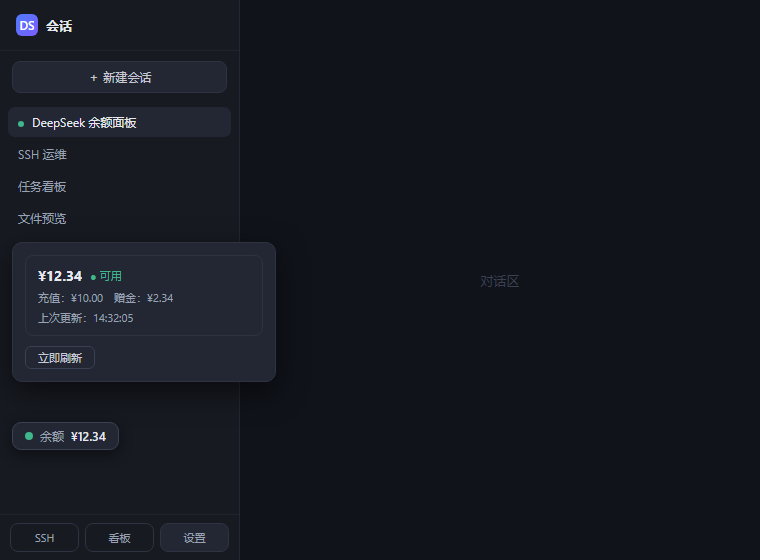
界面预览(示意渲染)
功能
- 左侧边栏左下角悬浮余额徽章,可拖拽调整位置(位置记忆在浏览器 localStorage,默认位于设置按钮上方)
- 状态圆点实时反映:🟢 可用 / 🔴 不可用或出错 / ⚪ 未配置
- 点击徽章弹出详情气泡:多币种余额(总余额 / 充值 / 赠金)、可用状态、上次更新时间、立即刷新;未配置 Key 时可内联粘贴保存
- 自动刷新:30 秒 / 1 分钟 / 5 分钟可调(默认 1 分钟)
- 设置 → 「DeepSeek 余额」页:API Key 管理(保存 / 清除)、刷新间隔、余额明细
- API Key 持久化在
~/.dsh/ds-balance.json(仅本机,重启不丢失) - 网络抖动自愈:curl 走 HTTP/1.1 + 自动重试 3 次(规避 Windows schannel 的瞬时断连 56 错误)
架构
- Host(
lib/index.js):经subprocess调curl.exe请求 DeepSeek 官方余额接口GET https://api.deepseek.com/user/balance(携带Authorization: Bearer); 提供/api/ds-balance/status|balance|key路由(仅回环地址可访问) - Client(
lib/client.js):window.__ModuleLoader__模块,注册shell.overlay徽章与settings.section设置页,同源 fetch 调路由
安装(本地链接)
# 克隆到 web profile 同盘目录(pnpm 在 Windows 上对跨盘 link: 绝对路径会拼接错误)
git clone https://github.com/linshule/dsh-balance.git
/plugins/ds-balance
dsh plugin --profile web add link:./plugins/ds-balance
重启 web 服务生效(插件行由包内 cordis.patch.yml 的 dsh.bundle.patch 声明)。
使用
- 重启后点击左下角「余额 · 未配置」徽章(或 设置 → DeepSeek 余额)
- 粘贴你的
sk-...API Key 并保存 —— 持久化到~/.dsh/ds-balance.json,之后重启无需重填 - 按住徽章拖动可调整位置(松手自动记忆)
API 路由(仅回环)
| 路由 | 方法 | 说明 |
|---|---|---|
/api/ds-balance/status | GET | 是否已配置 Key(含掩码) |
/api/ds-balance/balance | GET | 实时查询余额(并发去重) |
/api/ds-balance/key | PUT / DELETE | 保存 / 清除 API Key |
License
MIT © 2026 linshule