dsh-latex-tools
Hover LaTeX formulas in the DeepSeek Harness Web UI to copy the TeX source or export the formula as a standalone SVG.
安装
$
npx -p @deepseek-ai/dsh dsh plugin --profile web add github:liuup/dsh-latex-tools说明文档
阅读完整 README ↗dsh-latex-tools
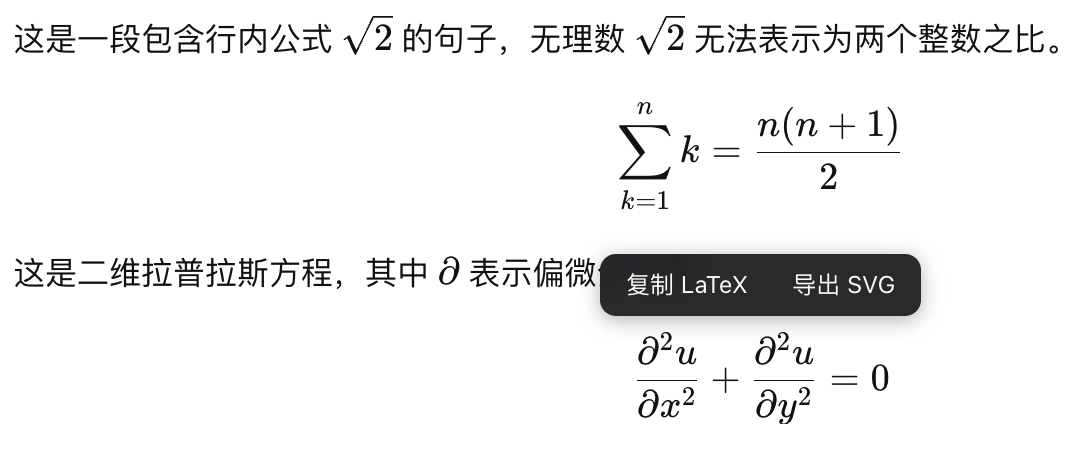
♾️ Copy and export the LaTeX in DeepSeek Harness 悬停任意 LaTeX 公式,即可复制 TeX 源码或导出为独立的 SVG 文件
功能
- 复制 LaTeX:鼠标悬停公式(行内或块级),点击「复制 LaTeX」,TeX 源码即进入剪贴板。
- 导出 SVG:点击「导出 SVG」,公式经 MathJax 渲染为自包含的矢量图(字形轮廓内嵌为 path,无外部字体/样式依赖),下载为
formula-.svg,可用于论文、PPT、网页。 - 完全离线可用:MathJax 脚本由插件自身的 host half 提供,首次导出时才按需加载,之后浏览器缓存;不依赖任何 CDN。
- 支持行内与块级公式(块级按 display 模式导出)。
安装
要求:安装 Node.js,然后直接用官方 npm 方式运行(无需全局安装):
npx @deepseek-ai/dsh web
插件装进 profile 后随 Web UI 启动自动加载,无需手动启用;Settings → Plugins 列表只显示有配置项的插件,本插件没有配置项,不会出现在那里。
一键 npm 安装
npx @deepseek-ai/dsh plugin --profile web add dsh-latex-tools
安装的是预构建产物,无需本地构建、无需任何额外配置,装完重启 Web UI 即可。
验证安装
npx @deepseek-ai/dsh --profile web --dump-config   # 应看到 "# == dsh-latex-tools" 层
# 浏览器检查:
#   /plugins/dsh-latex-tools/client.js   —— browser half 的 bundle
#   /dsh-latex-tools/mathjax/es5/tex-svg.js  —— SVG 导出用的 MathJax(约 2.1 MB)
卸载
npx @deepseek-ai/dsh plugin --profile web remove dsh-latex-tools
从 web profile 移除插件依赖与配置层,重启 Web UI 后生效。
开发(构建、测试、GitHub/源码安装,点击展开)
pnpm install
pnpm typecheck   # tsc --noEmit
pnpm test        # vitest(jsdom:工具条显隐 / 复制 / SVG 导出)
pnpm build       # tsdown:lib/index.js(host half)+ lib/client.js(browser half)
从 GitHub 安装(无需本地构建)
npx @deepseek-ai/dsh plugin --profile web add github:liuup/dsh-latex-tools
git 安装拉取的是源码,pnpm 会自动执行包内的 prepare 脚本完成构建。pnpm ≥10 默认拒绝运行 git 依赖的 prepare,首次 add 会失败——dsh 会打印指引:按提示把对应条目加入 profile 的 pnpm-workspace.yaml(allowBuilds 段),然后重跑上面的命令。生产使用建议 pin 提交:github:liuup/dsh-latex-tools#。
本地源码安装(开发/自用)
git clone https://github.com/liuup/dsh-latex-tools.git
cd dsh-latex-tools
pnpm install && pnpm build          # 构建出 lib/(产物已被 gitignore,必须本地构建)
npx @deepseek-ai/dsh plugin --profile web add link:/absolute/path/to/dsh-latex-tools
npx @deepseek-ai/dsh web            # 启动 Web UI