rabbitknight/dsh-tui--packages-dsh-tui-app ↗★ 0
@dsh-tui/app
The dsh terminal-surface bundle: an interactive TUI over dsh-base, ported from pi's terminal UI (@earendil-works/pi-tui)
安装
$
npx -p @deepseek-ai/dsh dsh plugin --profile web add github:rabbitknight/dsh-tui#73497acf709379b2d3273442b95b3ecbbfa35fd0&path:packages/dsh-tui-app说明文档
阅读完整 README ↗dsh-tui
Made in DeepSeek Harness — 构建于
DeepSeek Harness 之上的交互式终端界面
(dsh --profile tui),是一个挂在 dsh-base 上的 Cordis 插件 bundle
(cordis.patch.yml 补丁层)。渲染层基于
@earendil-works/pi-tui
(pi 的终端 UI 库,MIT),交互模式参考 pi-coding-agent,功能面以 DSH Web GUI
(apps/web + packages/client/ui-*)为基准复刻。
┌─────────────────────────────────────────────┐
│ dsh tui 0.1.0 · pi-tui 0.84.1               │  ← transcript (ScrollView, follow-end)
│ ╭ 官方 DeepSeek 鲸鱼(斜向 shimmer 光带扫描)╮ │  ← 空态开屏
│ ╰ 消息中的 URL 与文件路径自动变为 OSC 8 链接 ╯ │  ← ctrl/cmd+点击打开
│ You                                         │
│   Say exactly: pty-ok                       │
│ Assistant · deepseek-official/deepseek-v4…  │
│   pty-ok                                    │
│ ⚙ bash …                                   │
│   {"command":"ls"}                          │
│   total 0                                  │
├─────────────────────────────────────────────┤
│ ▶ build the tui · 2/30 rounds               │  ← goal bar (dock)
│ Working… (turn 1)                           │  ← status
│ ─────────────────────────────────────────── │  ← editor
│ deepseek-official/deepseek-v4-flash · sess… │  ← footer
└─────────────────────────────────────────────┘
截图
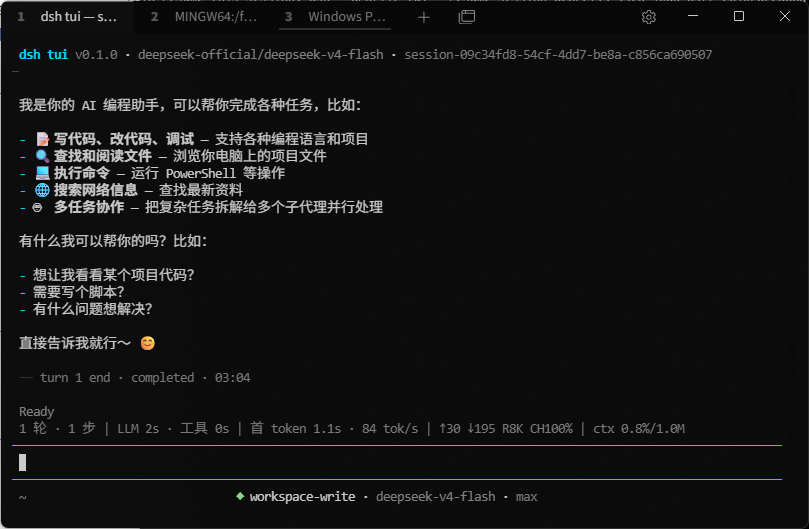
安装与使用
前置:Node.js ≥ 22.19(或 ≥ 24)、npm(含 pnpm,npm i -g pnpm)。
1. 安装 bundle 到 tui profile
dsh plugin 会把剩余参数原样转发给 profile 目录内的 pnpm,所以下面的
命令等价于在 ~/.dsh/profiles/tui 里执行 pnpm add :
# 方式一:dsh CLI(需全局安装 @deepseek-ai/dsh)
dsh plugin --profile tui add "F:\work\ai\dsh-tui\packages\dsh-tui-app"

# 方式二:npx(无需全局安装,推荐)
npx @deepseek-ai/dsh plugin --profile tui add "F:\work\ai\dsh-tui\packages\dsh-tui-app"
在仓库根目录也可以一键(重)安装——它会先构建再装进 profile:
npm run install:profile
2. 启动
# 推荐:npx 启动(等价于 dsh --profile tui)
npx @deepseek-ai/dsh --profile tui                      # 新会话
npx @deepseek-ai/dsh --profile tui "run the tests"      # 新会话并立即发送任务
npx @deepseek-ai/dsh --profile tui --resume    # 恢复持久化会话