rain02333z-spec/dsh-plugin-sidebar-manager ↗★ 0
dsh-plugin-sidebar-manager
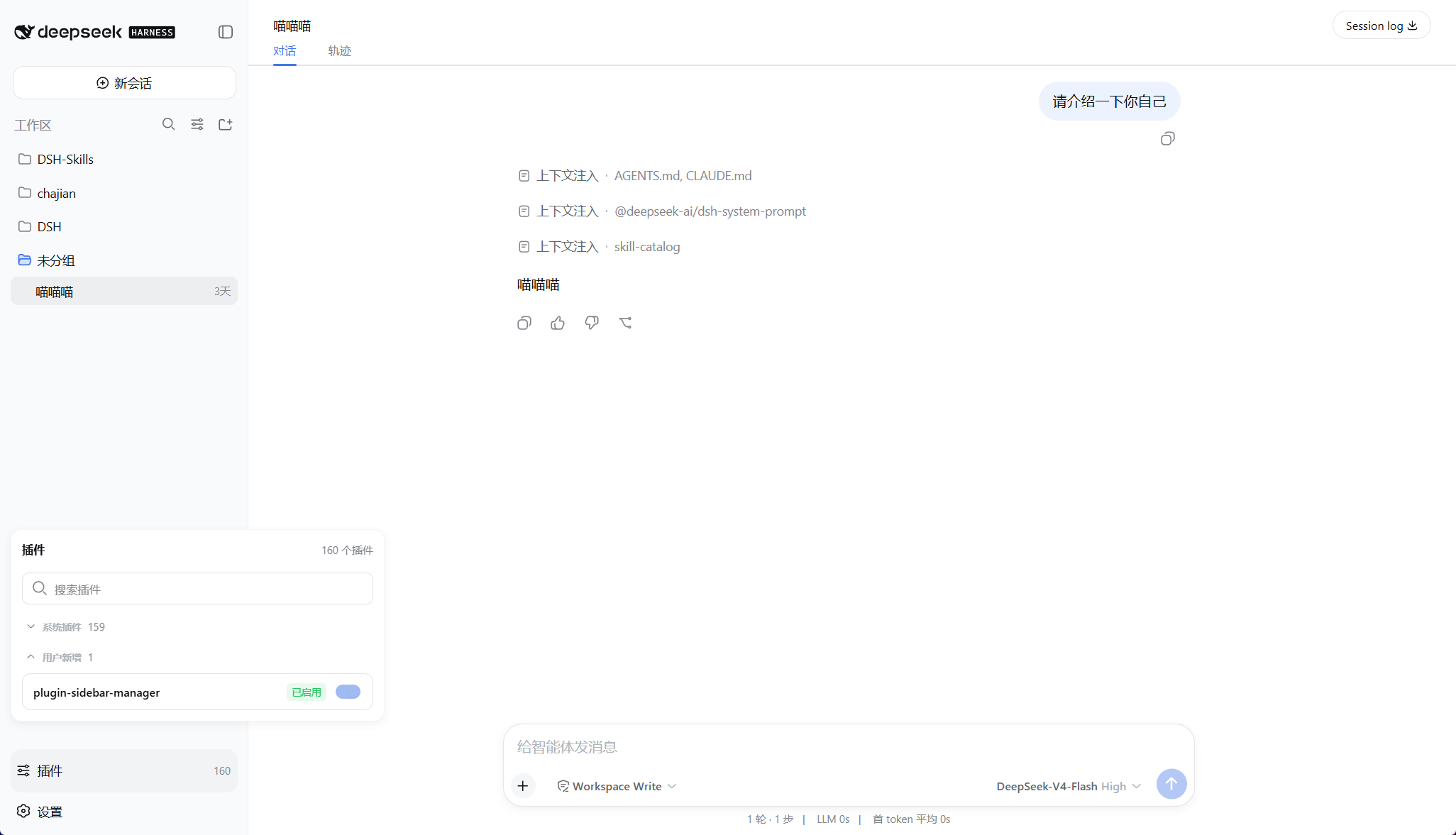
Sidebar Plugins panel: browse built-in vs user-added plugins and toggle them on/off
安装
npx -p @deepseek-ai/dsh dsh plugin --profile web add github:rain02333z-spec/dsh-plugin-sidebar-manager说明文档
阅读完整 README ↗DSH 侧栏插件管理器
dsh-plugin-sidebar-manager 是一个独立安装的 DSH Web 插件。它在左侧栏底部增加“插件”按钮,提供当前 Loader 插件清单、分类搜索和运行时启停。
界面预览
功能
- 左侧栏展开时显示“插件”和插件总数,收起时显示与“设置 → 插件”一致的图标按钮。
- 点击按钮后,在侧栏上方打开插件面板。
@deepseek-ai/*与cordis:*归为“系统插件”,其他模块归为“用户新增”。- 界面跟随 DSH 全局语言,完整支持简体中文和英文。
- 按完整模块名、短名称或 Loader
entryId搜索,不区分大小写。 - 系统与用户插件分组可独立展开或收起。
- 用户新增插件支持运行时启用和停用,操作后重新读取 Host 真实状态。
- DSH 与 Cordis 系统插件保持只读,插件管理器自身也不可修改。
- 提供加载中、空列表、搜索无结果、加载失败重试和单项操作失败状态。
- 支持 Escape、点击面板外部和再次点击入口关闭面板。
快速开始
环境要求
- 已安装 DeepSeek Harness,
dsh web可以正常启动。 - 使用 DSH
0.1.0-rc.5。 - 插件必须安装到
webprofile。
从 GitHub Release 安装(推荐)
直接安装当前发布包:
dsh plugin --profile web add https://github.com/rain02333z-spec/dsh-plugin-sidebar-manager/releases/download/v0.1.1/dsh-plugin-sidebar-manager-0.1.1.tgz
从 DSH 源码仓库运行 CLI 时,在命令前加 pnpm:
pnpm dsh plugin --profile web add https://github.com/rain02333z-spec/dsh-plugin-sidebar-manager/releases/download/v0.1.1/dsh-plugin-sidebar-manager-0.1.1.tgz
安装完成后停止并重新启动 dsh web。只刷新浏览器不会加载新插件。
从源码安装(开发调试)
源码使用 DSH monorepo 的构建约定。从 DSH 仓库根目录执行:
git clone https://github.com/rain02333z-spec/dsh-plugin-sidebar-manager.git packages/extensions/plugin-manager
pnpm install
pnpm exec tsc -b packages/extensions/plugin-manager/tsconfig.host.json packages/extensions/plugin-manager/tsconfig.client.json
pnpm --filter dsh-plugin-sidebar-manager bundle

$plugin = Join-Path (Get-Location) 'packages/extensions/plugin-manager'
dsh plugin --profile web add "link:$plugin"
使用仓库内的 CLI 时,将最后一行改为 pnpm dsh plugin --profile web add "link:$plugin"。源码安装只用于开发调试,普通使用请安装 Release 包。
验证与卸载
重启后,左侧栏底部出现“插件”入口即表示安装成功。也可以检查 web profile 的合成配置:
dsh --profile web --dump-config
卸载插件:
dsh plugin --profile web remove dsh-plugin-sidebar-manager
卸载后同样需要重启 dsh web。
运行机制
插件包含两部分:
- Host 端挂载
pluginManager.setEnabledRemote,通过 Cordis Loader 的Entry.update({ disabled })修改当前运行状态。 - Client 端复用 DSH 内置只读
pluginInventory.list()Remote,并注册到sidebar.footer.action。
启停只修改当前 Loader 运行状态,不写回 profile 的 cordis.patch.yml。重启 DSH 后,插件状态按照原 profile 配置恢复。
兼容性
当前源码和安装包面向 DSH 0.1.0-rc.5。它依赖该版本提供的:
pluginInventoryRemotesidebar.footer.action列表 slot- DSH Client Module Loader
- Typert Remote 生成与加载机制
开发与验证
源码使用 DSH monorepo 的双端插件构建约定。将本目录同步到 packages/extensions/plugin-manager,并确保根 tsconfig.host.json、tsconfig.client.json 引用对应项目后运行:
Set-Location
pnpm exec vitest run packages/extensions/plugin-manager/tests
pnpm exec tsc -b packages/extensions/plugin-manager/tsconfig.host.json packages/extensions/plugin-manager/tsconfig.client.json
pnpm --filter dsh-plugin-sidebar-manager bundle
pnpm --filter dsh-plugin-sidebar-manager pack
面板属于可见 Web 行为;合入 DSH 仓库前还应运行 pnpm run test:gui 和 Web replay 测试。