syncended/deepseek-harness-picture-in-picture ↗★ 1
@syncended/dsh-pip
Picture-in-picture mini chat for the DeepSeek Harness Web GUI.
安装
npx -p @deepseek-ai/dsh dsh plugin --profile web add github:syncended/deepseek-harness-picture-in-picture说明文档
阅读完整 README ↗DeepSeek Harness — Picture-in-Picture Chat
A browser plugin for the DeepSeek Harness Web GUI. It adds a compact chat that can stay above other windows, switch the active Harness session, follow streaming replies, and send a reply without returning to the full page.
Preview
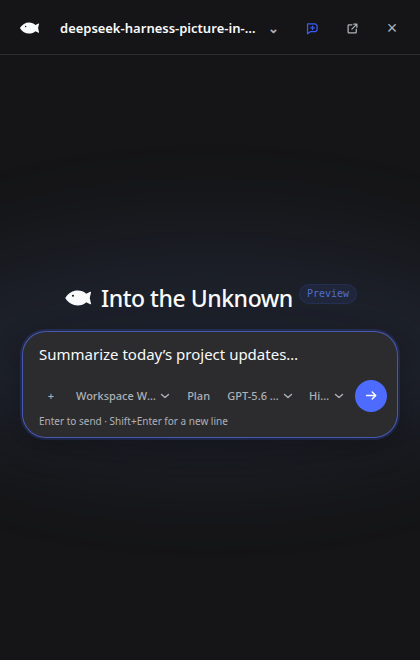
Real 420 × 660 Document Picture-in-Picture window captured from the plugin.
Features
- Native Document Picture-in-Picture on supported Chromium browsers.
- In-page floating fallback when the Document Picture-in-Picture API is unavailable or denied.
- Session switcher with live working / waiting / completed state.
- Compact Markdown transcript with streaming reasoning, tool activity, results, historical images, copy, branch, and older-history loading.
- Stop generation plus queued-message edit, remove, and Send now controls.
- Inline approval, plan-review, and structured user-question panels.
- Image attachment previews and image-plus-text submission through the public session API.
- Access-mode, plan-mode, model, model reasoning-effort, and context controls inside the compact composer.
- Compact context, turns/steps, throughput, cache-hit, and input/output token statistics.
- Collapsible todo progress and active-goal status above the composer.
- Human chat switcher grouped by workspace, omitting internal subagent sessions.
- New-chat action that opens or creates the blank session for the current/recent workspace, including workspaces with no prior messages.
- Replies are sent through the public
Session.prompt(..., "queue")API. While an agent is working, a reply is queued for the next turn and can be steered into the active turn with Send now. - Reactive synchronization with the locale selected in Harness settings (English and Chinese), with Russian fallback copy for compatible hosts; dark-theme synchronization, keyboard, and screen-reader labels.
Entersends;Shift+Enterinserts a new line.
Switching a chat in the mini window calls
ctx.sessions.open(id), so the main Harness window follows the same active chat.
Requirements
- DeepSeek Harness
0.1.0-rc.6or a compatible release with client plugins and theshell.overlayslot. - The Web profile (
dsh web). - Node.js 18 or newer.
- For native always-on-top PiP: a Chromium browser supporting the Document Picture-in-Picture API. Other browsers use the in-page panel.
Install
Install from npm:
dsh plugin --profile web add @syncended/dsh-pip
From this checkout during development:
dsh plugin --profile web add /absolute/path/to/deepseek-harness-picture-in-picture
Some pnpm-backed profiles require the workspace-root flag:
dsh plugin --profile web add -w /absolute/path/to/deepseek-harness-picture-in-picture
The package declares a DSH bundle, so no manual plugin entry is required. Restart dsh web after installing or upgrading and refresh the existing GUI. A chat-bubble button then appears in the bottom-right corner.
No environment variables, remote URL, or separate server connection are required; the plugin uses the Host and profile serving the current Web GUI.
Development
The published browser entry is deliberately dependency-free source in DSH's lazy client-module format; React and ReactDOM are resolved from the Web shell's platform module table.
npm run check
npm test
npm pack --dry-run
Tag-driven npm publication is documented in RELEASING.md.
The package has two faces:
lib/index.js— no-op Host loader entry.lib/client.js— browser implementation registered in the additiveshell.overlayslot.
package.json#dsh.client orders the client after runtime, layout, and conversation assembly. cordis.patch.yml inserts the package into the active profile.
Architecture notes
The implementation uses only supported DSH client seams:
ctx.slots.inject("shell.overlay", ...)for a lifecycle-safe floating UI contribution.ctx.sessions.listfor the session list and current selection.ctx.sessions.open(id)to switch the active session.ctx.sessions.binding(id).sessionfor conversation snapshots, projections, prompt/cancel/queue/history actions, and durable image reads.- Pending interaction carriers from
ConversationSnapshot.pendingfor approvals and structured questions. - Public
MarkdownTextandwriteClipboardprimitives for safe transcript rendering and copy actions. react-dom#createPortalto render the same React mini-chat tree into the Document PiP window.
The PiP view uses a compact presentation rather than cloning the full Harness conversation component. It renders tool activity as concise logs and provides compact attachments, approvals, plan review, and ask_user_question controls; the main window remains available for full-size inspection.
Current limitations
- Document Picture-in-Picture is Chromium-only at the time of writing; other browsers use the in-page fallback.
- The operating system and browser own the native PiP window frame, outer corner shape, and final placement.
- Generic tool rows are intentionally compact; the main Harness window remains the best surface for deeply inspecting large tool payloads.
License
MIT — see LICENSE.