u9521/dsh-session-settings ↗★ 2
@local/dsh-session-settings
Session settings, MCP servers, and Skill management plugin for DeepSeek Harness (DSH) Web GUI.
安装
npx -p @deepseek-ai/dsh dsh plugin --profile web add github:u9521/dsh-session-settings说明文档
阅读完整 README ↗dsh-session-settings
English | 中文
Session Settings, MCP Server, and Skill Management plugin for DeepSeek Harness (DSH) Web GUI.
Configure per-session or global settings directly from the Web GUI with immediate effect:
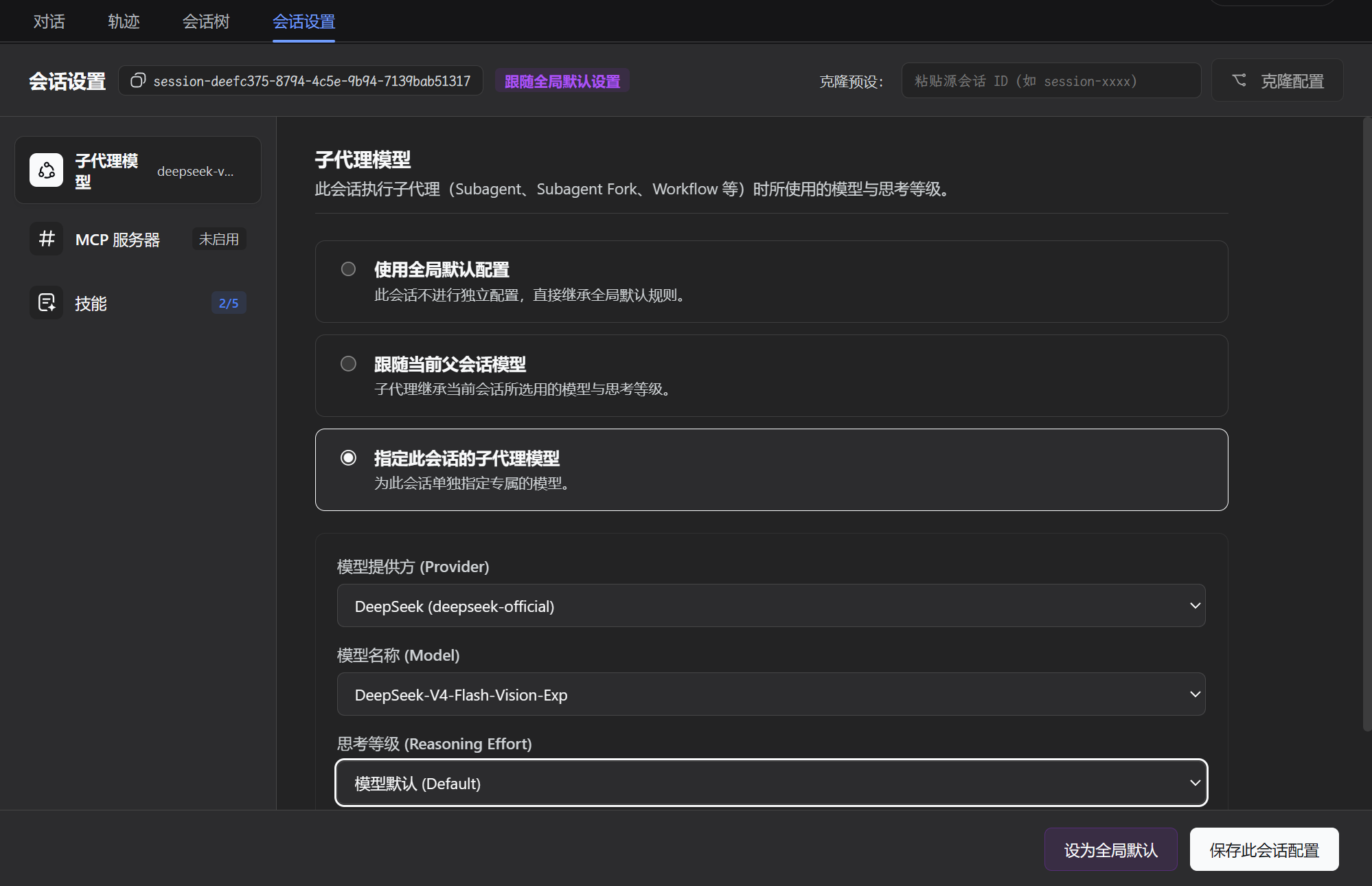
- Subagent Model & Reasoning Effort: Independently configure provider, model, and reasoning effort for subagents (
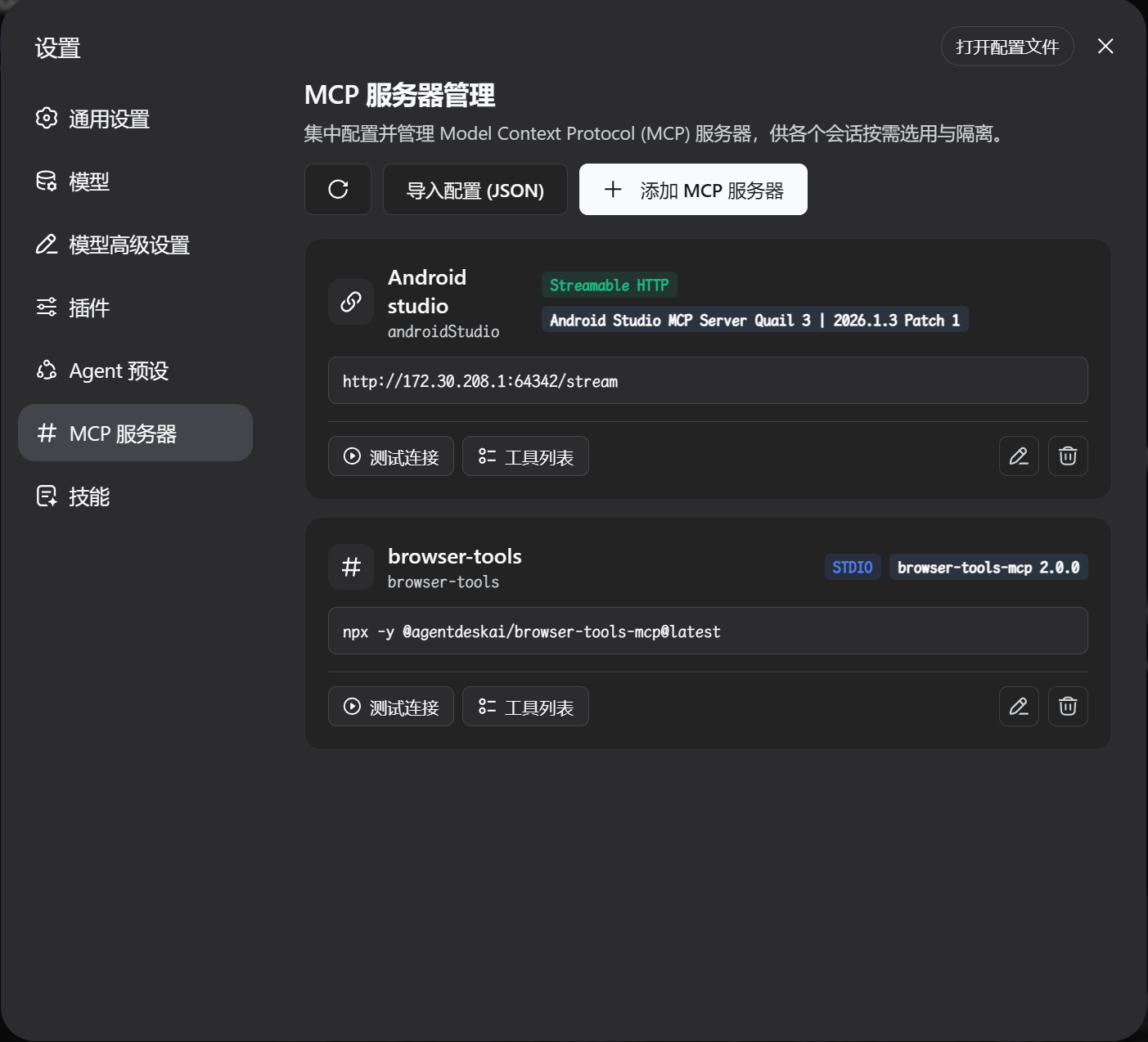
subagent,subagent_fork,workflow). - Centralized MCP Server Management: First-class sidebar navigation item for Model Context Protocol (MCP) servers with 2-stage compatibility probing, automatic protocol downgrade, and tool schema inspection.
- Session-Level MCP Tool Control: Granularly enable/disable MCP servers and specific tools per session or follow global defaults.
- Session-Level Skill Management & Control: Independently enable/disable bundled, user, and project skills per session, with automatic dynamic prompt catalog filtering and execution enforcement.
Screenshots
1. Per-Session Settings (Models / MCP Tools / Skills)
2. Centralized MCP Server Management
3. Skill Management & Dedicated Rule Modal
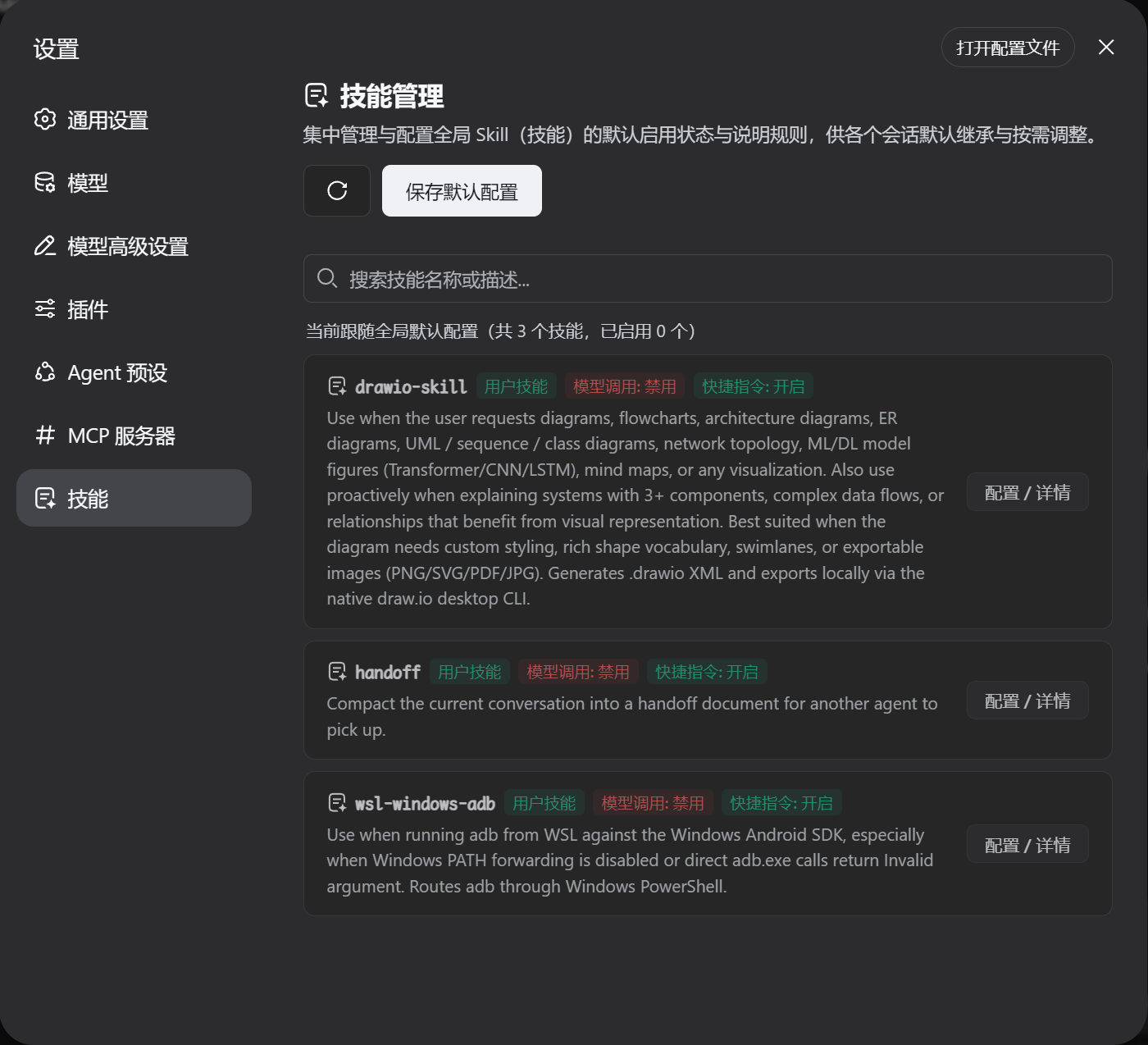
Table of Contents
- Features
- Screenshots
- Mainline Compatibility
- Installation
- Plugin Updates & Upgrades
- Uninstallation
- Development & Maintenance Commands
- Frequently Asked Questions (FAQ)
- License
Features
- Settings Sidebar Navigation Entry: Top-level section in Settings navigation sidebar (dedicated icon) for direct MCP server and Skills management.
- Session-Specific Tab: Dedicated tab in the conversation view for configuring the active session's subagent models, MCP tools, and skills.
- Flexible Modes:
- Use Global Default: Inherit global default rules automatically.
- Follow Parent Session: Inherit model and reasoning effort from parent session.
- Customize for Session: Specify custom models, available MCP servers, and per-tool / per-skill disablement.
- Instant Effect: Real-time request interception and on-demand MCP client lifecycle management without restarting DSH.
Mainline Compatibility
| Plugin Branch | Compatible DeepSeek Harness (DSH) Mainline | Architecture & Features |
|---|---|---|
main branch | >= 0.1.5-rc.1 | Native support for Session Format V3, Cordis 4.0.2, modern subagent/descriptor contracts, and dynamic SystemPromptProjection. |
⚠️ Note: The
mainbranch of this plugin targets DSH 0.1.5-rc.1 and above natively without legacy backward-compatibility shims. It does not support DSH ≤ 0.1.2. Please ensure your DSH host is upgraded to the latest mainline release.
Installation
🚀 One-Line Quick Install (Recommended)
This repository includes a GitHub Actions workflow that automatically builds and deploys a minimal release to the dist branch (containing built artifacts and manifests without raw source bloat).
You can install this plugin with a single command without any local build step:
dsh plugin --profile web add github:u9521/dsh-session-settings#dist
Note: After installation, start or restart the Web service:
dsh web
Installation from Source (For Developers)
Step 1: Obtain the Source Code
Clone the repository to your local machine:
mkdir -p ~/.dsh/plugins
cd ~/.dsh/plugins

git clone https://github.com/u9521/dsh-session-settings.git
cd dsh-session-settings
Step 2: Install Dependencies & Build
pnpm install
pnpm run build
Step 3: Register to DSH Web Profile
dsh plugin --profile web add .
Verify Installation
List the plugins in the web profile to verify that @local/dsh-session-settings is registered:
dsh plugin --profile web list
Step 4: Start and Verify
dsh web
Plugin Updates & Upgrades
Option 1: Online Update (Recommended)
If you installed via the one-line command from the GitHub dist branch, update directly using dsh plugin --profile web update:
dsh plugin --profile web update github:u9521/dsh-session-settings#dist
Note: After updating, start or restart the Web service:
dsh web
Option 2: Local Source Upgrade (For Developers)
If you installed from cloned local source, pull the latest commits from the main branch and rebuild:
# Step 1: Navigate to the plugin source directory
cd ~/.dsh/plugins/dsh-session-settings

# Step 2: Pull latest commits from the main branch
git pull origin main

# Step 3: Update dependencies and rebuild artifacts
pnpm install
pnpm run build

# Step 4: Restart the Web service
dsh web
Uninstallation
To disable and completely remove the plugin, use the DSH CLI to remove it from the web profile:
dsh plugin --profile web remove @local/dsh-session-settings
Note: If installed via the GitHub specifier, you can also run:
dsh plugin --profile web remove github:u9521/dsh-session-settings#distAfter uninstallation, start or restart
dsh webto return to the default DSH interface.
Development & Maintenance Commands
| Command | Description |
|---|---|
pnpm run build | Full build (runs tsc type check + generates lib/ bundles) |
pnpm run check | Type check only (tsc --noEmit) without emitting files |
pnpm run fmt | Format source code and configuration files with Prettier |
pnpm run fmt:check | Check code formatting compliance |
Frequently Asked Questions (FAQ)
Q1: Do I need to restart dsh web after updating session settings or disabling tools/skills?
A: No. The host plugin intercepts requests dynamically at runtime and manages tool/skill policies on demand. As soon as you save settings in the Web GUI, they take effect on the very next request.
Q2: How do I uninstall or remove the plugin?
A: See the Uninstallation section above and run dsh plugin --profile web remove from the corresponding profile.
License
This project is licensed under the MIT License.