dsh-model-pricing
Model pricing and capability board for DeepSeek Harness: compare per-1M-token prices, find the cheapest route, and see coding/agentic/vision tags for every LLM you can connect — in the DSH settings UI.
安装
npx -p @deepseek-ai/dsh dsh plugin --profile web add github:vitas/dsh-model-pricing说明文档
阅读完整 README ↗dsh-model-pricing
Compare LLM API prices before you pick a model — and see what you actually paid after you used it. A plugin for DeepSeek Harness (DSH) that puts a model pricing and capability table directly into your DSH settings (~7,250 priced models, 213 providers), and then reads your own session logs through the same catalog: per-project spend priced by the route you actually called, and the dollars your prompt cache is silently losing.





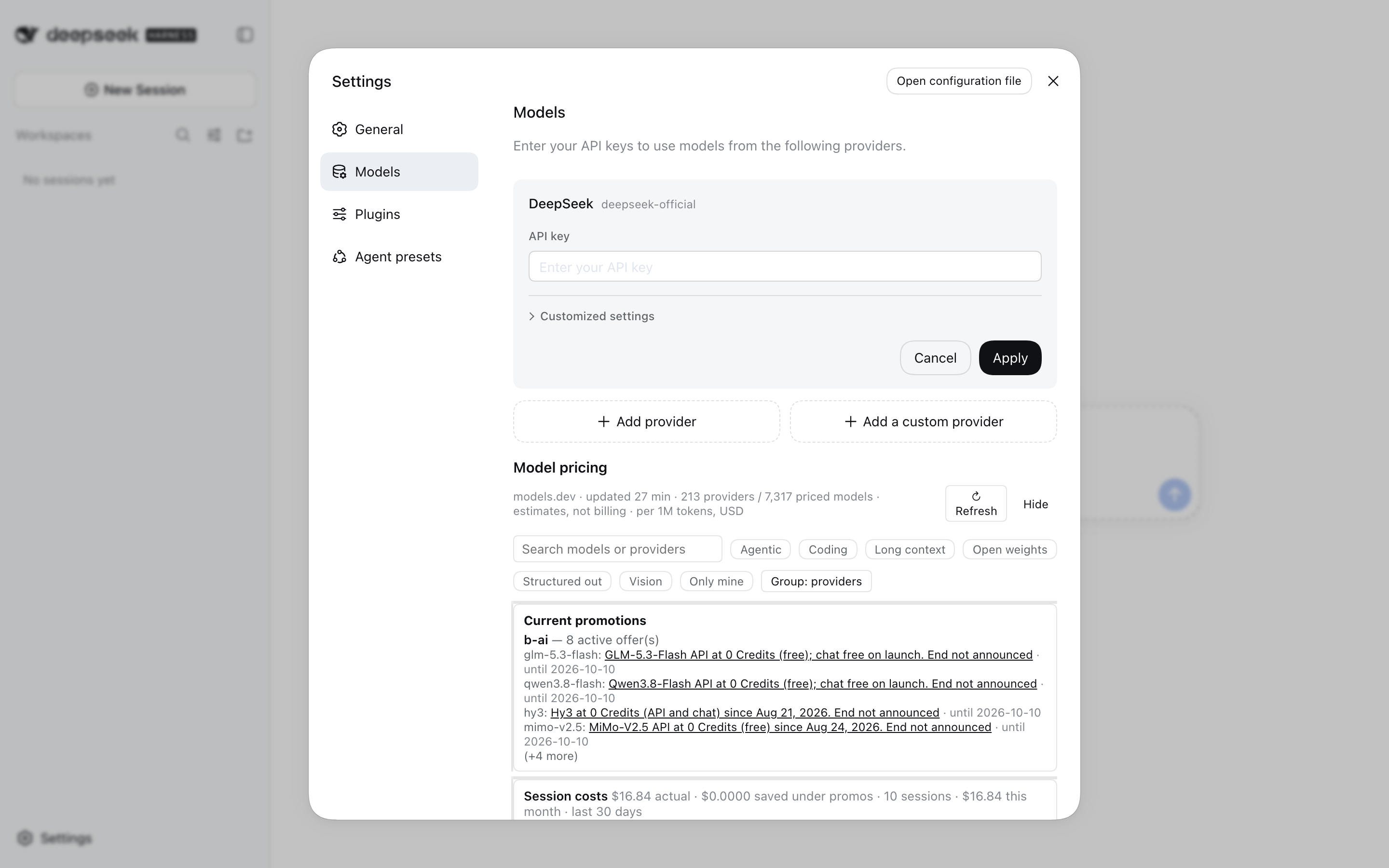
The pricing table in the DSH Settings → Models page: cross-provider
lowest listed badges, capability tags, and per-1M-token prices.
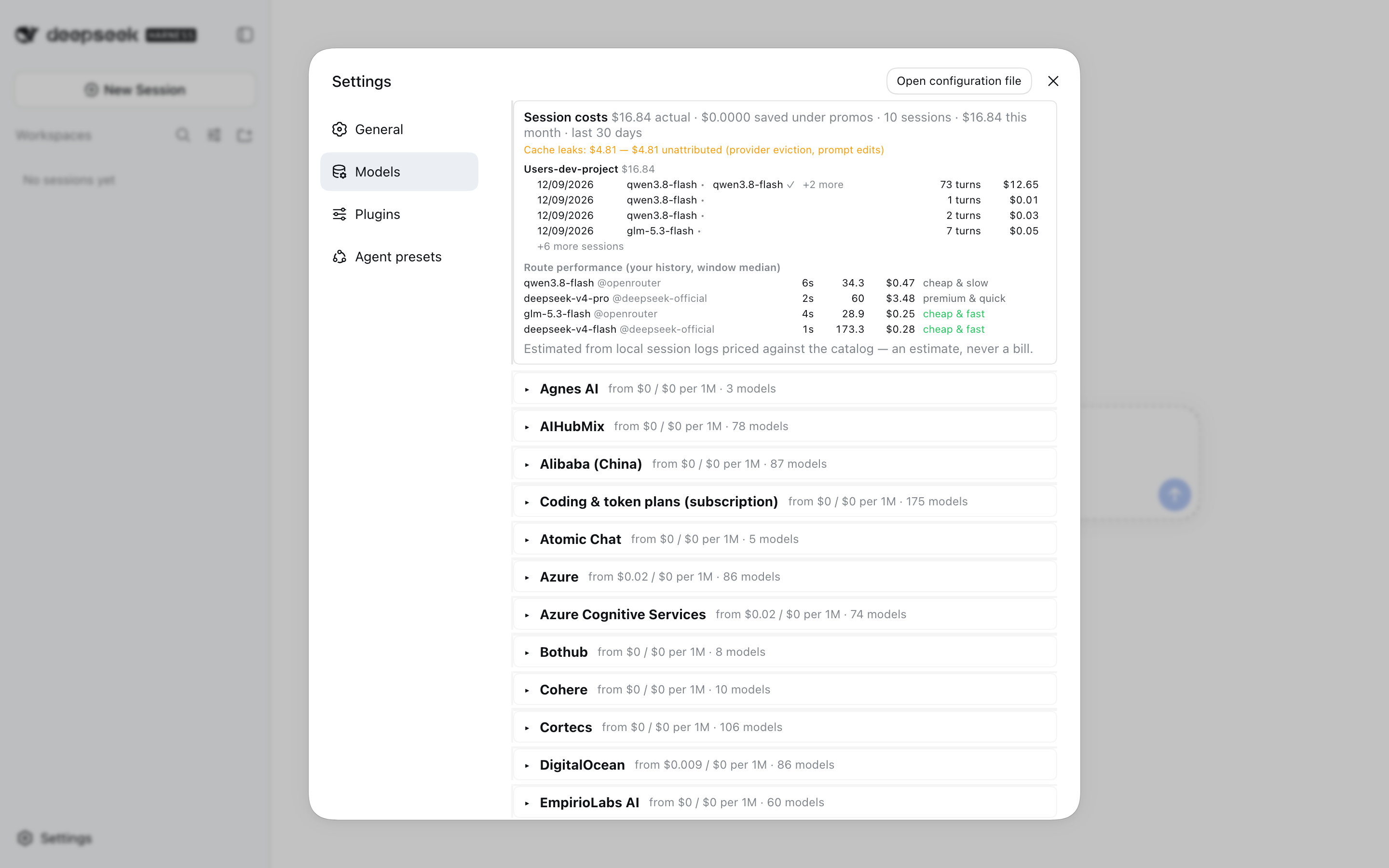
The session costs panel: per-workspace spend by the route actually called, cache leaks by cause, and a price × speed quadrant measured from your own history.
Why
Choosing a coding agent model today means opening three browser tabs: your provider's
price page, a comparison site, and someone's spreadsheet of which API is discounting
this month. dsh-model-pricing collapses that into the harness you are already in:
one table, filtered to what you can actually call, refreshed from public catalogs on
your own machine.
Features
- Pricing table for every connectable model — input / output / cache-read price per 1M tokens, context window, and max output (213 providers, ~7,250 priced models)
- Capability tags computed from structured catalog fields: Coding, Agentic, Vision, Long context, Open weights, Structured output — with user-configurable rules
- Authoritative routing prices: for models DSH can actually invoke, the harness's
own bundled
pi-aicatalog overrides the public catalog, and price divergences larger than 10% are flagged row by row - Honest cross-provider comparison: the winner badge says lowest listed — a claim about the catalog, not the market — $0 free tiers compare only against free tiers, and a route listed below half the first-party price is flagged ⚠ to verify
- Community promotion feed: verified, time-boxed offers rendered as badges with
provenance tooltips and a one-click filter; contributed through reviewed pull
requests and validated by CI (
promos/README.md) - Session costs, priced by the actual route: replays the harness's own session logs — including mid-session model switches — and sums what each project spent per (provider, model), with an explicit confidence ladder (routed > listed > estimated range > nothing shown) and promo-adjusted savings next to list price
- Cache-leak attribution: what share of your spend is history re-billed at full input price instead of cached price, split by cause — idle gaps past documented provider TTLs, route switches, unattributed — and never charging compaction, which is the opposite of a leak
- Route performance quadrant: time-to-first-token and tokens/second per (provider, model), medians over your own window — paired with the list price, so “cheap & slow” is a fact about your history, not a blog post; five samples or more before anything is labelled
- English, Chinese and Russian UI, parity-checked in CI
Planned next: badges inside provider cards, a /pricing command, and cost
projection before compaction.
Install
dsh plugin --profile web add dsh-model-pricing
Restart dsh web and open Settings → Models: the pricing table appears at the
bottom of the page. The plugin needs no configuration; first load fetches the
catalog and caches it locally.
From source (for development):
git clone https://github.com/vitas/dsh-model-pricing.git
cd dsh-model-pricing
npm install && npm run snapshot && npm run build
dsh plugin --profile web add .
Privacy and data sources
The plugin runs entirely on your machine; it operates no server of its own. Its outbound traffic is an anonymous read of public catalog data:
models.dev— 213 providers with per-model costs and capability metadata- the
@earendil-works/pi-aimodel catalog already bundled with DSH — authoritative for the routes you can invoke - the promotion feed served as static JSON from this repository
Session costs and cache leaks are computed from the local session logs under your DSH home directory and stay on your machine — nothing is uploaded to see them. Every displayed price is labeled with its source and freshness. Prices, cost and leak figures are estimates for model selection, not billing data — your provider's invoice is the only authority.
Documentation
| Document | Contents |
|---|---|
| docs/feature-map.md | Feature specification: scenarios, epics, MVP definition of done, risks, recorded decisions |
| docs/architecture.md | System architecture: deployment model, transport, data model, packaging, CI, milestones |
| docs/design.md | UX design of the pricing section: layout, states, badge vocabulary, tokens, accessibility |
| docs/distribution.md | How the plugin is published, discovered, and maintained in the DSH ecosystem |
| spike/RESULTS.md | Platform-validation evidence for the architectural assumptions |
Contributing
Wrong price? Missing promotion? Open an issue
using the structured forms, or send a pull request to promos/** — every entry needs
a source URL and an expiry. Code contributions should follow
docs/architecture.md (package layout, CI expectations).
This plugin is listed in
awesome-dsh-plugin
(accepted 2026-09-11) and installable alongside the other community plugins
through dsh plugin add.
If this saved you a tab-switch, a star helps other people find it.
License
Apache-2.0. Pricing and capability data are retrieved at runtime from
models.dev and the bundled @earendil-works/pi-ai catalog;
source and freshness are attributed per row in the UI.