dsh-tui-app
基于 Readline 的 DeepSeek Harness 交互式终端(TUI)配置包。
AI 分析
核心用途是为 DSH 提供轻量级的命令行交互界面。适合喜爱终端操作、不希望启动浏览器 WebUI 的极客和开发者。
安装
npx -p @deepseek-ai/dsh dsh plugin --profile web add github:yhfgyyf/dsh-tui-app说明文档
阅读完整 README ↗DSH TUI App
A readline-based interactive terminal profile bundle for DeepSeek Harness. It keeps DSH's model, Agent Preset, session, permission, command, and tool services, and supplies a terminal chat surface over them.
This is an independent lightweight implementation. It is not the React/Ink
project published as ccch1mneyyy/dsh-TUI.
Preview
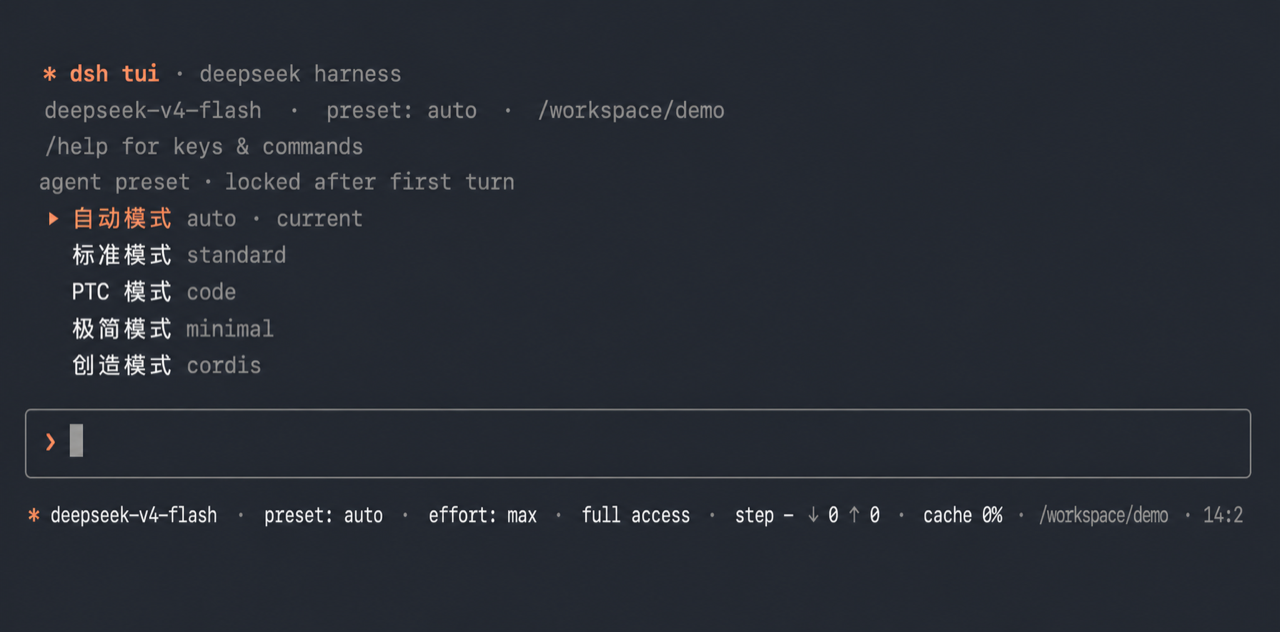
The image is cropped from a real local dsh --profile tui startup. Shell
history and window chrome were removed, and the workspace path was anonymized
as /workspace/demo; it contains no user name, home-directory path, session
ID, or personal project information.
Features
- Streaming assistant text, reasoning, tool calls, tool results, and
Codex-style
[Image #N]placeholders for image output/history. - Native rc.1 image input through repeatable
--image/-istartup flags or/imagefor the next prompt; pasted image paths are attached automatically, and Ctrl+V reads a copied Finder file or bitmap on macOS. This is the Control key, not Command/⌘V: Terminal does not forward a bitmap-only Command+V paste to the TUI process. Pending images use[Image #N]placeholders while attachment bytes remain in DSH's local store. Before sending, the TUI uses rc.1's model-capability preflight and retains the pending batch when the selected model is explicitly text-only. - Bordered TTY composer with command completion, history, resize reflow, and a plain line-loop fallback when stdin/stdout are pipes.
- New, resume, list, and delete session flows over DSH's durable session store.
- Blank-session Agent Preset selection; the preset is locked after the first model-loop turn.
- Model and reasoning-effort pickers, plus permission-preset cycling with Shift+Tab.
- DSH slash-command registry integration and an explicit
!local shell shortcut.
Install
Requires DeepSeek Harness 0.1.1-rc.1 or a compatible later build.
dsh plugin --profile tui add github:yhfgyyf/dsh-tui-app
dsh --profile tui
The first command creates the tui profile when it does not exist, adds this
package as a standard dsh.bundle, and records it in that profile.
Startup options:
dsh --profile tui --help
dsh --profile tui --preset minimal
dsh --profile tui -i diagram.png
dsh --profile tui -i a.png -i b.jpg
dsh --profile tui --resume
The standalone default is standard. To make first-prompt automatic routing
available and default, install the router bundle after this TUI bundle:
dsh plugin --profile tui add github:yhfgyyf/dsh-auto-preset-router
dsh --profile tui --preset auto
Commands and keys
Local commands include /help, /image, /sessions, /resume, /preset,
/new, /model, /effort, and /exit. /image a.png,b.jpg attaches images
to the next prompt and /image clear removes the pending batch. /model lists
models from every configured provider; /model / switches routes.
The shipped DeepSeek V4 Flash/Pro routes are text-only; rc.1 adds the official
deepseek-v4-flash-vision-exp image model. Select that model, or another route
that declares image input, before sending. DSH application commands such as /compact,
/goal, /feedback, and /export are merged from the shared command
registry when their providers are composed.
Main keys: Enter sends, Up/Down navigate history or pickers, Tab completes, Shift+Tab cycles permission presets, Ctrl+V pastes a clipboard image on macOS, Esc interrupts/closes, Ctrl+L clears, and Ctrl+D exits.
Security boundary
! is an explicit human-operated shell escape. It launches the
user's shell directly in the current workspace and therefore does not pass
through the Agent tool sandbox or approval policy. Only run commands you trust.
The ordinary model-driven shell tools remain governed by the active DSH preset
and permission configuration.
Like any DSH plugin, this package runs with the permissions of the DSH process.
Remove
Remove the Auto Router first if it was installed into the same profile:
dsh plugin --profile tui remove dsh-auto-preset-router
dsh plugin --profile tui remove dsh-tui-app
Session data under $DSH_HOME is not deleted.
Development
npm test
npm run check
npm run pack:check
The repository follows the current DSH distribution contract: package.json
declares dsh.bundle.patch, and cordis.patch.yml composes the terminal app
through dsh plugin --profile … add ….