yuqisun/dsh-theme-machine ↗★ 0
dsh-theme-machine
为 DeepSeek Harness Web UI 提供的《疑犯追踪》(Person of Interest)THE MACHINE 监控 HUD 风格深色主题皮肤插件。
AI 分析
核心用途是为 Web UI 提供个性化的深色科技感视觉主题。适合追求极客、科幻界面风格的用户。安装后即时应用,卸载可完全恢复官方默认外观。
安装
npx -p @deepseek-ai/dsh dsh plugin --profile web add github:yuqisun/dsh-theme-machine说明文档
阅读完整 README ↗dsh-theme-machine
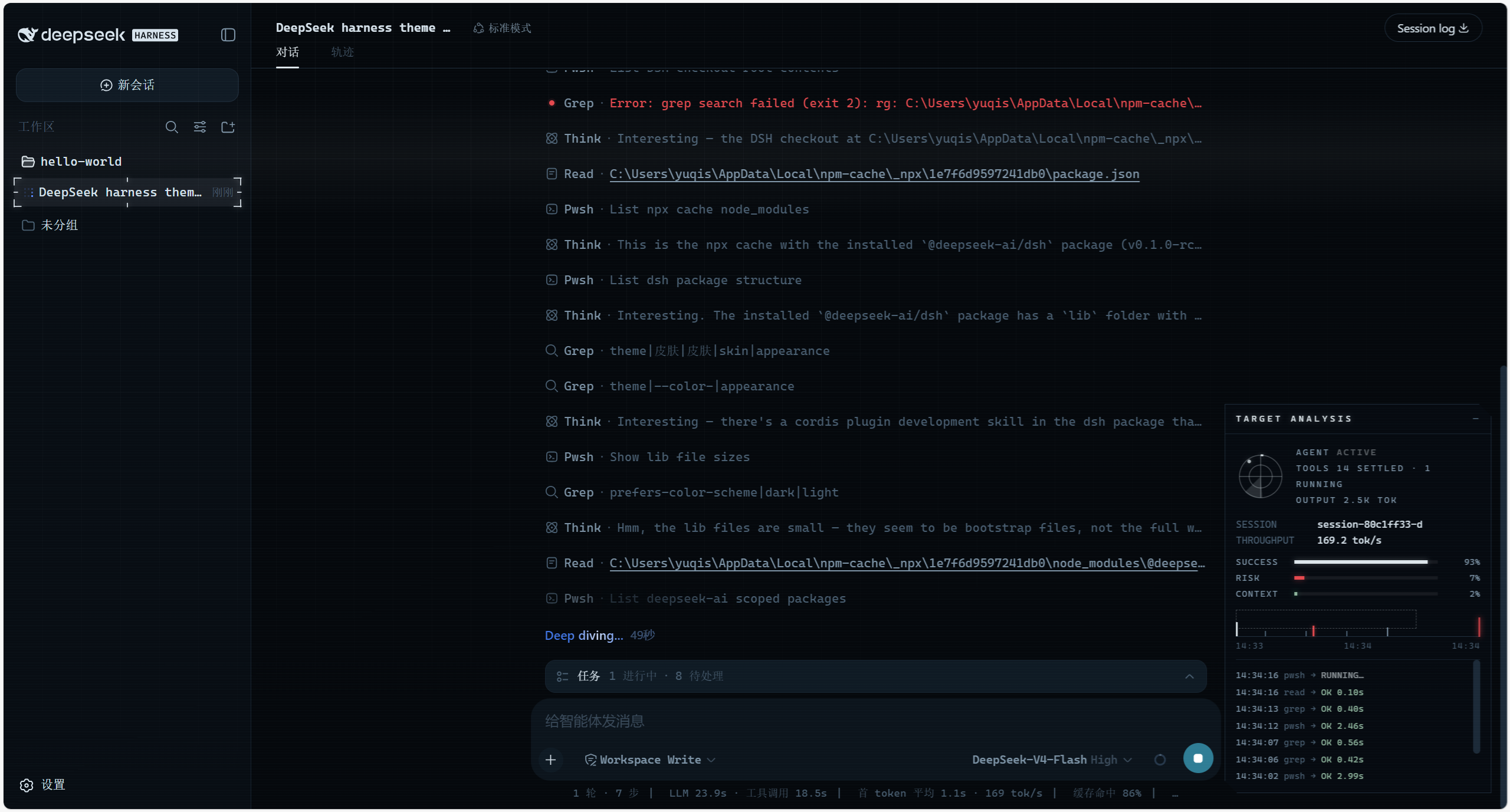
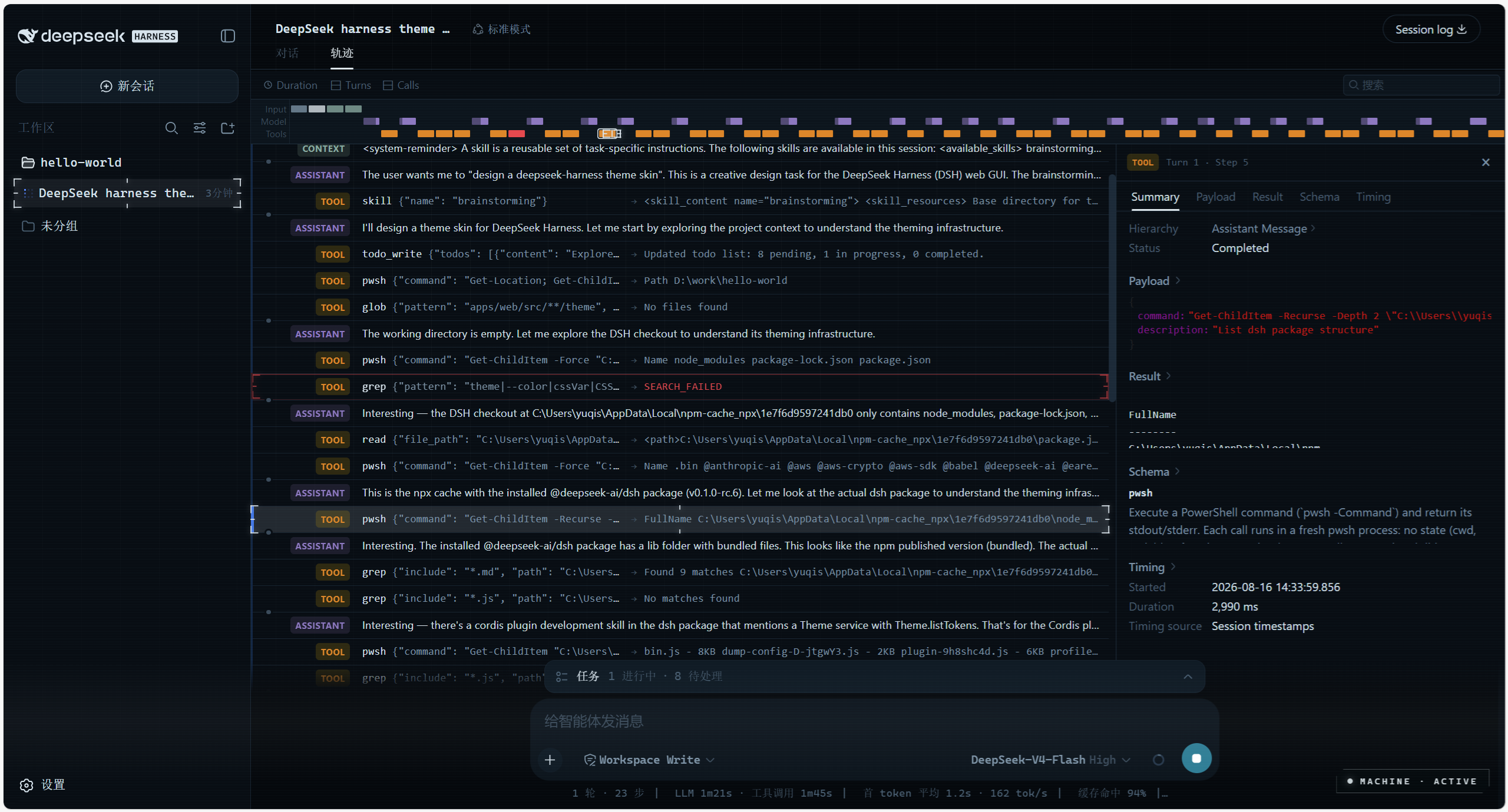
Person of Interest skin for DeepSeek Harness (dsh) — THE MACHINE surveillance-HUD theme for the web UI: deep blue-black surfaces, machine-cyan accents, scanline/grid atmosphere, and a live telemetry panel that makes the UI feel like it's backed by a superintelligence.
Preview
Features
A THE MACHINE dark HUD skin — applied on install, fully restored to the official look on uninstall.
- Token override layer — repaints the whole UI through
ctx.theme.overrideTokens()(~50--dsw-alias-*semantic tokens). Install = applied, uninstall = restored. Works on top of the built-in light/dark preference (the skin is dark-only by design and pins both palettes). - HUD chrome — monospace typography, subtle HUD grid, slow scanline, cyan selection color. Injected as `` + two atmosphere
- Live telemetry panel (
shell.overlayfloating seat, bottom-right):- Radar — sweeps only while the agent is actually running (
ConversationSnapshot.running) - SUCCESS / RISK — real settled tool-call success/error rates (
tool-resultnodes) - CONTEXT — real context-window occupancy from the token-meter
contextPressureprojection (same source as the official composer ring) - THROUGHPUT — decode tok/s folded from assistant timing + provider usage
- EVENT STREAM — the session's real tool calls with durations and error states
- Radar — sweeps only while the agent is actually running (
Collapsed it shrinks to a MACHINE LINK pill that pulses while the agent works.
Install
Requires DeepSeek Harness (dsh CLI). Plugins are managed via dsh plugin; --profile web targets the web profile. Pick one source:
# from npm (recommended)
dsh plugin --profile web add dsh-theme-machine

# from a local checkout
dsh plugin --profile web add link:/path/to/dsh-theme-machine

# from GitHub — pnpm ≥10 will ask you to allowBuilds the prepare script
# (zero-dependency build, see scripts/build.mjs), then re-run the add
dsh plugin --profile web add github:yuqisun/dsh-theme-machine
Then:
- Run the
addcommand above. - Restart
dsh web— the skin applies on load. - Optional — verify the plugin loaded:
dsh web --dump-config | grep dsh-theme-machine
Uninstall
dsh plugin --profile web remove dsh-theme-machine
- Run
removeto drop the plugin dependency. - Restart
dsh web— the stock look is fully restored.
Note: if the Loader row was manually written into
$DSH_HOME/cordis.patch.yml,removewon't rewrite that patch line — delete the matchinginsertentry by hand.
License
MIT