01NGVI-QINGYI/no-ai-style ↗★ 2
no-ai-style
Academic and professional prose editing for DeepSeek Harness: a skill that removes mechanical AI phrasing, defensive hedging and filler while protecting claims, citations, statistics, methodology and limitations, plus a composer button that inserts one of its three modes into the input box. 适合学术写作和专业报告润色,可保留引用和数据并消除AI感。
Install
npx -p @deepseek-ai/dsh dsh plugin --profile web add github:01NGVI-QINGYI/no-ai-styleREADME
Read the full README ↗Usage
Ask your agent in plain language. Paste the text or provide a file path:
Use no-ai-style to check.
Use no-ai-style to edit.
Use no-ai-style to draft.
Use “check” for a review or a submission-readiness check. If you ask whether it is ready to submit, the agent adds a verdict and any unresolved issues.
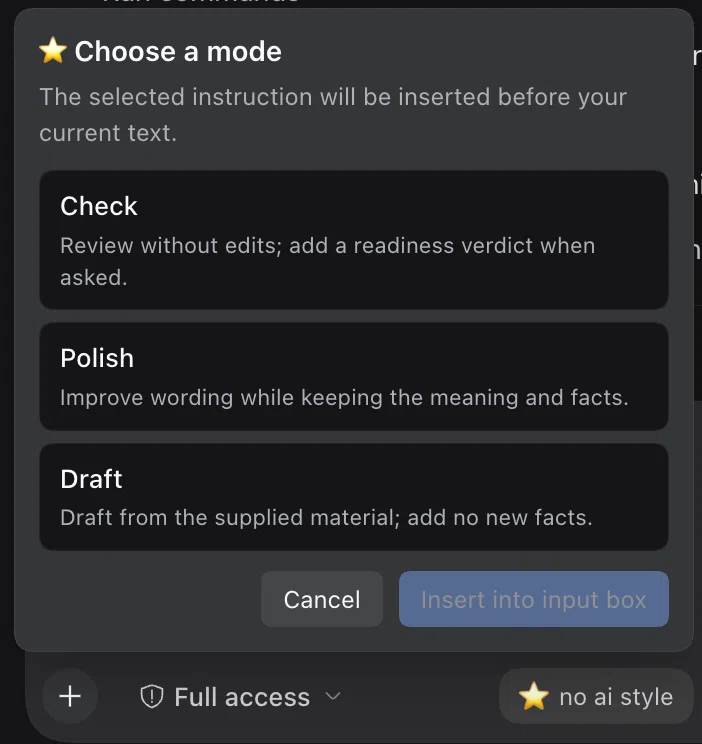
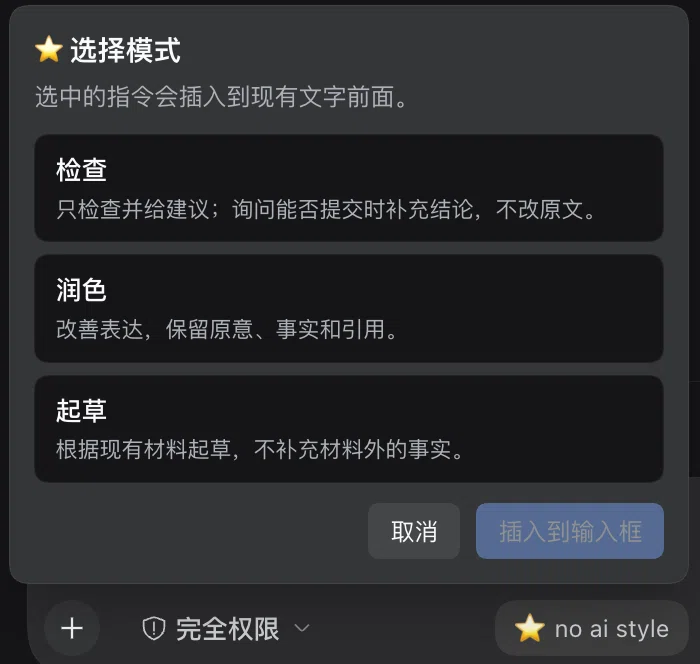
In DSH, the composer carries a no ai style button (⭐ no ai style). Click it and choose Check, Polish, or Draft. Insert adds the localized instruction before your existing draft; Cancel leaves it unchanged. The UI follows DSH’s language; Japanese appears when a Japanese DSH locale is enabled, and other unsupported locales use English. On older DSH releases, insertion is blocked while file or command reference chips are present so they are not lost.
| Mode | What you get |
|---|---|
audit | Findings and suggestions; add a readiness verdict when requested; source files stay unchanged |
revise | Edited prose within the requested scope |
compose | A draft based on supplied notes and evidence |
Light editing is the default. Request a stronger rewrite when needed.
The skill follows the text’s language and keeps sound passages unchanged.
Missing evidence is marked [EVIDENCE GAP], which blocks ready;
ambiguous interpretations are marked [INTERPRETATION FLAG] for author review.