15926719006/dsh-plugins-market--plugins-dsh-task-notify ↗★ 0
@local/dsh-task-notify
Desktop notification when an agent turn finishes or when the agent waits for your answer.
Other repositories with this package name
Install
$
npx -p @deepseek-ai/dsh dsh plugin --profile web add 'github:15926719006/dsh-plugins-market#273b3da77078551c39734dd546f9d161705c8440&path:plugins/dsh-task-notify'README
Read the full README ↗任务完成通知(@local/dsh-task-notify)
任务跑完、出错或被打断时,以及智能体停下来等你回答 / 审批时,弹一条 macOS 系统通知。 不画任何页面元素:通知就是系统横幅本身,和微信、钉钉的通知长一样。
效果图
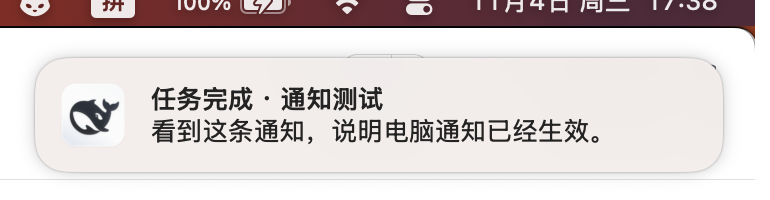
图:macOS 右上角弹出的系统横幅,标题「任务完成 · 通知测试」,正文是该轮回复的摘要(最多 200 字)。
看不到横幅时,去 系统设置 → 通知 → DeepSeek Harness 打开「允许通知」(横幅 + 声音)。
什么时候会通知
| 时机 | 通知标题 |
|---|---|
| 一轮对话正常跑完 | 任务完成 · 会话标题 |
| 跑失败 | 任务出错 · 会话标题 |
| 被中止 / 打断 / 触到长度上限 | 任务已中止、任务被打断、任务到达长度上限 |
智能体调用 ask_user_question 等你回答 | 需要你回答 |
| 有操作等你批准 | 需要你审批 |
正文是该轮最后一段回复的摘要(最多 200 字)。
不会通知:子智能体(subagent)和团队成员的会话 —— 只通知你自己在驱动的主会话。
两条投递路径
- 页面通知(默认):Host 通过
GET /plugins/task-notify/events(Server-Sent Events)把记录推给网页, 网页用浏览器的Notification接口弹出系统通知,归属「DeepSeek Harness」这个 App。 - 系统兜底:如果当前没有打开的页面,或页面上报浏览器拒绝通知,Host 改用 macOS
osascript发通知。
第 1 条要求系统里允许本 App 通知(一次设置): 系统设置 → 通知 → DeepSeek Harness → 允许通知(横幅 + 声音)。
验证
curl -s "http://127.0.0.1:60800/plugins/task-notify/test?force=1"
# {"ok":true,"clients":1,"permission":"granted","record":{...}}
clients为 0:网页还没加载到插件的浏览器半边(刷新一下页面)。permission为granted:浏览器允许通知。- 有记录但没横幅:去「系统设置 → 通知 → DeepSeek Harness」打开允许通知。
页面里也可以直接触发:DevTools 控制台执行 __dshTaskNotifyTest()。
自检(Host 侧看到了什么)
curl -s "http://127.0.0.1:60800/plugins/task-notify/debug"
返回 Host 实际收到的事件计数、turnEnd 分类、emitted 记录数、errors 与当前
clients / permission。排查「没弹通知」时先看这里:sessionEvent 在涨说明监听正常,
turnEnd.completed 在涨而 emitted 不涨说明被过滤或抛错(errors 会有内容)。
实现
index.js(Host):监听session/event的turn/end、user-questions/request、approval/request, 组成记录;SSE 广播给页面;无页面/被拒绝时走osascript。client.js(Web):订阅 SSE,用系统通知展示;只上报通知权限,不渲染任何界面。
测试
node --test test/plugin.test.mjs