Brunojomosi/dsh-plugin-deepseek-saldo ↗★ 0
dsh-plugin-deepseek-saldo
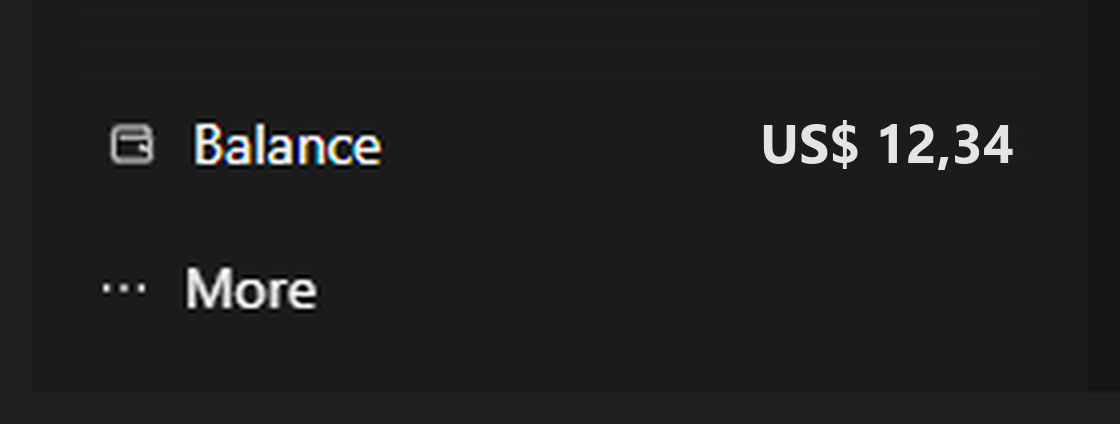
Mostra o saldo em dinheiro da conta DeepSeek na barra lateral esquerda, acima do botao More 适合需要直观监控官方API账户余额的开发者。
Install
npx -p @deepseek-ai/dsh dsh plugin --profile web add github:Brunojomosi/dsh-plugin-deepseek-saldoREADME
Read the full README ↗DeepSeek Balance — DSH plugin
Português | English
Shows the money balance of your DeepSeek account in the left sidebar, right above the "More" button.
[icon] Balance                    US$ 12.34
[•••]  More
What it does
- Reads the balance from
GET https://api.deepseek.com/user/balanceusing the sameDEEPSEEK_API_KEYcredential the DSHdeepseek-officialprovider uses. - Shows the total balance (topped up + granted) in the currency returned by
the API (usually
USD), formatted with the browser locale. - Refreshes itself every 60 seconds while the window is visible.
- Click the row to force a fresh read (bypasses the 30 s host cache).
- Hover for details: granted, topped up, last read time and a usage hint.
- On failure it shows
—with the reason in the tooltip:DEEPSEEK_API_KEYmissing from credentials/launch environment;- key rejected by the API (HTTP 401/403);
- network failure/timeout;
- balance below the minimum for new requests (value in warning color).
Requirements
- DSH 0.2.1-rc.2 (tested on that version; it uses the client slot API and the authenticated harness Connection).
DEEPSEEK_API_KEYconfigured — on DSH's Models page or as an environment variable of the process that starts the app.- No third-party dependencies and no install scripts.
Install
Clone this repository and install the package folder:
git clone https://github.com/Brunojomosi/dsh-plugin-deepseek-saldo.git
With DSH open, ask the agent:
install the plugin from the folder
C:\path\to\clone
plugin_manager accepts the absolute path of the package. After installing, the
row appears on its own; no restart is needed on the first install.
Repository and issues:
Privacy and security
- The only external address is
https://api.deepseek.com/user/balance. - The key stays inside the host process: the page receives only the number,
currency and timestamp, through an authenticated DSH Connection route
(
/api/deepseek-balance/state). - No telemetry, no file writes, no cookies/localStorage reads, no command execution.
Layout
| File | Role |
|---|---|
lib/index.js | Host half: registers the authenticated Connection route and calls the DeepSeek API. |
lib/client.js | Browser half: registers the row in sidebar.footer.action (the space right above the account menu). |
cordis.patch.yml | Inserts the deepseek-balance entry into the profile Loader. |
locale/en.json, locale/zh.json | Title and description shown in Settings → Plugins. |
icon.svg | Plugin icon in the plugin list. |
Where it lives and how to remove
DSH installs the package as a link to a folder on your computer, so that folder must keep existing. A common choice is:
%USERPROFILE%\.dsh-plugins\dsh-plugin-deepseek-saldo
Keep the folder out of Downloads and out of the app installation folder, so
cleanups and DSH updates cannot affect the plugin.
To remove: Settings → Plugins → DeepSeek Balance → uninstall (or
plugin_manager with remove_bundle). Restart the app if the removal asks for
it.
Reinstalling: the browser module id is
dsh-plugin-deepseek-saldo. If you remove and reinstall this same package, DSH may cache the old module as "absent" and the row only comes back after restarting the app — that is harness behavior, not the plugin.
Limitations
- Only visible with the sidebar expanded; in the 56 px rail the row is hidden.
- The balance is the API account balance (
DEEPSEEK_API_KEY). If the key is changed in the environment, the next cycle reads the new balance. - The currency comes from the API and is limited to CNY or USD; when both wallets exist, the row shows USD first and the other currency in the tooltip. Other currencies are not provided and there is no conversion.
License
MIT.