HelloQingTao/dsh-global-prompt ↗★ 0
@zfgcta/dsh-global-prompt
DeepSeek Harness plugin: edit the user-global instructions file (~/.dsh/AGENTS.md) from the Web settings UI. Maintained, installable fork of couplingartist/dsh-global-prompt — ships prebuilt lib/, declares dsh 0.2.x-compatible peers/engines, and installs from both npm and GitHub.
Install
npx -p @deepseek-ai/dsh dsh plugin --profile web add github:HelloQingTao/dsh-global-promptREADME
Read the full README ↗@zfgcta/dsh-global-prompt
English | 中文
Edit the user-global instructions file (
~/.dsh/AGENTS.md) from the DeepSeek Harness Web settings UI — no need to open the.dshfolder by hand.
Based on couplingartist/dsh-global-prompt (MIT, © couplingartist); this repository fixes its packaging so the plugin actually installs, and continues the work.
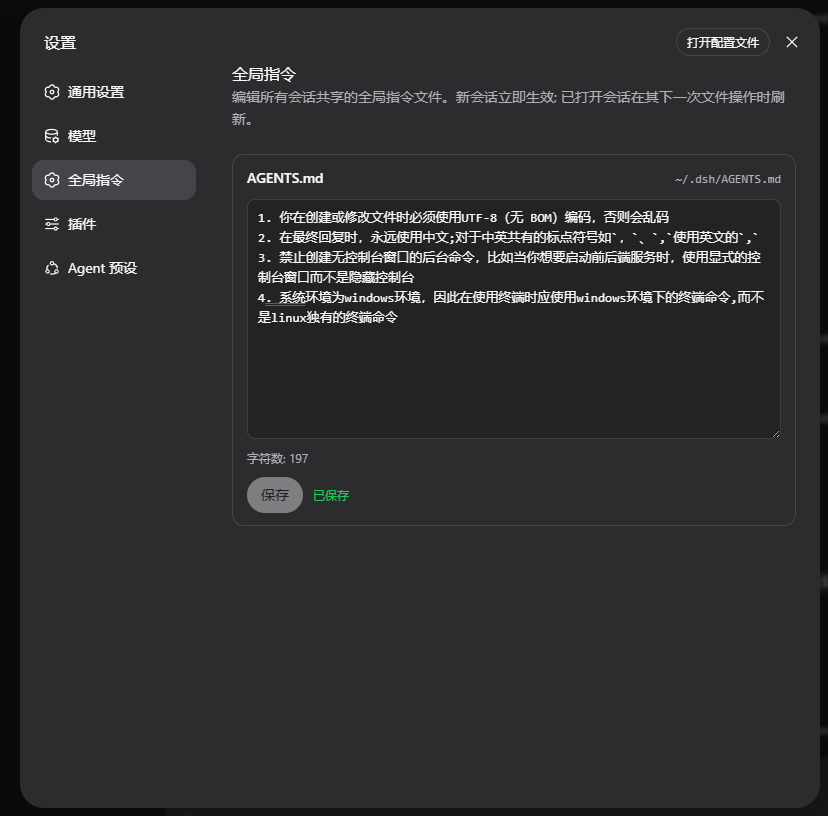
What you get
| Situation | Behavior |
|---|---|
| Settings → 全局指令 (Global instructions) | A new settings section: multiline editor + Save button + file path + character count |
| First save | Creates ~/.dsh/AGENTS.md if it does not exist (UTF-8, no BOM) |
| Single source of truth | The settings page reads/writes the same file external editors do — no second copy |
| Effect timing | Follows the harness's touch-driven reload: new sessions read the latest content immediately; open sessions re-read on their next successful file tool call or turn |
| Security | The HTTP API answers loopback (127.0.0.1) only; request bodies capped at 1 MiB |
What this fork fixes
As published, upstream could never be installed from GitHub or npm:
| Defect (upstream) | Fix (here) |
|---|---|
lib/ gitignored, no prepare/prepack → dsh plugin add github:... installs an empty shell (ERR_MODULE_NOT_FOUND) | Prebuilt lib/ is committed, and prepack rebuilds before npm publish |
The npm name dsh-global-prompt belongs to an unrelated project | Published as @zfgcta/dsh-global-prompt |
Peers pinned to 0.1.1-rc.2 → dsh 0.2.x rejects the install | @deepseek-ai/dsh-client-* ranges >=0.2.0-rc.1 在 DeepSeek Harness 的 Web 设置界面里直接编辑**用户全局指令文件**(~/.dsh/AGENTS.md),不必再手动打开 .dsh` 目录改文件。 |
基于 couplingartist/dsh-global-prompt(MIT,© couplingartist);本仓库修复了它的打包问题使其真正可安装,并继续维护。
你会得到什么
| 场景 | 行为 |
|---|---|
| 设置 → 全局指令 | 新增一个设置分区页:多行编辑器 + 保存按钮 + 文件路径显示 + 字符数统计 |
| 首次保存 | 文件不存在时自动创建 ~/.dsh/AGENTS.md(UTF-8 无 BOM) |
| 唯一真源 | 设置页与外部编辑器读写同一份文件,没有第二份数据 |
| 生效时机 | 遵循系统触摸驱动刷新:新会话立即读到最新内容;已打开会话在下一次成功文件工具调用或新一轮时重新读取 |
| 安全 | HTTP 接口仅允许本机回环(127.0.0.1)访问;请求体上限 1 MiB |
本仓库修复了什么
上游原版按它发布的样子在 GitHub / npm 上根本装不上:
| 缺陷(上游) | 修复(本仓库) |
|---|---|
lib/ 被 gitignore 且没有 prepare/prepack → dsh plugin add github:... 装出来是空壳(ERR_MODULE_NOT_FOUND) | 预构建的 lib/ 直接入库,并在 npm publish 前用 prepack 重新构建 |
npm 上的 dsh-global-prompt 包名属于另一个无关项目 | 改名发布为 @zfgcta/dsh-global-prompt |
peer 钉死 0.1.1-rc.2 → 被 dsh 0.2.x 拒装 | @deepseek-ai/dsh-client-* 改为范围 >=0.2.0-rc.1 <0.3.0-0,并声明 engines.dsh |
dsh.client.inject 引用了外壳里已不存在的模块 | 改为 0.2.0-rc.2 冻结模块表实际存在的 dsh-client-ui-slots / dsh-client-ui-primitives |
| 客户端 bundle id 硬编码旧名;sourcemap 泄漏本地路径 | 按完整包名注册;关闭 sourcemap |
| 缺 LICENSE / CHANGELOG / engines | 已补齐(MIT) |
安装
# npm(推荐)
dsh plugin --profile web add @zfgcta/dsh-global-prompt

# 或者直接从 GitHub 安装(lib/ 已入库,开箱即用)
dsh plugin --profile web add github:HelloQingTao/dsh-global-prompt
重启 web 实例使新插件生效:
dsh web
然后打开 http://127.0.0.1:3080 → 设置 → 全局指令。(--profile web 请换成你实际使用的 profile。)
卸载
dsh plugin --profile web remove @zfgcta/dsh-global-prompt
dsh web
开发
pnpm install
pnpm test         # vitest:store(13)+ editor(7)
pnpm typecheck
pnpm build        # lib/index.js(宿主半)+ lib/client.js(客户端 bundle)
| 文件 | 职责 |
|---|---|
src/store.ts | 接缝 1:用户全局指令文件的读写语义(单测覆盖) |
src/index.ts | Host 插件:注册 GET/PUT /api/global-prompt |
src/client/GlobalPromptEditor.tsx | 接缝 2:编辑器组件(单测覆盖) |
src/client/api.ts | 编辑器 IO 边界的 HTTP 实现 |
src/client/index.tsx | Client 插件:注册 settings.section 分区 |
tsdown.config.ts | 构建:ESM 宿主 lib + 包在 __ModuleLoader__.load 里的 CJS 客户端工厂 |
cordis.patch.yml | bundle 层:插入 global-prompt 行 |
许可与致谢
MIT — 见 LICENSE。原作者 couplingartist(dsh-global-prompt);打包、兼容性与维护修复来自 HelloQingTao。