HelloQingTao/dsh-multi-folder ↗★ 0
@zfgcta/dsh-multi-folder
DeepSeek Harness plugin: secondary working directories for a project. The agent keeps the primary workspace as cwd, gains equal write/exec permissions on configured secondary directories under workspace-write mode, and is notified of configuration changes at the next message boundary. Managed from the composer's own '+' menu (official option picker, with an owned directory browser when no native picker can answer), configurable before the first message through a sessionless multiFolder remote API, and referenceable with @ in the input, subdirectories included. 适合需要让 Agent 同时操作主工作区之外多个辅助目录的复杂项目任务。
Install
npx -p @deepseek-ai/dsh dsh plugin --profile web add github:HelloQingTao/dsh-multi-folderREADME
Read the full README ↗dsh-multi-folder
English | 中文
Secondary working directories for one DSH project: the agent's primary workspace stays put, while configured secondary directories get equal read/write/execute rights and are reachable with
@in the input.
Based on AngelosZou/dsh-multi-folder (MIT, © 2025 Yutong Zou); this repository continues that work.
What you get
| Situation | Behavior |
|---|---|
| Composer "+" menu | A Multi-folder row in its Commands group — listed whether or not the draft has text; picking it opens the shell's own option picker (the same surface behind the model selector) |
| Picker: add | First row "Add working directory" → native directory picker; when no native picker can answer (remote / LAN / desktop shell), it falls back to a directory browser this plugin draws (breadcrumbs back, descend level by level, create a folder inline, and step past a drive root into "This PC" to switch volumes); re-adding the same path keeps a single entry and says so; add several in a row |
| Picker: remove | One row per configured directory → a two-step confirmation (tick to acknowledge, then Remove; Cancel returns to the list) |
Typing @ | Files inside the secondary directories appear as their own group; the picked path is inserted absolute, so the agent can read it directly; directory rows drill with Tab like the shipped source, with breadcrumbs back up |
| In a session | The directory list is injected into the system prompt; config changes reach the agent at the next message or tool-call boundary, without interrupting |
| Other windows / hand edits | Config lives in a host-owned store and reads are version-checked against the file, so a change made in another window — or by editing the JSON directly — is picked up on the next read, no restart |
| Writing files / running commands | write / edit / pwsh / bash landing in a secondary directory are re-rooted to it automatically; every sandbox mode keeps its semantics. read / glob / grep are unrestricted anyway |
Showcases
The "+" menu entry — a Multi-folder row inside the composer's own menu, with a localized label, a folder glyph and a one-line description:

@ references — the configured secondary directories listed under their own group while typing @:
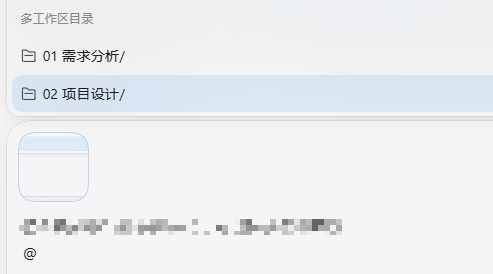
Slash command (same capability, also what the agent sees):
/multi-folder list
/multi-folder add "D:\path\to\repo"
/multi-folder remove "D:\path\to\repo"
/multi-folder set "D:\a" "D:\b"
Install
dsh plugin --profile web add @zfgcta/dsh-multi-folder
Where GitHub is hard to reach from, the npm registry route above is the one to use; a git or local source also works:
dsh plugin --profile web add git+https://github.com/HelloQingTao/dsh-multi-folder.git
dsh plugin --profile web add file:D:/projects/dsh-multi-folder   # local clone, forward slashes
Afterwards restart the DSH backend (host plugins are composed at process start) and refresh the browser page (the client bundle is served fresh). Remove with dsh plugin --profile web remove @zfgcta/dsh-multi-folder.
Requirements
- Node.js >= 20
- A DSH profile composed from
@deepseek-ai/dsh-base+@deepseek-ai/dsh-web-app(the standard web profile) - No build step: the host half is plain ESM,
lib/client.jsis a hand-maintained factory bundle in the DSH client-modules format
DSH compatibility
| DeepSeek Harness | Support |
|---|---|
| 0.1.7 and later | ✅ Full support: "+"-menu picker, @ references into secondary directories, cross-window config coherence (verified on 0.1.7-rc.2) |
| 0.1.6 and earlier | ❌ Not supported |
The "+"-menu picker and @ references build on the commandUi / inputTriggers client services shipped from 0.1.7; on older hosts those services are absent — the plugin skips just those registrations instead of erroring, but the two features are unavailable.
Install this package and the upstream dsh-multi-folder one at a time: they claim the same runtime namespace, so having both in a profile breaks one of them. Uninstall the other first (dsh plugin --profile web remove ).
How it works
- Sandbox re-rooting — a listener on the
tools/executearound-dispatch waterfall interceptswrite/edit/pwsh/bashcalls whose resolved path (orworkdir) falls inside a configured directory and runs them with the session's standing policy re-rooted to that directory ({ ...standing, workspaceRoot: dir }). The mode itself is untouched, soread-onlystill denies andworkspace-writestill allows. Paths go throughfs.resolve+processPathbefore matching, so.., symlinks and case differences behave. Background runs (run_in_background: true) register with the generic jobs runtime under the same re-rooted policy, sojob_output/job_killkeep working. - One writable root — the Windows ACL runner grants each process tree a single writable root, so a command that stays in the primary workspace cannot create files in a secondary directory (
git -C, orcdinside a script, fails with an OS-levelPermission denied). File-creating commands must passworkdirset to the directory they write into, as an absolute path; when a failure matches this pattern the plugin appends the fix to the tool result. - The "+"-menu entry — the host registers
/multi-folderwith the human-command registry, which is what feeds the shipped menu's Commands group. Two things matter: ① the command deliberately declares noinput.hint, because the shipped group hides hinted rows once the draft is non-empty, and this row must always be present (the handler still parsesrawInput, soaddkeeps working by hand); ② the client hangs apopupSelectspec on that same host command viactx.commandUi.decorate, so a pick opens the shell's own picker instead of inserting a bare command line. The list and the removals supply only data — rows, labels, and theconfirmationshape — and draw no popup of their own; the one surface this plugin does draw is the directory browser used by "Add" (see below), because the shipped picker is one-shot and cannot carry a level-by-level browse. - The
@references drill down.ctx.inputTriggers.registerSourceadds a second@-trigger source (same trigger, distinctname, so it coexists with the shipped source as its own group) that asks the host'smultiFolder/listFilesendpoint for each directory's direct children and returns absolute paths. Directory rows carrydrill: true, so Tab descends instead of committing — inserting the directory with a trailing slash and keeping the quote open for spaced paths, exactly like the shippedformatFileMention— and aheaderbreadcrumb walks back up a level. Queries accept both the alias form (@/rest) and the absolute form a drill inserts, so Tab keeps working. The whole body is guarded and capped at 30 rows; per the pipeline'ssource-failedsemantics a failure drops only this group. - An owned directory browser —
uiWorkspace.pickDirectory()is native-only: when the host composes the browse backend (a LAN bind, a remote client, a desktop shell) it answersdirectory-picker/unavailable. So "Add directory" degrades to a browser this plugin draws, served by the newmultiFolder/browse(child directories over thefsseam, which every composition provides; one level capped at 1000 with atruncatedflag) andmultiFolder/makeDir(a validated single segment, thenmkdir). Neither touches the configuration store — a choice still commits through the mode's own channel (/multi-folder addin a session,multiFolder/addon the creation page). Every colour comes from a--dsw-alias-*token, so it follows the theme and any applied skin. - Configuration and security boundary — per-workspace config is a JSON array in a host-owned store outside every agent sandbox root (
/storages/multi-folder/.json); directwrite/editattempts against it are rejected with an explicit message — the agent can never self-grant a directory; configuration is user-managed by design. The in-process cache is kept honest withfs.stat: a cached copy is reused only while the file still reports the version it was read at (stamped before the read, so a racing write can't leave older content cached under a newer stamp); every read normalizes and de-duplicates. See SECURITY.md. - Sessionless remote API — the
multiFoldernamespace is registered throughctx.typert.registerwith hand-writtensrc-jsondescriptors and provided as a plain-object service.list/add/remove/set/listFilesare keyed by workspace path and share one validated core with the command, so the new-session screen can configure directories before any session exists.listFilesis fenced: the target directory must lie inside one of the workspace's configured secondary roots, or it returns nothing — the endpoint can never degrade into a general path enumerator.browse/makeDirare keyed by path and serve only the browser.
Known issues
- On versions ≤ 0.3.0 the Commands group could come up empty when "+" was opened in an older session (a fresh session worked). Fixed in 0.4.0: a notice threw while being written to the session log and left the session write handle retained. Upgrading resolves it; in the meantime, open a new session or restart DSH.
Development & docs
- Tests:
node test/smoke-host.mjs(host apply + remote API + cache coherence + thelistFilesfence +browse/makeDir),node test/intercept.mjs(interception / command / notification),node test/activation.mjs(activates with the optional services absent),node test/at-source.mjs(@query parsing, Tab drill, breadcrumbs),node test/browser.mjs(the owned browser end to end) - Architecture: docs/design.md · Security model: SECURITY.md · Changes: CHANGELOG.md