Nikodem5/dsh-web-terminal--packages-code-editor ↗★ 4
@nikodem5/dsh-code-editor
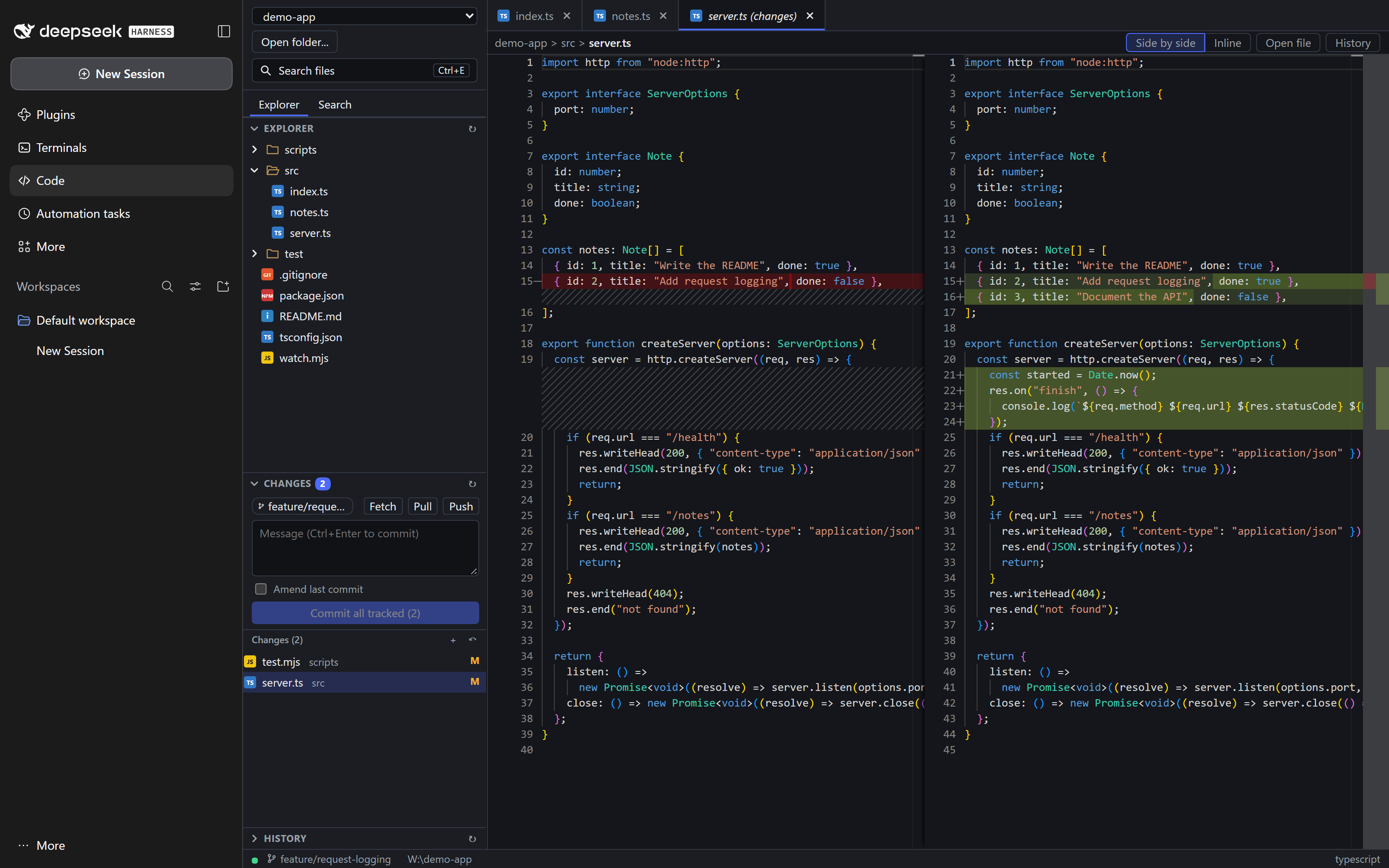
Monaco-based code editor and reviewer inside the DeepSeek Harness web GUI: explorer, git tools, search in files and Markdown preview.
Install
npx -p @deepseek-ai/dsh dsh plugin --profile web add @nikodem5/dsh-code-editorREADME
Read the full README ↗@nikodem5/dsh-code-editor
A Monaco code editor and reviewer for the DeepSeek Harness web GUI: browse and edit files in folders you register, review what an agent changed, and run git from the same page. Everything runs locally; no data leaves your machine.
Install
From npm:
dsh plugin --profile desktop add @nikodem5/dsh-code-editor
dsh plugin --profile web add @nikodem5/dsh-code-editor
Use the profile you run (desktop for the desktop app, web for the web GUI) and restart DSH afterwards. Remove it
with dsh plugin --profile remove @nikodem5/dsh-code-editor.
Requires DSH 0.1.5 or newer (tested against 0.2.2-rc.1; older versions load the plugin without showing its sidebar entry), Node.js 22+, and git on PATH for the git features.
No native builds and no postinstall scripts, so installing cannot leave a half-configured profile.
From a release archive: download dsh-plugins-.zip from
GitHub Releases, unzip it, close the app and run
node install.mjs desktop (or web) in the unzipped folder. --dry-run previews, --remove uninstalls,
and --package dsh-code-editor installs only this plugin.
From source:
git clone https://github.com/Nikodem5/dsh-web-terminal.git
cd dsh-web-terminal
npm install
npm run build
npm run install:desktop      # or install:web; restart the app afterwards
Up to 0.1.0 this plugin was installed from a release archive or a clone under the unscoped name dsh-code-editor.
Installing 0.2.0 or newer with the archive or clone installer replaces that copy. If you switch to the npm package,
remove the old copy first with the installer you used (node install.mjs --remove --package dsh-code-editor ),
otherwise both copies are loaded.
What you get
- Explorer, tabs, diff view and a Markdown preview (sanitized, no remote images)
- Safe saving: a file changed on disk since you opened it is refused instead of overwritten
- Git: status, stage/unstage/discard, commit and amend, branches, history, fetch/pull/push
- "Changed by an agent" markers for files an agent edited in a Terminals window
- Search across a folder, quick open, and nested repositories
How it is built
Two halves:
- Host (
lib/index.js, this section): confined file and git routes plus a live-update WebSocket. - Client (
lib/client.js, built fromsrc/bybuild.mjs): the "Code" page.
The host/client contract is API.md. It is the source of truth for routes, bodies, error codes and frames.
Host
Cordis plugin code-editor, inject = ['webServer'] only (git runs through child_process.execFile; a real cordis ctx throws on any property that is not injected).
Routes under /api/dsh-code-editor (details in API.md): roots, tree, files, file (GET, PUT), git/status, git/diff, git/stage, git/unstage, git/discard, plus the git tools git/commit (GET and POST), git/last-commit, git/branches, git/checkout, git/log, git/show, git/fetch, git/pull, git/push (lib/git-tools.js). WebSocket: /code-editor/ws?root=.
Security model
This plugin serves arbitrary file reads and writes to the browser, so every request is treated as hostile.
- Roots are opt-in. Only folders registered through
POST /roots(persisted in/code-editor/roots.json, re-validated on load) can be touched. Filesystem roots, the home folder itself and its parents are refused. Unregistered root -> 403root. - Paths are relative and confined. Forward slashes only, no
.., no absolute or drive paths, no NUL or control characters, length caps. The deepest existing ancestor isrealpathed and must stay inside the root's real path, so symlinks and junctions pointing outside are refused (403escape). Percent-encoding is never decoded. .gitis off limits to the file routes (also.GIT,git~1): editing hooks or config through the editor would be code execution. Git data is only reachable through the git routes.- Git is never a shell.
execFile('git', [...]),--before every path,--literal-pathspecs(a file called*.txtis just a file),--no-optional-locks,core.fsmonitor=false(an untrusted repo cannot run a command throughgit status), 20 s timeout, bounded output, at most 6 concurrent git processes. - Git tools are bounded. Commit, checkout, fetch, pull and push never use a shell, never
--force, and never wait for input:GIT_TERMINAL_PROMPT=0, closed stdin, no askpass / credential-manager UI, ssh in batch mode (a remote that needs credentials fails with "Authentication required - run git in a terminal"). Pull is--ff-only --no-rebase(no silent merge commits), push sets an upstream only for a branch that has none, checkout never stashes or forces (git's refusal is shown), and the client asks for a confirmation naming repository, branch and remote before every pull and push. Branch names are checked withgit check-ref-format --branch, commit hashes with^[0-9a-f]{4,40}$, andprotocol.ext.allow=neveris always set. Sync commands time out after 120 s. One mutating git-tool call per repository at a time (409busy). - Destructive git actions are narrow. Discard deletes an untracked path only if git currently lists it as an untracked file; directories are never deleted. Git paths are confined like file paths.
- Writes are atomic and optimistic. Temp file in the same folder, fsync, rename; creation uses a hard link so it cannot overwrite a concurrently created file. A stale
expectedMtimegives 409 and changes nothing. - Browser-facing hardening. Every HTTP route and the WebSocket upgrade accept only a loopback peer with a loopback Host and the per-boot token the host puts into the page (
Authorization: Bearer, or thedsh-wt.subprotocol on the socket; see SECURITY.md), and apply the terminal's Origin policy on top (a foreign web page cannot read or write files through the user's browser). Bodies must beapplication/json, which also forces a CORS preflight. Extra origins:DSH_CE_ALLOWED_ORIGINS(also honoursDSH_WT_ALLOWED_ORIGINS). - Remaining limit: a path check and the following file operation are not one atomic step, so a process that can swap a directory for a link inside a registered root at exactly the wrong moment is not defended against. Anyone with that ability already controls the folder.
Limits
| What | Limit |
|---|---|
| File read | 2 MiB (larger -> tooLarge); binary = NUL in the first 8 KiB or invalid UTF-8 |
| File write body | 4 MiB |
| JSON bodies | 256 KiB |
| Path | 1024 chars, 255 per segment, 1000 paths per git call |
| Registered roots | 256 |
| Tree listing | 20 000 entries per folder |
Quick open (/files) | 50 000 files |
| Git status | 10 000 files, 64 MiB output |
| Sockets | 64 |
Live updates
One watcher per root, shared by all its sockets, closed 30 s after the last socket leaves and on dispose. Changes are debounced 150 ms; more than 500 paths in one frame become overflow. .git/ changes are ignored except .git/index and .git/HEAD (-> git frame); node_modules/** is ignored.
- Windows / macOS: one recursive
fs.watchon the root. - Linux: non-recursive watches on the root, on
.git, and on every folder the client has listed through/tree, plus a 2 s poll ofgit statusthat raises agitframe. Limit: edits in a folder the client never expanded are only noticed as agitframe (and only in git roots).
Tests
npm test (in this package, or from the repo root) runs node --test over tests/: confinement, roots, every route against temp dirs and a temp git repo, watcher frames in both modes, WebSocket origin policy, and a strict-ctx resilience test. The tests do not need lib/client.js.
Client (the Code page)
Source in src/client/, built by node build.mjs into one classic script (lib/client.js, about 3.9 MiB: Monaco 0.52.2 lite, the editor worker and the codicon font are embedded). Monaco only runs when the Code page first opens, so a failure there shows a notice and never breaks plugin loading. Workers start from a blob URL (data: URL, then the main thread, as fallbacks). Highlighting is Monarch only (no TypeScript language service); JSON has a small built-in grammar.
Features
- Sidebar: root picker (harness Workspaces, folders opened before), Browse... (the desktop app's native folder dialog,
__DSH_DIRECTORY_PICKER__; without it a typed absolute path via "Open folder..."), a Search files button (same as the shortcut), EXPLORER (lazy tree with file-type icons, refreshed on livechangedframes) and CHANGES (Staged / Changes / Untracked; per-file Stage, Unstage, Discard; group Stage all / Unstage all). Discard asks first and lists the untracked files it will delete. - Git tools (per repository, in CHANGES): a sync bar (branch chip,
↑ahead ↓behind, Fetch / Pull / Push with a spinner while running) and a commit box (multi-line message with a first-line counter against 72 characters,Ctrl+Entercommits). Commit takes the staged changes; with nothing staged the button becomes "Commit all tracked (N)" and asks first (git commit -a, untracked files excluded). Amend last commit prefills the previous message and warns (plus a confirm) when that commit is already on the upstream branch. Pull and Push ask for a confirmation naming repository, branch and remote; Pull is fast-forward only; a push of a branch without upstream says it will rungit push -u. Errors (hook output, missinguser.name/user.email, authentication, git refusals) are shown inline and nothing is retried. The branch chip (CHANGES, repository blocks, status bar) opens a picker: switch to a local branch, check out a remote branch as a tracking branch, or type a new name to create it from HEAD. A HISTORY section lists commits 50 at a time (short hash, subject, refs, author, relative date, "Load more"); click a commit for its changed files (A / M / D / R) and a file for a read-only diff of parent vs commit in the diff editor. The History button of a file tab shows that file's history (--follow). Every mutation refreshes CHANGES, the explorer and open files (the host also sends thegitframe). Logic:src/client/git-tools.ts, UI:src/client/git-panel.tsx, API wrapper:src/client/git-api.ts. - Nested repositories (like VS Code): when the open folder is inside a git work tree, CHANGES shows that repository. When it is NOT a repository but contains some (e.g. a monorepo-of-repos), CHANGES lists every repository found up to 4 levels down (
GET /git/repos, cap 50,node_modulesand hidden folders skipped), each collapsible with its branch, count, status groups and actions; repositories without changes start collapsed. The refresh button rescans. No repository at all: "No git repository in this folder." - Layout: drag the bar between the sidebar and the editor (200-640 px, default 280) and the bar between EXPLORER and CHANGES; arrow keys on a focused bar nudge it, double-click resets. Both sections collapse. Sizes and collapsed state are remembered (
localStorage, global). 13 px UI text, 24 px rows, 35 px tab bar, 22 px status bar. - File-type icons (explorer, tabs, quick open, changes): small inline SVG badges chosen by extension or well-known name (
src/client/file-icons.ts), no icon font. - Tabs with a dirty dot, middle-click close and a confirmation for unsaved tabs. Files open in Monaco; change entries open in the diff editor (staged or unstaged, side by side or inline).
- Saving sends
expectedMtime. A 409 (or an on-disk change under unsaved edits) shows "File changed on disk" with Reload / Overwrite / Compare (disk vs mine diff, then keep mine or take disk). - A clean open tab reloads silently on disk changes (cursor and scroll kept). Status bar: branch, ahead/behind, live state, root, line:col, EOL, language.
- Search in files (sidebar
Files | Searchswitch,Ctrl+Shift+F): query box with match-case, whole-word and regex toggles, collapsible include / exclude globs (*.ts, src/**; a bare name matches anywhere), results grouped by file with counts. Typing is debounced (300 ms), toggles search at once, and a newer search aborts the older request (the host stops itsgit grep/ worker when the connection drops). Clicking a result opens the file at the match and highlights it (Monaco decoration); Up/Down in the box move the selection, Enter opens it,F4/Shift+F4step through results from anywhere in the view. Host side (GET /search):git grep -n --column -I(+--untracked --exclude-standard) in git roots, a symlink-skipping walk elsewhere; caps 2000 matches / 200 files, 10 s budget, previews ~200 characters around the match. Regular-expression work (the walk, and locating matches ingit greplines) runs in a worker thread that is terminated at the deadline, so a catastrophic pattern returns partial results withtimedOutinstead of freezing the host. Patterns use JavaScript regex syntax. - Markdown preview (
.md/.markdowntabs): anEditor | Side by side | Previewswitch in the breadcrumb row; the preview follows typing (200 ms debounce) and the editor scroll position (by ratio, side by side only). Rendering ismarked(GFM: tables, task lists, fences, strikethrough) followed by DOMPurify (plain-HTML profile: no scripts, handlers, svg / math / forms / media /style/class/id/data-*) and a post-pass that rewrites links and images; the result is appended as a DOM fragment, never re-parsed. The markdown is treated as hostile (agents, untrusted repositories). Links: relative.mdlinks open in the editor,http(s)links open withwindow.open(..., 'noopener,noreferrer')(anchors carry nohref, so middle-click cannot navigate),#anchorsscroll to heading ids, everything else (javascript:,mailto:,file:, ...) is inert text. Images: relative images are fetched throughGET /raw(rasters and svg only, 5 MiB cap, shown from a blob URL); remote images are never loaded (privacy / tracking) and show a[image: alt]placeholder. Fenced code is coloured with Monaco'scolorize, its output rebuilt node by node (only text andmtkspans survive). - Changed by agent: a small lightning mark (hover:
Changed by Claude · · 14:32 (Edit)) on files that a Claude session in a currently open Dsh Web Terminal edited (Edit / Write / MultiEdit / NotebookEdit, reported by Claude hooks). It shows on explorer rows (collapsed folders above get a faint dot), tabs, quick-open results and CHANGES entries, only for files inside the open root, and is temporary: it disappears when that terminal is closed. It needs the terminal plugin (window.__dshTerminals, contract inpackages/terminal/README.md); without it nothing is shown. Source:src/client/agent-marks.ts(pure mapping and live source) andagent-marks.tsx(badges). Path matching is case-insensitive and slash-agnostic for Windows roots. - Per-root UI state (open tabs, active tab, expanded folders, diff layout) is kept in
localStorage.
Shortcuts
| Key | Action |
|---|---|
| Ctrl+E | Search files (quick open: fuzzy over the repo files; Up/Down, Enter, Esc). Also the "Search files" button |
| Ctrl+P | Same, where the app lets the page have it (see below) |
| Ctrl+S | Save the active file |
| Ctrl+F4 | Close the active tab (asks when dirty); also middle-click or the tab's x |
| Ctrl+Shift+F, Ctrl+Shift+H | Search in files (shows the SEARCH view and focuses the box) |
| F4 / Shift+F4 | Next / previous search result (only while there are results) |
| Ctr |