Xizhi1024/deepseek-harness-dsh-for-vscode ↗★ 6
dsh-vs-sidebar
%dsh.ext.description% 适合希望在VS Code内与本地DSH对话、发送代码选区,并审阅和确认文件修改的开发者。
Other repositories with this package name
Install
This plugin has no verified bundle, or compatibility checks failed. Read the repository notes first. Read the full README ↗
README
Read the full README ↗🚀 Usage
- Press
Ctrl+Alt+B— the extension starts (or reuses) the localdsh weband loads the UI - Select code → right-click Add to DSH Thread; the draft receives a compact
file:linelink, press Enter to send - Type
@dsh+ your question in the VS Code chat — replies stream from your local DSH session - Let DSH propose an edit through the bridge: it lands in the DSH Changes view for diff / accept / undo — nothing is written without approval
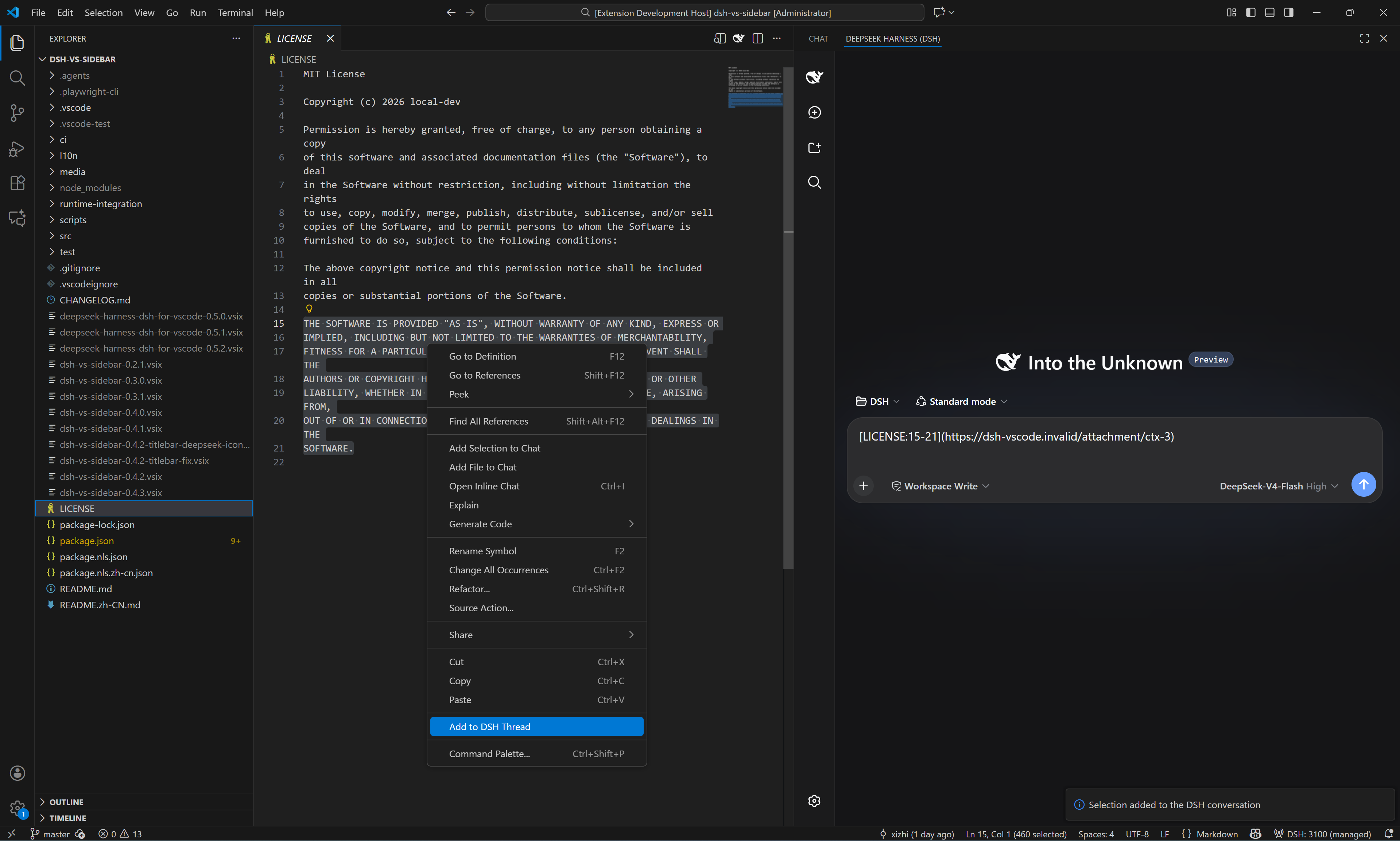
Common commands (palette, DSH: prefix): New / Switch Session · Open Session History · Restart / Stop Server · Open in Browser · New DSH Instance (Ctrl+Alt+N) · Diagnose · Restart Cleanly · Set DSH FIM API Key.
⚙️ Configuration
| Key | Default | Description |
|---|---|---|
dsh.port | 3080 | Port for the DSH web server |
dsh.autoStart | true | Start the service when VS Code opens |
dsh.home.mode | shared | shared = official ~/.dsh; isolated = extension-private home |
dsh.profile | web | DSH profile directory name |
dsh.executablePath | (empty) | Explicit DSH executable / package dir / shim; takes precedence over discovery |
dsh.closePolicy | onVscodeExit | When to stop the owned server |
dsh.features.changes-review | true | DSH changes review (approval-gated writes) |
dsh.changes.observe-tools | true | Attribute tool-made edits in the changes tree (tool group) |
dsh.features.chat-participant | true | @dsh chat participant |
dsh.features.ctrl-k / ctrl-i | false | Inline edit commands (Ctrl+K / Ctrl+I) |
dsh.features.lm-route | false | Expose DSH models in the VS Code LM picker |
dsh.features.mcp-consume | false | Let DSH consume VS Code-side MCP servers |
dsh.features.tab-completion | false | FIM tab completion — needs dsh.fim.baseUrl + DSH: Set FIM API Key, then restart the DSH server |
dsh.fim.baseUrl | (empty) | Upstream FIM endpoint (full URL of an OpenAI-compatible completions API) |
dsh.keybindings.ctrlL | true | Ctrl+L adds the selection to the thread (never sends) |
dsh.bridge.terminal / editorRead / ui | false | Terminal / editor-read / UI surface bridges (consent switches) |
Full key list in package.json; run DSH: Diagnose for a health summary.