Xraytest/exneo-useful-dsh-workshop--plugins-dsh-free-search ↗★ 0
dsh-free-search
Free web search for DeepSeek Harness: 27 engines (Bing/DuckDuckGo/AnySearch/SearXNG/Exa/Tavily/Keenable/Firecrawl/Parallel/You.com keyless; Zhihu global/site via MCP and Perplexity/SerpBase/DeepSeek (official + native tools/search)/Baidu/Kimi/Aliyun/Doubao with key; OpenAI/Gemini/Claude model built-in search, explicit-only) + auto smart routing + global engine enable/disable & fallback priority + editable zh/en language pools + multi mode (parallel full language-pool merge) + multi_search cross-source tool + failure-aware fallback (quota/auth cooldown, transient retry, fallbackOn) + time filtering + platform search + domain blocklist (blockedDomains) + web_fetch, with web settings UI.
Other repositories with this package name
Install
npx -p @deepseek-ai/dsh dsh plugin --profile web add 'github:Xraytest/exneo-useful-dsh-workshop#00eac4b561264144529fef6704283cd044bdccae&path:plugins/dsh-free-search'README
Read the full README ↗使用
网页设置(推荐)
安装后打开配置页(DSH 0.1.7-rc.1+):
- 左侧 插件 页 → 已安装 分组 →
free-search→ 点击组件行web-search-free(行内"配置"入口)
配置页提供:
-
Search engine:下拉框切换引擎,保存即生效
-
API keys:为 Exa / Tavily / Keenable / Firecrawl / Parallel / Perplexity / DeepSeek / SerpBase / Serply / You.com 填写 key(密码框,保存后只显示"已配置";Exa / Tavily / Keenable / Firecrawl / Parallel / You.com 不填也可免 key 使用)
- 推荐:付费引擎 key 建议写入 harness 凭据中心
~/.dsh/.credentials.yaml(如DEEPSEEK_API_KEY: sk-...,与官方 LLM provider 一致,一处管理所有 key)。插件读取优先级:凭据中心 > 设置页 > 环境变量,设置页填的 key 仅作为遗留兼容。
- 推荐:付费引擎 key 建议写入 harness 凭据中心
-
Test engine:直测当前引擎可用性(不走回退链,付费引擎无 key 会明确报错)
-
Use Bing default:把当前搜索引擎切回稳定的免费 Bing;
Discard只撤销尚未保存的编辑 -
Platform search:勾选启用 GitHub / V2EX / Bilibili / Reddit / Hacker News / Stack Overflow / 维基百科 / npm / YouTube / Vimeo / 掘金 / 豆瓣 / Qiita / X (Twitter) 平台搜索(
platform_search工具按此过滤) -
EN / 中文:切换界面语言(默认中文)
[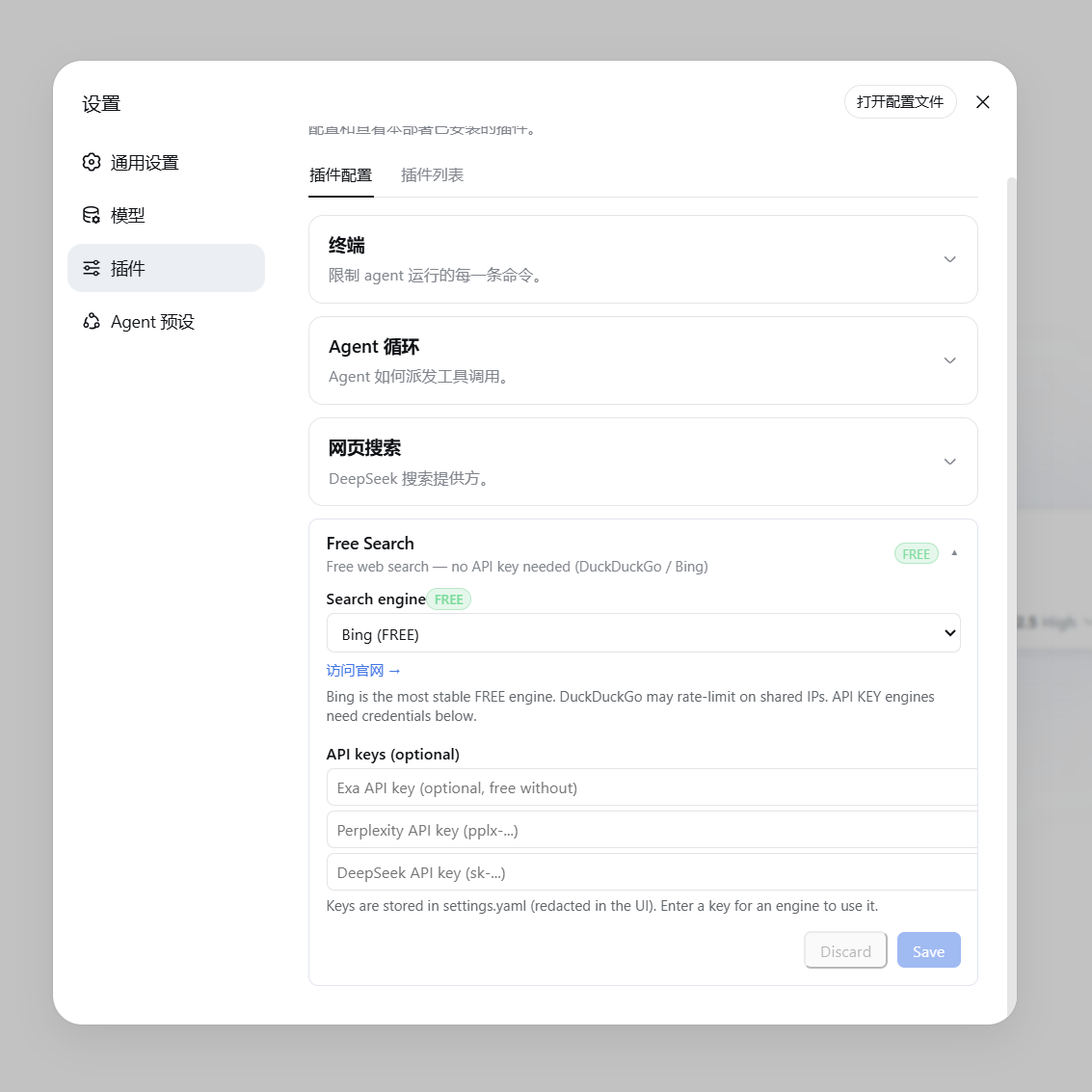](https://raw.githubusercontent.com/DDDMUC/dsh-free-search/master/assets/settings-free.png) ▲ 免费引擎(显示绿色 FREE 徽章与官网链接) [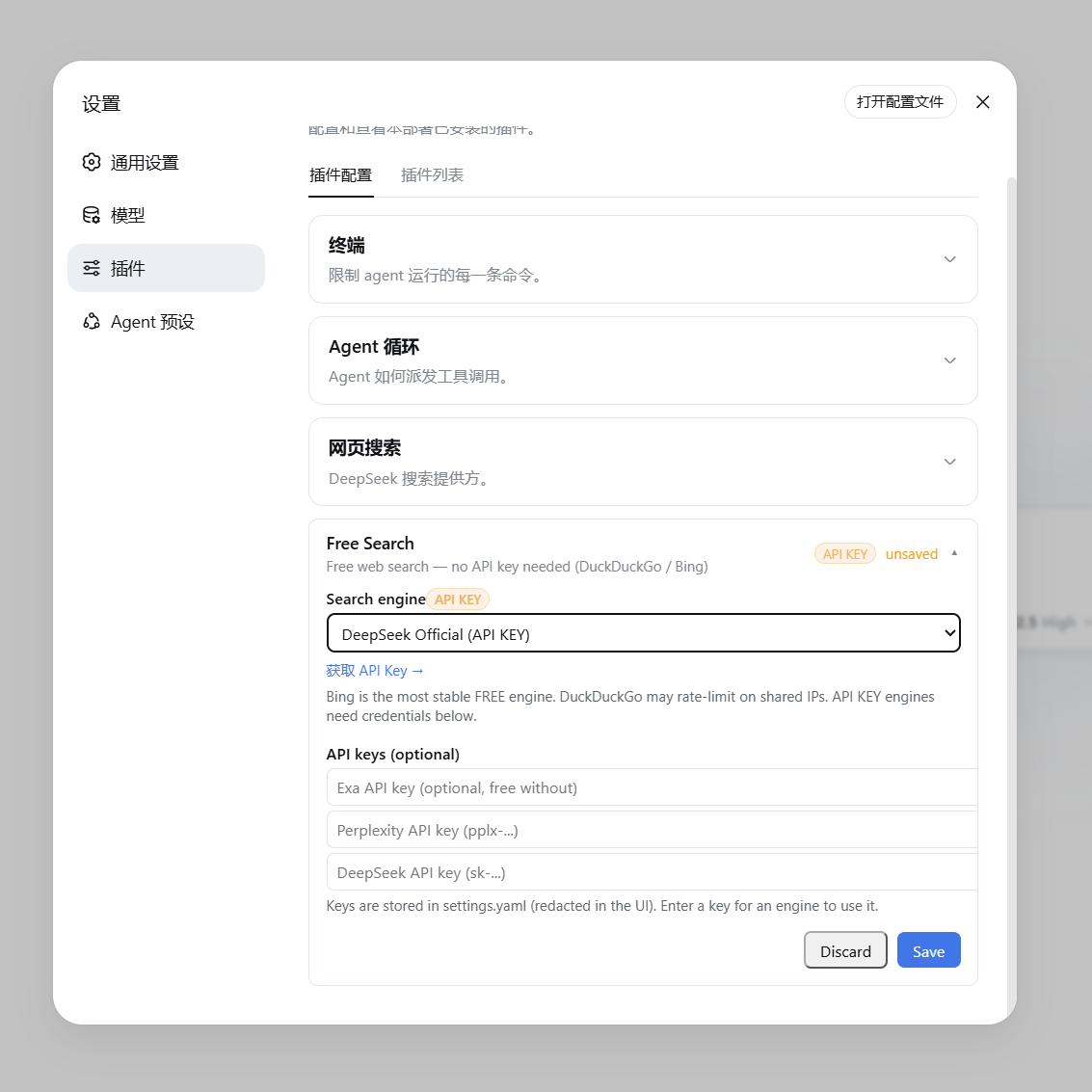](https://raw.githubusercontent.com/DDDMUC/dsh-free-search/master/assets/settings-apikey.png) ▲ 付费/API Key 引擎(显示橙色 API KEY 徽章与获取链接)
聊天框切换引擎(/free-search-engine)
不用进设置页也能切换引擎:在聊天框输入 /free-search-engine,弹出引擎选择窗口(和 /model 选模型一样的交互),点选即切换,当前引擎会标记出来。等效于设置页切换 + 保存,且界面语言跟随设置页(中文/英文)。
命令只改首选引擎配置,搜索仍走 web_search + 统一回退链:即使首选引擎挂了也会自动换其他引擎,永不直接失败。系统提示词同步刷新。
引擎开关、回退优先级与 Multi 模式
设置页有这些块(都会保存进条目 config):
- 全局启用的搜索引擎:取消勾选后,该引擎会从普通
web_search回退链、Auto 智能路由、advanced_search、multi_search和引擎测试中全局排除;至少要保留一个引擎。 - 全局回退优先级:用 ↑↓ 调整先后顺序。首选引擎仍先尝试;Auto 保留"语言/时间"路由规则,但自定义后同一分组内及后续回退按此顺序。被禁用的引擎保留在列表里(标记「已禁用」)但不执行;「恢复默认顺序」一键还原。
- 中文查询池(zhPool)/ 英文查询池(enPool):Auto 路由的起始组,也是 Multi 模式的并发池。按查询语言自动二选一(检测到中日韩文字走中文池,其余走英文池);两池都可用 ↑↓ 排序、下拉添加引擎、「−」移除(每池最低 2 个引擎,无上限)。默认中文池
bing / baidu / aliyun / anysearch,默认英文池bing / exa / tavily;禁用/冷却/缺 key 的引擎运行时自动跳过。 - 搜索引擎下拉里的
Multi Search:选中后web_search会并发查询查询语言对应池的全部已启用引擎(不再是前 3 个),URL 去重合并、跨源命中的结果排前面。注意整池并发会成倍消耗额度(池里含按额度计费引擎时尤其注意);Multi 失败时会自动退回普通单引擎回退链并在结果里注明。
失败分类与引擎冷却(Failure-aware fallback)
回退链不再把所有失败一视同仁,而是先给失败分类(issue #36):
quota(额度/预算耗尽,HTTP 402 /NO_MORE_CREDITS/ SerpBase 免费额度用尽):立即切换,并把该引擎在本进程内冷却——后续搜索不再尝试它,避免反复撞墙;auth(401/403、key 无效或未配置):同上,冷却到本会话结束(改好 key 重载插件即恢复);bot-wall(如 DDG 反爬挑战):冷却一小段(默认 60s)后再自动放回链中;transient(超时 / 5xx / 网络 / 429 限流):同一引擎重试一次再回退,避免一次抖动就丢掉好引擎;invalid-response(解析失败 / 结构变化 / 返回 0 结果):照常回退,但归类为插件侧问题,不冷却引擎。
回退结果的 Note: 现在会给出具体类别,例如 Note: exa is out of quota, using doubao.、Note: perplexity is misconfigured (API key rejected), using doubao.、Note: bing failed (transient), using doubao.。free_search_test 也会为每个失败引擎附上类别(failureClass)。
冷却只作用于本进程(重载插件或重启即清空),且对配置的首选引擎同样适用:若它正在冷却,本轮会跳过并回退,结果里注明 is cooling down;冷却中的引擎一旦成功即自动解冻。
fallbackOn 控制哪些失败类别允许触发回退:默认勾选全部六类,即当前的「搜索永不直接失败」;取消某类后,遇到该类失败会停下并把该引擎的错误报出,不再换引擎(例如去掉 invalid-response:首选引擎返回空/解析失败时直接报错,而不是静默退回低质引擎)。设为空数组 [] 则任何失败都立即中止。注意缺 key、被禁用、不支持时间过滤不算失败,无论怎样都照常换引擎。设置页有对应勾选框,也可在 config 写 fallbackOn: [quota, auth, bot-wall, transient, invalid-response, unknown]。
安全搜索(safeSearch)
safeSearch 控制内置来源是否额外套一层安全过滤,默认 off(不加参数,保持引擎自身默认行为):
| 值 | 含义 |
|---|---|
off(默认) | 不加过滤参数,保持引擎默认行为 |
moderate | 过滤成人内容 |
strict | 最严格过滤 |
作用于 Bing(adlt)、DuckDuckGo HTML(adlt)、DuckDuckGo Lite(adlt);其它引擎没有对应参数,不受影响。设置页有下拉框,也可直接在 config 里写 safeSearch: moderate。
fetch provider 接管(与其它 fetch 插件冲突)
插件运行时会尝试接管 web.fetchProvider:
- 未设置、或仍是出厂默认
http→ 接管为fs-quality-fetch(直连 → exa contents → firecrawl → crawl4ai); - 已被显式指向其它 provider(例如
playwright)→ 不抢占,只记一条日志(进程内只打一次)。
如果你同时装了也会注册 fetch provider 的插件(例如 dsh-web-fetch-playwright、dsh-chatgpt-subscription),请在 profile 的 cordis.patch.yml 里明确让一方退出:
- id: web
  config:
    fetchProvider: playwright   # 用别人的 fetch;本插件只接管 search
否则启动阶段可能出现「互相写 web config → web 服务重建 → 插件重复 apply」的循环(见 issue #82)。
如果你特意 pin 了 fetchProvider: http(只想要内置抓取),把 fetchProviderTakeover 设为 false 即可:本插件不再把 http 当成「出厂默认」去接管,但仍会在完全未设置时补上。
searchProvider 的规则相同:未设置或仍是 deepseek-official 时接管,显式指定其它 provider 时不抢占。
配置文件
DSH 0.1.7-rc.1 起,配置跟随 profile 的插件条目保存:设置页与 /free-search-engine 都会写入当前 profile 的 cordis.patch.yml 中 web-search-free(dsh-free-search)条目的 config。
旧版 ~/.dsh/settings.yaml 的 free-search: 段不会被 DSH 核心自动导入(核心的 importLegacyDocument 只为 ui-developer-tools / ui-onboarding / shell 三个段提供了映射),原文件在导入其它段后会被改名为 settings.yaml.imported,该段的值只留在那里。插件会在启动时检测 settings.yaml.imported(或仍存在的 settings.yaml)中的 free-search: 段,把可识别的字段一次性补种进当前 profile 的条目 config(写一次后不再重复,可在启动日志看到 free-search: migrated N field(s)…)。如果你想手动处理,也可以照着 settings.yaml.imported 里的值在插件页行配置中填一遍。
### Usage
#### Web Settings (Recommended)
After installation, open the config page (DSH 0.1.7-rc.1+):
- Sidebar **Plugins** page → **Installed** group → `free-search` → click the `web-search-free` component row (the row's "configure" entry)
The config page provides:
- **Search engine**: Select an engine from the dropdown; changes take effect immediately upon saving.
- **API keys**: Enter keys for Exa / Tavily / Keenable / Firecrawl / Parallel / Perplexity / DeepSeek / You.com (password fields; displayed as "configured" once saved; Exa / Tavily / Keenable / Firecrawl / Parallel / You.com work without a key too).
- **Recommended**: store paid-engine keys in the harness credential center `~/.dsh/.credentials.yaml` (e.g. `DEEPSEEK_API_KEY: sk-...`, same as the official LLM providers — one place for all keys). Resolution order: credentials center > settings page > environment variable; the settings-page fields remain for backward compatibility.
- **Test engine**: Tests the selected engine directly (no fallback chain; paid engines without a key report an explicit error).
- **Use Bing default**: stage a switch back to the stable free Bing engine; `Discard` only cancels unsaved edits
- **Platform search**: check platforms (GitHub / V2EX / Bilibili / Reddit / HN / Stack Overflow / Wikipedia / npm / YouTube / Vimeo / Juejin / Douban / Qiita / X (Twitter)) to enable them for the `platform_search` tool (unchecked platforms are skipped, and X needs Grok Build signed in).
- **EN / 中文**: toggle the interface language (default Chinese).
[](https://raw.githubusercontent.com/DDDMUC/dsh-free-search/master/assets/settings-free.png)
▲ Free Engine (shows green FREE badge and official website link)
[](https://raw.githubusercontent.com/DDDMUC/dsh-free-search/master/assets/settings-apikey.png)
▲ Paid / API Key Engine (shows orange API KEY badge and link to get an API key)
#### Switching Engines from the Chat (/free-search-engine)
You can also switch the engine right from the chat — no need to open the settings page. Type `/free-search-engine`: a **picker opens with all engines** (the same interaction as `/model` for selecting a model). Click one to switch; the current engine is marked. Equivalent to switching and saving in the settings page, and the language follows the settings page (Chinese/English).
The command only changes the preferred engine; search still goes through `web_search` + the unified fallback chain — even if the preferred engine fails, it automatically switches to others, never failing outright. The system prompt refreshes accordingly.
#### Engine Switches, Fallback Priority and Multi Mode
The settings page has these blocks (all saved into the entry config):
- **Globally enabled engines**: unchecking an engine excludes it everywhere — the web_search fallback chain, Auto routing, `advanced_search`, `multi_search` and engine tests. At least one engine must remain enabled.
- **Global fallback priority**: use ↑↓ to reorder. The preferred engine is still tried first; Auto keeps its language/time routing, while a customized order governs engines inside a route group and the remaining fallback chain. Disabled engines stay in the list (marked "disabled") but are skipped; "Reset default order" restores the defaults.
- **Chinese query pool (zhPool) / English query pool (enPool)**: the route head for Auto and the concurrent pool for Multi. Picked automatically by query language (CJK scripts go to the zh pool, everything else to en). Both pools support ↑↓ reordering, adding engines from a dropdown and removing with "−" (**minimum 2 engines per pool, no upper limit**). Defaults: zh `bing / baidu / aliyun / anysearch`, en `bing / exa / tavily`; disabled/cooling/keyless engines are skipped at runtime.
- **`Multi Search` in the engine dropdown**: web_search then queries **every enabled engine of the query's language pool** concurrently (no longer top 3), merges/deduplicates URLs and prioritizes cross-source hits. Running a whole pool multiplies quota usage (mind engines billed per credit); if a multi run fails it automatically falls back to the single-engine chain and says so in the result note.
#### Failure-aware fallback
The fallback chain no longer treats every failure the same way — it classifies them first (issue #36):
- **`quota`** (HTTP 402 / `NO_MORE_CREDITS` / SerpBase free quota exhausted): fail over immediately and put the engine on a **process-wide cooldown**, so later searches stop hammering an engine that cannot succeed;
- **`auth`** (401/403, invalid or missing key): same — cooled for the rest of the session (reload the plugin after fixing the key);
- **`bot-wall`** (e.g. the DDG anti-bot challenge): cools down for a short while (60s by default), then rejoins the chain;
- **`transient`** (timeout / 5xx / network / 429 rate limit): the engine is **retried once** before advancing, so a single blip does not drop a good engine;
- **`invalid-response`** (parse failure / schema change / 0 results): still fails over, but is reported as a plugin-side issue and does not cool the engine down.
The `Note:` line now names the class, e.g. `Note: exa is out of quota, using doubao.`, `Note: perplexity is misconfigured (API key rejected), using doubao.`, `Note: bing failed (transient), using doubao.`. `free_search_test` also reports the class per failed engine (`failureClass`).
Cooldowns are per-process (reloading the plugin or restarting clears them) and apply to the configured preferred engine too: if it is cooling down, this run skips it, fails over and says `is cooling down`. An engine that succeeds is automatically un-cooled.
`fallbackOn` decides which failure classes are **allowed** to trigger a fallback: by default all six are checked, i.e. today's "search never fails outright". Unchecking a class makes such a failure **stop the search and surface that engine's error** instead of trying another engine (e.g. drop `invalid-response` and a preferred engine that returns nothing/parses badly fails loudly rather than silently handing you a lower-quality engine's results). An empty array `[]` aborts on any failure. Note that **missing keys, disabled engines and unsupported time filters are not failures** and always advance. There is a matching checkbox group in the settings page, and you can also write `fallbackOn: [quota, auth, bot-wall, transient, invalid-response, unknown]` in the config.
#### Safe Search (`safeSearch`)
`safeSearch` controls whether the built-in sources apply an extra safety filter. Default is `off` (no parameter is added — each engine keeps its own default):
| Value | Meaning |
|---|---|
| `off` (default) | no filter parameter; engine default behavior |
| `moderate` | filter adult content |
| `strict` | strictest filtering |
It applies to **Bing** (`adlt`), **DuckDuckGo HTML** (`adlt`), and **DuckDuckGo Lite** (`adlt`). Other engines have no such parameter and are unaffected. There is a dropdown in the settings page; you can also write `safeSearch: moderate` in the config.
#### Fetch provider takeover (conflicts with other fetch plugins)
At runtime the plugin tries to take over `web.fetchProvider`:
- unset, or still the factory default `http` → taken over as `fs-quality-fetch` (direct → exa contents → firecrawl → crawl4ai);
- **explicitly pointed at another provider** (e.g. `playwright`) → **not stolen**, one log line only (once per process).
If you also run a plugin that registers a fetch provider (`dsh-web-fetch-playwright`, `dsh-chatgpt-subscription`, …), **make one of them step aside** in the profile's `cordis.patch.yml`:
```yaml
- id: web
config:
fetchProvider: playwright # use theirs; this plugin only takes over search
Otherwise startup can loop on "write the web config → the web service rebuilds → the plugin re-applies" (see issue #82).
If you deliberately pinned fetchProvider: http (you only want the built-in fetcher), set fetchProviderTakeover: false: http is no longer treated as the factory default, while a completely unset provider is still filled in.
searchProvider follows the same rule: taken over when unset or still deepseek-official, never when explicitly pointed elsewhere.
Configuration File
Since DSH 0.1.7-rc.1 the configuration is stored with the profile's plugin entry: the settings page and /free-search-engine both write the config of the web-search-free (dsh-free-search) entry in the active profile's cordis.patch.yml.
The old free-search: section of ~/.dsh/settings.yaml is not imported by the DSH core (importLegacyDocument only maps ui-developer-tools / ui-onboarding / shell); the file is renamed to settings.yaml.imported after the other sections are imported, and the section's values stay there. The plugin detects that section in settings.yaml.imported (or in a still-present settings.yaml) at startup and seeds the recognized fields into this entry's config once (watch for free-search: migrated N field(s)… in the startup log). You can also migrate manually by copying the values from settings.yaml.imported into the plugin row config.