@zseven-w/dsh-computer
A headless-first macOS Computer Use driver for DeepSeek Harness with AX-first observations, window-bound multimodal evidence, host-owned approval, and evidence-backed action receipts 适合macOS用户,允许AI在受控和安全授权下直接操作桌面系统。
Install
npx -p @deepseek-ai/dsh dsh plugin --profile web add github:ZSeven-W/dsh-computerREADME
Read the full README ↗DSH Computer
A headless-first macOS Computer Use driver that refuses to act on yesterday's screen.
Bounded Accessibility observation • Native window vision + Set-of-Mark • Expiring opaque refs • Host-owned approval • Action receipts
Package: @zseven-w/dsh-computer · Local candidate: 0.1.0-rc.2 · Runtime: macOS + Node.js >=24.11.0
Capabilities · Quick start · Safety · Development · Documentation
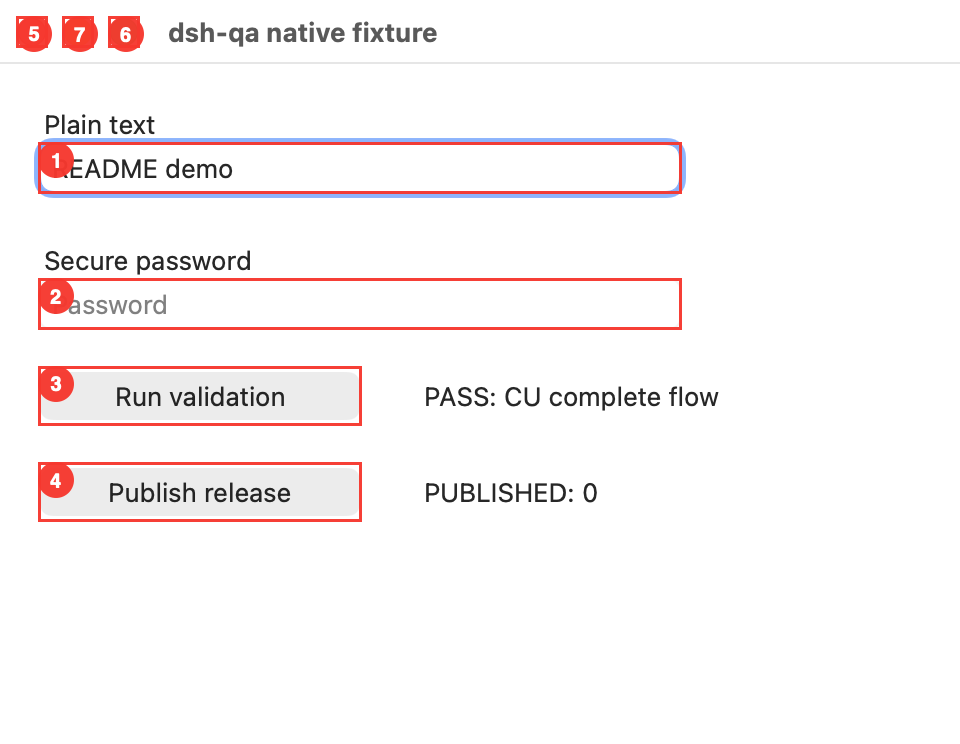
Real native fixture, captured by the Computer driver in light mode. Numbered marks come from visual observation. Text entry and AX click were executed; a fresh observation verified PASS after an unknown click receipt. No release was published.
Why another Computer Use driver?
Seeing a button once is not authority to click it later. Windows move, applications restart, PIDs are reused, dynamic UIs rebind children, and another Agent can be operating at the same time. DSH Computer treats every observation as a short-lived capability rather than a bag of coordinates.
computer_observe
  explicit/frontmost app + explicit/focused window
  bundle id + PID + launch identity
  window number (or composite identity)
  role + name + identifier + frame
           │
           ▼ observation + opaque refs, scoped to one live Agent, expires in  {
  const driver = driverCtx[COMPUTER_DRIVER_SERVICE] as ComputerDriver
  // scopeId must come from the trusted live Agent/session, not model input.
})
contractVersion is currently 5. v3 added the scroll action; v4 made evidence honest about truncation (computer_evidence now carries receipts_total/receipts_dropped/receipts_returned/bounded), made observation eviction TTL-first rather than count-based, and reports every unmarked Set-of-Mark target in omitted with a reason from a closed vocabulary. v5 adds the coordinate-based computer_visual_act fallback for AX-opaque custom views: computer_visual_observe persists a capture binding keyed by the delivered PNG SHA-256, the DSH tool converts attachment pixels to native capture pixels using trusted stored metadata, and the driver re-captures/re-validates the exact window before and after a required host approval before dispatching click/drag/scroll. Visual dispatch receipts are unknown, never confirmed; the consumer re-observes to decide the effect and must not retry an unknown blindly. Evidence now returns the typed AX/visual receipt union from the same bounded ring, so visual actions are not hidden from computer_evidence. Omitted-reason vocabulary: mark-budget-exceeded, static-label, target_has_no_frame, target_outside_captured_window, stale_target: …. Consumers must branch on that value before relying on later fields.
Observation retention is also byte-budgeted per Agent scope (32 MiB of serialized payload): when a new observation would exceed the budget, the oldest TTL-valid observations are evicted first — still reported as OBSERVATION_EVICTED — and the most recent observation is never evicted.
Quick start (local candidate)
The Helper is not distributed with the package: you build it and grant it locally, and it is deliberately not Developer ID signed or notarized. No step below installs an app into /Applications.
Requirements: macOS, Node.js >=24.11.0, pnpm 10.34.5, and a Swift toolchain for the native Helper. Install DSH separately:
npm install -g @deepseek-ai/dsh@latest
Run the following from this repository, replacing the absolute path with your checkout:
pnpm install
pnpm build
dsh plugin --profile web add link:/absolute/path/to/dsh-computer
dsh web
The Swift helper source ships with the plugin. Runtime resolution is deliberately ordered as: an explicit DSHPLUGIN_COMPUTER_HELPER override, the fixed local app below, then development builds staged into a content-addressed cache and ad-hoc re-signed with a fixed development code identifier. SwiftPM worktree artifacts are never executed in place. Explicit overrides and development builds are reported as identityStable: false.
For a stable local TCC identity, choose the signing identity yourself and run the installer explicitly:
security find-identity -v -p codesigning
pnpm run helper:install-local -- --identity ""
It assembles and verifies ~/Library/Application Support/ZSeven/DSH Computer/DSH Computer Helper.app with bundle id io.github.zseven-w.dsh-computer.helper. Nothing in install, activation, build, test, pack, or publish runs this script automatically. It never chooses a certificate, opens System Settings, or requests Accessibility/Screen Recording permission; the npm archive contains the script and Swift source, never the machine-signed .app.
Before observing UI, macOS must expose an unlocked interactive console session and grant Accessibility to DSH Computer Helper at the exact reported path. Screen capture separately requires Screen Recording for the same Helper. computer_evidence reports session availability/known lock state, both TCC preflight booleans, the actual executable/bundle/signing identity, Helper PID/PPID, and its immediate DSH/Node caller context. Status uses prompt-free APIs and never opens a permission prompt. A false interactiveSessionAvailable can also mean the session signals were indeterminate; a TCC boolean cannot distinguish “denied” from “not determined.”
Develop and verify
pnpm install
pnpm run typecheck
pnpm test
pnpm build
pnpm run smoke:pack
Acceptance includes Node unit tests, Swift pure-policy/identity tests, a real Swift helper build and protocol status handshake, and npm pack → clean npm install. On macOS the clean install lazily builds its own packed Helper, runs status plus a bounded observation (never an action), and then reaches quiescence. The smoke also asserts that no @deepseek-ai/* package is pulled into node_modules.
Current limits
- macOS only. The package still installs elsewhere so a DSH profile can explain the unsupported platform instead of failing activation; native actions remain unavailable.
- The current desktop must be unlocked and interactively available. Lock transitions are checked before and after read paths and immediately before mutation; background automation while the login window owns the session is rejected.
- AX refs are the primary action path. For AX-opaque views,
computer_visual_actprovides capture-bound coordinateclick,drag, andscrollafter host approval; dispatch remainsunknownuntil a consumer verifies the outcome. AXscrolladjusts the containing scroll area's vertical scroll bar. There is no built-in OCR, clipboard automation, or full IME simulation. - Visual observation requires an exact AX window number/frame, Screen Recording permission for the reported Helper identity, a mounted DSH attachment store, and an exact current model route that explicitly declares image input. Near-black/transparent captures fail pixel validation; near-white/near-uniform captures are retained with their warning classification.
typeuses a settable Accessibility value; it is not a general replacement for natural keyboard/IME input.- Some applications expose incomplete AX names, identifiers, frames, window numbers, or actions. Missing strong launch identity makes action preflight fail closed.
- Deterministic risk classification can only use