ZSeven-W/dsh-openpencil ↗★ 184
@zseven-w/dsh-openpencil
Preview, inspect, and edit real .op OpenPencil design documents inside DSH conversations — headless rendering, a read-only canvas, and a managed editor. 适合需要在对话中直接查看和编辑.op格式设计文件的用户。
Install
npx -p @deepseek-ai/dsh dsh plugin --profile web add github:ZSeven-W/dsh-openpencilREADME
Read the full README ↗
DSH OpenPencil
The DeepSeek Harness plugin for OpenPencil — preview, inspect, and edit real .op documents inside a conversation.
Exact Multi-Frame Previews • Interactive Canvas • Managed Editor • Agent-Native Design Tools
npm: @zseven-w/dsh-openpencil · Current plugin release: 0.1.0-rc.7 · Tested through DSH 0.1.1-rc.2
English · 简体中文 · 繁體中文 · 日本語 · 한국어 · Français · Español · Deutsch · Português · Русский · हिन्दी · Türkçe · ไทย · Tiếng Việt · Bahasa Indonesia



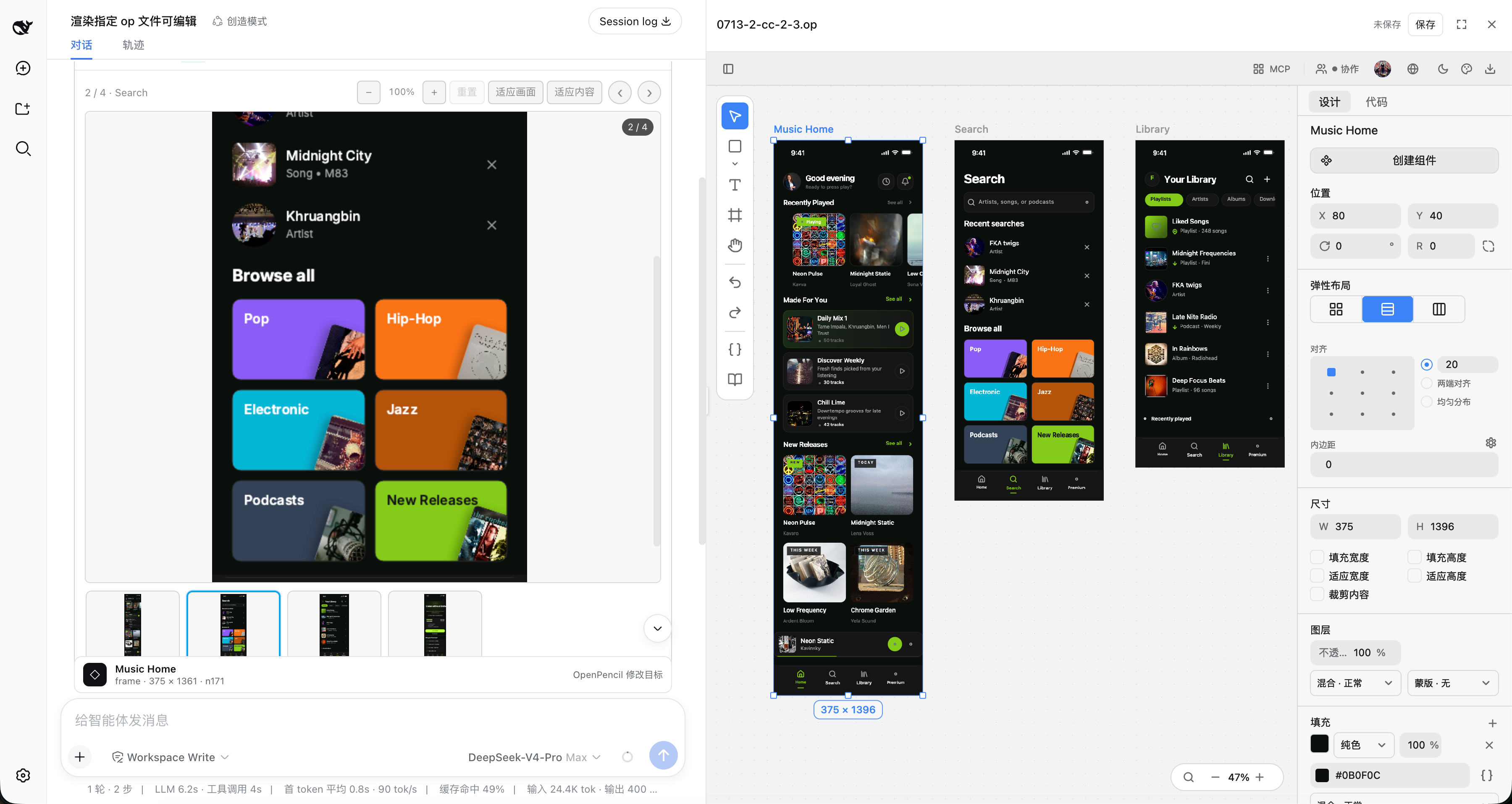
Exact multi-frame .op previews with an interactive canvas and the managed editor workbench
Why DSH OpenPencil
DSH OpenPencil connects DeepSeek Harness with OpenPencil so an Agent drives a real, editable, interactive design canvas instead of returning a generated image.
🖼️ Exact Multi-Frame Previews
The installed OpenPencil headless exporter renders design-faithful previews: the first top-level frame as a large replay-safe PNG, plus a horizontally scrollable thumbnail rail, click-to-select, and previous/next navigation for multi-frame documents.
🗺️ Interactive Canvas
"Open interactive canvas" lazily mounts the read-only OpenPencil Web SDK with pan, zoom, and fit — inspect any page, nested node, or inactive page without leaving the conversation.
✏️ Managed Editor
With editable: true, the edit action opens the managed OpenPencil editor — selection, layers, properties, drawing tools, undo/redo, and explicit save semantics — in a resizable right-hand workbench with a full-screen option.
🤖 Agent-Native Design Tools
Five direct-canvas tools plus six openpencil_pipeline_* tools let the Agent create, inspect, refine, publish, modify, and read a real canvas through managed OpenPencil runtimes.
🔐 Capability-Gated Grants
Image and document grants are signed, hash-bound capabilities. Browser metadata never exposes an arbitrary host path, and signed preview/editor capabilities never enter the canonical tool result or model context.
⚡ Transactional Safety
A full-pipeline document stays in a private unpublished draft until every native and DSH quality gate passes. Publication never overwrites an existing path, and aborts or failed batches leave no empty target behind.
🌍 Follows DSH Look & Feel
The tool card and managed editor follow DSH's Chinese/English locale and light/dark theme without reloading the editing session.
🎯 One Complete Workflow
"Requirement → private draft → semantic batches → live user previews → deterministic structure/layout/quality validation → exact-PNG-integrity atomic publish" — one complete loop inside DSH.
Install into DSH
DSH is a separate package. Install it once if you do not already have it:
npm install -g @deepseek-ai/dsh@latest
Then add the plugin to a profile and start the web app:
dsh plugin --profile web add @zseven-w/dsh-openpencil@next
dsh web
The plugin is still on a prerelease line, so install it from the npm next tag. The npm latest tag currently points to the older 0.1.0-rc.1 package.
For local development, build the checkout, link its absolute path into the Web profile, and then restart DSH:
pnpm run build
dsh plugin --profile web add link:/absolute/path/to/dsh-openpencil
dsh web
The link: dependency exposes subsequent rebuilds from this checkout, but DSH must be fully restarted after replacing the profile dependency because the shipped Web profile does not hot-reload host bundles by default.
Prefer not to install DSH globally? Run the same two steps through pnpm dlx:
pnpm dlx --package=@deepseek-ai/dsh@latest dsh plugin --profile web add @zseven-w/dsh-openpencil@next
pnpm dlx --package=@deepseek-ai/dsh@latest dsh web
The OpenPencil plugin is public and requires no npm token. If the DSH prerelease itself requires registry authentication, keep that credential in a user-level or temporary npm config outside the checkout. This repository intentionally contains no registry credentials.
Design Tools
Optional style selection uses openpencil_style_plan → openpencil_style_confirm → openpencil_pipeline_begin with the original brief and style_selection handle. Catalog browsing and exact-guide choice work without a model recommendation; the recommendation provider is off by default. This handoff supports the script engine. App-agent and commerce handoffs remain unsupported; ordinary app-agent generation still works.
| Tool | What it does |
|---|---|
openpencil_new | Compatible fast path for simple jobs: runs one transactional QuickJS batch_design script, publishes with create-if-absent semantics, and returns an editable presentation. Prefer the full pipeline below for production design. |
openpencil_pipeline_begin | Starts an owner-scoped private draft, internally seeds its only root, returns rootNodeId, continuationStyle, and the compact runtime-matched canvas/build contract, then immediately opens the same live draft in the sidebar; the target .op remains unpublished. |
openpencil_pipeline_context | Loads one bounded guideline, style, theme, or UI-kit detail that is genuinely missing from the begin contract; it is not a startup-context refresh loop. |
openpencil_pipeline_batch | Runs at most two direct native I(...)/K(...) generation scripts: the bounded first-visible-viewport script returned by begin's next, then one script for every remaining region. Before exposing the second preview, an authored-structure gate rejects empty category/product helpers, atomically restores the first-batch snapshot, and permits one corrected second script without consuming the two-script budget. Each successful transaction attempts an exact user-facing PNG and must be followed immediately, without narration, by its returned next. A third generation script is rejected; only the complete repair gate returned by finish may authorize one bounded U(...) QuickJS repair script. |
openpencil_pipeline_inspect | Provides manual diagnostics only when the user explicitly requests them; ordinary generation never uses it as a preview or model-inspection step. |
openpencil_pipeline_finish | In one healthy call, finalizes and validates the document, automatically renders the exact post-final root preview, and atomically publishes with createIfAbsent. One U(...)-only repair and one final finish are authorized only when the result is needs_correction, canContinue: true, and contains a complete non-empty repairTargets array with omitted: 0; every other non-published result is terminal. |
openpencil_pipeline_abort | Discards the unpublished draft without creating the target file. |
openpencil_create | Applies a transactional batch_design program to generate or restructure nodes on an existing live canvas. |
openpencil_edit | Modifies an explicit node or the single node selected by the user. |
openpencil_render | Creates an immutable, content-addressed .op snapshot and renders every top-level frame on the active page — optional scale and editable. |
openpencil_selection | Reads the exact nodes selected in the live editor canvas. |
Agent Design Workflow
Model tier for design turns
Generation quality tracks the model driving the pipeline turns. The two-batch
contract works on fast tiers, but layout judgment, copywriting, and contract
adherence improve markedly on a stronger or reasoning-enabled model. For
design-heavy profiles, prefer a non-flash tier (for example
deepseek-v4 with reasoningEffort enabled over deepseek-v4-flash) in the
profile's agent-default-model; keep the fast tier for chat-only profiles
where design output is incidental.
Desktop commerce Hero geometry is validated before batch two: every right-side visual child and layered shape must stay inside the fixed Hero inner width and height. An oversized visual is rolled back with the entire first batch instead of inflating the live canvas or reaching final publication. Generation receipts expose only committed node mappings and previews; native diagnostics are deferred to finish so they produce one exact repair transaction instead of a speculative mid-generation loop.
For an ordinary one-line request, call openpencil_pipeline_begin immediately without spending a model step loading the optional skill, then use the fixed fast path: the bounded first direct-JS batch from begin's next → a second and final direct-JS batch containing every remaining region → one openpencil_pipeline_finish. The current first batch renders only the first visible viewport: a complete navigation/header plus a polished primary hero/content selected from the brief, capped at 32 I/K calls and 8 KiB. This budget preserves real structure and visual hierarchy without reopening an unbounded generation loop; secondary cards, detail, and below-fold content wait for the second batch. For commerce, begin now selects the concrete App-aligned ecommerce-modern-light recipe before drawing: a white base with warm-tinted section rhythm, restrained orange actions, 1120px centered content, a 56px Hero display, and visible copy in the language of the user's request (a Chinese request keeps Chinese copy, except for an optional short ASCII brand). A desktop commerce Hero is a full-width horizontal frame with padding:[64,160]; its inner content is copy 512px + gap 64px + product visual 448px, and both headline and subtitle use width:"fill_container". Never combine a fixed 1120px Hero width with that padding. Generic commerce creates the visual directly under Hero as I(hero,{type:"image",name:"Hero product image",width:448,height:360,imageSearchQuery:"gray loveseat isolated photo"}): imageSearchQuery is a direct node field, never an image:{...} object, and the image is neither wrapped nor mixed with decorative shapes or reused by a product card. It is enriched as soon as the first batch commits. An explicit layout:"none" stack of 4–6 positioned layers, including at least one ellipse/path, is allowed only when the user explicitly requests illustration or no photos. Plain stacked rounded rectangles, an empty right field, overflow, or an undersized decorative tile are rejected and atomically rolled back before batch two. Platform and viewport come from the latest direct user request: a model-expanded brief cannot silently turn an unspecified request into a mobile canvas. When the brief provides no brand, immediately use a neutral shop name or short placeholder that fits its context, without comparing naming options. When no logo asset is supplied, use a text-only brand; do not invent a letter badge or give a text node a background, fixed height, or effects. Begin creates the only root and opens the private live canvas immediately. After every successful begin or batch call, make the next required call immediately without narration, planning, comparison, inspection, or any unrelated tool call. A healthy finish runs native finalization first, enriches the canonical image slots, renders the post-final user preview, and publishes in that same call.
The App-aligned commerce preset fixes the 64px Header at padding:[0,160]: the Header is a navbar, its Nav is one nav-links collection of 44px nav-link items, and Header actions are a toolbar of 44×44 icon-button frames rather than bare icons. The 160×48 primary CTA is a button, contains its own label, and uses the AA pair #C2410C/#FFFFFF. All three product cards stay in one coherent collection. For a generic home brief, the exact runtime-validated set is gray armchair isolated photo, artemide tolomeo lamp photo, and potted plant isolated photo; the last card must be labeled as a potted plant rather than a vase.
The begin result is the compact authoritative run contract. Omit path unless the user explicitly named one; the plugin creates the concrete collision-resistant .op filename, avoiding template syntax or a retrying begin/abort loop. Preserve its exact rootNodeId, continuationStyle, canvas, and buildContract, then implement the bounded first script exactly as next specifies without broadening its scope or inserting a user-facing reasoning message. After its automatic preview, write the second and final script for all remaining regions with arrays and loops. This direct two-script flow keeps execution bounded and responsive.
Both generation scripts use direct I(...)/K(...) QuickJS plus begin's exact rootNodeId, continuationStyle, and buildContract. Inside run_code, construct the embedded source with a String.raw tagged template so escapes and intended text newlines reach QuickJS unchanged. Use this exact multiline wrapper:
const draftId = "";
const script = String.raw`...`;
const r = await tools.openpencil_pipeline_batch({ draftId, script });
return r;
Quote the exact begin.draftId into the standalone draftId string first, then declare script. The fixed tool argument object contains only draftId and script; never append canvasWidth, another field, or return inside it. Return only r without logging, printing, or stringifying it. Each QuickJS batch has a fresh scope: local bindings do not cross batches. I and K return opaque node-id strings, not mutable nodes: use a binding only as a later I/K parent and never assign binding.x, binding.y, or any other member. In batch 2, never recreate Page, App Content, Header, or Hero. Prefer attaching each new bound section rail directly to begin's rootNodeId. If batch 1 created a shared content wrapper, reuse it only through the exact nodeId returned by batch 1; never rebuild another wrapper with the same name